
1. Introdución
Thank you for choosing the XDeer Biometric Pistol Safe, Model GS-S003FB. This safe is designed to provide secure storage for your firearms and valuables, offering multiple quick-access methods including biometric fingerprint recognition, a digital keypad, backup keys, and smartphone Bluetooth control. Please read this manual thoroughly before operating the safe to ensure proper setup and safe usage.
2. Información de seguridade
- Seguridade das armas de fogo: Always store firearms unloaded and separate from ammunition. Ensure the safe is securely locked at all times when not in use.
- Key Security: Keep backup keys in a secure location away from the safe and out of reach of unauthorized individuals, especially children. Do not store backup keys inside the safe.
- Montaxe: For enhanced security, utilize the included steel security cable and expansion screws to anchor the safe to an immovable object or surface.
- Sistema de alarma: The safe features an alarm that activates after 5 incorrect password attempts, followed by a 3-minute freeze period.
- Nenos: This safe is designed to deter unauthorized access. However, no safe is completely childproof. Always educate children about firearm safety and the dangers of firearms.
3. Contido do paquete
Verifique que todos os elementos que se indican a continuación estean incluídos no seu paquete:
- XDeer Biometric Pistol Safe (1)
- Steel Security Cable (1)
- Adaptador de alimentación (1)
- Manual de instrucións (1)
- After-sales Card (1)
- Teclas de copia de seguridade (2)
- Button Tool (1)
- Parafusos de expansión (4)
Note: Alkaline dry batteries are required for operation but are not included in the package.
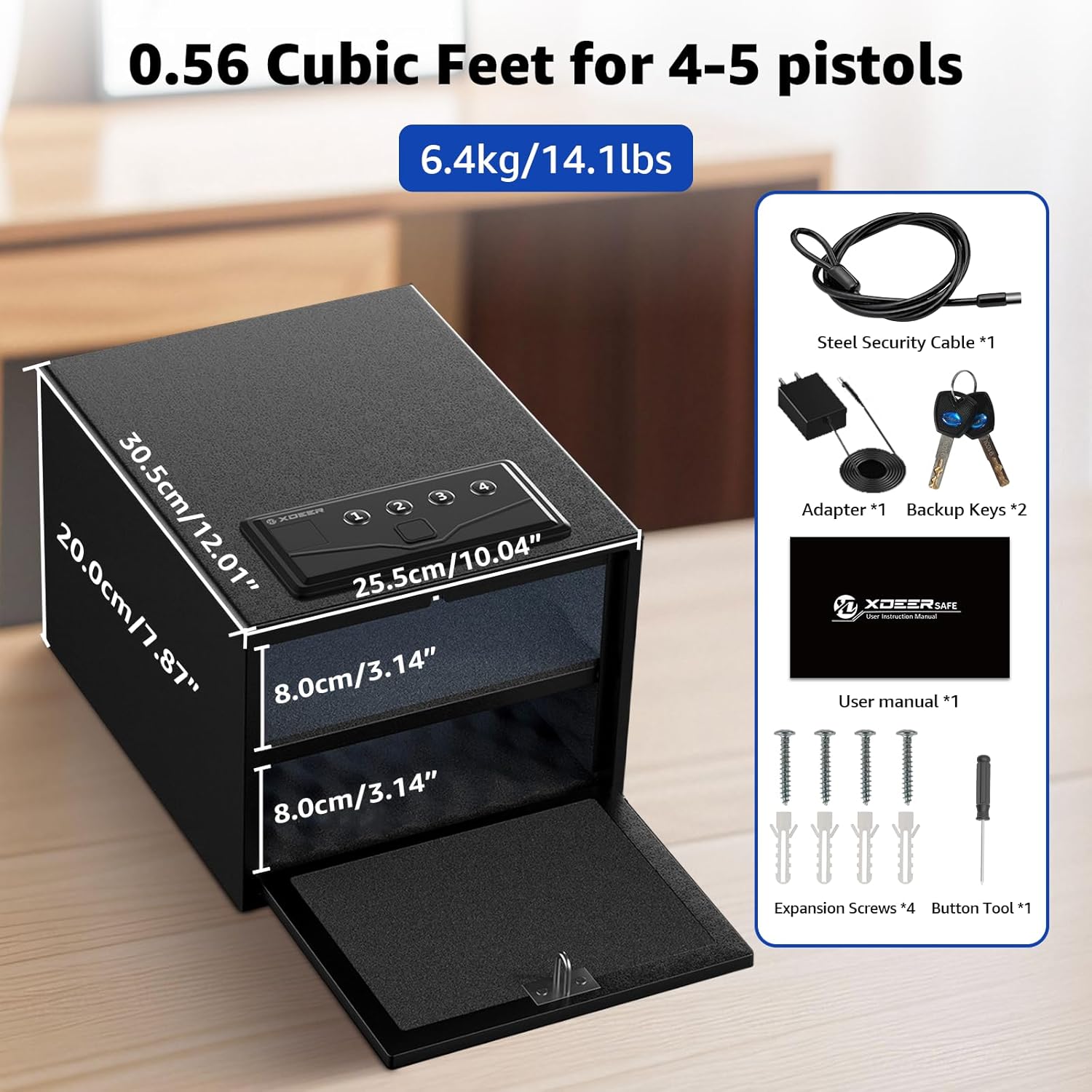
Figure 3.1: Safe and Included Accessories
4. Produto rematadoview
The XDeer Biometric Pistol Safe is constructed from durable alloy steel and features a compact design with a 0.6 cubic feet capacity. It includes an internal LED light for visibility and a removable shelf for flexible storage configurations.
4.1 Características principais
- 4-in-1 Quick Access: Fingerprint, Digital Keypad, Backup Keys, and Bluetooth APP.
- Advanced Biometric Sensor: 0.1-second high-precision recognition, capacity for 30 fingerprints.
- Customizable Keypad: 3-8 digit password.
- Modo silencioso: For discreet operation.
- Iluminación LED interna: Illuminates the interior for easy access in low light.
- Deseño antirroubo: Includes a steel security cable for anchoring.
- Opcións de enerxía: Operates on alkaline batteries (not included) with low-battery warnings, and supports external power supply via adapter.
- Estante extraíble: Allows for versatile storage of pistols, documents, or other valuables.
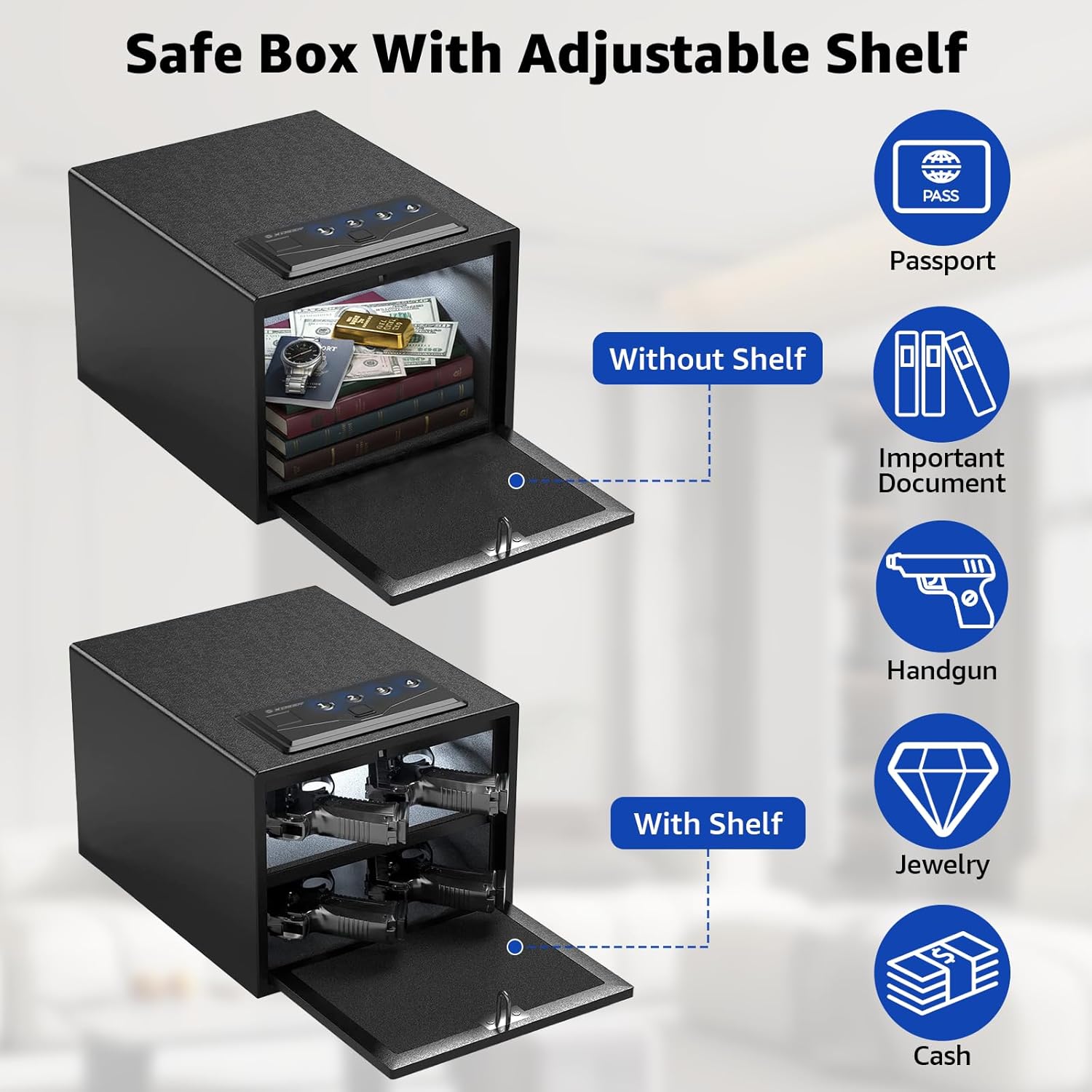
Figure 4.1: Adjustable Shelf for Versatile Storage

Figure 4.2: Internal Components Diagram
5. Configuración
5.1 Instalación da batería
The safe requires alkaline dry batteries (not included) for operation. Locate the battery compartment, typically inside the safe door or on the back panel. Insert the batteries according to the polarity markings. The safe will emit a low-battery warning when power is running low.
5.2 Initial Unlock and Programming
Upon first use, open the safe using one of the backup keys. Refer to the detailed instructions in the included user manual for programming your initial fingerprint(s) and setting a digital keypad password. The safe can store up to 30 fingerprints.
5.3 Montaxe da caixa forte
To prevent unauthorized removal, it is highly recommended to secure the safe using the provided steel security cable and expansion screws. Anchor the safe to a fixed structure such as a wall, floor, or heavy furniture.

Figure 5.1: Securing the Safe
6. Instrucións de funcionamento
6.1 Métodos de desbloqueo
The XDeer Biometric Pistol Safe offers four methods for quick access:
- Pegada dixital: Place a registered finger on the biometric sensor. The safe will unlock in approximately 0.1 seconds if the fingerprint is recognized.
- Teclado dixital: Enter your 3-8 digit customizable password on the keypad.
- Teclas de copia de seguranza: In case of battery failure or forgotten codes, use one of the provided backup keys to manually open the safe.
- Smartphone Bluetooth APP: Connect your smartphone via Bluetooth to the safe using the dedicated app for unlocking and management.

Figure 6.1: Four Quick Access Methods

Figure 6.2: Advanced Biometric Technology
6.2 Modo silencioso
To enable or disable silent mode, refer to the specific instructions in your user manual. This feature allows for discreet access without audible feedback from the keypad or safe mechanism.
7. Mantemento
- Limpeza: Limpa o exterior da caixa forte cun pano suave eamp pano. Evite produtos de limpeza abrasivos ou solventes que poidan danar o acabado ou os compoñentes electrónicos.
- Substitución da batería: Replace batteries promptly when the low-battery warning is indicated to ensure continuous functionality.
- Sensor de impresión dixital: Manteña o sensor de impresión dixital limpo e seco para un rendemento óptimo.
- Cable de seguridade: Periodically check the steel security cable and mounting points for any signs of wear or damage.
8 Solución de problemas
- A caixa forte non abre coa pegada dixital/teclado numérico:
- Ensure batteries are not depleted. Use the external power adapter or backup keys if necessary.
- For fingerprint, ensure your finger is clean and placed correctly on the sensor. Re-register your fingerprint if issues persist.
- For keypad, verify the correct password is being entered.
- Alarm sounds after multiple attempts: The safe will trigger an alarm and enter a 3-minute freeze if 5 incorrect password attempts are made. Wait for the freeze period to end before trying again.
- Aviso de batería baixa: Replace the alkaline batteries immediately. The safe can also be powered externally via the adapter.
- A porta non pecha con seguridade: Ensure no obstructions are preventing the door from fully latching. Check the locking mechanism for any visible damage.
9. Especificacións
| Característica | Detalle |
|---|---|
| Marca | XCervo |
| Número de modelo | GS-S003FB |
| Dimensións do produto | 32.5 cm x 35.5 cm x 28 cm (12.8 polgadas de profundidade x 14 polgadas de ancho x 11.1 polgadas de alto) |
| Capacidade | 0.6 pés cúbicos |
| Material | Aceiro de aliaxe |
| Tipo de bloqueo | Fingerprint, Code, Key, Phone App Bluetooth |
| Capacidade de impresión dixital | 30 |
| Teclado | 3-8 digit customizable password |
| Características especiais | Alarm System, Biometric Fingerprint, Portable, Removable Shelf, Sensor Light |
| Fonte de enerxía | Alkaline Batteries (not included), External Power Adapter |
10. Garantía e soporte
For warranty information and customer support, please refer to the included After-sales Card in your package. You may also visit the official XDeer websitio para obter máis axuda e rexistro do produto.