
1. Introdución
This manual provides comprehensive instructions for the safe and effective use of the AMPBANK H128 Handheld Thermal Camera. The H128 is designed for precise temperature measurement and thermal imaging, suitable for various applications including electrical inspections, HVAC diagnostics, building energy audits, and automotive maintenance. Please read this manual thoroughly before operating the device and retain it for future reference.

Figura 1.1: O/A AMPBANK H128 Handheld Thermal Camera, showcasing its ergonomic design and integrated display.
2. Información de seguridade
Observe sempre as seguintes precaucións de seguridade para evitar lesións e danos no dispositivo.
- Do not point the camera directly at extremely high-intensity energy sources, such as the sun or lasers, as this may damage the infrared detector.
- Avoid dropping the device or subjecting it to severe impact, despite its robust design.
- Do not immerse the device in water or other liquids. While it has an IP65 rating for dust and water jet protection, it is not designed for submersion.
- Use only the specified charging cable (USB-C) and power adapter to charge the device.
- Non intente desmontar nin modificar a cámara. As reparacións só deben ser realizadas por persoal de servizo autorizado.
- Keep the lens clean and free from dust and debris. Use a soft, lint-free cloth for cleaning.
- Operate the device within the specified environmental conditions (temperature and humidity).
3. Produto rematadoview
3.1 Compoñentes
O AMPBANK H128 thermal camera includes the following main components:
- Lente infravermella: Captures thermal radiation.
- Pantalla de visualización: Mostra imaxes térmicas, lecturas de temperatura e opcións de menú.
- Botóns de control: For navigation and selection (OK, Up, Down, Return/Power).
- Botón de disparo: To capture images.
- Porto USB-C: Para carga e transferencia de datos.
- Soporte para trípode: Standard 1/4-inch thread for stable positioning.
3.2. Características clave
The H128 thermal camera offers a range of advanced features for efficient and accurate thermal inspections:
- Enhanced Clarity with TISR Resolution: The camera utilizes TISR (Thermal Image Super Resolution) technology to achieve an effective display resolution of 240x240 pixels from a 128x128 infrared sensor, providing clearer thermal images.
- Duración da batería prolongada de 24 horas: Equipped with a built-in 2900mAh rechargeable battery, the H128 provides up to 24 hours of continuous operation, minimizing downtime during extended inspections.
- Precise Temperature Measurement: The device offers high accuracy with a temperature resolution of 0.1°C and readings within ±3%, covering a wide temperature range from -4°F to 842°F (-20°C to 450°C). Users can adjust emissivity for various materials to improve accuracy.
- Temperature Alarm for Anomaly Detection: A built-in alarm system quickly identifies abnormal heat sources, automatically tracking and displaying maximum, minimum, and center temperatures on the screen.
- Durable and Robust Design: The H128 is built to withstand demanding environments, featuring a 6.56-foot (2-meter) drop protection and an IP65 ingress protection rating against dust and water jets.
- Velocidade de fotogramas alta: A 25Hz frame rate ensures smooth, real-time thermal imagery, crucial for dynamic inspections.
- Multiple Thermal Palettes: Choose from 5 different color palettes (Iron Red, Black Hot, Rainbow, White Hot, Red Hot) to best visualize temperature differences for specific applications.

Figure 3.1: Comparison of thermal image clarity with and without TISR technology, demonstrating the enhanced 240x240 resolution.

Figure 3.2: Illustration of the H128's long-lasting 24-hour battery life and Type-C charging port.

Figure 3.3: The H128 in use, demonstrating its capability for accurate temperature measurement in an electrical panel.

Figure 3.4: The H128 display highlighting hot, center, and cold spots with an integrated high/low temperature alarm.
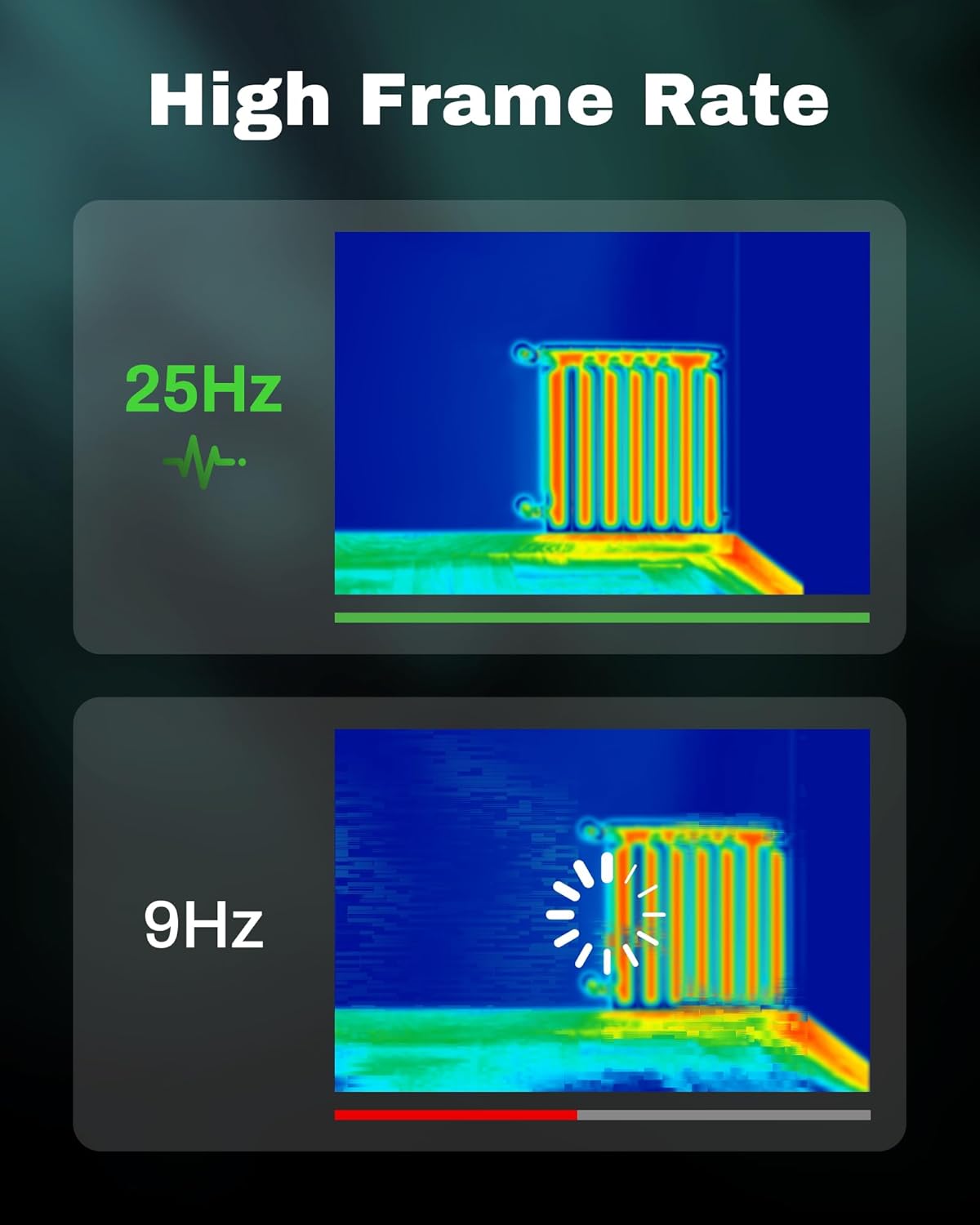
Figure 3.5: Visual comparison of thermal image fluidity at 25Hz versus 9Hz frame rates.

Figure 3.6: Display of the five available thermal color palettes for varied visualization of heat signatures.
4. Configuración
4.1. Desembalaxe
Carefully remove all items from the packaging. The box should contain:
- AMPBANK H128 Thermal Imaging Camera
- Cable USB-C
Inspect the camera for any signs of damage. If any components are missing or damaged, contact customer support immediately.
4.2. Cargando a batería
Before first use, fully charge the camera's built-in battery.
- Connect the supplied USB-C cable to the USB-C port on the top of the camera.
- Conecta o outro extremo do cable USB-C a un adaptador de corrente USB compatible (non incluído) ou ao porto USB dun ordenador.
- The charging indicator on the screen will show the charging status. A full charge typically takes several hours.
- Unha vez cargado completamente, desconecta o cable.
4.3. Acendido inicial e configuración básica
- Encendido: Press and hold the power button (often integrated with the Return button) for approximately 8 seconds until the screen illuminates.
- Selección do idioma: Upon first power-on, you may be prompted to select your preferred language. Use the Up/Down buttons to navigate and the OK button to confirm.
- Data e hora: Establece a data e a hora correctas para a hora exactaamping of captured images. Navigate to the settings menu using the OK button, then find the Date/Time option.
5. Funcionamento
5.1. Funcionamento básico
- Encendido/apagado: Press and hold the power button for 8 seconds to turn on. Press and release the power button to turn off or enter sleep mode.
- Menús de navegación: Usa o OK para entrar no menú. Use o botón Up e Abaixo arrow buttons to scroll through options. Press OK to select an option. Press the Volver button to exit a menu or go back.
- Captura de imaxes: Aim the camera at the target. Press the trigger button (located on the handle) to capture a thermal image. Images are saved internally.
5.2. Measurement Modes and Settings
- Temperature Spot Measurement: The H128 automatically displays the maximum, minimum, and center temperatures on the screen.
- Axuste de emisividade: For accurate temperature readings, adjust the emissivity setting based on the material being inspected. Access this setting through the menu. Common emissivity values can be found in reference tables.
- Configuración de distancia: Inputting the approximate distance to the target can further refine temperature accuracy.
- Thermal Palettes: Change the color scheme of the thermal image to highlight temperature differences more effectively. Navigate to the palette settings in the menu and choose from Iron Red, Black Hot, Rainbow, White Hot, or Red Hot.
5.3. Xestión de datos
The H128 can store over 8000 images internally. To transfer images to a computer:
- Conecta a cámara ao teu ordenador usando o cable USB-C subministrado.
- The camera will appear as a removable storage device.
- Browse to the image folder and copy the desired files ao teu ordenador.

Figure 5.1: Connecting the H128 thermal camera to a laptop via USB-C for image transfer.
6. Mantemento
6.1. Limpeza
- Corpo da cámara: Limpe o corpo da cámara cun pano suave eamp pano. Non use produtos de limpeza ou disolventes abrasivos.
- Lente infravermella: The infrared lens is a delicate optical component. Use a lens cleaning cloth or a soft, lint-free cloth specifically designed for optics. Gently wipe the lens to remove dust or smudges. Do not apply excessive pressure or use harsh chemicals.
6.2. Almacenamento
When not in use, store the H128 in a cool, dry place, away from direct sunlight and extreme temperatures. Ensure the battery is partially charged (around 50%) before long-term storage to preserve battery health.
6.3. Coidado da batería
Para maximizar a duración da batería:
- Evite descargar completamente a batería con frecuencia.
- Evite deixar a batería completamente cargada durante períodos prolongados.
- Cargue a batería a temperatura ambiente.
7 Solución de problemas
| Problema | Causa posible | Solución |
|---|---|---|
| A cámara non se acende. | A batería está esgotada. | Carga a batería usando o cable USB-C. |
| A imaxe está borrosa ou pouco clara. | Lens is dirty. / Incorrect focus (if applicable). | Clean the infrared lens with a soft, lint-free cloth. The H128 has fixed focus, ensure you are within the optimal measurement distance. |
| As lecturas de temperatura parecen inexactas. | Incorrect emissivity setting. / Distance to target is too far. | Adjust the emissivity setting in the menu to match the material being measured. Ensure you are within the recommended measurement distance. |
| Non se poden transferir imaxes ao ordenador. | Loose USB-C connection. / Driver issue. | Ensure the USB-C cable is securely connected to both the camera and the computer. Try a different USB port or cable. Restart both devices. |
| A duración da batería é máis curta do esperado. | Frequent use of high-brightness settings. / Battery degradation over time. | Reduce screen brightness if possible. Ensure proper charging and storage practices. If battery life significantly degrades, contact support. |
Se o problema persiste despois de intentar estas solucións, póñase en contacto con AMPBANK customer support.
8. Especificacións
| Parámetro | Valor |
|---|---|
| Modelo | H128 |
| Resolución infravermella | 128 x 128 píxeles |
| TISR Display Resolution | 240 x 240 píxeles |
| Rango de temperatura | -4 °F a 842 °F (-20 °C a 450 °C) |
| Precisión | ±3% or ±3°C (whichever is greater) |
| Sensibilidade térmica (NETD) | 40mk |
| Velocidade de cadros | 25 Hz |
| Tipo de batería | Built-in Rechargeable Lithium Ion (2900mAh) |
| Duración da batería | Ata 24 horas de uso continuo |
| Porto de carga | USB-C |
| Protección contra caídas | 6.56 pés (2 metros) |
| Clasificación IP | IP65 |
| Capacidade de almacenamento | 8000+ images |
| Dimensións | 9.33 x 4.76 x 3.86 polgadas (aproximado) |
| Peso | 1.06 libras (aproximadamente) |
9. Garantía e soporte
Para obter información detallada sobre a garantía, consulte a tarxeta de garantía incluída co produto ou visite o sitio web oficial AMPBANCO websitio. Os termos e condicións da garantía poden variar segundo a rexión e o produto.
Se precisa asistencia técnica, ten algunha pregunta sobre o seu produto ou precisa iniciar unha reclamación de garantía, póñase en contacto con AMPBANK customer support through their official channels:
- Fabricante: AMPBANCO
- Tenda en liña: Visita o AMPBANK Store on Amazon
- Consulte o oficial AMPBANCO website or product packaging for the most current contact information (email, phone, service centers).