
1. Introdución
Grazas pola compraasing the Nillkin Foldable Bluetooth Keyboard. This compact and versatile keyboard is designed to enhance your productivity across multiple devices, offering a comfortable typing experience with an integrated touchpad and numeric keypad. Please read this manual carefully to ensure proper use and maintenance of your device.
2. Produto rematadoview
Características principais:
- Deseño plegable e portátil: Weighing approximately 238g, this keyboard folds to a compact size (18.2 x 10.8 x 1.6cm when folded) for easy portability.
- Integrated Touchpad & Numeric Keypad: Features a large, responsive touchpad (59mm x 64mm) for smooth cursor control and multi-gesture operations. The touchpad can be switched to a numeric keypad using Fn + Right Command key.
- Comfortable Typing Experience: Utilizes a pantograph key structure with a 19mm key pitch and 1.2mm key travel for quiet and efficient typing, similar to a laptop keyboard.
- Long Battery Life & Energy Saving: Built-in large capacity battery provides over 1 week of continuous use and 150 days of standby time on a single charge. Features automatic sleep mode after 10 minutes of inactivity and auto power on/off upon folding/unfolding.
- Conectividade multidispositivo: Supports simultaneous connection to up to 3 devices via Bluetooth 5.0, compatible with Android, Windows, iPad OS, macOS, and iOS. Easily switch between devices with a single touch.
- Durable Silicone Material: Made with organic silicone material that is skin-friendly, durable, and resistant to extreme temperatures (-40℃ to 200℃).
- Convenient Indicators: Five LED lamps on the top indicate battery level and connection status.
Contido do paquete:
- Nillkin Foldable Bluetooth Keyboard x 1
- Cable de carga USB-C x 1
- Manual de usuario x 1
- Bolsa de almacenamento x 1
Dimensións do produto:
- Unfolded Size: 34.2 cm (L) x 10.8 cm (W) x 0.95 cm (H)
- Folded Size: 18.2 cm (L) x 10.8 cm (W) x 1.6 cm (H)
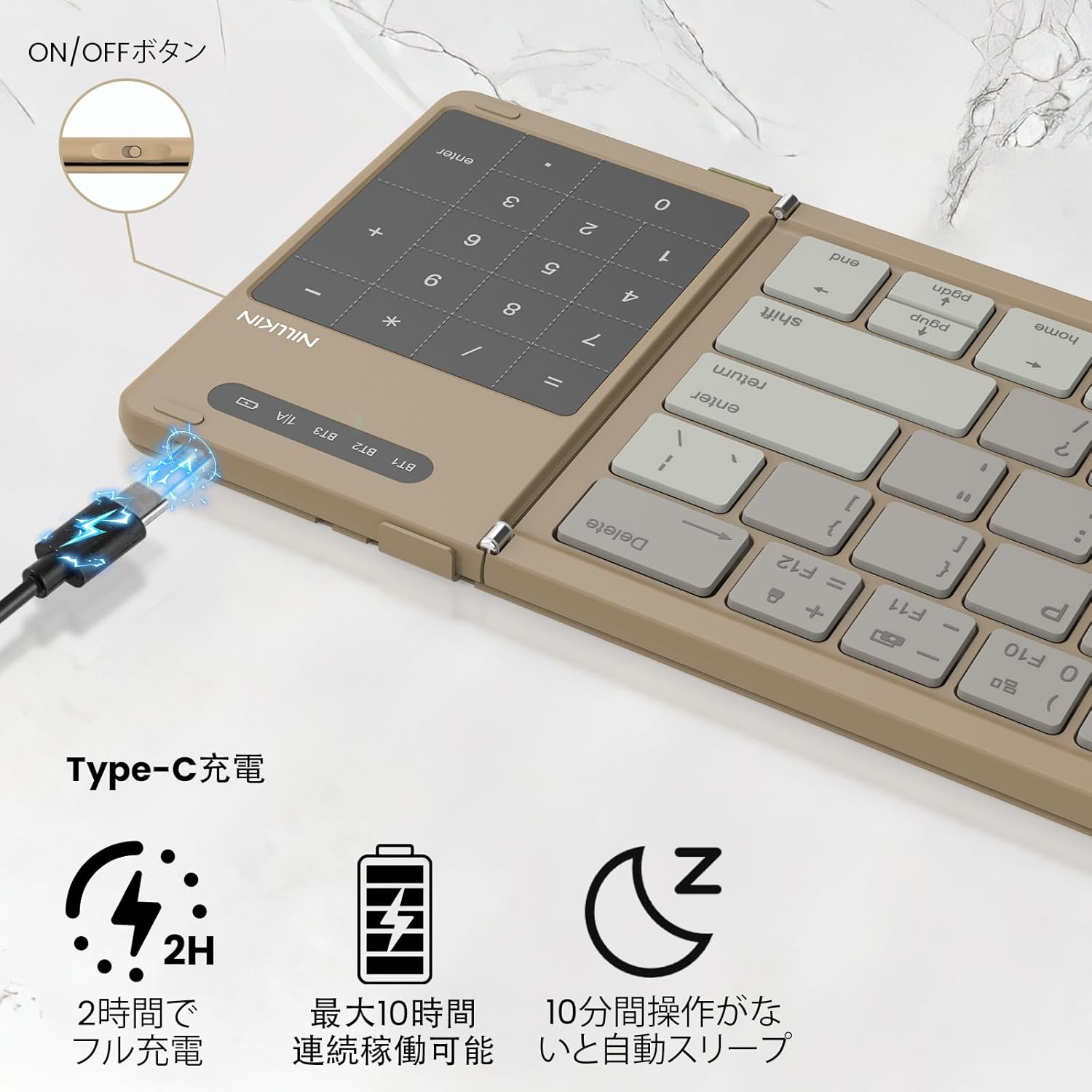
Image: Nillkin Foldable Bluetooth Keyboard showing its unfolded and folded dimensions.

Image: The Nillkin keyboard in its compact, folded state.
3. Configuración
3.1. Cargar o teclado
- Connect the provided USB-C charging cable to the keyboard's charging port and a power source.
- The red indicator light will stay on during charging.
- The indicator light will turn off when charging is complete. A full charge takes approximately 2 hours.

Image: The keyboard connected via USB-C for charging, showing the charging indicator.
3.2. Emparellamento Bluetooth
- Unfold the keyboard to automatically power it on.
- Turn on Bluetooth on your device (e.g., iPad, smartphone, computer).
- Preme Fn + Q (para BT1), Fn + W (para BT2), ou Fn + E (para BT3) para seleccionar unha canle Bluetooth.
- Preme Fn + C to enter pairing mode. The blue indicator light will flash.
- On your device, search for "Cube Pocket Keyboard" in the Bluetooth settings and tap to connect.
- Once connected, the blue indicator light on the keyboard will turn off.
Video: This video demonstrates the Bluetooth pairing process for the Nillkin Foldable Bluetooth Keyboard, including how to select a channel and enter pairing mode.
4. Instrucións de funcionamento
4.1. Conmutación multidispositivo
After successfully pairing with up to three devices (BT1, BT2, BT3), you can quickly switch between them by pressing Fn + Q, Fn + W, ou Fn + E respectivamente.

Image: The keyboard demonstrating multi-device connectivity and switching between a smartphone, laptop, and tablet.
4.2. Numeric Keypad / Touchpad Toggle
The integrated touchpad can function as a numeric keypad. To switch between touchpad mode and numeric keypad mode, press Fn + Right Command key. This allows for convenient numerical input without needing a separate mouse.

Image: Illustration of the touchpad and numeric keypad functionality, highlighting the toggle feature.
4.3. Multimedia e teclas de atallo
The keyboard features various multimedia and shortcut keys for enhanced productivity:
- Pressing a multifunction key alone will activate numeric input mode.
- Presionando Shift + Multifunction Key allows for symbol input.
- Presionando Fn + Multifunction Key activates multimedia functions (e.g., brightness, volume, media control).
- For Windows users, Fn + Shift + Multifunction Key can be used for specific shortcut functions.

Image: A visual guide to the Fn key shortcuts for various functions like brightness, volume, and media control.
4.4. Cambio de idioma
- iOS / Mac: Preme Ctrl + Barra espaciadora.
- Android: Preme Ctrl + Barra espaciadora or Shift + Spacebar.
- Windows: Preme Alt + Maiús.
4.5. Verificación do nivel da batería
Para comprobar o nivel da batería, prema Fn + Command:
- Green light flashes 3 times: 70% - 100% battery.
- Blue light flashes 3 times: 30% - 70% battery.
- Red light flashes 3 times: 0% - 30% battery.
5. Mantemento
- Manteña o teclado limpo limpándoo cun pano suave e seco.
- Avoid exposing the keyboard to extreme temperatures, direct sunlight, or liquids.
- Store the keyboard in its provided pouch when not in use to protect it from dust and scratches.
6 Solución de problemas
- O teclado non se conecta: Ensure Bluetooth is enabled on your device and the keyboard is in pairing mode. Try restarting both the keyboard and your device.
- As teclas non responden: Check the battery level and charge the keyboard if necessary. Ensure the keyboard is properly connected via Bluetooth.
- Problemas do touchpad: For iPad users, ensure "Settings → General → Trackpad" is turned on. Some gestures may not be supported depending on the OS or application.
- Unexpected input: Ensure the keyboard is placed on a stable surface. If keys are registering multiple presses or not at all, try cleaning around the keys.
7. Especificacións
| Característica | Descrición |
|---|---|
| Marca | Nillkin |
| Modelo | B0FDKPY2P2 |
| Tecnoloxía de conectividade | Bluetooth 5.0 |
| Dispositivos compatibles | iPad OS, Windows 10+, Mac OS X 10.10+, Android 4.3+, Smartphones, Tablets, Laptops, PCs |
| Disposición do teclado | QWERTY |
| Tipo de cambio | Mechanical (Pantograph) |
| Fonte de enerxía | Alimentado por batería |
| Material | ABS, silicona, policarbonato |
| Cor | Caqui |
8. Garantía e soporte
Nillkin products come with a 2-year manufacturer's warranty from the date of purchase. In case of any issues, please contact customer service. We offer a 30-day quality guarantee (return/exchange for defective products) and 2-year after-sales service.
To contact support, navigate to "Account Service" → "Order History" → "Contact Seller". We aim to respond within 24 hours.