
1. Introdución
This manual provides detailed instructions for the installation, operation, and maintenance of your BESTTEN 24W USB Wall Outlet, Model BAA-015. This device integrates a standard 15 Amp electrical outlet with both Type C and Type A USB charging ports, offering a total output of 4.8A (5VDC, 24W). It is designed for convenient charging of various electronic devices while maintaining a clean aesthetic with its screwless wallplate.

Imaxe 1.1: Acabadoview of the BESTTEN 24W USB Wall Outlet.
2. Información de seguridade
Please read all safety instructions carefully before installation and use. Failure to follow these instructions may result in electric shock, fire, or property damage.
- Listado UL/cUL: This product is UL/cUL Listed, ensuring it meets recognized safety standards.
- Tamper-Resistant (TR) Shutters: A toma de corrente ten tamper-resistant shutters to prevent foreign objects from being inserted, enhancing electrical safety, especially in homes with children.
- Material: Constructed from fire and impact-resistant polycarbonate thermoplastic material for enhanced durability and safety.
- Precaucións durante a instalación:
- Desconecte sempre a alimentación no disyuntor antes da instalación.
- Do not unscrew the terminal screws too far or with excessive force.
- Do not use power tools to loosen or tighten terminal screws.
- The USB receptacle can only be wired to one circuit.
- This USB outlet cannot charge laptops.

Image 2.1: Tamper-Resistant feature for enhanced safety.

Image 2.2: Multiple safety protections integrated into the outlet.
3. Contido do paquete
Comprobe que todos os compoñentes estean presentes antes de comezar a instalación:
- USB Outlets (quantity as per pack)
- Screwless Wallplates
- Parafusos de montaxe
4. Especificacións
| Característica | Especificación |
|---|---|
| Número de modelo | BAA-015 |
| Clasificación USB | Two USB Ports with 4.8 Amp, 5VDC (24W total) |
| AC Outlet Rating | 15 Amp, 125VCA |
| Terminais de arame | #14 - #12 AWG for Side, #14 AWG for Back |
| Temperatura de funcionamento | -4 a 140 °F (-20 a 60 °C) |
| Compatibilidade USB | USB 1.1/2.0/3.0 Devices, including Apple Products (excluding laptops) |
| Certificación | Listado UL / cUL |
| Material | Policarbonato (PC) |
| Dimensións do produto | 4.69"L x 2.91"W x 1.75"D (11.91cm x 7.39cm x 4.45cm) |
| Peso do elemento | 6.3 onzas |
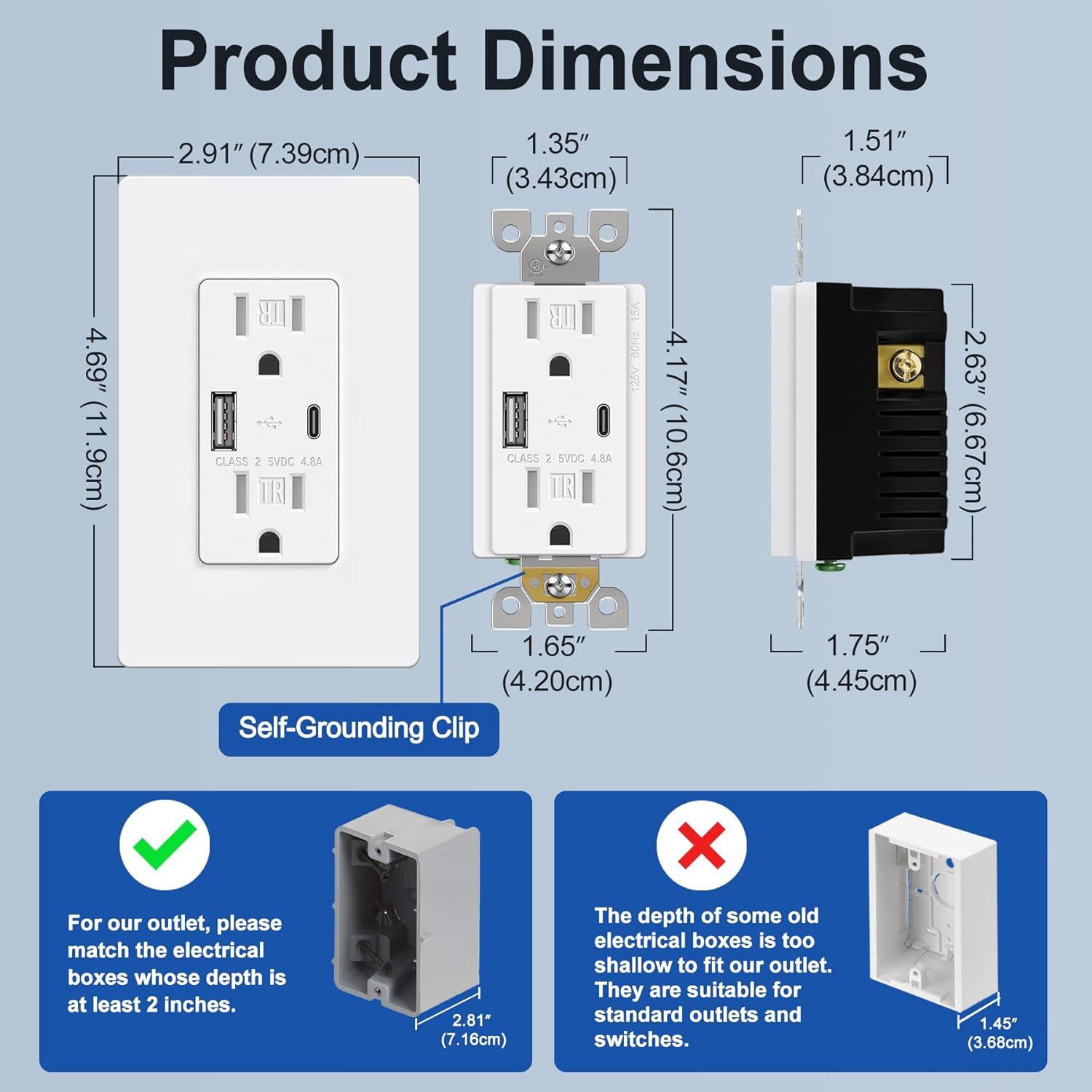
Image 4.1: Product dimensions and electrical box depth requirement.

Image 4.2: Comprehensive product specifications and dimensions.
5. Configuración (Instalación)
Installation should be performed by a qualified electrician or a knowledgeable individual following all local electrical codes and safety guidelines. Always ensure power is OFF at the circuit breaker before starting.
Instrucións de cableado
The outlet supports both back and side wiring options.

Image 5.1: Wiring diagram and installation steps.

Image 5.2: Back wire vs. Side wire connection methods.
Steps for Back Wiring:
- Gently loosen the screw holding it against the terminal.
- Press the screw, insert the bare wire into the terminal hole.
- Tighten the terminal screw to 12-14 in-lbs.
Steps for Side Wiring:
- Strip approximately 1 inch of insulation from the wire.
- Wrap the wire clockwise around the screw terminal, ensuring 2/3 of the way around.
- Tighten the terminal screw securely.
Precaucións importantes:
- Ensure the electrical box depth is at least 2 inches for proper fitment.
- Connect the Black/Hot wire to the Brass screw, White/Neutral wire to the Silver screw, and Green/Ground wire to the Green screw.
- After wiring, carefully push the outlet into the electrical box and secure it with mounting screws.
- Attach the screwless wallplate by snapping it into place.
- Restablecer a enerxía no interruptor automático.
6. Instrucións de funcionamento
Once installed and power is restored, the BESTTEN USB Wall Outlet is ready for use.
- Tomas de CA: Plug standard electrical devices into the two 15 Amp AC receptacles.
- Portos de carga USB: Use the Type C or Type A USB ports to charge compatible electronic devices. The total output for both USB ports is 4.8A (5VDC, 24W).
- Carga simultánea: You can charge two USB devices simultaneously without needing adapters, while still having access to the two AC outlets.
- Compatibilidade: Compatible with a wide range of electronic devices including smartphones, tablets, e-readers, digital cameras, and MP3 players. Note: This USB outlet cannot charge laptops.

Image 6.1: High-speed charging with Type C and Type A USB ports.

Image 6.2: Wide compatibility with various electronic devices.
7. Mantemento
The BESTTEN USB Wall Outlet requires minimal maintenance.
- Limpeza: Para limpar a superficie, limpe cun pano suave eamp pano. Non empregue produtos de limpeza abrasivos nin disolventes. Asegúrese de que a corrente estea desconectada antes de limpar.
- Inspección: Periodically inspect the outlet and wallplate for any signs of damage, wear, or loose connections. If any issues are found, turn off power at the breaker and consult a qualified electrician.
8 Solución de problemas
If you encounter issues with your USB wall outlet, refer to the following table:
| Problema | Causa posible | Solución |
|---|---|---|
| No power from AC outlets | Circuit breaker tripped; Loose wiring connection | Check and reset the circuit breaker. Verify wiring connections are secure (power off first). |
| Os portos USB non se cargan | Device incompatibility; Faulty USB cable; USB ports failed; Overload | Ensure device is compatible (not a laptop). Try a different USB cable. Reduce number of devices charging. If USB ports fail after extended use, replacement may be necessary. |
| O dispositivo está cargando lentamente | High power demand from multiple devices; Faulty USB cable | Ensure total USB current draw does not exceed 4.8A. Try a different, high-quality USB cable. |
| Wallplate does not fit flush | Electrical box too shallow; Obstruction | Ensure electrical box depth is at least 2 inches. Check for any wires or debris obstructing the fit. |
9. Garantía e soporte
This BESTTEN product is backed by a standard return policy, typically 30 days from the date of purchase for refund or replacement, as per retailer terms. For specific warranty details and duration, please refer to the product packaging or contact BESTTEN customer support.
For technical assistance or further inquiries, please visit the official BESTTEN websitio web ou póñase en contacto co seu departamento de atención ao cliente. Garde o recibo de compra para reclamacións de garantía.
Información de contacto:
Please refer to the BESTTEN official websitio web para obter os datos de contacto de atención ao cliente máis actuais.