
Bmax B9 Plus
Manual de usuario do mini ordenador Bmax B9 Plus
Guía completa para a configuración, o funcionamento e o mantemento.
1. Introdución
This user manual provides detailed instructions for the Bmax B9 Plus Mini PC. It covers initial setup, operational guidelines, maintenance procedures, and troubleshooting tips to ensure optimal performance and longevity of your device. Please read this manual thoroughly before using the product.

Figure 1: Bmax B9 Plus Mini PC, showing front and rear ports.
2. Configuración
2.1. Contido do paquete
- 1 x B9 Plus MINI PC
- Adaptador de alimentación
- Manual de usuario (este documento)
- VESA Mount (if included)
2.2. Conexión do seu mini PC
Follow these steps to connect your Bmax B9 Plus Mini PC:
- Conectar a pantalla: Connect your monitor(s) to the Mini PC using the HDMI 2.1, DisplayPort 1.4a, or Type-C (full features) ports. The B9 Plus supports triple-display output at 4K@60Hz.
- Conectar periféricos: Connect your keyboard, mouse, and other USB devices to the available USB 3.2 (x2) or USB 2.0 (x2) ports.
- Conectar rede: For wired internet, connect an Ethernet cable to the RJ45 port. For wireless, ensure your Wi-Fi network is available.
- Conectar enerxía: Plug the power adapter into the DC 19V/3.42A port on the Mini PC, then plug the adapter into a power outlet.
- Encendido: Press the power button located on the front of the Mini PC.

Figure 2: Triple display setup with Bmax B9 Plus Mini PC.

Figura 3: detallada view of Bmax B9 Plus Mini PC ports, including USB, HDMI, DP, Ethernet, and power input.
2.3. Arranque inicial e configuración do sistema operativo
Upon first boot, the Mini PC may guide you through the operating system setup process. Follow the on-screen instructions to configure language, region, network settings, and user accounts. The B9 Plus is compatible with Windows 11 Pro, Linux, and Ubuntu.
3. Funcionamento do seu mini PC
3.1. Rendemento por ribaview
The Bmax B9 Plus is equipped with an Intel Core i5-1250P Processor (up to 4.4GHz, 12 Cores/16 Threads, 12MB Smart Cache) and 24GB LPDDR5 memory, providing robust performance for various tasks including gaming, office work, streaming, and web navegación.

Figure 4: Intel Core i5-1250P processor details and performance comparison.
3.2. Storage and Expansion
The Mini PC includes an ultrafast 512GB NVMe SSD for quick boot times and application loading. It also features an M.2 2280 SATA or NVMe SSD slot for additional storage expansion (SSD not included).
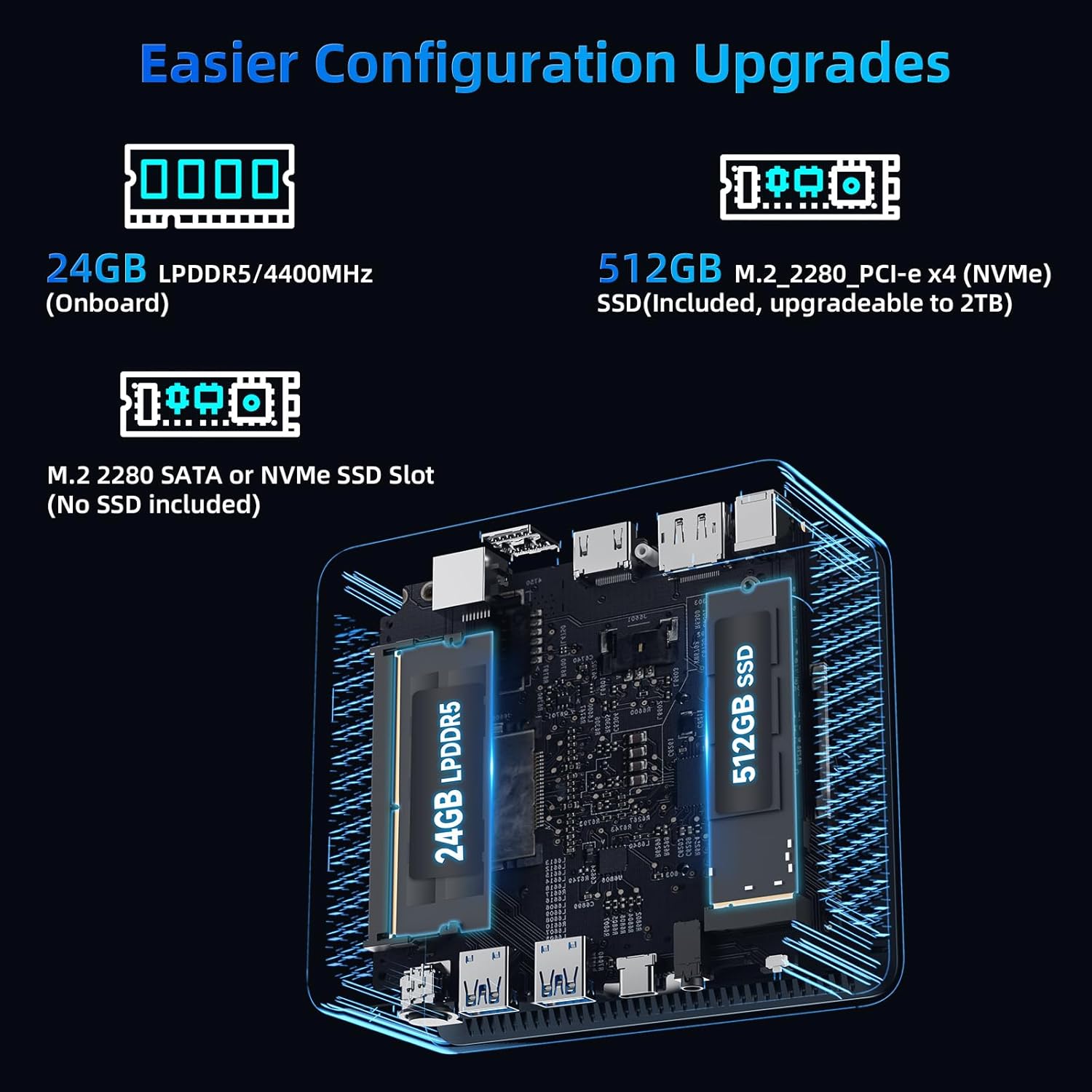
Figura 5: Interno view highlighting 24GB LPDDR5 memory and 512GB NVMe SSD, with an additional M.2 slot for expansion.
3.3. Conectividade sen fíos
Benefit from high-speed wireless connectivity with built-in WiFi 6, offering speeds up to 3x faster than Wi-Fi 5. Bluetooth 5.2 allows for quick connection to wireless peripherals like headsets, mice, and keyboards.
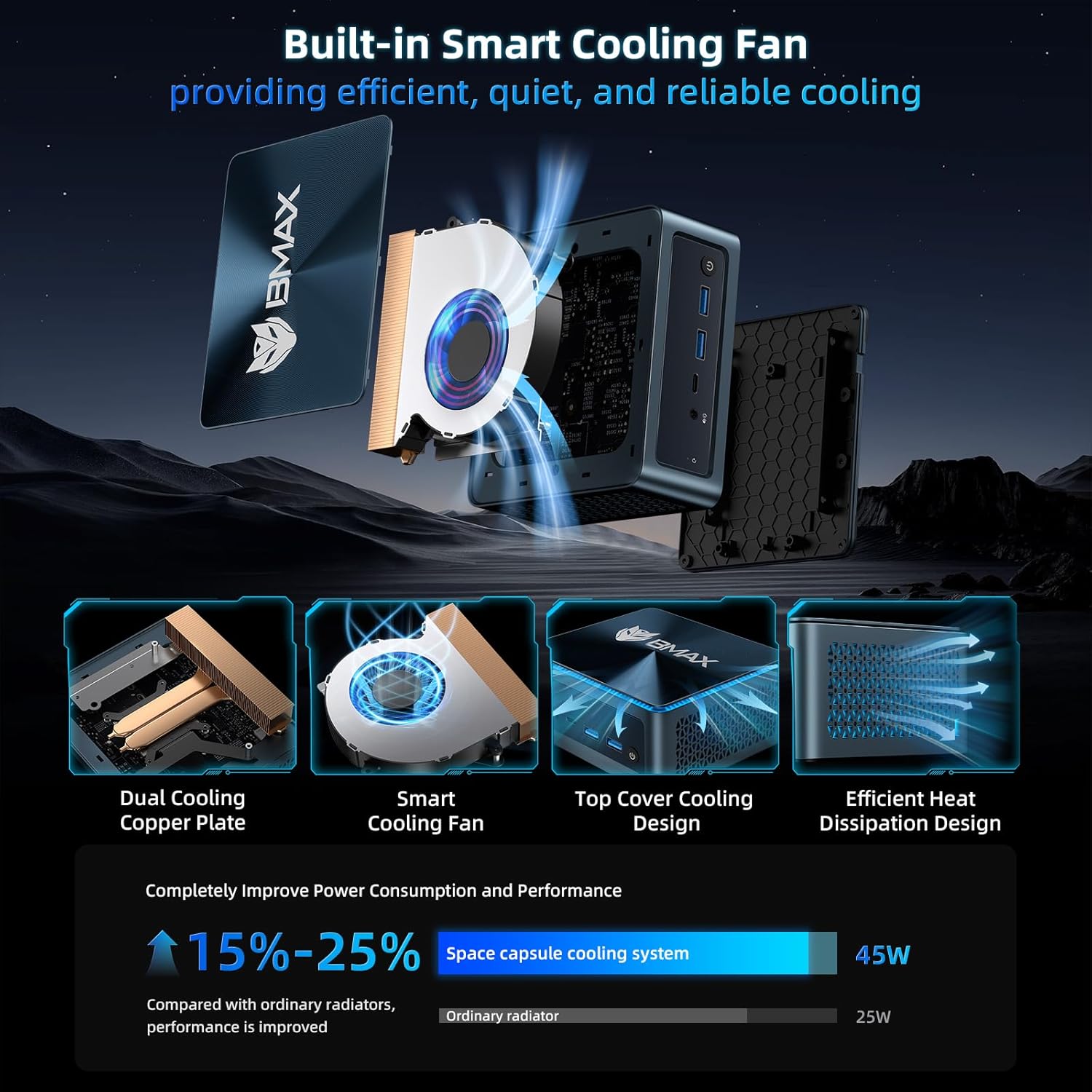
Figure 6: Bmax B9 Plus Mini PC demonstrating WiFi 6 and Bluetooth 5.2 capabilities.
3.4. Video Playback and Usage Scenarios
The Bmax B9 Plus is designed for versatile use, from home entertainment to professional applications. Its powerful processor and ample memory ensure smooth performance across various tasks.
Video 1: Official BMAX MINI PC B9 Plus product overview, mostrarasing its features and various usage scenarios like office work, home theater, and gaming.
4. Mantemento
4.1. Sistema de refrixeración
The B9 Plus features a "Space Capsule Cooling System" with an enlarged double copper heat pipe and a giant turbo smart fan. This design ensures efficient heat dissipation, improving performance by 15-25% compared to ordinary radiators.

Figura 7: Explotado view of the Bmax B9 Plus cooling system, showing the dual copper cooling plate and smart fan.
4.2. Actualizacións de software
Regularly update your operating system and drivers to ensure optimal performance, security, and compatibility. Refer to your operating system's documentation for specific update procedures.
4.3. Limpeza
Keep the Mini PC clean by gently wiping the exterior with a soft, dry cloth. Ensure ventilation openings are free from dust and obstructions to maintain efficient cooling.
5 Solución de problemas
5.1. Problemas comúns e solucións
| Problema | Causa posible | Solución |
|---|---|---|
| Sen saída de visualización | Incorrect cable connection, monitor off, incorrect input source. | Check display cables (HDMI/DP/Type-C), ensure monitor is on and set to correct input. |
| Mini PC not powering on | Power adapter not connected, faulty power outlet. | Verify power adapter connection to PC and outlet. Try a different outlet. |
| Rendemento lento | Too many applications running, insufficient storage, outdated drivers. | Close unnecessary applications, check available storage, update drivers and OS. |
5.2. One-Click Smart Recovery
The Bmax B9 Plus features a unique one-click smart recovery function. If your OS crashes, becomes slow, or encounters issues during upgrades, this function allows you to restore the system to factory settings quickly, replacing the current OS with a fresh configuration.
6. Especificacións
| Característica | Detalle |
|---|---|
| Procesador | Intel Core i5-1250P (up to 4.4GHz, 12 Cores/16 Threads, 12MB Cache) |
| RAM | 24 GB LPDDR5 |
| Almacenamento | 512GB NVMe SSD (expandable via M.2 2280 SATA/NVMe slot) |
| Gráficos | Gráficos Intel Iris Xe integrados |
| Conectividade sen fíos | WiFi 6, Bluetooth 5.2 |
| Portos | HDMI 2.1, DisplayPort 1.4a, Type-C (full features), 2x USB 3.2, 2x USB 2.0, RJ45 Ethernet, 3.5mm Audio Jack, DC Power In |
| Mostrar saída | Triple-display 4K@60Hz |
| Sistema Operativo | OS (Compatible with Windows 11 Pro, Linux, Ubuntu) |
| Dimensións | 4.9 x 4.4 x 1.7 polgadas |
| Peso | 1.5 libras |
7. Garantía e soporte
BMAX MINI PCs provide a one-Year warranty and lifetime professional customer service. For any pre-sale or after-sale support, please do not hesitate to contact Bmax Official Store.
Para obter máis asistencia, visite o Bmax Official Store on Amazon.
Ask a question about this manual
Ask about setup, troubleshooting, compatibility, parts, safety, or missing instructions. Manuals+ will review the question and use this page’s manual context to help answer it.