
1. Produto rematadoview
This manual provides essential instructions for the proper installation, operation, and maintenance of your SEEIRIR TP.HV352T.PB753(N) TV Motherboard. This motherboard is designed as a replacement component for televisions, offering precise adaptation and stable performance.
Características principais:
- Precise Adaptation: Engineered for perfect replacement of original TV motherboards.
- Reparación de avarías: Capable of resolving common display issues such as black screen, blurred screen, or no signal.
- Estable e duradeiro: Constructed with industrial-grade PCB materials to withstand high temperatures and moisture, ensuring long-term reliability.
- Fácil instalación: Features clear interface identification and includes a comprehensive installation guide.
- Funcións básicas: Provides all necessary functions for daily television use.
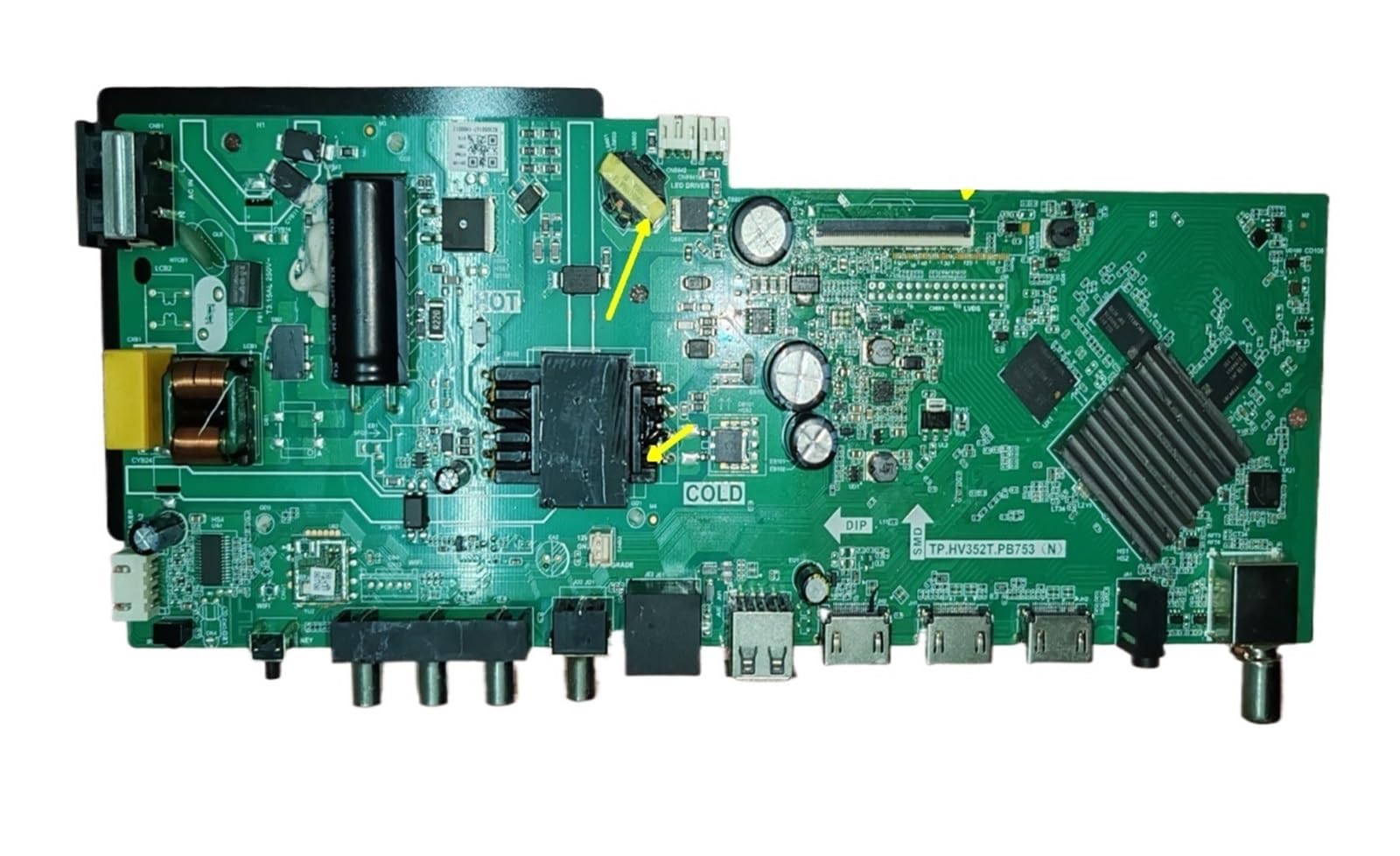
Figura 1: Fronte view of the SEEIRIR TP.HV352T.PB753(N) TV Motherboard, showing various ports and components.
2. Información de seguridade
Please read and understand all safety instructions before attempting to install or operate this product. Failure to follow these instructions may result in electric shock, fire, or damage to the product or other equipment.
- Desconexión de alimentación: Always disconnect the television from the main power supply before beginning any installation or maintenance work.
- Electricidade estática: Electronic components are sensitive to static electricity. Use appropriate anti-static precautions (e.g., anti-static wrist strap) when handling the motherboard.
- Instalación profesional: If you are not confident in your ability to perform the installation, seek assistance from a qualified technician.
- Ventilación: Ensure adequate ventilation around the television after installation to prevent overheating of components.
- Exposición ao líquido: Keep the motherboard and television away from liquids and excessive moisture.
- Manexo de compoñentes: Sujete a placa base polos bordos para evitar tocar os compoñentes sensibles.
3. Configuración e instalación
This section provides general guidelines for installing the TP.HV352T.PB753(N) TV Motherboard. Refer to the detailed installation guide included with your product for specific steps and diagrams.
- Prepara a televisión:
- Desconecte o televisor da toma de corrente.
- Coloque o televisor boca abaixo sobre unha superficie suave e limpa para protexer a pantalla.
- Retire a tapa traseira do televisor para acceder aos compoñentes internos.
- Remove the Old Motherboard:
- Carefully disconnect all cables connected to the existing motherboard (e.g., power, LVDS, backlight, speaker, input ports). Note their positions or take photos for reference.
- Unscrew the mounting screws holding the old motherboard in place.
- Gently lift and remove the old motherboard.
- Install the New Motherboard:
- Align the new SEEIRIR TP.HV352T.PB753(N) motherboard with the mounting holes in the TV chassis.
- Fixa a placa base cos parafusos axeitados. Non os apertes demasiado.
- Reconnect all cables to their corresponding ports on the new motherboard. Ensure all connections are firm and correctly oriented. Pay special attention to the LVDS cable and power connections (35-110V, 600mA, FCP 75W).
- Encendido inicial:
- Before replacing the back cover, plug the TV into a power outlet.
- Power on the TV and check for basic functionality (e.g., power indicator, screen display, sound).
- If issues arise, refer to the Troubleshooting section.
- Asemblea final:
- Once basic functionality is confirmed, unplug the TV again.
- Volva colocar a tapa traseira do televisor e asegúreaa con parafusos.
- Reconnect all external peripherals and power up the TV for full testing.
Nota: The motherboard features clear interface identification to assist with correct cable connections. Always double-check connections before powering on.
4. Funcionamento
Once the SEEIRIR TP.HV352T.PB753(N) TV Motherboard is correctly installed, the television should function as expected. The motherboard manages all core TV operations.
- Encendido/apagado: Use the TV's remote control or physical power button to turn the television on or off.
- Selección de entrada: Select desired input sources (HDMI, AV, USB, etc.) using the TV remote.
- Sintonización de canles: If applicable, perform channel scanning for over-the-air or cable channels.
- Navegación do menú: Access and navigate the TV's on-screen display (OSD) menu for settings adjustments (picture, sound, network, etc.).
Refer to your television's original user manual for detailed instructions on specific TV functions and menu navigation.
5. Mantemento
The SEEIRIR TP.HV352T.PB753(N) TV Motherboard is designed for durability with industrial-grade PCB. Minimal maintenance is required, but following these guidelines can extend its lifespan and ensure optimal performance:
- Eliminación de po: Periodically clean the interior of the TV (with power disconnected) using compressed air to remove dust buildup, which can impede cooling and cause component failure.
- Ventilación: Ensure the TV's ventilation openings are not blocked. Proper airflow is crucial to prevent overheating of the motherboard and other internal components.
- Condicións ambientais: Operate the TV in a stable environment, avoiding extreme temperatures, high humidity, and direct sunlight.
- Sobretensións: Consider using a surge protector to safeguard the TV and its internal components, including the motherboard, from electrical spikes.
6 Solución de problemas
This section addresses common issues you might encounter after installing the SEEIRIR TP.HV352T.PB753(N) TV Motherboard. If problems persist, consult a qualified technician.
| Problema | Causa posible | Solución |
|---|---|---|
| No Power / TV Does Not Turn On |
|
|
| Black Screen / No Display |
|
|
| Blurred Screen / Distorted Image |
|
|
| Sen sinal |
|
|
7. Especificacións
| Característica | Detalle |
|---|---|
| Número de modelo | TP.HV352T.PB753(N) |
| Marca | SEEIRIR |
| Compatible & Video Equipment Style | Equipo de exhibición |
| Vol. De entradatage Alcance | 35-110 V |
| Saída actual | 600 mA |
| Power Output (Variant) | FCP 75W |
| Peso do elemento | 500 gramos |
| ASIN | B0FF41WYG7 |
8. Garantía e atención ao cliente
Información da garantía:
Specific warranty terms for the SEEIRIR TP.HV352T.PB753(N) TV Motherboard are typically provided by the seller at the time of purchase. Please refer to your purchase documentation or contact the seller directly for details regarding warranty coverage, duration, and claims procedures. Standard return policies may apply as per the retailer's terms.
Atención ao cliente:
For technical assistance, installation queries, or troubleshooting beyond the scope of this manual, please contact the seller or manufacturer directly. You can typically find their contact information on your purchase invoice or the product packaging.
Vendedor: taizhoushidimaimaoyistore


