
Introdución
This manual provides detailed instructions for the installation, operation, and maintenance of your UNITOPSCI Single Din Car Stereo, Model 6886C. This unit features a 6.86-inch HD touchscreen, Apple CarPlay, Android Auto, Bluetooth 5.0, FM radio, USB connectivity, and support for a backup camera. Please read this manual thoroughly before use to ensure proper functionality and safety.
Contido do paquete
Verifique que todos os elementos que se indican a continuación estean incluídos no seu paquete:
- 1 x Car Stereo
- 1 x cámara de respaldo
- 1 x cable de alimentación
- 1 x cable de altofalante
- 1 x Remote Control (Battery Not included)
- 1 x Manual de usuario
- 1 x micrófono

Image: All components included in the UNITOPSCI car stereo package.
Produto rematadoview
The UNITOPSCI 6886C is a single DIN car stereo featuring a 6.86-inch HD touchscreen. Its compact design allows for installation in standard single DIN openings.
Dimensións e conexións
The unit measures approximately 187mm (7.3 inches) in length and 52mm (2.0 inches) in height. The screen itself is 6.86 inches. The rear panel includes various ports for power, speakers, microphone, video output, camera input, and GPS antenna.

Imaxe: Fronte e parte traseira view with dimensions and connection ports labeled.
Configuración e instalación
Recoméndase a instalación por parte dun profesional. Asegúrese de desconectar a alimentación do vehículo antes de comezar a instalación.
Pasos de instalación:
- Prepare Dash Opening: Confirm your vehicle's dash opening is suitable for a single DIN unit (187mm x 52mm). A suitable dash kit may be required if the opening is not standard.
- Conexións de cableado: Connect the power cable and speaker cable to the corresponding ports on the car stereo and your vehicle's wiring harness. Refer to the wiring diagram in the included user manual for specific connections.
- Cámara de respaldo: Connect the backup camera cable to the 'CAMIN' port on the rear of the stereo. Ensure the camera's power is correctly wired to the vehicle's reverse light circuit for automatic activation.
- Micrófono: Connect the external microphone to the 'MIC' port for improved hands-free calling audio quality.
- Antena GPS: If applicable, connect the GPS antenna to the 'GPS' port.
- Unidade segura: Mount the car stereo securely into the dash opening.
- Reconectar a enerxía: Reconnect the vehicle's battery and test all functions.
Instrucións de funcionamento
This section details the primary functions and features of your car stereo.
1. Apple CarPlay & Android Auto (Wired Connection)
Connect your iPhone or Android smartphone via a USB cable to access Apple CarPlay or Android Auto. This allows you to use navigation, make calls, send messages, and listen to music directly from your phone's interface displayed on the stereo screen. Voice control (Siri for CarPlay, Google Assistant for Android Auto) is supported for hands-free operation.

Image: Apple CarPlay, Android Auto, and Mirror Link functionality via wired USB connection.
2. Bluetooth 5.0
Pair your mobile device with the stereo via Bluetooth 5.0 for hands-free calling and wireless audio streaming. Access your phonebook and dial directly from the stereo's touchscreen. The Bluetooth name for pairing is 'CAR BT'.
3. Radio FM
Tune into FM radio stations (frequency range 87.5-108MHz). The unit supports 18 preset stations, allowing quick access to your favorite channels for news, music, and traffic updates.
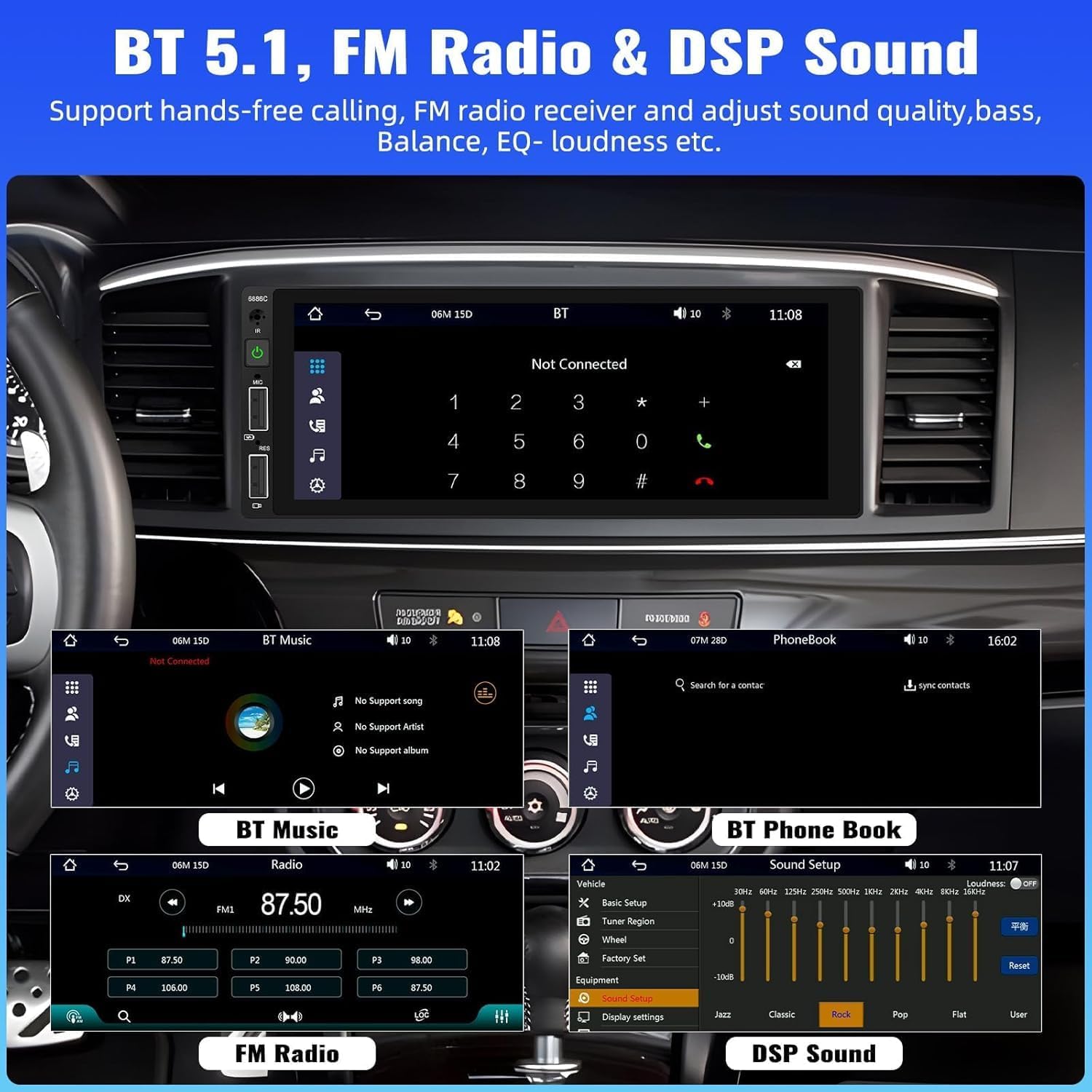
Image: Bluetooth, FM Radio, and Digital Sound Processing (DSP) settings interface.
4. Ligazón de espello
Utilize the Mirror Link function to display your smartphone's screen directly on the car stereo. Connect your device using its original USB cable. This feature is useful for viewing maps or playing videos from your phone.
5. USB Playback & Charging
The stereo features dual USB slots. Use these ports for media playback from USB drives or for fast charging your mobile devices. The unit also supports DVR connection via USB (DVR not included).

Image: Multiple playback options including USB charging and DVR support.
6. EQ Sound Feature
Adjust the audio output to your preference using the built-in EQ sound feature. Customize settings for bass, balance, and loudness to optimize your listening experience.
7. Control do volante (SWC)
If your vehicle supports it, connect the steering wheel control wires to easily manage radio functions, adjust volume, and handle calls without taking your hands off the wheel. This enhances driving safety.
8. Entrada da cámara de seguridade
When the vehicle is shifted into reverse gear, the stereo automatically displays the video feed from the connected backup camera. The included camera features 4 LED lights for clear night vision and parking lines to assist with safer parking maneuvers.

Image: Backup camera input and steering wheel control interface.
9. Retroiluminación de sete cores
Customize the button backlight color to match your vehicle's interior or your personal preference. Choose from seven available colors.
10. Memoria de apagado
The unit retains the last playing state (e.g., radio station, music track) when powered off and resumes from that point upon restart.
Mantemento
Para garantir a lonxevidade e o rendemento óptimo do equipo de son do teu coche, segue estas pautas de mantemento:
- Limpeza: Usa un pano suave e seco para limpar a pantalla e o exterior. Evita produtos de limpeza abrasivos ou solventes.
- Temperatura: Evite expor a unidade a temperaturas extremas.
- Humidade: Keep the unit dry and away from moisture.
- Actualizacións de firmware: Consulte o do fabricante website periodically for any available firmware updates to improve performance and add features.
Resolución de problemas
Se tes problemas co equipo de son do teu coche, consulta os seguintes problemas e solucións comúns:
| Problema | Causa posible | Solución |
|---|---|---|
| Sen Poder | Cableado incorrecto; fusible fundido; batería do vehículo baixa. | Check power connections; Replace fuse; Check vehicle battery. |
| Sen son | Cables do altofalante desconectados; Volume demasiado baixo; Función de silenciamento activa. | Verify speaker connections; Increase volume; Deactivate mute. |
| Bluetooth non se conecta | Bluetooth not enabled on device; Incorrect pairing process. | Ensure Bluetooth is on; Re-attempt pairing (Bluetooth name: CAR BT). |
| CarPlay/Android Auto Not Working | Faulty USB cable; Phone not compatible; Software issue. | Use original USB cable; Check phone compatibility; Restart phone and stereo. |
| Backup Camera No Display | Camera not powered; Video cable disconnected; Incorrect trigger wire. | Check camera power supply; Verify video cable connection; Ensure reverse trigger wire is connected. |
Especificacións
Detailed technical specifications for the UNITOPSCI 6886C car stereo:
- Modelo: 6886C
- Voltage: DC12V
- Sistema: WINCE
- Chip da CPU: F133
- Tamaño da pantalla: 6.86 polgadas
- Resolución da pantalla: 1280*480
- Ligazón espello: Soportado
- Banda de radio: FM
- Chip de radio: QN8035
- Potencia de saída: 45W*4 (180 Watts total)
- Temperatura de traballo: -10 ~ 60 ℃
- Versión Bluetooth: 5.0
- Nome Bluetooth: COCHE BT
- Retroiluminación colorida: Soportado
- Entrada de inversión: CVBS
- Poder Ampchip lifier: TDA7388
- Frecuencia de radio: 87.5-108 MHz
- Soporte con formato de audio: MP3 / WMA / WAV / APE / FLAC
- Soporte de formato de vídeo: RM/RMVB/AVI/MP4/MKV/3GP
- Compatibilidade con formatos de imaxe: JPG BMP PNG
- Idiomas admitidos: English, Chinese, Spanish, Portuguese, Russian, Italian, German, French, Turkish, Czech, Arabic, Polish, Hebrew
Garantía e Soporte
Your UNITOPSCI car stereo comes with a 2 ano de garantía from the date of purchase, covering manufacturing defects. For technical assistance, troubleshooting, or warranty claims, please contact our support team.
Soporte en liña: UNITOPSCI@126.com

