
1. Introdución
The NGTeco NG-MB1 4-in-1 APP-Based Time Clock is a versatile attendance management system designed for small businesses. It offers multiple verification methods including facial recognition, fingerprint scanning, RFID card, and PIN entry to accurately track employee work hours. This manual provides detailed instructions for setting up, operating, maintaining, and troubleshooting your device.
2. Información de seguridade
- Ensure the device is installed indoors and away from direct sunlight, heat sources, and moisture.
- Use só o adaptador de corrente fornecido para evitar danos.
- Non intente desmontar ou reparar o dispositivo vostede mesmo. Póñase en contacto co servizo de atención ao cliente para obter asistencia.
- Manteña o dispositivo limpo e libre de po e restos.
3. Contido do paquete
Verifica que todos os elementos estean presentes no paquete:
- NGTeco NG-MB1 Time Clock Unit
- Adaptador de alimentación
- Soporte de montaxe en parede
- Ferraxes de montaxe (parafusos, ancoraxes)
- RFID Cards (multiple)
- USB Drive (for data transfer)
- Guía de inicio rápido
- Contact Information Card
4. Produto rematadoview
The NGTeco NG-MB1 Time Clock features a compact design with multiple input options for employee verification.
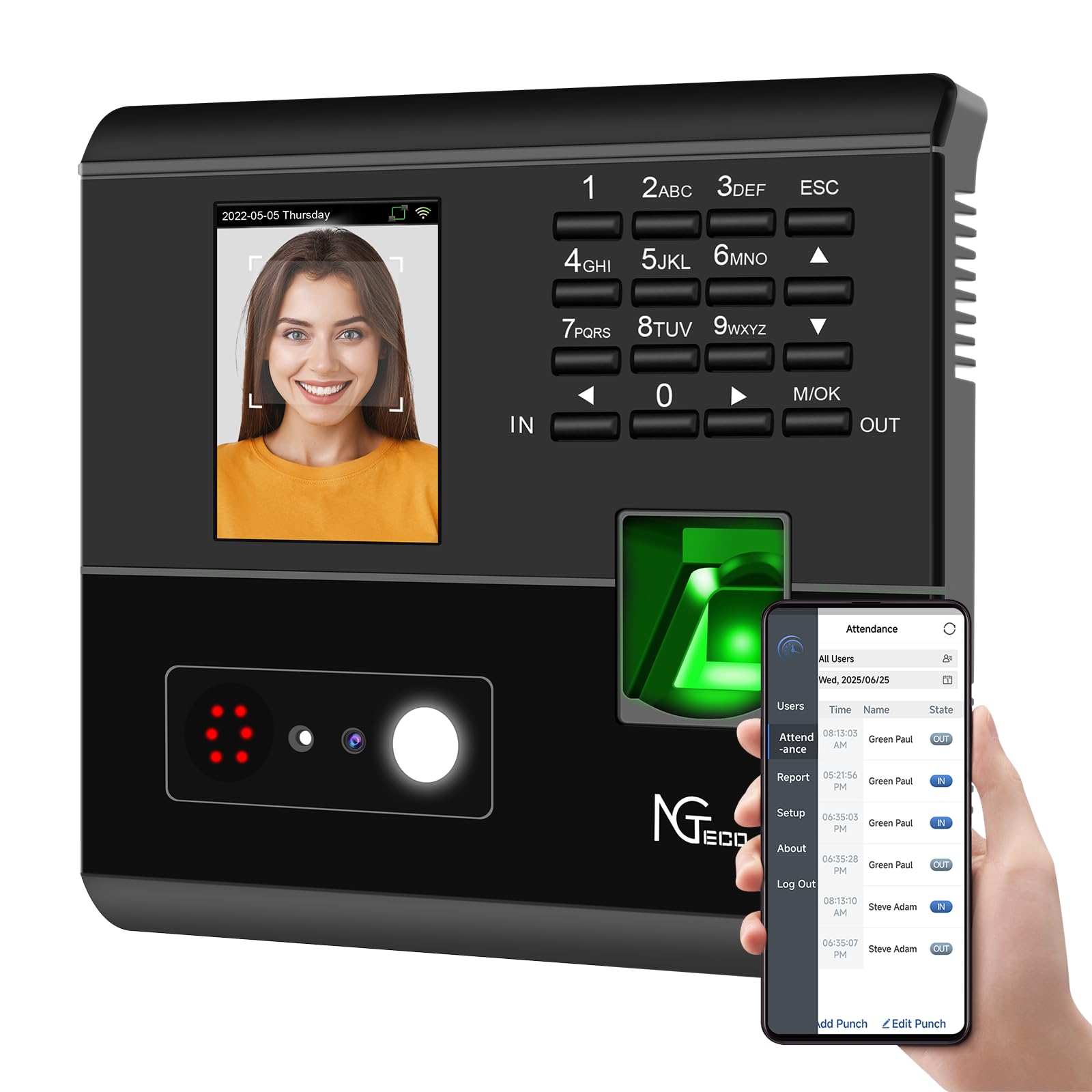
Figura 1: Fronte view of the NGTeco NG-MB1 Time Clock highlighting its four verification methods: Face Scan, Fingerprint, RFID Card, and Password.
Características do panel frontal:
- Pantalla de visualización: Shows time, date, user information, and menu options.
- Teclado: Numeric keys for PIN entry and navigation.
- Lector de pegadas dixitais: For biometric fingerprint verification.
- Face Recognition Camera: For facial recognition verification.
- RFID/Card Reading Area: For scanning RFID cards.
Side and Back Panel Features:

Figura 2: Traseira view of the NGTeco NG-MB1 Time Clock, illustrating the power input, Ethernet port, and USB port for connectivity and data transfer.
- Porto USB: For direct data transfer using a USB drive.
- Porto de alimentación: Conéctase ao adaptador de corrente fornecido.
- Porto Ethernet: Para conexión de rede por cable.
5. Configuración
5.1 Instalación do dispositivo
- Choose a suitable indoor location for mounting the time clock, ensuring it is at an appropriate height for all users.
- Use the provided mounting template to mark drill holes on the wall.
- Secure the wall mounting bracket using the supplied screws and anchors.
- Connect the power adapter and, if desired, an Ethernet cable to the device.
- Attach the time clock unit to the mounted bracket.
5.2 Descarga da aplicación
Descarga o NGTeco Time App from your mobile device's app store (Apple App Store for iOS or Google Play Store for Android). This app is essential for managing users, attendance records, and generating reports.
Vídeo 1: This video demonstrates the two methods for registering employee information on the NGTeco Time Clock, including using the device directly and through the NGTeco Time App.
5.3 Conexión Wi-Fi
To connect your device to a Wi-Fi network:
- On the device, navigate to the [Comm] menú.
- Seleccione [Rede sen fíos].
- Escolle a rede Wi-Fi desexada da lista.
- Enter the Wi-Fi password using the keypad and confirm.
- The device will attempt to connect to the network. A successful connection will be indicated on the screen.
Vídeo 2: This video provides a step-by-step guide on how to configure the Wi-Fi settings on your NGTeco Time Clock device.
6. Instrucións de funcionamento
6.1 Engadir usuarios
Employees can be added directly on the device or through the NGTeco Time App.
Adding Users via Device:
- Manteña premido o M/OK botón para acceder ao menú principal.
- Navega ata [Usuarios] e selecciona [Engadir usuario].
- Introduza o ID de usuario, Nome, Apelidoe configure o Rol de usuario (e.g., Employee, Admin).
- Seleccione a Modo de verificación (Password, Fingerprint, Card, or Face).
- Follow the on-screen prompts to enroll the chosen verification method(s).
Adding Users via NGTeco Time App:
- Open the NGTeco Time App on your smartphone.
- Navega ata o Usuarios section and tap Engadir usuario.
- Enter the employee's details including Nome, Apelido, PIN, e Permiso nivel.
- Save and sync the data with the device.
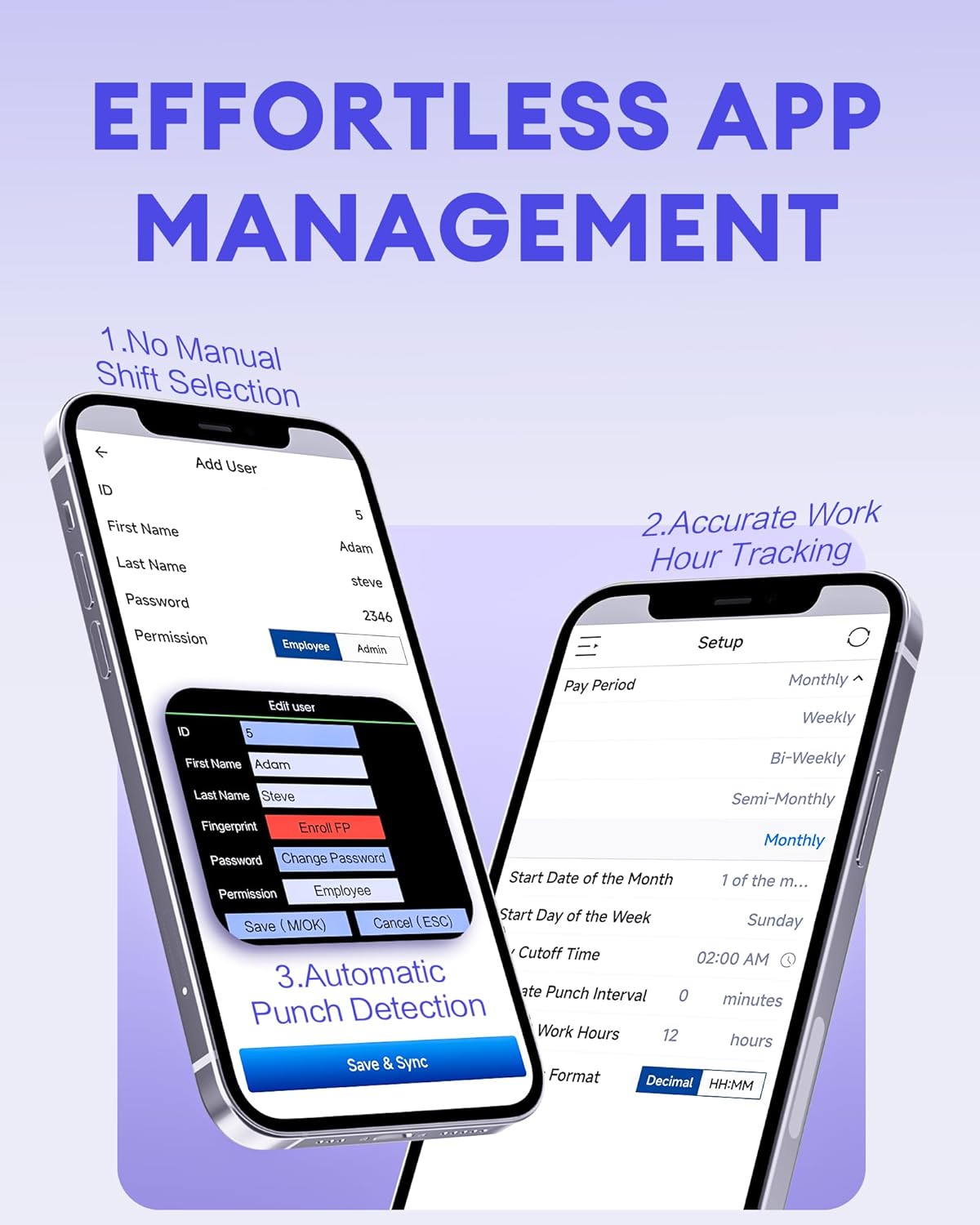
Figura 3: The NGTeco Time App interface for effortless management, including adding users, setting up work hour tracking, and automatic punch detection.
6.2 Enrolling Biometrics and Cards
Rexistro de impresión dixital:
For optimal fingerprint recognition:
- Always use clean fingers and avoid angled or tilted finger positions during enrollment.
- Place your finger belly completely in the middle of the reader.
- Do not slide the finger while enrolling. Apply some pressure for 1 second until the result is shown.
- If a finger is dry, gently breathe on it to moisten it before scanning.

Figura 4: Visual representation of the high-precision fingerprint module, emphasizing reliable, fast, and secure access.
Rexistro facial:
Follow the on-screen instructions to position your face correctly in front of the camera for enrollment.
Rexistro de tarxetas RFID:
When prompted, hold the RFID card near the designated reading area on the device until it is successfully registered.
6.3 Clocking In and Out
The NGTeco NG-MB1 supports automatic detection for clocking in and out, eliminating the need to press specific 'IN' or 'OUT' keys. Simply present your chosen verification method (face, fingerprint, RFID card, or enter your PIN) to the device.
Vídeo 3: This video demonstrates the four recognition methods (Face, Fingerprint, RFID, PIN) for clocking in on the NGTeco Time Clock.
6.4 Managing Attendance Records
Attendance records can be modified directly on the device or through the NGTeco Time App.
Adding/Editing Missing Punches:
- A través do dispositivo: Access the menu, navigate to [Time Data], entón [Add Missing Punch]. Select the user, date, time, and punch state (Check In/Check Out).
- A través da aplicación: In the NGTeco Time App, go to the Asistencia section. You can add a new punch or edit an existing one by selecting the user, date, time, and punch state.

Figura 5: The NGTeco Time App's punch record correction feature, allowing easy fixes for errors or missing punches.
Vídeo 4: This video illustrates how to modify attendance records directly on the NGTeco Time Clock device and through the mobile application.
6.5 Xeración de informes
The NGTeco Time Clock supports various payroll cycles and offers multiple ways to download attendance reports.

Figura 6: The NGTeco Time Clock supports various payroll cycles, including Monthly, Semi-Monthly, Bi-Weekly, and Weekly, for flexible attendance management.
Report Download Options:
- App Email Download: Use the NGTeco Time App to email detailed reports directly to your inbox.
- USB Drive Download: Insert the provided USB drive into the device's USB port to download attendance data.

Figura 7: Illustration of the two convenient methods for downloading attendance reports: directly to a USB drive or via email through the NGTeco Time App.
7. Mantemento
- Limpeza: Regularly wipe the device's screen, keypad, and fingerprint sensor with a soft, dry cloth. Avoid using abrasive cleaners or liquids.
- Actualizacións de software: Check the NGTeco Time App or websitio web para ver se hai actualizacións de firmware ou software dispoñibles para garantir un rendemento e unha seguridade óptimos.
- Copia de seguridade de datos: Periodically back up your attendance data using the USB drive or through the app to prevent data loss.
8 Solución de problemas
- O dispositivo non se acende: Asegúrate de que o adaptador de corrente estea conectado correctamente tanto ao dispositivo como a unha toma de corrente que funcione.
- Problemas de conectividade wifi: Verify your Wi-Fi password and ensure the device is within range of your router. Restarting the device or router may help.
- Fingerprint/Face Recognition Failure: Ensure the sensor/camera is clean. For fingerprints, ensure fingers are clean and placed correctly with adequate pressure. Re-enrollment may be necessary if issues persist.
- Problemas de sincronización de aplicacións: Check your device's internet connection and ensure the time clock is connected to the same Wi-Fi network as your phone.
- Missing Punches: Refer to Section 6.4 for instructions on adding or editing missing punches.
For further assistance, consult the Quick Start Guide or contact NGTeco customer support.
9. Especificacións
| Característica | Detalle |
|---|---|
| Marca | NGTeco |
| Número de modelo | NG-MB1 |
| Cor | Negro |
| Tipo de visualización | Dixital |
| Característica especial | Face/Fingerprint/Card/PIN |
| Dimensións do produto | 5" de ancho x 4" de alto |
| Fonte de enerxía | Eléctrico con cable |
| Tecnoloxía de conectividade | WiFi |
| Peso do elemento | 0.79 quilogramos |
| Tipo de material | Plástico ABS Premium |
10. Garantía e soporte
- Garantía: The NGTeco NG-MB1 comes with a 1-year manufacturer's warranty.
- Soporte técnico: Enjoy free lifetime technical support from NGTeco's U.S.-based service team. Support is available Monday to Friday, 6 AM to 6 PM EST.
- For support, refer to the contact information provided in your Quick Start Guide or visit the official NGTeco websitio.