
1. Introdución
This manual provides essential information for setting up, operating, maintaining, and troubleshooting your new HP Laptop 15-fd0127dx. Please read this manual thoroughly before using your device to ensure optimal performance and longevity. Keep this manual for future reference.
2. Que hai na caixa
Carefully unpack your HP Laptop and verify that all items are present:
- HP Laptop 15-fd0127dx
- Adaptador de alimentación e cable
- Windows 11 Pro Operating System (Pre-installed)
- Microsoft Office Professional Plus Lifetime License (Pre-installed)
- Mouse silencioso sen fíos
- Cepillo de limpeza
- Concentrador USB 7 en 1
- 128GB USB Type-C Drive

Figura 2.1: Accesorios incluídos
This image displays the HP Laptop 15-fd0127dx along with its accessories: a power adapter, a wireless silent mouse, a cleaning brush, a 7-in-1 USB hub, and a 128GB USB Type-C drive. The laptop is shown with Windows 11 Pro and Microsoft Office Professional Plus pre-installed.
3. Produto rematadoview
The HP Laptop 15-fd0127dx is designed for productivity and entertainment, featuring a powerful Intel Core i7 processor, ample memory, and fast storage.
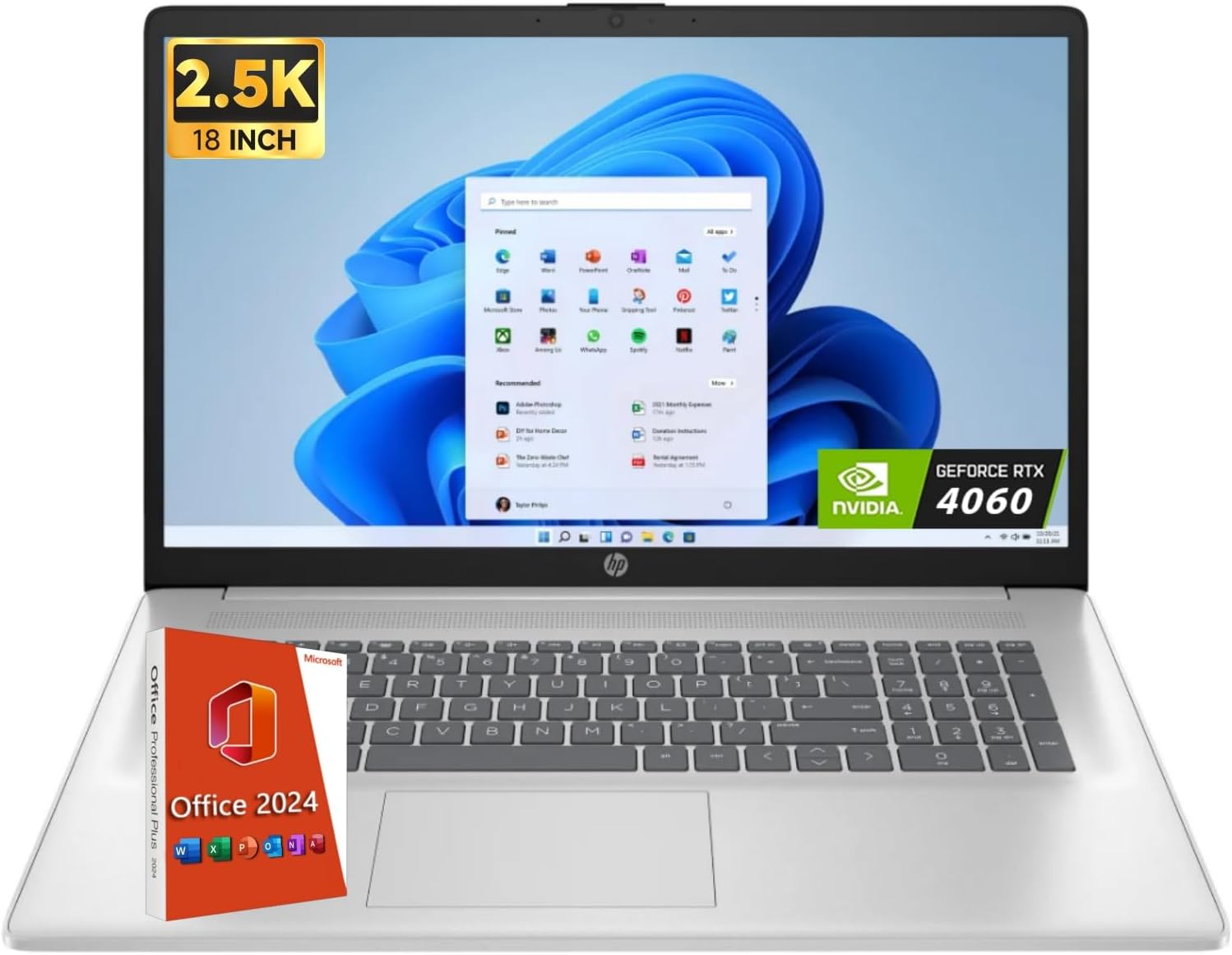
Figure 3.1: HP Laptop 15-fd0127dx Front View
This image shows the laptop from the front, open to reveal the screen displaying the Windows 11 operating system, the full-size keyboard, and the touchpad. An 'Office 2024' box and an 'NVIDIA GeForce RTX 4060' sticker are visible, indicating software and graphics capabilities.
Características principais:
- Visualización: 15.6-inch Full HD (1920 x 1080) Anti-Glare Touchscreen Display
- Procesador: Intel Core i7 family, 3 GHz, 4 Cores
- Memoria: 64 GB de RAM DDR4
- Almacenamento: 2 TB Solid State Drive (SSD)
- Gráficos: Gráficos Intel integrados
- Sistema operativo: Windows 11 Pro
- Conectividade: Wi-Fi 6, Bluetooth 5.3
- Audio: Configuración de altofalantes duplos
- Cámara: HP True Vision HD camera with camera shutter

Figure 3.2: Display and Performance Features
This image emphasizes the laptop's 15.6-inch Full HD display, ample storage capacity (up to 4TB SSD, though this model has 2TB), HP Fast Charge capability (0-50% in 45 minutes, up to 7 hours battery life), and the Intel Processor (up to 5.0GHz, 10 Cores, 12 Threads).
Portos e conectores:
Familiarize yourself with the various ports on your laptop for connecting peripherals and power.

Figura 3.3: Portos laterais
Esta imaxe mostra o lado profile of the HP Laptop, showcasing multiple USB ports, an HDMI port, and the power input jack. The design is sleek and functional for various connectivity needs.
4. Configuración
4.1 Encendido inicial
- Connect the power adapter to the laptop's power port and then to a wall outlet.
- Abre a tapa do portátil. É posible que o portátil se acenda automaticamente ou que teñas que premer o botón de acendido/acendida.
- Siga as instrucións que aparecen en pantalla para completar a configuración de Windows 11 Pro, incluíndo o idioma, a rexión, a conexión de rede e a creación da conta de usuario.
4.2 Conexión de periféricos
- Rato sen fíos: Insert the USB receiver for the wireless mouse into an available USB port on the laptop. The mouse should connect automatically.
- Hub USB: Connect the 7-in-1 USB Hub to a USB-C port on your laptop to expand connectivity options.
- Pantalla externa: Use an HDMI cable to connect your laptop to an external monitor or TV. Press Tecla Windows + P to configure display settings.
5. Instrucións de funcionamento
5.1 Usando Windows 11 Pro
Your laptop comes with Windows 11 Pro pre-installed. Explore the Start Menu, Taskbar, and Widgets for a personalized computing experience. Refer to Microsoft's official documentation for detailed Windows 11 usage guides.
5.2 Funcionalidade da pantalla táctil
The 15.6-inch display supports touch input. Use gestures such as tap, swipe, pinch-to-zoom, and two-finger scroll for intuitive navigation.
5.3 Xestión da batería
- To maximize battery life, adjust screen brightness, close unused applications, and enable power-saving modes.
- The laptop supports HP Fast Charge, allowing you to charge from 0% to 50% in approximately 45 minutes when the system is off or in standby.
6. Mantemento
6.1 Limpeza do portátil
- Use the provided cleaning brush to gently remove dust from the keyboard and vents.
- For the screen, use a soft, lint-free cloth lightly dampened with a screen cleaner. Avoid harsh chemicals.
- Asegúrate de que o portátil estea apagado e desconectado antes de limpalo.
6.2 Actualizacións de software
Regularly check for and install updates for Windows 11 Pro and HP drivers to ensure security and optimal performance. Access Windows Update via Configuración > Actualización de Windows.
6.3 Xestión do almacenamento
Periódicamente review your 2 TB SSD storage. Delete unnecessary files and uninstall unused applications to maintain performance. Utilize cloud storage for backups of important data.
7 Solución de problemas
This section addresses common issues you might encounter with your HP Laptop.
| Problema | Posible Solución |
|---|---|
| O portátil non se acende | Ensure the power adapter is securely connected to both the laptop and a working power outlet. Check if the power outlet is functional. Try a different outlet. |
| A pantalla está en branco ou negra | Press the power button to wake the laptop. Check screen brightness settings. If connected to an external display, press Tecla Windows + P para alternar entre os modos de visualización. |
| Problemas de conexión wifi | Ensure Wi-Fi is enabled in Windows settings. Restart your router and modem. Check for updated Wi-Fi drivers. |
| Rendemento lento | Close unnecessary applications. Check for background processes consuming resources. Ensure sufficient free space on the SSD. Run a system scan for malware. |
| A pantalla táctil non responde | Restart the laptop. Ensure the screen is clean and free of debris. Check for updated touchscreen drivers in Device Manager. |
If issues persist, refer to the HP support websitio ou póñase en contacto co servizo de atención ao cliente.
8. Especificacións
Detailed technical specifications for your HP Laptop 15-fd0127dx:

Figure 8.1: Laptop Dimensions and Connectivity
This image illustrates the physical dimensions of the laptop: 15.78 inches (W), 10.15 inches (D), and 0.81 inches (H), with a weight of 3.52 pounds. It also highlights key connectivity features such as Wi-Fi 6, Bluetooth 5.3, dual speaker setup, and AI Noise Removal technology.
| Característica | Especificación |
|---|---|
| Número de modelo | 15-fd0127dx |
| Mostrar | 15.6-inch Full HD (1920 x 1080) Anti-Glare Touchscreen |
| Procesador | Intel Core i7 family, 3 GHz (up to 5.0GHz), 4 Cores |
| RAM | 64 GB DDR4 |
| Almacenamento | SSD de 2 TB (unidade de estado sólido) |
| Gráficos | Gráficos Intel integrados |
| Sistema Operativo | Windows 11 Pro |
| Conectividade sen fíos | Wi-Fi 6, Bluetooth 5.3 |
| Portos | USB 3.0 (x1), USB-C, HDMI, Audio Jack |
| Duración da batería | Ata 7.75 horas (media) |
| Dimensións (WxDxH) | 15.78 x 10.15 x 0.81 polgadas |
| Peso | 3.52 libras |
| Cor | Prata Natural |
9. Garantía e soporte
9.1 Garantía do produto
Your HP Laptop 15-fd0127dx is covered by a standard manufacturer's warranty. Please refer to the warranty card included with your product or visit the official HP websitio web para obter información detallada sobre os termos e condicións da garantía.
9.2 Atención ao cliente
For technical assistance, product inquiries, or service requests, please contact HP Customer Support:
- Soporte HP Websitio: support.hp.com
- Asistencia telefónica: Refer to the HP support websitio para os números de contacto rexionais.
When contacting support, please have your laptop's serial number and model number (15-fd0127dx) readily available.