
1. Introdución
The Thunderobot L1 Computer Monitor Lamp is designed to provide optimal lighting for your workspace, focusing on eye comfort and visual clarity. It features an asymmetric light source, high color rendering (Ra≥95), flicker-free illumination, low blue light protection, and adjustable color temperature and brightness levels.
2. Información de seguridade
- Asegurar o lamp is securely placed on the monitor to prevent accidental falls.
- Non expoña o lamp á auga ou á humidade excesiva.
- Avoid disassembling the product. Contact support for repairs.
- Use só o cable USB fornecido para a alimentación.
- Manter fóra do alcance dos nenos.
3. Contido do paquete
Verifica que todos os elementos estean presentes no paquete:
- Thunderobot L1 Computer Monitor Lamp
- Cable de alimentación USB
- Manual de usuario
4. Instrucións de configuración
- Colocación de Lamp: Gently place the Thunderobot L1 Monitor Lamp on top of your computer monitor. The gravity-activated clamping mechanism and silicone anti-slip stabilizers will help secure it in place. Adjust the lamp's angle using the dual-pivot adjustment system to direct light onto your workspace without screen glare.
- Potencia de conexión: Connect the provided USB cable to the USB-C port on the lamp and plug the other end into an available USB port on your computer or a USB power adapter (not included). The lamp acenderase.

Image: The Thunderobot L1 lamp features a gravity-activated clamp, silicone stabilizers, and a dual-pivot adjustment system for secure and flexible positioning.
Video: This video demonstrates the assembly and installation of the Thunderobot L1 Computer Monitor Lamp, showing how to attach it to a monitor and connect the power cable.
5. Instrucións de funcionamento
The Thunderobot L1 Monitor Lamp features intuitive touch controls located on the top surface of the lamp.
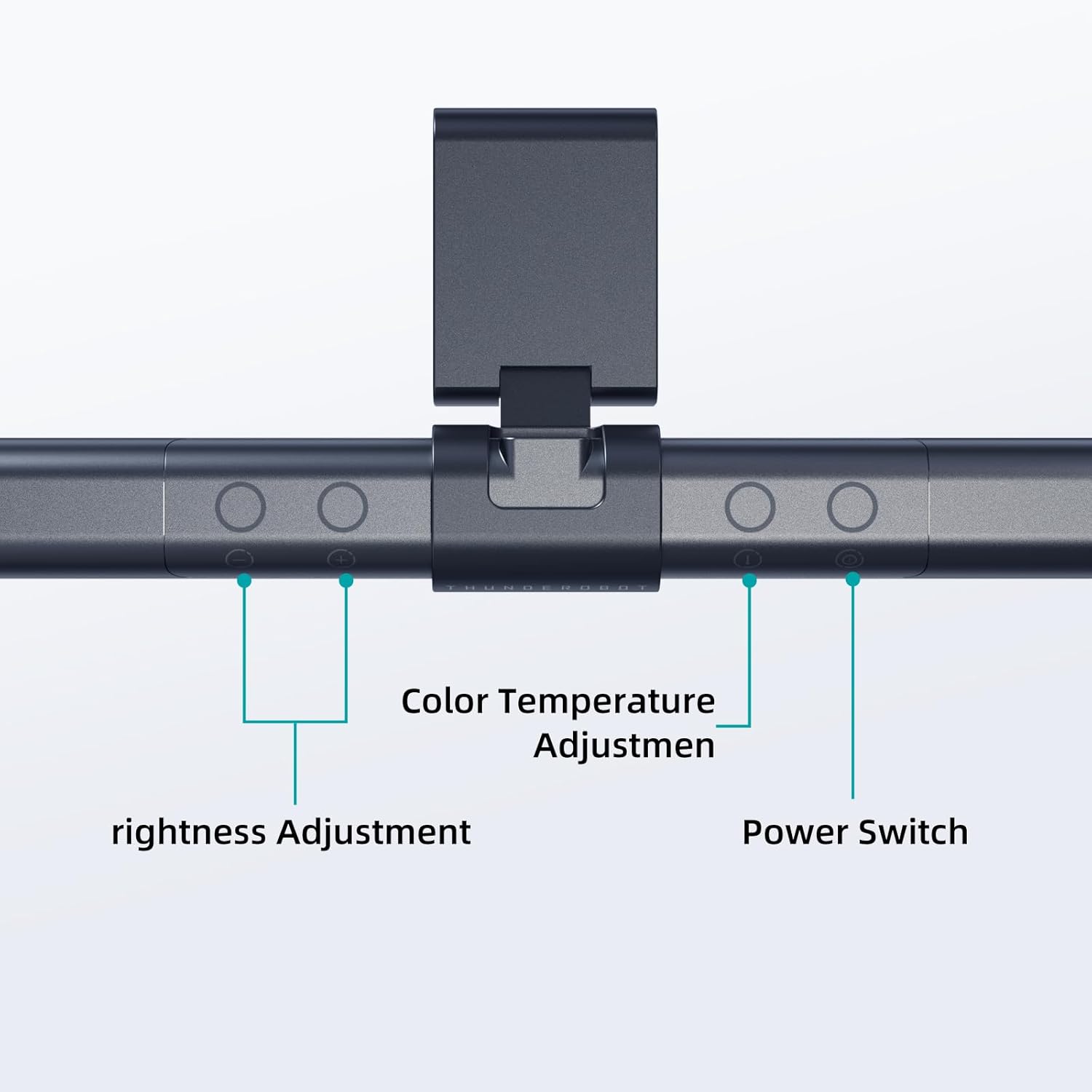
Image: The touch controls include buttons for brightness adjustment, color temperature adjustment, and power.
- Encendido/apagado: Preme o botón de acendido (O) xirar o lamp on ou off.
- Axuste de brillo: Use the brightness adjustment buttons (+ e -) to cycle through ten levels of brightness.
- Axuste da temperatura da cor: Press the color temperature button (i) to switch between six different color temperature settings.

Imaxe: O lamp offers six adjustable color temperatures, ranging from 3000K (Warm Light) to 6000K (Cool White Light), suitable for various activities like movie viewing, reading, studying, and working.
6. Características clave
- Asymmetric Light Source: The advanced asymmetric light design ensures uniform light distribution across the workspace, eliminating screen glare and shadows. This optimizes the light path for comfortable, prolonged use.
- Ra≥95 High Color Rendering: With a color rendering index of Ra≥95, the lamp accurately reproduces colors, providing a vivid and true-to-life visual experience for various tasks.
- Iluminación sen parpadeos: Equipped with flicker-free technology, this lamp provides constant, stable illumination, reducing eye strain and headaches associated with traditional lighting.
- Low Blue Light Protection: Advanced low blue light technology reduces harmful blue wavelengths, alleviating eye strain, dryness, and fatigue, especially during extended screen time.
- Six Color Temperatures: Offers a versatile range of six color temperature options, from warm white to cool white, allowing users to customize the lighting atmosphere for different scenarios and preferences.
- Ten-Level Dimming: Provides ten adjustable brightness levels for precise control over illumination intensity.

Image: The Ra≥95 High CRI ensures colors are displayed accurately and vibrantly, as demonstrated by the fruit comparison.

Imaxe: O lamp provides low blue light protection, reducing harmful blue light exposure for eye comfort.
7. Especificacións
| Característica | Detalle |
|---|---|
| Dimensións do produto | 3.5" D x 17.7" W x 3.85" H |
| Peso do elemento | 16 onzas |
| Lamp Tipo | Escritorio Lamp |
| Cor de sombra | Negro |
| Material de sombra | Poliéster |
| Tipo de cambio | Pulsador |
| Tecnoloxía de conectividade | USB (para alimentación) |
| Voltage | 12 voltios |
| Cor | Negro |
| Forma | Plano |
| Tipo de material | Policarbonato |
| Número de modelo | TH-L1-B2 |
8. Mantemento
- Limpeza: Desconecte a alimentación antes de limpar. Use un pano suave e seco para limpar a lamp. Non use produtos de limpeza ou disolventes abrasivos.
- Almacenamento: Cando non o use durante períodos prolongados, garde o lamp nun lugar fresco e seco.
9 Solución de problemas
- Lamp non acende:
- Asegúrese de que o cable USB estea conectado de forma segura a ambos os dous lamp e a fonte de enerxía.
- Verify that the power source (USB port or adapter) is functional.
- Parpadeos de luz:
- Comprobe a conexión de alimentación.
- Se o parpadeo persiste, póñase en contacto co servizo de atención ao cliente.
- Os controis non responden:
- Disconnect and reconnect the power cable to reset the lamp.
- Asegúrate de ter os dedos limpos e secos ao usar os controis táctiles.
10. Garantía e soporte
Thunderobot provides 1-year product quality support for the L1 Computer Monitor Lamp. For warranty claims or technical assistance, please contact Thunderobot customer service.