
1. Introdución
Thank you for choosing the Jedel WS732 Wireless Keyboard and Mouse Combo. This product provides a convenient and efficient wireless solution for your computing needs. Designed for comfort and ease of use, this combo features a 104-key keyboard with English and Arabic layouts and a high-speed wireless mouse with 1000 DPI. Please read this manual carefully to ensure proper setup and operation.
2. Contido do paquete
- Jedel WS732 Wireless Keyboard
- Jedel Wireless Mouse
- Receptor sen fíos USB
- Manual de usuario (este documento)
3. Produto rematadoview
The Jedel WS732 combo offers a full-sized keyboard and an ergonomic mouse for comfortable use across various devices.

Figure 3.1: Jedel WS732 Wireless Keyboard and Mouse Combo packaging.
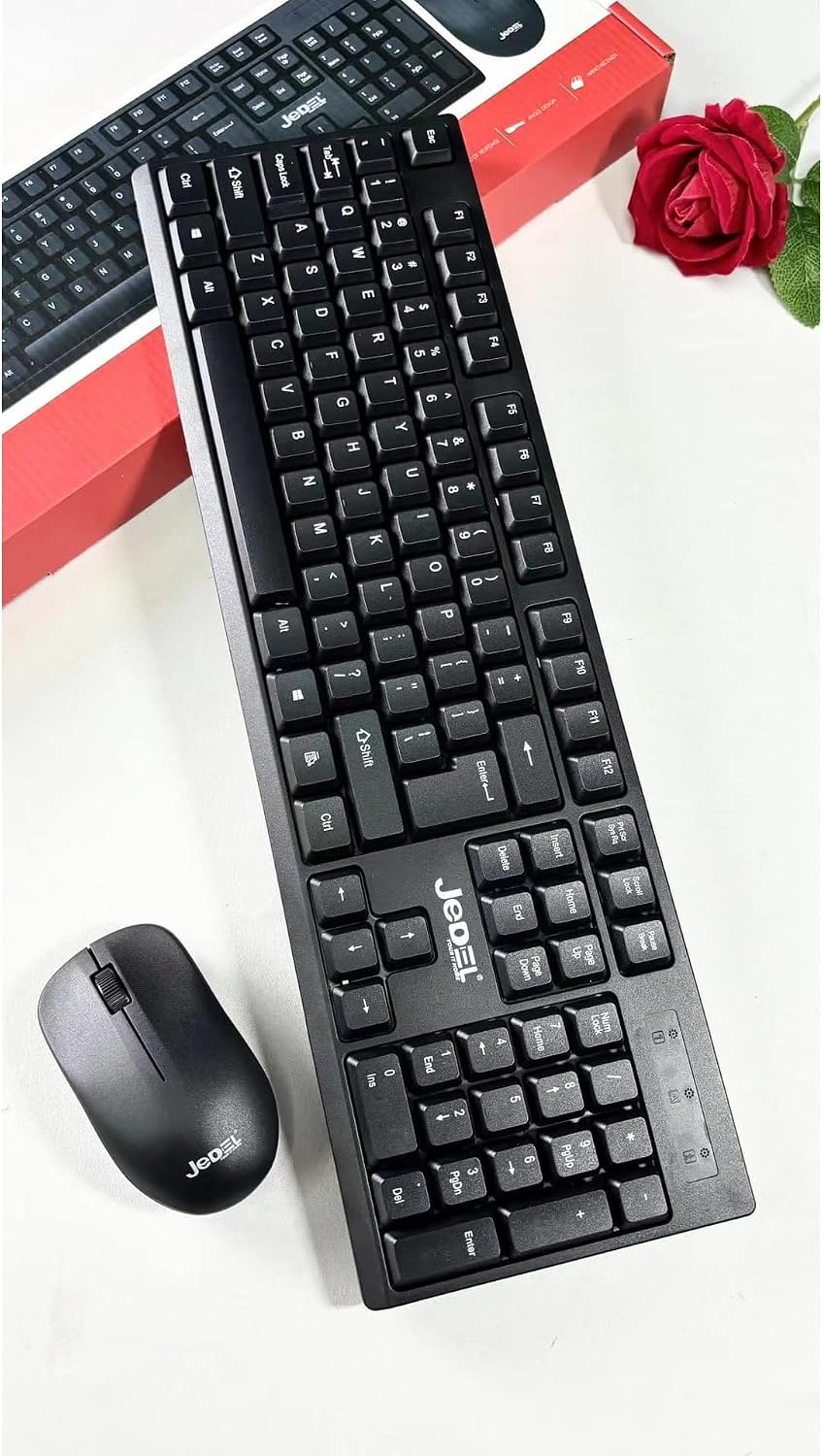
Figura 3.2: Arriba view of the Jedel wireless keyboard and mouse, showcasing the full layout.

Figure 3.3: Underside of the Jedel wireless mouse, revealing the battery compartment and the convenient storage slot for the USB receiver.
4. Instrucións de configuración
Follow these steps to set up your Jedel WS732 Wireless Keyboard and Mouse Combo:
- Instalar baterías:
- For the keyboard: Open the battery compartment on the underside of the keyboard and insert the required batteries (not included), ensuring correct polarity.
- For the mouse: Open the battery compartment on the underside of the mouse (refer to Figure 3.3) and insert the required batteries (not included), ensuring correct polarity.
- Conectar o receptor USB: Locate the USB wireless receiver, usually stored within the mouse's battery compartment. Plug this receiver into an available USB port on your computer, laptop, or compatible device.
- Encendido: Ensure the keyboard and mouse are switched on (if they have an on/off switch). Your device should automatically detect and install the necessary drivers.
- Funcionalidade de proba: Once drivers are installed, test the keyboard and mouse to ensure they are working correctly.
5. Instrucións de funcionamento
The Jedel WS732 combo operates on a 2.4GHz wireless frequency, providing a stable connection.
- Uso do teclado: The keyboard features a standard 104-key layout with both English and Arabic characters. Use it as you would any standard keyboard for typing and input.
- Uso do rato: The mouse offers precise tracking with 1000 DPI sensitivity. Use the left and right click buttons and the scroll wheel for navigation and interaction.
- Compatibilidade: This combo is compatible with various devices including laptops, desktop PCs, and smart TVs that support USB input devices.
6. Mantemento
To ensure the longevity and optimal performance of your Jedel WS732 combo, follow these maintenance guidelines:
- Limpeza: Usa un pano suave e seco para limpar as superficies do teclado e do rato. Para a sucidade persistente, usa un pano lixeiramente seco.amp cloth can be used, but ensure no liquid enters the devices. Avoid harsh chemicals or abrasive cleaners.
- Substitución da batería: When the keyboard or mouse performance degrades (e.g., lag, unresponsive keys/clicks), it's time to replace the batteries. Always use new batteries of the specified type and dispose of old batteries responsibly.
- Almacenamento: When not in use for extended periods, remove the batteries to prevent leakage. Store the devices in a cool, dry place away from direct sunlight and extreme temperatures.
7 Solución de problemas
If you encounter issues with your Jedel WS732 combo, try the following solutions:
- Sen resposta do teclado/rato:
- Asegúrate de que as baterías estean instaladas correctamente e que non estean esgotadas. Substitúeas se é necesario.
- Verifica que o receptor USB estea conectado correctamente a un porto USB que funcione. Proba cun porto USB diferente.
- Make sure the keyboard and mouse are switched ON.
- Reinicia o teu ordenador ou dispositivo.
- Conexión con atraso ou intermitente:
- Achegue o teclado e o rato ao receptor USB.
- Ensure there are no large metal objects or other wireless devices (like Wi-Fi routers, cordless phones) interfering with the 2.4GHz signal.
- Substitúe as pilas.
- O cursor do rato salta ou é inexacto:
- Limpa a área do sensor do rato na parte inferior.
- Use o rato sobre unha superficie limpa e non reflectante ou sobre unha alfombrilla de rato.
8. Especificacións
| Característica | Descrición |
|---|---|
| Marca | Jedel |
| Modelo | WS732 |
| Tecnoloxía de conectividade | Sen fíos de 2.4 GHz (receptor USB) |
| Disposición do teclado | 104 Keys, QWERTY, English & Arabic |
| Rato DPI | 1000 DPI |
| Fonte de enerxía | Funciona con batería (baterías non incluídas) |
| Dispositivos compatibles | Laptop, PC, TV |
| Cor | Negro |
| Peso do elemento | 1 kg |
9. Garantía e soporte
The Jedel WS732 Wireless Keyboard and Mouse Combo comes with a 30-day warranty from the date of purchase. This warranty covers manufacturing defects under normal use.
For technical support, warranty claims, or further inquiries, please visit the official Jedel websitio web ou póñase en contacto co servizo de atención ao cliente:
- Oficial Websitio: www.jedelit.com