
Introdución
This manual provides essential instructions for the installation, operation, and maintenance of your Rosewill VMG 1000W 80+ Gold ATX 3.1 Full Modular Power Supply. Please read this manual thoroughly before installation and retain it for future reference. This power supply unit (PSU) is designed to deliver stable and efficient power to your personal computer system, featuring ATX 3.1 and PCIe 5.1 compatibility for modern hardware.

Image: Rosewill VMG1000 Fully Modular ATX Power Supply overview banner, highlighting low noise, premium reliability, and 80 Plus efficiency.
Precaucións de seguridade
- Always disconnect the power cord from the wall outlet before installing, removing, or cleaning the power supply.
- This power supply is designed for use in personal computers only. Using it for other purposes may cause damage and void the warranty.
- Non abra a fonte de alimentación casing. Alto volumetages are present inside, and opening the unit will void the warranty and pose a risk of electric shock.
- Ensure proper grounding of your system to prevent electrical hazards.
- Instale a fonte de alimentación nunha zona ben ventilada, lonxe de fontes de calor e humidade.
Configuración e instalación
Contido do paquete
- Rosewill VMG 1000W Power Supply Unit
- Modular Cable Set (including 12V-2x6 PCIe 5.1 cable)
- Cable de alimentación de CA
- Parafusos de montaxe
- Manual de usuario
Instalación física
- Ensure your computer is powered off and the AC power cord is disconnected from the wall outlet.
- Abre a carcasa do teu ordenador.
- Localiza a zona de montaxe da fonte de alimentación, normalmente na parte superior ou inferior traseira da carcasa.
- Carefully place the Rosewill VMG 1000W PSU into the designated slot, ensuring the fan faces the correct direction for optimal airflow (usually facing downwards if there's a bottom vent, or inwards if top-mounted).
- Fixe a fonte de alimentación á caixa usando os parafusos de montaxe proporcionados.

Imaxe: De arriba abaixo view of the Rosewill VMG 1000W power supply, showcasing its fan grille and modular cable connection ports.
Conexións por cable
The Rosewill VMG 1000W is a full modular power supply, allowing you to connect only the cables necessary for your system, which helps improve airflow and cable management.

Imaxe: Detallada view of the modular cable connection panel on the Rosewill VMG 1000W power supply, showing labeled ports for MB, CPU/PCI-E, PERIF/SATA, and the orange 12V-2x6 connector.

Image: A diagram illustrating the various modular connectors included with the Rosewill VMG1000 power supply, such as 24-pin Motherboard, 4+4 pin CPU, 6+2 pin PCI-E, 12+4 pin PCI-E 5, SATA, and 4-pin Molex.
- 24-Pin Motherboard Cable: Connect the large 24-pin cable to the corresponding port on your motherboard.
- CPU Power Cable (4+4 Pin): Connect the 4+4 pin CPU cable to the CPU power connector(s) on your motherboard. Modern motherboards may require one or two such connectors.
- PCIe Power Cables (6+2 Pin): For graphics cards requiring 6-pin or 8-pin PCIe power, use the 6+2 pin PCIe cables. Connect the appropriate end to the PSU and the other to your graphics card.
- 12V-2x6 PCIe 5.1 Cable: This dedicated cable provides up to 600W of power for compatible PCIe 5.1 graphics cards. Connect the orange 12V-2x6 connector from the PSU to your graphics card's 12V-2x6 port. Ensure a firm connection.

Image: A close-up showing the vibrant orange 12V-2x6 connector on the Rosewill VMG 1000W power supply, designed for instant identification and secure engagement with compatible graphics cards.
- Cables de alimentación SATA: Conecta os cables de alimentación SATA aos teus SSD, HDD e unidades ópticas.
- Cables periféricos (Molex): Use Molex cables for any other peripherals that require this type of power connector.
- Once all necessary components are connected, organize your cables for optimal airflow and aesthetics.
- Pecha a caixa do ordenador.
- Conecte o cable de alimentación CA á fonte de alimentación e despois a unha toma de corrente con conexión a terra.
Instrucións de funcionamento
Powering On Your System
- Ensure all cables are securely connected and the power supply's main switch (located on the rear of the PSU) is in the 'ON' (I) position.
- Preme o botón de acendido da carcasa do teu ordenador.
- The power supply fan will activate, and your system should begin its boot sequence.
Powering Off Your System
- Always shut down your operating system properly before turning off the main power switch on the PSU or disconnecting the AC power cord.
- For complete power removal, switch the PSU's main switch to the 'OFF' (O) position and disconnect the AC power cord from the wall outlet.
Mantemento
Un mantemento regular axuda a garantir a lonxevidade e o rendemento óptimo da súa fonte de alimentación.
Limpeza
- Periodically inspect the power supply's fan and ventilation grilles for dust accumulation.
- With the system powered off and unplugged, use compressed air to gently clear dust from the fan blades and vents. Hold the fan blades to prevent them from spinning rapidly during cleaning, which can damage the bearings.
- Do not use liquid cleaners or solvents on the power supply.
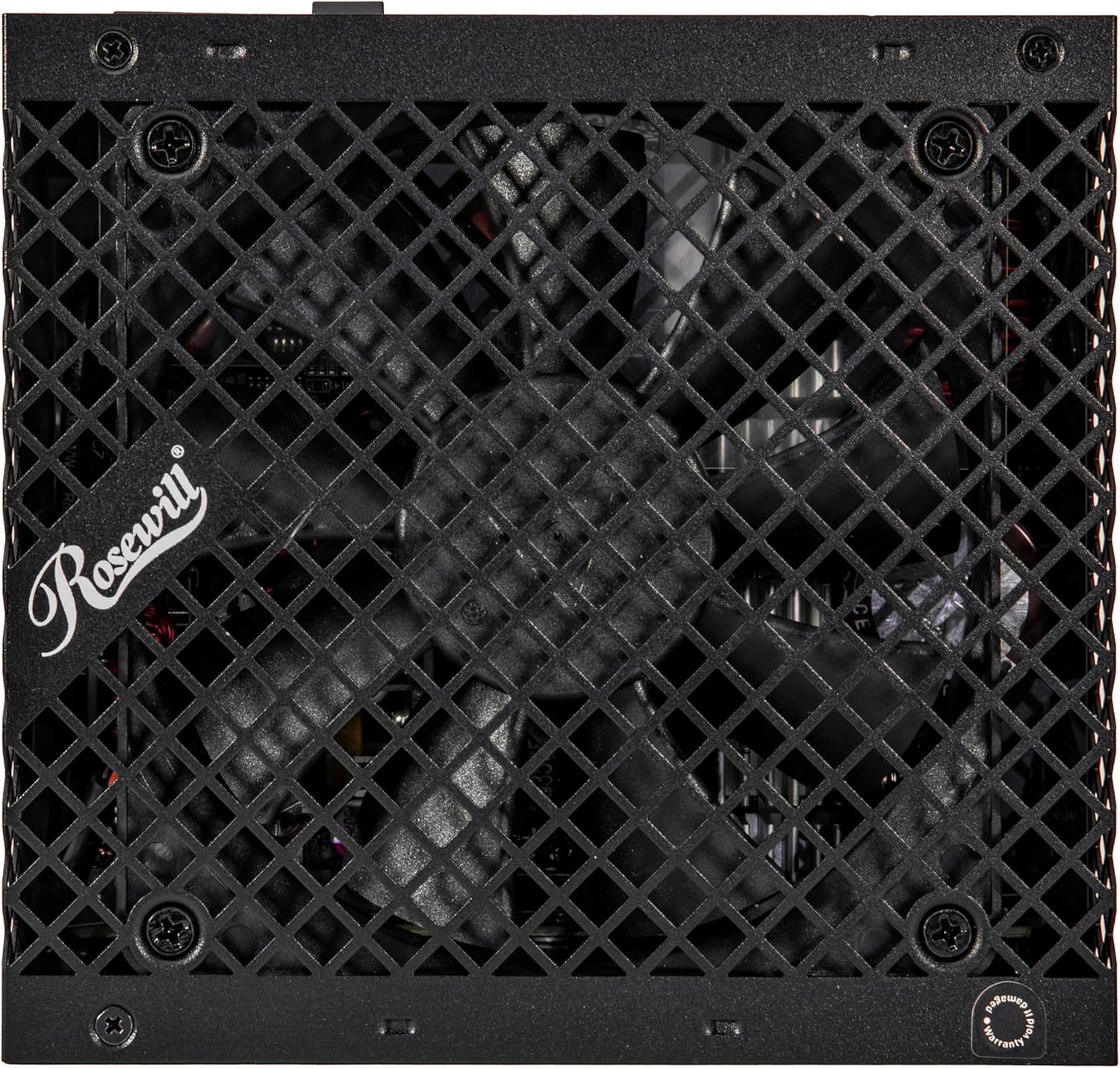
Imaxe: Arriba view of the Rosewill VMG 1000W power supply, showing the 120mm FDB fan through its protective grille, which is crucial for cooling.
Resolución de problemas
If you encounter issues with your Rosewill VMG 1000W power supply, refer to the following common problems and solutions:
Sen Poder
- Comproba as conexións de alimentación: Ensure the AC power cord is securely plugged into both the power supply and a working wall outlet. Verify the 24-pin motherboard and 4+4 pin CPU cables are firmly seated.
- Interruptor da fonte de alimentación: Confirm the power supply's main switch on the rear is in the 'ON' (I) position.
- Enchufe de parede: Proba a toma de corrente con outro dispositivo para asegurarte de que subministra corrente.
- Conexións internas: Double-check all modular cables are correctly connected to both the PSU and the components.
System Instability or Random Shutdowns
- Protección contra sobrecarga: The power supply features multiple protection circuits (OCP, OPP, OTP, OVP, SCP, UCP) to prevent damage. If your system is drawing too much power, the PSU may shut down. Ensure your system's power requirements do not exceed the PSU's capacity.
- Problemas cos compoñentes: Instability can also be caused by other faulty components (e.g., RAM, CPU, GPU). Test components individually if possible.
- Ventilación: Asegúrate de que haxa un fluxo de aire axeitado dentro da carcasa do teu PC para evitar o sobrequecemento dos compoñentes, incluída a fonte de alimentación.

Image: Diagram illustrating the advanced protection suite of the Rosewill VMG1000 power supply, detailing OCP (Over Current Protection), OPP (Over Power Protection), OTP (Over Temperature Protection), OVP (Over Voltage Protection), SCP (Short Circuit Protection), and UCP (Under Current Protection).
Ruído excesivo do ventilador
- Acumulación de po: Clean the fan and vents as described in the Maintenance section.
- Carga: Fan speed increases with load and temperature. Ensure your system is not under excessive load or experiencing high ambient temperatures.
If problems persist after attempting these solutions, please contact Rosewill customer support.
Especificacións
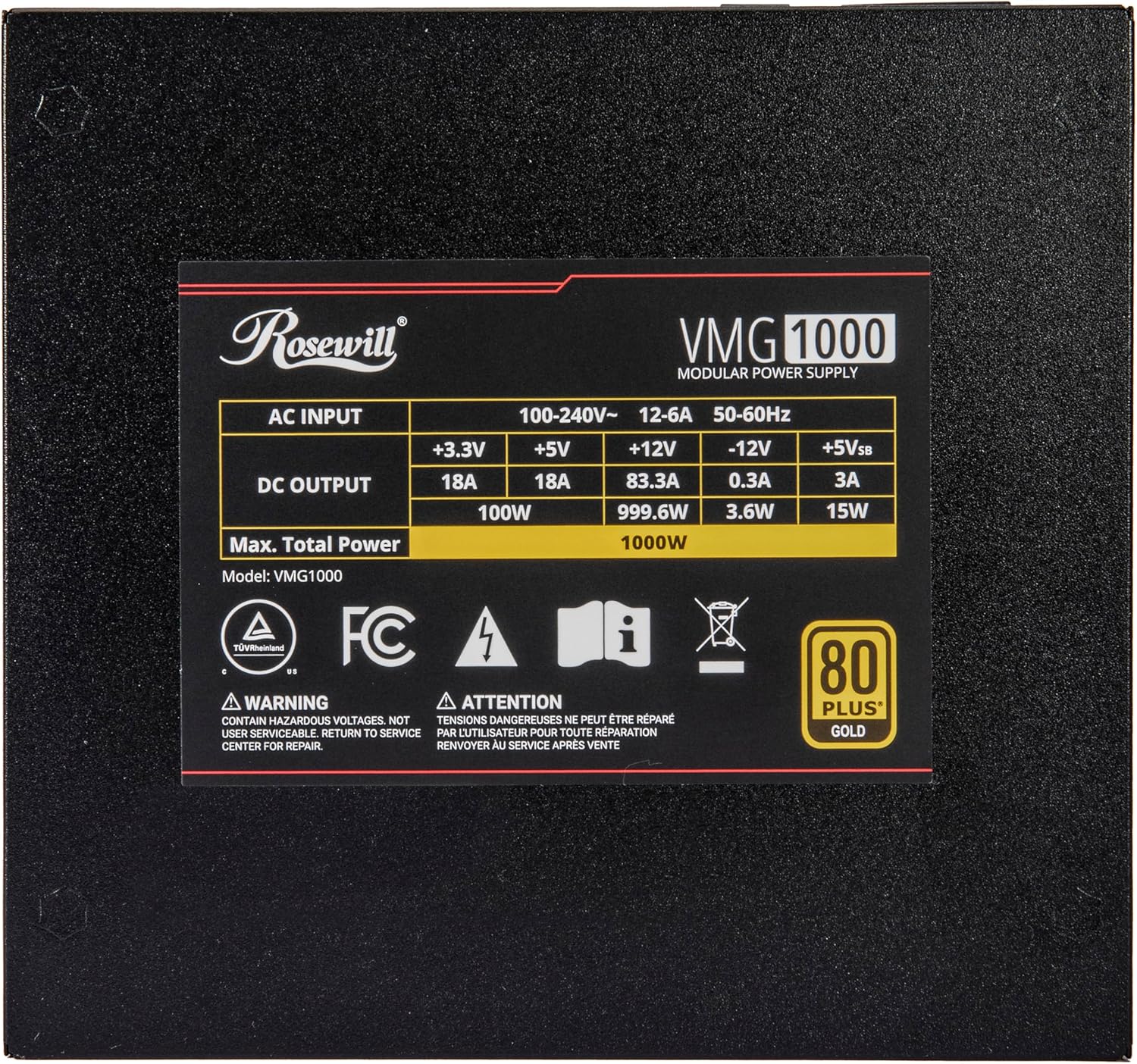
Image: The rating label on the Rosewill VMG 1000W power supply, detailing AC input, DC output for +3.3V, +5V, +12V, -12V, +5Vsb, and maximum total power of 1000W.
| Característica | Detalle |
|---|---|
| Nome do modelo | VMG1000 |
| Potencia de saídatage | 1000 vatios |
| Certificación 80 PLUS | Ouro |
| Factor de forma | ATX |
| Estándar ATX | ATX 3.0 & 3.1 Compatible |
| Estándar PCIe | PCIe 5.1 (with 12V-2x6 Connector) |
| Modularidade | Completamente modular |
| Tipo de ventilador | Ventilador silencioso FDB (rodamento dinámico de fluídos) de 120 mm |
| Capacitores | Capacitores electrolíticos 100% xaponeses |
| Características de protección | OCP, OPP, OTP, OVP, SCP, UCP |
| Dimensións do produto (L x W x H) | 5.51 x 5.9 x 3.38 polgadas (140 x 150 x 86 mm) |
| Peso do elemento | 5.5 libras |
| Dispositivos compatibles | Ordenador persoal |
Información da garantía
The Rosewill VMG 1000W Power Supply comes with a 5 ano de garantía from the date of purchase. This warranty covers defects in materials and workmanship under normal use. It does not cover damage resulting from accident, misuse, abuse, neglect, improper installation, unauthorized repair or modification, or external causes such as power surges or lightning strikes.
To claim warranty service, please retain your proof of purchase. For detailed warranty terms and conditions, or to initiate a warranty claim, please contact Rosewill customer support.
Atención ao cliente
For technical assistance, troubleshooting, or warranty inquiries regarding your Rosewill VMG 1000W Power Supply, please visit the official Rosewill website or contact their customer support team. Contact information can typically be found on the Rosewill websitio web ou na embalaxe do produto.
Rosewill Official Websitio: www.rosewill.com