
Nelko PM220
Nelko PM220 Bluetooth Thermal Label Printer User Manual
Modelo: PM220
1. Introdución
Thank you for choosing the Nelko PM220 Bluetooth Thermal Label Printer. This portable device is designed for efficient label printing without the need for ink cartridges, making it ideal for small businesses, address labeling, logo printing, and various organizational tasks. This manual provides detailed instructions for setup, operation, maintenance, and troubleshooting to ensure optimal performance.
2. Produto rematadoview
The Nelko PM220 is a compact thermal label printer that connects wirelessly via Bluetooth to your smartphone or PC. It supports various label sizes and offers clear, high-resolution printing for text, barcodes, and QR codes.
2.1 Contido do paquete
- Nelko PM220 Label Printer
- Label Paper Roll (starter roll)
- Cable de carga USB
- Manual de usuario

Figura 1: The Nelko PM220 Bluetooth Thermal Label Printer shown with a roll of blank labels. The printer features a sleek navy blue design with a power button and a paper feed button on the front panel.
3. Guía de configuración
3.1 Carga da cinta de etiquetas
- Open the printer cover by gently pushing the release button or lifting the designated area.
- Insert the label roll into the paper bin, ensuring the labels face upwards and the leading edge extends slightly out of the printer slot.
- Adjust the paper slot guide to the right to ensure the label paper is tightly attached to the far right side of the paper bin, preventing misalignment during printing.
- Pecha a tapa da impresora de forma segura.

Figura 2: A label roll being correctly inserted into the paper compartment of the Nelko PM220 printer. The roll is placed with the labels facing upwards.
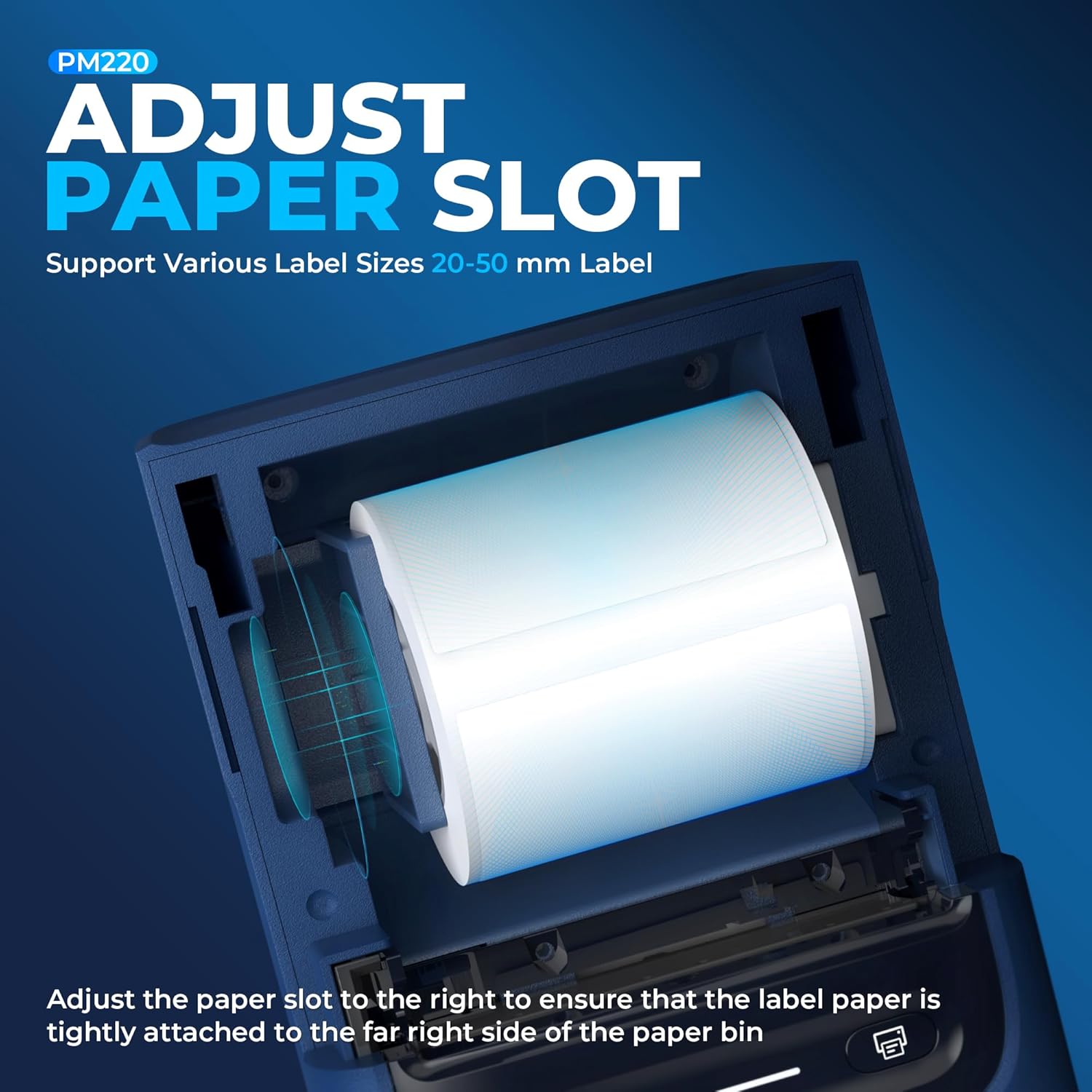
Figura 3: Un primeiro plano view demonstrating how to adjust the paper slot guide within the Nelko PM220 printer. The guide is moved to the right to secure the label roll.
3.2 Conexión á enerxía
- Connect the provided USB charging cable to the printer's charging port.
- Conecta o outro extremo do cable USB a un adaptador de corrente USB compatible (non incluído) ou a un porto USB dun ordenador.
- Allow the printer to charge fully before first use. The indicator light will typically change color to indicate a full charge.
3.3 Instalación da aplicación e emparellamento Bluetooth
- Download the official Nelko label printing application from your device's app store (e.g., Apple App Store for iOS, Google Play Store for Android). For PC connectivity, download the appropriate driver and software from the official Nelko websitio.
- Ensure Bluetooth is enabled on your smartphone or PC.
- Power on the Nelko PM220 printer by pressing and holding the power button until the indicator light illuminates.
- Open the Nelko app (or PC software) and navigate to the device connection section.
- Busca available Bluetooth devices and select 'Nelko PM220' from the list.
- Follow any on-screen prompts to complete the pairing process. A successful connection will be indicated by a change in the printer's indicator light or a message within the app.
4. Instrucións de funcionamento
4.1 Encendido/apagado
- Para acender: Press and hold the power button for approximately 2-3 seconds until the indicator light turns on.
- Para apagar: Press and hold the power button for approximately 2-3 seconds until the indicator light turns off.
4.2 Imprimir unha etiqueta
- Ensure the printer is powered on and successfully connected to your device via Bluetooth.
- Open the Nelko app or PC software.
- Select your desired label template or create a new label design.
- Enter the text, add images, barcodes, or QR codes as needed.
- Adjust label size and print settings within the app to match the loaded label tape.
- Preview a etiqueta para garantir a precisión.
- Tap the 'Print' button in the app. The printer will feed and print the label.
- Carefully tear off the printed label along the serrated edge.

Figura 4: The Nelko PM220 printer actively printing various labels, including shipping labels, product labels, and decorative stickers, demonstrating its versatility.
5. Mantemento
5.1 Limpeza do cabezal de impresión
A limpeza regular do cabezal de impresión garante unha calidade de impresión óptima e prolonga a vida útil da impresora. Use un pano suave e sen fiapos lixeiramenteampcon alcohol isopropílico.
- Ensure the printer is powered off and disconnected from power.
- Abra a tapa da impresora.
- Gently wipe the print head surface with the dampened cloth. Avoid touching the print head with bare hands.
- Deixe que o cabezal de impresión seque completamente antes de pechar a tapa e acender a impresora.
5.2 Almacenamento
Store the printer in a cool, dry place away from direct sunlight and extreme temperatures. Remove any label rolls if storing for an extended period.
6 Solución de problemas
If you encounter issues with your Nelko PM220 printer, refer to the table below for common problems and solutions.
| Problema | Causa posible | Solución |
|---|---|---|
| A impresora non se acende | Low battery or no power connection | Charge the printer using the provided USB cable. Ensure the power adapter is working. |
| Non se pode conectar a través de Bluetooth | Bluetooth is off, printer is not in pairing mode, or incorrect device selected | Ensure Bluetooth is enabled on your device. Restart the printer and try pairing again. Verify you are selecting 'Nelko PM220'. |
| Poor print quality (faint, blurry) | Dirty print head, incorrect label type, or low battery | Clean the print head as described in Section 5.1. Ensure you are using thermal labels. Charge the printer. |
| Labels are not feeding correctly | Label roll improperly loaded or paper slot not adjusted | Re-load the label roll, ensuring it is seated correctly and the paper slot guide is adjusted tightly against the roll (refer to Section 3.1). |
| Printer stops printing mid-label | Out of labels or low battery | Replace the label roll. Charge the printer. |
7. Especificacións técnicas
| Característica | Especificación |
|---|---|
| Marca | Nelko |
| Nome do modelo | PM220 |
| Tecnoloxía de impresión | Térmica |
| Tecnoloxía de conectividade | Bluetooth |
| Saída da impresora | Monocromo |
| Resolución máxima de impresión en branco e negro | 203 ppp |
| Velocidade de impresión máxima en monocromo | 45 mm/s |
| Tamaños de soportes compatibles | 23-54mm (width) |
| Dimensións do produto | 13.3 x 8 x 10.2 polgadas |
| Peso do elemento | 13.4 onzas |
| Tipo de tinta da impresora | No Ink (Thermal) |
| Compoñentes incluídos | Printer, Paper |
8. Garantía e soporte
Nelko products are designed for reliability and performance. For specific warranty information, please refer to the warranty card included with your purchase or visit the official Nelko website. If you require technical assistance or have questions not covered in this manual, please contact Nelko customer support through their official channels.
Soporte en liña: Visit the official Nelko websitio web con preguntas frecuentes, controladores e descargas de software.
Soporte por correo electrónico: Consulte a embalaxe do produto ou a ficha oficial websitio web para enderezos de correo electrónico de atención ao cliente.
Ask a question about this manual
Ask about setup, troubleshooting, compatibility, parts, safety, or missing instructions. Manuals+ will review the question and use this page’s manual context to help answer it.