
1. Introdución
Thank you for choosing the Cecotec Conga Y50 Robot Vacuum and Mop. This device is designed to provide efficient and autonomous cleaning for your home, combining powerful vacuuming with effective mopping. Featuring advanced laser navigation and a convenient self-draining base, the Conga Y50 simplifies your cleaning routine. Please read this manual thoroughly before operating the robot to ensure proper use, maintenance, and optimal performance.
2. Instrucións de seguridade
To reduce the risk of injury or damage, always observe basic safety precautions when operating your robot vacuum cleaner. Keep this manual for future reference.
- Este aparello pode ser usado por nenos a partir de 8 anos e persoas con capacidades físicas, sensoriais ou mentais reducidas ou con falta de experiencia e coñecementos se recibiron supervisión ou instrucións sobre o uso do aparello de forma segura e comprenden os perigos que implica. .
- Os nenos deben ser supervisados para asegurarse de que non xoguen co aparello.
- A limpeza e o mantemento do usuario non deben ser feitos por nenos sen supervisión.
- Ensure the robot is placed on a stable, level surface.
- Do not expose the robot or its base to water or other liquids.
- Manteña o cabelo, a roupa solta, os dedos e todas as partes do corpo lonxe das aberturas e das partes móbiles.
- Non opere o robot en zonas con chamas abertas ou materiais explosivos.
- Only use the original power adapter and charging base provided by the manufacturer.
- Remove any loose cables, small objects, or fragile items from the floor before cleaning to prevent entanglement or damage.
3. Contido do paquete
Carefully unpack the box and ensure all components are present and in good condition. If any items are missing or damaged, contact customer support.
- Conga Y50 Robot Vacuum Cleaner
- Accesorio para fregona
- Base autobaleirable
- Dust bag (pre-installed in base)
- Adaptador de alimentación
- Side brushes (spare set)
- Ferramenta de limpeza
- Manual de instrucións
4. Produto rematadoview
Familiarize yourself with the main components and features of your Conga Y50 robot vacuum.
Compoñentes do robot

Figura 4.1: Arriba view of the Conga Y50 robot, highlighting the power, home, and Wi-Fi indicator buttons.

Figura 4.2: Parte inferior view of the robot, illustrating the main multifunctional brush, side brushes, and driving wheels.
Self-Draining Base

Figure 4.3: The Conga Y50 robot next to its self-draining base, ready for automatic dust collection.
Características clave
- Navegación láser avanzada: The robot uses advanced laser technology to create an interactive map of your home, ensuring precise and personalized cleaning regardless of ambient light. This system provides fast and accurate tracking, reducing navigation errors and ensuring comprehensive coverage.
- 5000Pa High Suction Power: Equipped with a powerful 5000Pa motor, the robot effectively removes dust, hair, and various types of dirt, leaving surfaces thoroughly clean.
- Self-Draining Base: The self-draining base automatically empties the robot's dustbin into a 3-liter dust bag, providing up to 12 weeks of autonomous cleaning. This feature is ideal for allergy sufferers as it keeps dust and allergens contained.
- Multifunctional Brush: The robot includes an all-round brush with bristles and rubber silicone, making it suitable for cleaning all types of surfaces, including hard floors and carpets.
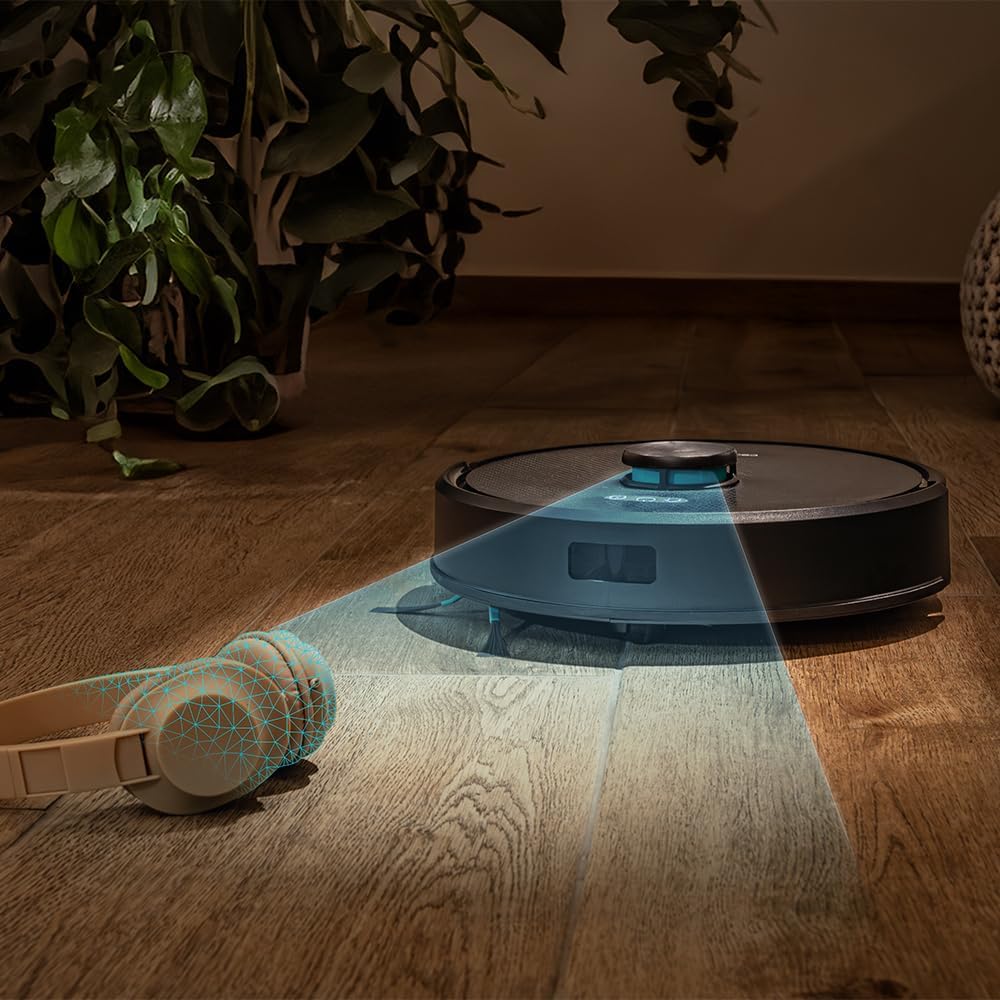
Figure 4.4: The robot's laser navigation system actively mapping its surroundings for efficient cleaning.

Figure 4.5: The robot actively vacuuming a floor, effectively collecting debris.

Figure 4.6: Visual representation of the robot emptying its dustbin into the self-draining base.

Figure 4.7: The robot cleaning a carpet, highlighting the effectiveness of its multifunctional brush.
5. Configuración
Follow these steps to prepare your Conga Y50 for its first cleaning session.
5.1 Desembalaxe e colocación
- Remove all packaging materials and protective films from the robot and the self-draining base.
- Place the self-draining base against a wall in an open area, ensuring there is at least 0.5 meters of clear space on both sides and 1.5 meters in front of the base. Avoid placing it near stairs or obstacles that could block the robot's return path.
- Connect the power adapter to the self-draining base and plug it into a wall outlet. Ensure the power cable is neatly tucked away to prevent entanglement.

Figure 5.1: The robot correctly docked at its self-draining base.
5.2 Carga inicial
- Place the robot onto the charging contacts of the self-draining base. Ensure the charging indicators on the robot illuminate.
- Allow the robot to charge completely before its first use. This typically takes 4-6 hours. The indicator lights will change to show a full charge.
5.3 Instalación e emparellamento da aplicación
The Conga Y50 can be controlled via a smartphone app.
- Descarga a aplicación oficial de Cecotec Conga desde a tenda de aplicacións do teu teléfono intelixente (iOS ou Android).
- Abre a aplicación e crea unha conta ou inicia sesión.
- Follow the in-app instructions to add your Conga Y50 robot. This usually involves connecting the robot to your home Wi-Fi network.
- Once paired, you can access all smart features, including mapping, scheduling, and cleaning mode selection.

Figure 5.2: Controlling the robot through the dedicated smartphone application.
6. Funcionamento do robot
Learn how to start, stop, and manage your robot's cleaning tasks.
6.1 Inicio dun ciclo de limpeza
- Inicio manual: Prema o botón de acendido do robot unha vez. O robot comezará a limpar no modo automático.
- Inicio da aplicación: Open the Cecotec Conga app, select your robot, and tap the 'Start Cleaning' button. You can also choose specific cleaning modes or areas from the app.
6.2 Pausar e reanudar
- To pause cleaning, press the Power button on the robot or the 'Pause' button in the app.
- To resume cleaning, press the Power button again or the 'Resume' button in the app.
6.3 Returning to Base
- Press the Home button on the robot or the 'Return to Base' button in the app. The robot will navigate back to its self-draining base to charge and empty its dustbin.

Figure 6.1: The robot intelligently returning to its charging and self-draining station.
6.4 Cleaning Modes and Scheduling
The app allows for advanced control over cleaning modes (e.g., Auto, Edge, Spot, Restricted Areas) and scheduling cleaning times. Refer to the in-app guide for detailed instructions on these features.

Figure 6.2: The robot following a planned path to clean the floor.

Figure 6.3: The robot demonstrating its versatility across various floor surfaces.
7. Mantemento
Regular maintenance ensures optimal performance and extends the lifespan of your Conga Y50.
7.1 Emptying the Self-Draining Base Dust Bag
The 3-liter dust bag in the self-draining base typically needs replacement every 12 weeks, depending on usage. The app will notify you when it's full.
- Open the lid of the self-draining base.
- Retire con coidado a bolsa de po chea e desfágase dela.
- Insert a new dust bag, ensuring it is properly seated.
- Close the lid of the self-draining base.
7.2 Cepillos de limpeza
The multifunctional brush and side brushes should be cleaned regularly to prevent hair and debris buildup.
- Cepillo principal: Turn the robot over. Remove the main brush cover and lift out the brush. Use the provided cleaning tool to cut and remove tangled hair. Reinstall the brush and cover.
- Cepillos laterais: Gently pull the side brushes off. Remove any hair or debris. If damaged, replace with new ones. Push them back into place.
7.3 Limpeza de sensores e contactos de carga
Wipe the anti-drop sensors, wall sensors, and charging contacts on both the robot and the base with a clean, dry cloth. This prevents navigation errors and ensures proper charging.
7.4 Mop Maintenance
If using the mopping function, remove the mop cloth after each use, wash it, and allow it to air dry. Replace mop cloths periodically for best results.
8 Solución de problemas
If you encounter issues with your Conga Y50, refer to the following common problems and solutions.
| Problema | Causa posible | Solución |
|---|---|---|
| O robot non se acende | Batería baixa; o botón de acendido non se premeu correctamente | Coloque o robot na base de carga; prema e manteña premido o botón de acendido durante 3 segundos |
| Robot cannot find charging base | Base obstructed; Robot too far from base | Ensure base has clear space; Manually place robot closer to base |
| Mal rendemento da limpeza | Brushes tangled; Dust bag full; Filters clogged | Clean main and side brushes; Replace dust bag; Clean or replace filters |
| O robot quédase atascado con frecuencia | Obstáculos no chan; Sensores sucios | Clear floor of clutter; Clean all sensors |
| Problemas de conexión da aplicación | Incorrect Wi-Fi password; Robot out of Wi-Fi range; Router issues | Verify Wi-Fi credentials; Move robot closer to router; Restart router and robot |
For further assistance, consult the FAQ section in the Cecotec Conga app or contact customer support.
9. Especificacións
| Característica | Detalle |
|---|---|
| Marca | Cecotec |
| Nome do modelo | Conga Y50 |
| Número de modelo | A01_EU01_114519 |
| Dimensións do produto (L x W x H) | 32 x 32 x 10 cm |
| Peso do elemento | 3.81 quilogramos |
| Presión de succión | 5000 Pa |
| Self-Emptying Base Capacity | 3 litros (bolsa para o po) |
| Tipo de navegación | Navegación láser |
| Tipo de batería | Ion de litio |
| Fonte de enerxía | Alimentado por batería |
| Método de control | Aplicación |
| Dispositivos compatibles | Smartphones |
| Compoñentes incluídos | Robot vacuum cleaner, mop, self-emptying base, dust bag |
| Ano de fabricación | 2025 |
10. Garantía e soporte
Cecotec products are manufactured to high-quality standards. This product comes with a standard manufacturer's warranty. Please refer to the warranty card included in your package or visit the official Cecotec websitio web para obter información detallada sobre os termos e condicións da garantía.
For spare parts, Cecotec ensures EU spare part availability for a duration of 10 years from the date of manufacture (2025).
For technical support, troubleshooting assistance, or to inquire about spare parts, please contact Cecotec customer service through their official websitio web ou a información de contacto proporcionada na documentación do produto.