
1. Introdución
This manual provides detailed instructions for the setup, operation, and maintenance of your WallarGe Large Digital Wall Clock, Model CL8003. This electric clock features a clear LED display, temperature, date, and day indicators, automatic Daylight Saving Time (DST) adjustment, and adjustable brightness levels. Please read this manual thoroughly before use to ensure proper functionality and longevity of your device.
Vídeo 1: Rematadoview of the WallarGe Large LED Digital Wall Clock. This video demonstrates the clock's various features and display options.
2. Contido do paquete
Verifique que todos os elementos estean presentes no seu paquete:
- WallarGe Large Digital Wall Clock (CL8003)
- Adaptador de alimentación
- Cable de alimentación de 5 pés
- Accesorios de montaxe (parafusos, ancoraxes de parede)
- Manual de usuario
- Memory Battery (pre-installed)

Image 1: Contents included with the WallarGe Large Digital Wall Clock.
3. Produto rematadoview
Familiarize yourself with the main components and display elements of your clock.
3.1 Pantalla frontal

Image 2: Front display of the WallarGe digital clock, showing time, temperature, day, and date.
3.2 Panel traseiro e controis

Imaxe 3: Traseira view of the clock, indicating the location of control buttons, power input, wall mounting holes, the foldable stand, and the memory battery compartment.
- UP / 12/24HR Button: Adjusts values up during setting; toggles 12/24-hour format.
- Botón de axuste de tempo: Enters and confirms time/date setting mode.
- DOWN / °C/°F Button: Adjusts values down during setting; toggles temperature unit.
- ALARM SET / ON/OFF Button: Sets alarm; turns alarm on/off.
- DST ON/OFF Button: Activates or deactivates Daylight Saving Time.
- DIMMER Button: Axusta o brillo da pantalla.
- Porto de alimentación: Conéctase ao adaptador de alimentación.
- Buratos para colgar: Para montaxe en parede.
- Soporte plegable: Para colocación sobre mesa.
- Memory Battery Compartment: Houses the backup battery.
4. Configuración
4.1 Acendido
Connect the provided power adapter to the clock's power port and plug it into a standard electrical outlet. The clock is designed for continuous plug-in operation. A pre-installed memory battery preserves your settings during power outages, eliminating the need for frequent resets.

Image 4: Explanation of the clock's power source and memory battery function.
4.2 Initial Settings (Time, Date, Year, Alarm)
Follow these steps to set the clock's time, date, and year. The day of the week will automatically synchronize based on the set year and date.
- Manteña premido o HORARIO button for 3 seconds to enter setting mode. The year display will flash.
- Usa o UP / 12/24HR or ABAIXO / °C/°F buttons to adjust the year. Press HORARIO para confirmar e pasar á seguinte configuración.
- Repeat the process for setting the month, day, hour, and minute.
- To set the alarm, press and hold the ALARM SET / ON/OFF botón. Usa o UP or ABAIXO buttons to set the desired alarm time. Press CONXUNTO DE ALARMA para confirmar.
Video 2: Detailed instructions on how to set up the WallarGe digital clock, including time, date, and alarm settings.
4.3 Horario de verán (DST)
The clock features an automatic DST function. To enable or disable it:
- Preme o DST ON / OFF button to toggle the automatic DST feature. When enabled, the clock will automatically adjust for spring forward and fall back.

Image 5: Visual representation of the automatic Daylight Saving Time adjustment.
5. Instrucións de funcionamento
5.1 Axuste do brillo
The clock offers 5 levels of adjustable brightness to suit various environments and preferences.
- Preme o DIMMER button repeatedly to cycle through the 5 brightness levels (20%, 40%, 60%, 80%, 100%).

Image 6: Demonstration of the 5-level adjustable brightness feature.
5.2 Switching Display Modes
Easily switch between 12/24-hour time format and Celsius/Fahrenheit temperature units.
- Preme o UP / 12/24HR botón para alternar entre os formatos de hora de 12 horas e 24 horas.
- Preme o ABAIXO / °C/°F button to toggle between Celsius (°C) and Fahrenheit (°F) temperature units.
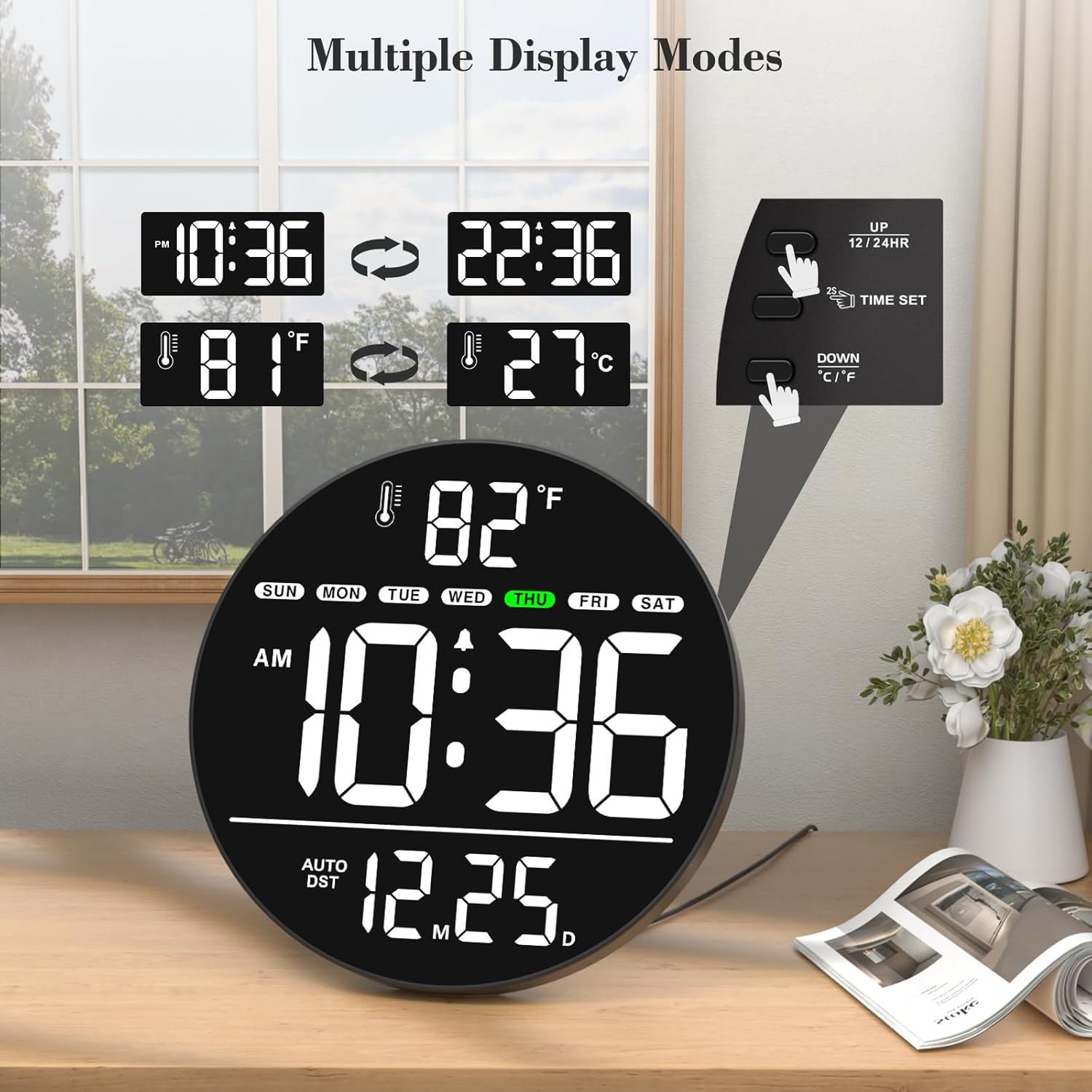
Image 7: Illustration of multiple display modes for time and temperature.
5.3 Opcións de colocación
The clock can be either wall-mounted or placed on a tabletop using its integrated foldable stand.
- Montaxe na parede: Use the hanging holes on the rear panel and the provided mounting accessories to secure the clock to a wall.
- Mesa: Extend the foldable stand on the rear panel to place the clock on any flat surface.
6. Mantemento
To ensure optimal performance and appearance of your WallarGe Digital Wall Clock, follow these maintenance guidelines:
- Limpeza: Limpe con coidado a pantalla e casing with a soft, dry cloth. Avoid using abrasive cleaners, solvents, or chemical sprays, as these can damage the surface.
- Fonte de alimentación: Always use the original power adapter and cord provided with the clock. Ensure the power cord is not pinched or damaged.
- Batería de memoria: The clock uses a memory battery to retain settings during power interruptions. If the clock consistently loses settings after a power outage, the memory battery may need replacement. Refer to the rear panel diagram for the battery compartment location.
- Ambiente: Place the clock in a dry environment, away from direct sunlight, extreme temperatures, and high humidity.
7 Solución de problemas
If you encounter any issues with your WallarGe Digital Wall Clock, please refer to the following common problems and solutions:
- No Display / Clock Not Turning On:
- Asegúrate de que o adaptador de corrente estea conectado correctamente tanto ao reloxo como a unha toma de corrente que funcione.
- Comprobe se a toma de corrente funciona conectando outro dispositivo.
- Hora/data incorrecta:
- Enter the setting mode by pressing and holding the HORARIO button and re-adjust the year, month, day, hour, and minute as described in Section 4.2.
- If the clock loses settings after a power outage, the memory battery may be depleted and require replacement.
- Day of the Week is Incorrect:
- The day of the week is automatically calculated based on the set year and date. Ensure the year, month, and day are set correctly.
- Temperature Display is Incorrect:
- Ensure the clock is placed in an area with stable ambient temperature, away from direct heat sources or drafts.
- Brightness Not Adjusting:
- Preme o DIMMER button repeatedly to cycle through all 5 brightness levels. If it remains unresponsive, contact customer support.
- A alarma non soa:
- Ensure the alarm time is set correctly and the alarm function is turned ON using the ALARM SET / ON/OFF botón.
If these steps do not resolve the issue, please contact WallarGe customer support for further assistance.
8. Especificacións
| Característica | Detalle |
|---|---|
| Marca | WallarGe |
| Número de modelo | CL8003 |
| Tipo de visualización | LED dixital |
| Cor | White (LED display color may vary by variant) |
| Características especiais | Time, Alarm, Indoor Temperature, Date, Day of the Week, LED, Auto DST, 5-Level Dimmer |
| Dimensións do produto | 0.7" de ancho x 8" de alto |
| Fonte de enerxía | Corded Electric (Adapter included) |
| Tipo de habitación | Classroom, Bedroom, Living Room, Office, Warehouse, Study Room, Dining Room |
| Tipo de montaxe | Soporte de parede, mesa |
| Material do marco | Plástico |
| Pilas incluídas | 1 Nonstandard Battery (for memory function) |
| Peso do elemento | 15.2 onzas |
| Fabricante | ShenZhen litian technology Co.,Ltd |
9. Garantía e soporte
WallarGe products are manufactured with quality and customer satisfaction in mind. For any product-related inquiries, technical support, or warranty claims, please contact our customer service team.
- Correo electrónico de atención ao cliente: WallarGe@outlook.com
- Información da garantía: Please retain your proof of purchase for any warranty claims. Specific warranty terms and conditions may apply and are subject to the retailer's policy at the time of purchase.