
Introdución
The Masajoy Spark 06 Wireless Headset is designed for clear communication and versatile connectivity in professional and personal environments. It features Bluetooth V5.3, 2.4G wireless via a USB A/C dongle, and a wired 3.5mm audio connection. Equipped with an AI noise-cancelling microphone and comfortable earcups, this headset aims to provide a reliable audio experience for calls, meetings, and music.

Image: User wearing the Masajoy Spark 06 headset, demonstrating its use in a work setting.
Contido do paquete
Verifica que todos os elementos estean presentes no paquete:
- Auriculares inalámbricos con micrófono
- Adaptador USB A/C
- USB C to 3.5MM Audio Cable
- Cable de carga tipo C.
- Manual de usuario
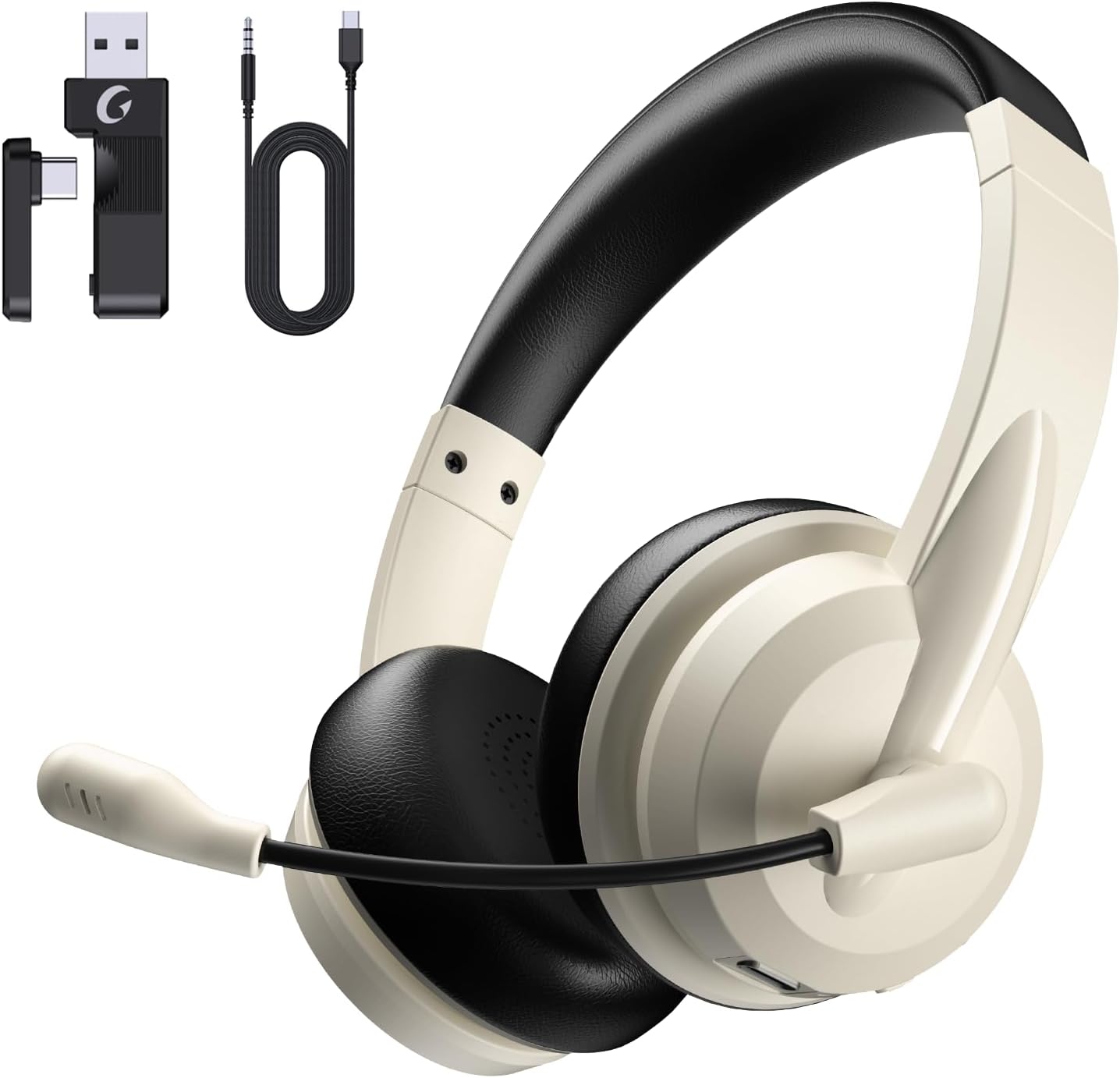
Image: The Masajoy Spark 06 headset shown with its accompanying accessories, including the USB A/C dongle and various cables.
Produto rematadoview
The Masajoy Spark 06 headset features an ergonomic design for extended wear and clear audio performance.
- Diadema axustable: For a comfortable fit across various head sizes.
- Protein Memory Foam Earcups: Soft and breathable for all-day comfort.
- Rotatable Microphone Boom: Allows for precise positioning and mute function activation.
- Controladores de son de 40 mm: Deliver clear and balanced sound.

Imaxe: Primeiro plano view highlighting the soft, breathable protein memory foam earcups and the adjustable headband for comfort.

Imaxe: Unha interna view of the earcup, illustrating the 40mm audio drivers responsible for sound quality.
Configuración
1. Cargando os auriculares
Before first use, fully charge the headset. Connect the included Type C Charging Cable to the headset's charging port and to a USB power source. The LED indicator will show charging status. A full charge takes approximately 2.5 hours.
2. Conexión dos auriculares
The Masajoy Spark 06 offers three connection methods:
Bluetooth V5.3 Connection
- Asegúrese de que os auriculares están apagados.
- Manteña premido o botón de acendido/apagado ata que o indicador LED parpadee en azul e vermello, o que indica o modo de emparellamento.
- On your device (smartphone, laptop), enable Bluetooth and search for "Masajoy Spark 06".
- Select the headset to connect. The LED will turn solid blue once connected.
2.4G Wireless Connection (USB A/C Dongle)
- Plug the USB A or USB C side of the dongle into an available port on your computer.
- Acenda os auriculares. Tentarán conectarse automaticamente ao dongle.
- The LED indicator on the headset will turn solid blue when connected.
Wired 3.5mm Audio Cable Connection
- Connect one end of the USB C to 3.5MM Audio Cable to the headset's USB-C port.
- Connect the other end (3.5mm jack) to your device's 3.5mm audio port.
- The headset will function as a wired headset. Power is not required for this mode.
Note: This headset does not support dual device connection simultaneously via Bluetooth and 2.4G wireless.

Image: Illustration of the Bluetooth V5.3 and 2.4GHz dual connection options, showing the USB A/C dongle and Bluetooth pairing with devices.
Instrucións de funcionamento
Encendido/apagado
- Encendido: Manteña premido o botón de acendido durante 3 segundos.
- Apagado: Manteña premido o botón de acendido durante 3 segundos.
Xestión de chamadas
- Responder/Finalizar chamada: Prema o botón multifunción unha vez.
- Rexeitar a chamada: Manteña premido o botón multifunción durante 2 segundos.
Reprodución de música
- Reproducir/Pausa: Prema o botón multifunción unha vez.
- Subir volume: Preme o botón Volume +.
- Baixar volume: Prema o botón de Volume -.
- Próxima pista: Manteña premido o botón Volume +.
- Pista anterior: Manteña premido o botón de Volume -.
Función de silenciamento do micrófono
To mute the microphone, simply rotate the microphone boom to the upright (vertical) position. A voice prompt will confirm "MIC mute". To unmute, rotate the microphone boom back down to the speaking position.

Image: A diagram illustrating the 270-degree rotation capability of the microphone boom, which activates the mute function when moved to the upright position.
Cancelación de ruído AI
The headset features AI noise cancellation technology to reduce background noise during calls, ensuring clearer voice transmission. This feature is automatically active when using the microphone in Bluetooth connection mode.
Note: The AI Noise Cancellation feature is only available when the headset is connected via Bluetooth.

Image: Depiction of the AI noise-cancelling microphone in action, showing how it filters out background noise for clear communication.
Mantemento
- Limpeza: Usa un pano suave e seco para limpar os auriculares. Non empregues produtos químicos agresivos nin materiais abrasivos.
- Almacenamento: Garde os auriculares nun lugar fresco e seco, lonxe da luz solar directa e de temperaturas extremas.
- Coidado da batería: Para prolongar a duración da batería, evite descargar completamente os auriculares con frecuencia. Cárgueos regularmente, mesmo se non os usa durante períodos prolongados.
Resolución de problemas
| Problema | Causa posible | Solución |
|---|---|---|
| Non hai son dos auriculares | Headset not connected; Volume too low; Device audio output incorrect. | Ensure headset is connected (Bluetooth, 2.4G, or wired). Increase headset and device volume. Check device's audio output settings. |
| O micrófono non funciona | Microphone muted; Incorrect input device selected; AI Noise Cancellation not active (if not Bluetooth). | Rotate mic boom down to unmute. Check device's microphone input settings. Ensure Bluetooth connection for AI Noise Cancellation. |
| Non se pode conectar a través de Bluetooth | Headset not in pairing mode; Device Bluetooth off; Interference. | Put headset in pairing mode (flashing blue/red). Enable Bluetooth on device. Move closer to device, away from other wireless devices. |
| 2.4G dongle not connecting | Dongle not properly inserted; Headset not powered on. | Ensure dongle is fully inserted into a working USB port. Power on the headset. |
| Batería de curta duración | Headset not fully charged; Battery degradation over time. | Ensure headset is fully charged (2.5 hours). If battery life significantly decreases, contact support. |
Especificacións
| Característica | Detalle |
|---|---|
| Nome do modelo | Faísca 06 |
| Tecnoloxía de conectividade | Wireless (Bluetooth, 2.4G), Wired (3.5mm) |
| Versión Bluetooth | 5.3 |
| Alcance Bluetooth | Ata 36 pés (11 metros) |
| Control de ruído | Passive Noise Cancellation (earcups), AI Noise Cancellation (microphone, Bluetooth mode only) |
| Tipo de controlador de audio | Driver dinámico |
| Impedancia | 40 ohmios |
| Rango de frecuencias | 20 Hz - 20,000 Hz |
| Tempo de carga | 2.5 horas |
| Tempo de conversa | Ata 30 horas |
| Tempo de reprodución de música | Ata 25 horas |
| Tempo de espera | Ata 400 horas |
| Peso do elemento | 0.3 quilogramos (10.5 onzas) |
| Material | Acrilonitrilo Butadieno Estireno (ABS) |
| Dispositivos compatibles | Laptops, Desktops, iPhones, Mac devices |
Garantía e Soporte
Masajoy products are designed for reliability and performance. For warranty information, please refer to the specific warranty card included with your product or visit the official Masajoy website. If you encounter any issues or require technical assistance, please contact Masajoy customer support through the contact information provided on the product packaging or the official websitio.