
ZeroKor 120W & 65W Portable Power Stations
ZeroKor Portable Power Station User Manual
Model: 120W & 65W Portable Power Stations
Introdución
This manual provides essential information for the safe and efficient operation of your ZeroKor Portable Power Stations. This bundle includes a 120W portable battery with a 22W solar panel and a 65W outlet power bank, designed for versatile power needs both indoors and outdoors, supporting laptops, smart devices, and more.
Información de seguridade
Lea todos os avisos e instrucións de seguridade antes de usar este produto para evitar lesións ou danos. Garde este manual para futuras consultas.
- Non desmonte, repare nin modifique a unidade.
- Non expoña a unidade ao lume nin a altas temperaturas.
- Manter lonxe da auga, da alta humidade e da luz solar directa.
- Asegúrese de que haxa unha ventilación axeitada durante o uso e a carga.
- Do not use if the unit is damaged or has been dropped.
- Manter fóra do alcance dos nenos.
- Eliminar o produto segundo a normativa local.
Contido do paquete
Verifica que todos os elementos estean incluídos no teu paquete:
- ZeroKor 120W Portable Power Station
- ZeroKor 65W Portable Power Bank
- Panel solar plegable 22W
- AC Wall Adapter (for 120W unit)
- 12V Car Charging Cable (for 120W unit)
- 9V/3A Max USB-C Adapter (for 65W unit)
- Manual de usuario (este documento)

Image: The ZeroKor Portable Power Station bundle, showing the 120W power station, the 65W power bank, and the foldable solar panel.
Produto rematadoview
ZeroKor 120W Portable Power Station
This unit is designed for higher power demands and features multiple output options.

Imaxe: Arriba view of the 120W Portable Power Station, highlighting its various ports and digital display.
- Saída CA: Two 110V/120W MAX AC outlets.
- Saída DC: One 12V~16.8V/6A MAX DC output.
- Saída USB-A: One USB1 (5V/2A) and one QC USB2 (5V/3A, 9V/2A MAX).
- Saída USB-C: One USB-C (5V/3A, 9V/2A MAX).
- Entrada: Dedicated input port for charging.
- Linterna LED: Features reading mode and SOS mode for emergencies.
- Visualización: Digital display showing battery level and output status.
ZeroKor 65W Portable Power Bank
This compact unit is ideal for smaller devices and on-the-go power.
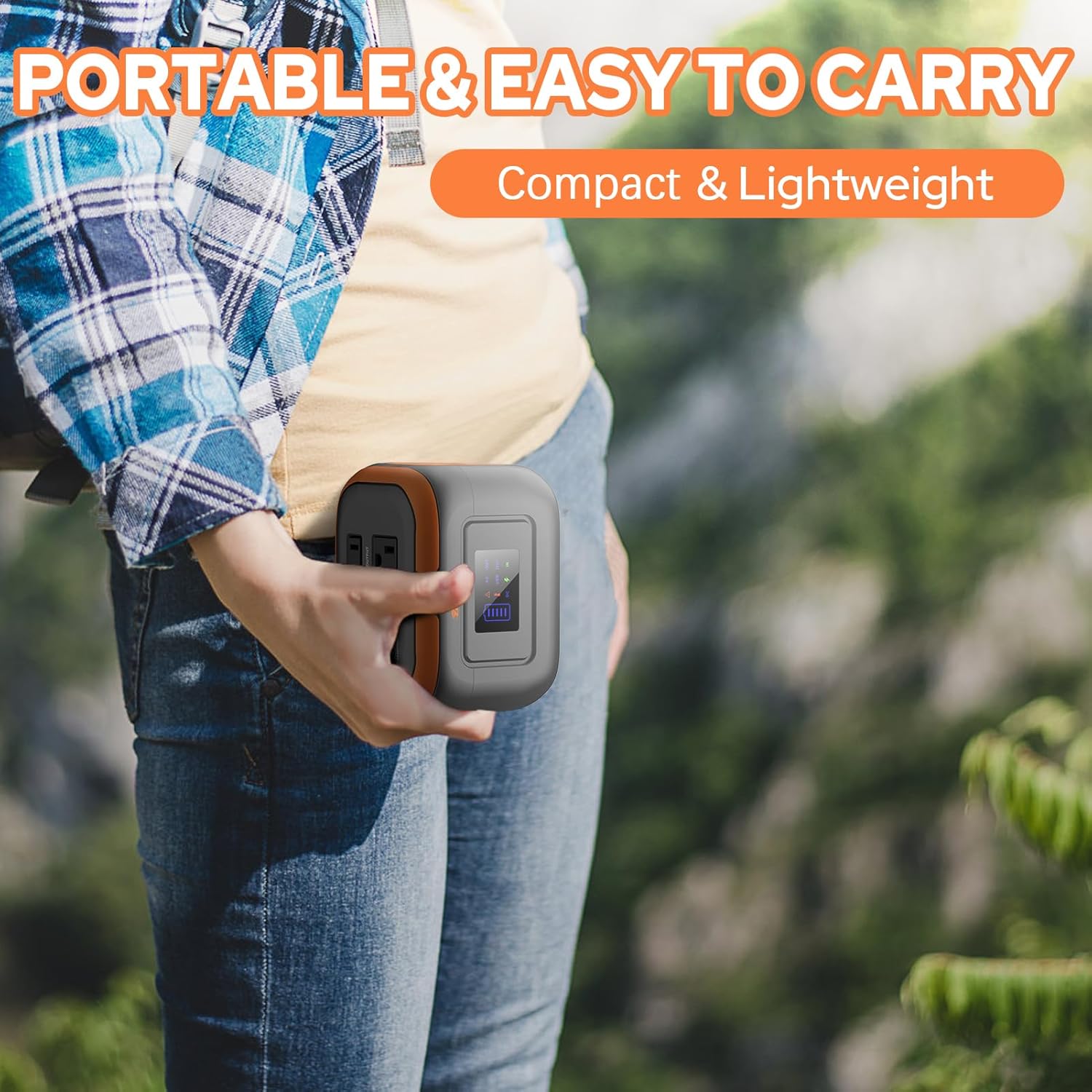
Image: A person holding the compact 65W Portable Power Bank, demonstrating its portability.
- Saída CA: One 110V/65W MAX AC outlet.
- Saída DC: One 9V~12.6V/10A MAX DC output.
- Saída USB: One USB-2 port (5V/2.1A Max) and one quick charge USB-1 port (5V/3A, 9V/2A MAX).
- Lanterna: Features reading mode and SOS mode.
Built-in Battery Management System (BMS)
Both ZeroKor portable power units feature an advanced BMS for enhanced safety and battery longevity.

Image: A diagram showing the Battery Management System (BMS) and its protective features, including short circuit, over-current, over-voltage, overload, overheating, and overcharge protection.
- Protección contra curtocircuítos
- Protección contra sobrecorriente
- Sobrevoltage protección
- Protección contra sobrecarga
- Protección contra sobrecalentamento
- Protección de sobrecarga
Configuración
Carga inicial
Before first use, fully charge your power station. There are three primary ways to recharge the 120W unit:
- Toma de corrente de parede: Connect the provided AC wall adapter to the input port of the 120W power station and plug it into a standard wall outlet.
- Panel solar: Connect the 22W foldable solar panel to the input port of the 120W power station. Place the solar panel in direct sunlight for optimal charging.
- Porto do coche: Use the included 12V car charging cable to charge the 120W power station from your vehicle's car port.
The 65W power bank can be recharged via its USB-C input using the provided 9V/3A Max USB-C adapter.

Image: Illustration of the three charging methods for the power station: solar panel, AC wall adapter, and 12V car charging cable.
Instrucións de funcionamento
Encendido/apagado
- To turn on the 120W power station, press and hold the main power button. The display will illuminate.
- To activate the AC output on the 120W unit, long press the DC button.
- To turn off, press and hold the main power button again.
Usando saídas
Connect your devices to the appropriate output ports (AC, DC, USB-A, USB-C). The power station is capable of powering various devices:

Image: A person charging a laptop with the 120W power station in an outdoor setting. Icons indicate the number of recharges for devices like laptops, cameras, smartphones, and drones.
Nota: If your devices need an air compressor to work, it is recommended to purchase a more powerful power station.
Carga directa
Both power stations support pass-through charging, allowing you to charge the power station while simultaneously powering your devices.

Image: A visual representation of pass-through charging, showing the power station being recharged from a wall outlet while simultaneously providing power to a connected mobile device.
Usando a lanterna LED
The integrated LED flashlight on both units offers multiple modes:
- Modo de lectura: Provides a steady light for illumination.
- Modo SOS: Emits a flashing signal for emergency situations.
Video: A demonstration of the ZeroKor Portable Power Station, showcasing its various ports, the functionality of the LED flashlight, and its ability to power a small fan. This video highlights the product's versatility for campuso e uso exterior.
Mantemento
- Limpeza: Empregue un pano suave e seco para limpar o exterior da unidade. Non empregue produtos de limpeza abrasivos nin disolventes.
- Almacenamento: Store the power station in a cool, dry place away from direct sunlight and extreme temperatures. For long-term storage, it is recommended to charge the unit to 50-80% every 3-6 months to maintain battery health.
- Coidado da batería: Evite descargar completamente a batería con frecuencia para prolongar a súa vida útil.
Resolución de problemas
| Problema | Causa posible | Solución |
|---|---|---|
| A unidade non se acende | Batería baixa; o botón de acendido non se premeu o tempo suficiente. | Charge the unit fully. Press and hold the power button for 3 seconds. |
| Sen saída dos portos CA/CC/USB | Output not activated; Device draws too much power; Overload protection triggered. | Ensure the specific output (e.g., AC) is activated (long press DC button for 120W unit). Check device power requirements. Disconnect device, restart unit, try a lower-power device. |
| Carga lenta | Using a low-power charger; Solar panel not in direct sunlight. | Use the original AC adapter. Ensure solar panel is fully exposed to direct sunlight and clean. |
| Unit gets warm during use | Funcionamento normal, especialmente baixo carga pesada. | Ensure adequate ventilation. If overheating protection triggers, the unit will shut down automatically. Allow it to cool before resuming use. |
Restricted Devices
The ZeroKor Portable Power Stations are designed for specific power outputs. Do not attempt to power devices that exceed the maximum wattage (120W for the larger unit, 65W for the smaller unit). Attempting to power high-wattage appliances can trigger overload protection or damage the unit.

Image: An illustration indicating types of high-power devices (e.g., coffee makers, induction cookers, hair dryers) that are restricted and should not be used with this power station due to their wattage exceeding 120W.
Especificacións
ZeroKor 120W Portable Power Station
- Capacidade da batería: 97 Wh
- Saída CA: 2 x 110V/120W MAX
- Saída DC: 1 x 12V~16.8V/6A MAX
- Saída USB-A: 1 x 5V/2A, 1 x QC (5V/3A, 9V/2A MAX)
- Saída USB-C: 1 x 5V/3A, 9V/2A MAX
- Entrada de carga: AC wall adapter, 22W solar panel, 12V car port
- Características: LED Flashlight (reading, SOS modes), BMS protection
ZeroKor 65W Portable Power Bank
- Saída CA: 1 x 110V/65W MAX
- Saída DC: 1 x 9V~12.6V/10A MAX
- Saída USB: 1 x 5V/2.1A Max, 1 x QC (5V/3A, 9V/2A MAX)
- Entrada de carga: USB-C (9V/3A Max adapter)
- Características: Flashlight (reading, SOS modes), BMS protection
Garantía e Soporte
ZeroKor products are designed for reliability and performance. For detailed warranty information and customer support, please refer to the official ZeroKor websitio web ou póñase en contacto directamente co servizo de atención ao cliente.
- Websitio: Visit the ZeroKor Store on Amazon
- Atención ao cliente: Refer to your purchase documentation or the ZeroKor websitio para os detalles de contacto.
Conserve o comprobante de compra para reclamacións de garantía.
Documentos relacionados120W & 65W Portable Power Stations


Ask a question about this manual
Ask about setup, troubleshooting, compatibility, parts, safety, or missing instructions. Manuals+ will review the question and use this page’s manual context to help answer it.