
1. Introdución
This manual provides detailed instructions for the installation, operation, and maintenance of your COUGAR OmnyX Mid Tower PC Case. Please read this manual thoroughly before beginning assembly to ensure correct setup and optimal performance. Keep this manual for future reference.
2. Información de seguridade
- Always disconnect the power supply from the wall outlet before installing or servicing any components inside the PC case.
- Handle all components with care to prevent damage from static electricity. Consider using an anti-static wrist strap.
- Avoid placing the PC case in direct sunlight, near heat sources, or in areas with high humidity.
- Asegúrate de que haxa unha ventilación axeitada arredor da carcasa para evitar o sobrequecemento.
- Manteña pezas e ferramentas pequenas lonxe dos nenos.
3. Contido do paquete
Verifica que todos os elementos estean presentes no teu paquete:
- COUGAR OmnyX Mid Tower PC Case
- Caixa de accesorios (que contén parafusos, separadores, bridas para cables, etc.)
- Manual de usuario (este documento)
- Pre-installed 160mm fans (quantity as specified in product details)
4. Produto rematadoview
The COUGAR OmnyX case is designed for high expandability and efficient cooling, suitable for various computing needs. Its symmetrical design allows for flexible placement, showcasing internal components from multiple angles. Key features include:
- Symmetrical Design: Allows for versatile orientation on your desk.
- Omnidirectional Dynamic Flow System (ODF): Optimized airflow for superior cooling performance.
- Quad 160mm Fans: Equipped with four large 160mm fans for powerful cooling.
- Ambidextrous I/O Module: Features 4x USB 3.0 Type-A and 2x USB 3.2 Gen 2 Type-C ports for convenient connectivity.
- Mecanismo de liberación rápida: Tool-less panel removal for easy access and installation.
- Xestión optimizada de cables: Dedicated channels and tie-down points for a clean build.
- Bracketless Vertical GPU Mount: Supports vertical GPU installation without additional brackets.
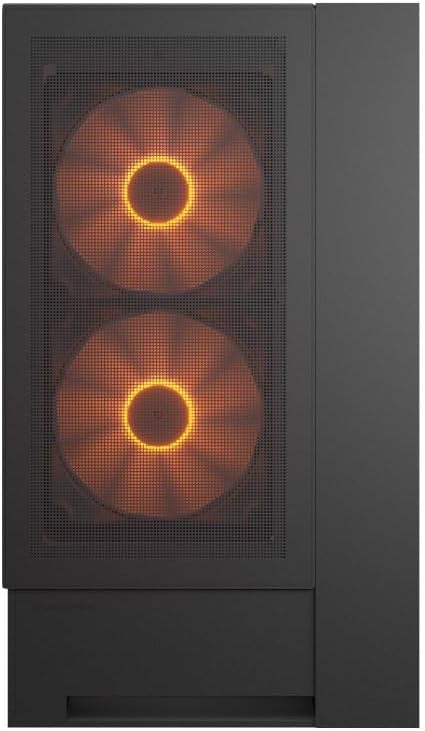
Fronte view of the COUGAR OmnyX PC case, highlighting the pre-installed 160mm fans.

Illustration of the symmetrical design, allowing flexible case orientation.

Close-up of the large 160mm fans providing powerful cooling.
Vídeo de presentación oficial do produtoasing the COUGAR OmnyX PC case features, including its symmetrical design, quad 160mm fans, ambidextrous I/O module, cable management, and quick release mechanism for easy installation.
5. Configuración e instalación
5.1. Preparación
Antes de comezar, asegúrate de ter un espazo de traballo limpo e ben iluminado e as ferramentas necesarias, incluído un destornillador Phillips.
5.2. Retirada do panel
The OmnyX case features a quick-release mechanism for easy panel removal. Gently pull the panels to detach them from the chassis. Refer to the exploded view para a identificación de compoñentes.

Desmontado view of the COUGAR OmnyX case, showing removable panels and components.
5.3. Instalación da placa base
The OmnyX supports Mini ITX, Micro ATX, and ATX motherboards. Install the necessary standoffs for your motherboard size, then carefully place the motherboard and secure it with screws.

Interno view showing the motherboard tray and mounting points.
5.4. Instalación da tarxeta gráfica (GPU)
Install your graphics card into the appropriate PCIe slot. The case supports GPUs up to 380mm in length. For vertical GPU mounting, utilize the integrated bracketless vertical GPU mount.

Illustration of the bracketless vertical GPU mounting option.
5.5. Instalación da unidade
The case provides bays for 2x 3.5-inch drives and 2x 2.5-inch drives. Secure your storage devices in the designated locations using the provided screws.
5.6. Instalación da fonte de alimentación (PSU)
Install your power supply unit in the rear-mount location. The case accommodates PSUs up to 200mm in length.
5.7. Xestión de cables
Utilize the dedicated cable management channels and tie-down points behind the motherboard tray to route and secure cables. This ensures optimal airflow and a clean internal appearance.

View illustrating the efficient cable management system within the case.
5.8. Conexións de E/S frontales
Connect the front panel I/O cables (USB 3.0, USB 3.2 Gen 2 Type-C, audio, power, reset) to their corresponding headers on your motherboard. The ambidextrous I/O module offers flexible placement.

Close-up of the front I/O panel with USB ports and controls.
6. Instrucións de funcionamento
6.1. Acendido/apagado
After all components are installed and cables connected, plug the power supply into a wall outlet. Press the power button on the front I/O panel to turn on your PC.
6.2. Control da iluminación RGB
The pre-installed fans feature RGB lighting. Control of the RGB effects and fan speed is typically managed through your motherboard's software or a dedicated controller if included. Refer to your motherboard manual for specific instructions on RGB synchronization.

Illustration depicting RGB LED and fan speed control capabilities.
7. Mantemento
Regular maintenance helps ensure the longevity and performance of your PC case:
- Limpeza do po: Periodically clean dust filters and internal components using compressed air or a soft brush. Dust accumulation can impede airflow and lead to overheating.
- Limpeza exterior: Limpe as superficies exteriores cun suave, damp pano. Evite produtos de limpeza abrasivos.
- Comprobación do cable: Ensure all internal cables remain securely connected and neatly routed.
8 Solución de problemas
Se tes problemas, consulta os seguintes pasos comúns para a resolución de problemas:
- Sen enerxía: Check if the power supply is properly connected to the wall outlet and the motherboard. Ensure the power button cable is correctly connected to the motherboard header.
- Os ventiladores non xiran: Verify that the fan cables are securely connected to the motherboard fan headers or a fan controller. Check BIOS settings for fan speed control.
- RGB Not Working: Confirm RGB cables are connected to the correct motherboard headers or controller. Check your motherboard's RGB software for settings.
- Sobrequecemento: Ensure all fans are functioning correctly and oriented for optimal airflow. Clean any dust buildup from filters and components. Verify CPU cooler and GPU cooler installations.
For more complex issues, consult your component manuals or contact COUGAR support.
9. Especificacións
| Característica | Especificación |
|---|---|
| Nome do modelo | OmnyX |
| Número de modelo | CGR-2WA3B-RGB |
| Tipo de caso | Torre media |
| Soporte de placa base | Mini ITX / Micro ATX / ATX |
| Dimensións (D x W x H) | 300 x 470 x 520 mm |
| Compartimentos para unidades de 3.5" | 2 |
| Compartimentos para unidades de 2.5" | 2 |
| Límite de altura do refrigerador da CPU | 170 mm |
| Límite de lonxitude da GPU | 380 mm |
| Límite de lonxitude da fonte de alimentación | 200 mm |
| Ventiladores preinstalados | 4 x 160 mm |
| Portos de E / S dianteiros | 4x USB 3.0 Type-A, 2x USB 3.2 Gen 2 Type-C |
| Peso | 12.6 kg |
10. Garantía e soporte
The COUGAR OmnyX PC Case comes with a 1 ano de garantía from the date of purchase. This warranty covers manufacturing defects and faulty components under normal use. It does not cover damage caused by misuse, accidents, unauthorized modifications, or improper installation.
For technical support, warranty claims, or further assistance, please visit the official COUGAR websitio web ou póñase en contacto co seu distribuidor local.
COUGAR Official Websitio: www.cougar-gaming.com