
1. Introdución
This manual provides essential information for the safe and efficient use of your Xiaomi 80 cm (32 inches) A Pro QLED Series Smart TV, model L32MB-APIN. Please read this manual thoroughly before operating the television and retain it for future reference.
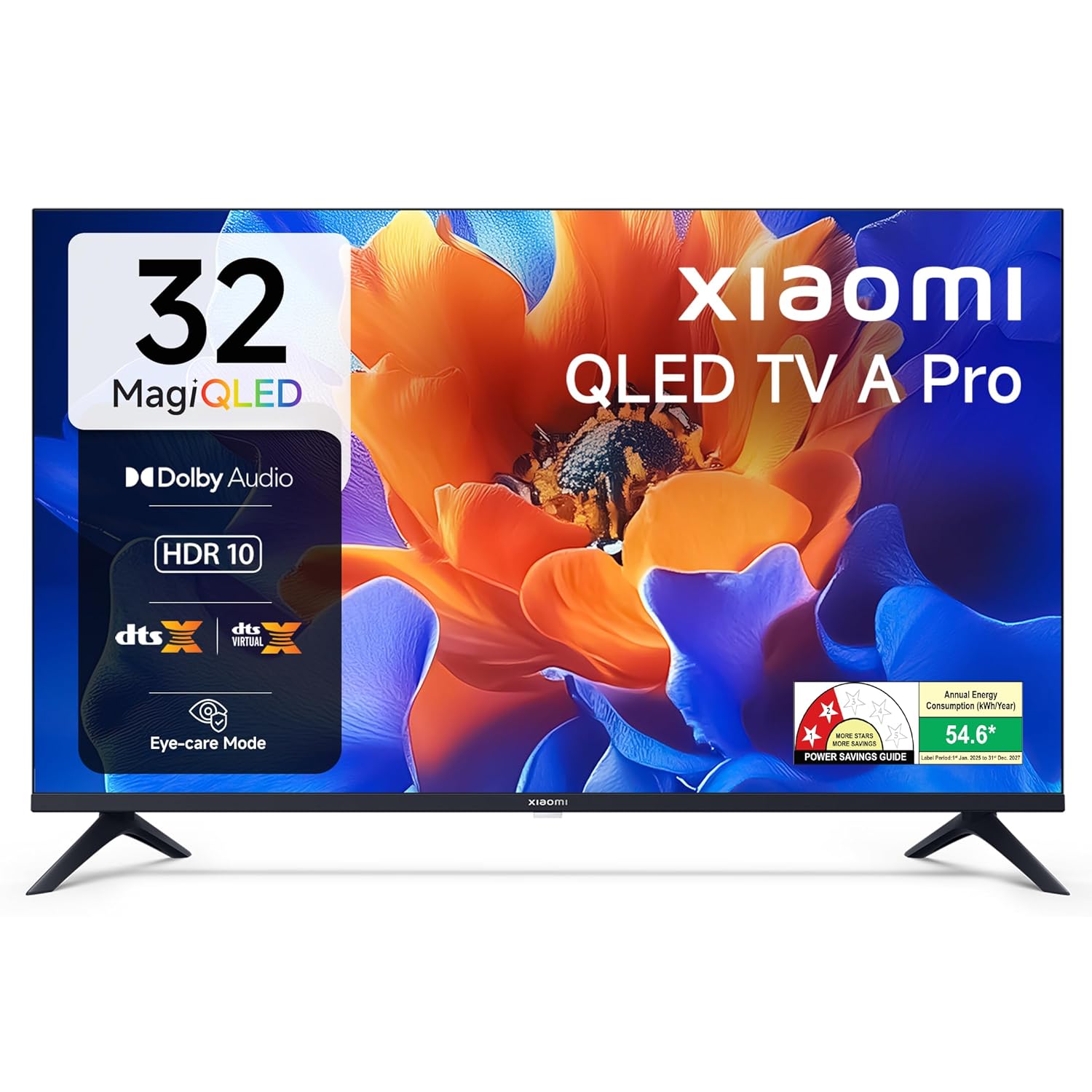
Imaxe 1.1: Fronte view of the Xiaomi 32-inch A Pro QLED Smart TV.
2. Información de seguridade
Observe as seguintes precaucións de seguridade para evitar incendios, descargas eléctricas ou lesións:
- Non expoña o televisor á choiva nin á humidade.
- Non abras a televisión casing; encomende todo o mantemento a persoal cualificado.
- Asegúrese de ventilar adecuadamente o televisor.
- Coloque o televisor sobre unha superficie estable e nivelada ou mónteo firmemente na parede.
- Manteña o televisor lonxe de fontes de calor e da luz solar directa.
- Desconecte o televisor durante as tormentas eléctricas ou cando non o use durante períodos prolongados.
3. Contido do paquete
Comprobe que todos os elementos estean presentes na embalaxe:
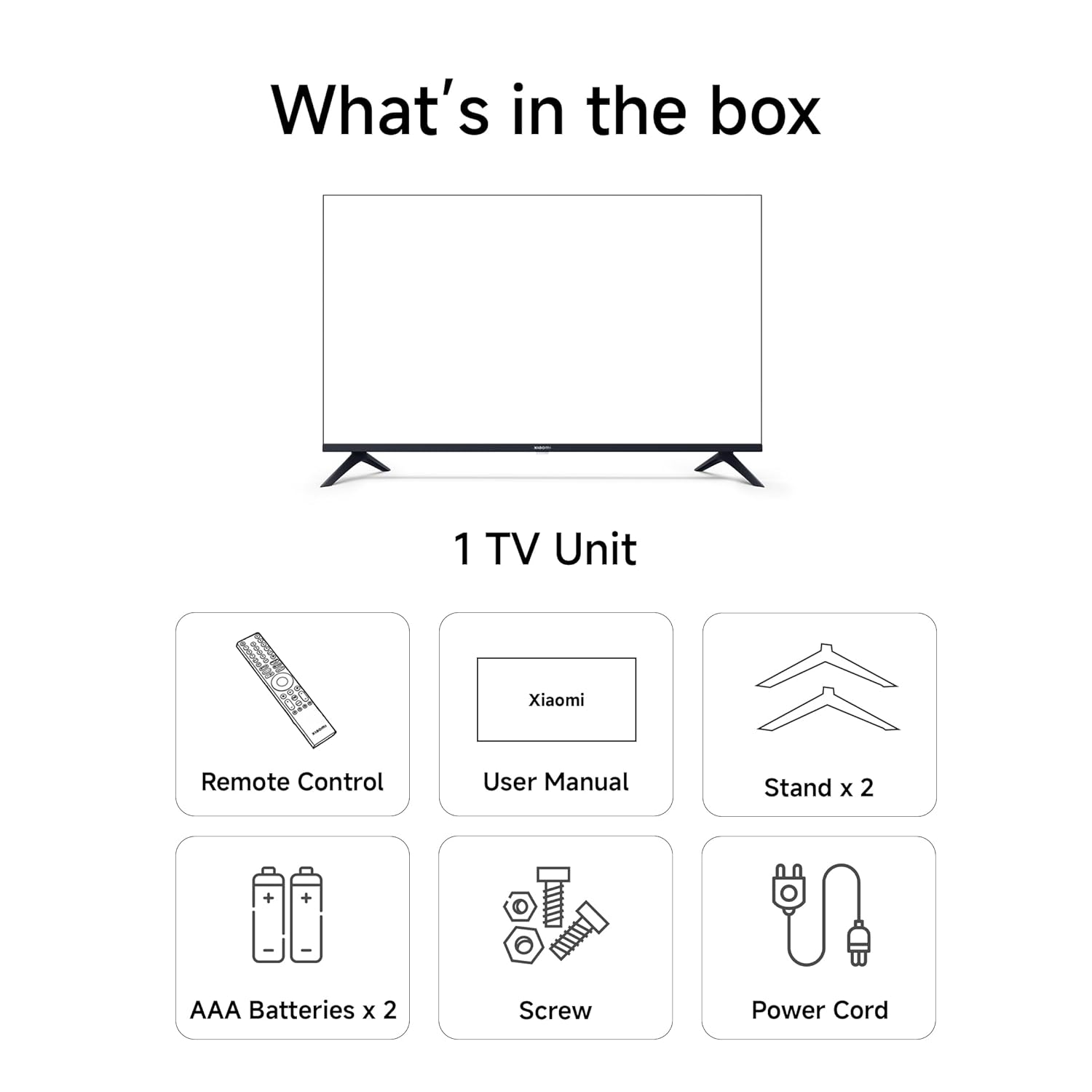
- 1 x Xiaomi LED TV (L32MB-APIN)
- 1 x mando a distancia
- 1 x Manual de usuario (este documento)
- 2 x TV Stands Unit
- 4 x Screws for stand installation
- 2 x AAA Batteries for remote control
- 1 x cable de alimentación

Image 3.1: Illustration of the items included in the TV package.
4. Produto rematadoview
4.1 Características principais
The Xiaomi A Pro QLED Series Smart TV offers a range of features for an enhanced viewexperiencia:
- Visualización: 32-inch HD Ready (1366 x 768) QLED panel with HDR 10, HLG, Vivid Picture Engine 2, and Eye Comfort Mode.
- Audio: 20 Watts output with Dolby Audio, DTS-X, and DTS Virtual:X for immersive sound.
- Smart TV: Powered by Android 14 OS and Google TV, featuring built-in Wi-Fi, screen mirroring, 1 GB RAM, 8 GB ROM, and support for popular streaming apps.
- Conectividade: Dual Band Wi-Fi, 2 HDMI ports, 2 USB ports, Bluetooth, and Ethernet.
Imaxe 4.1: Acabadoview of the TV's main features.
4.2 Portos de conectividade
The TV provides various ports for connecting external devices:
- HDMI (x2): For connecting gaming consoles, set-top boxes, Blu-ray players.
- USB (x2): For connecting hard drives and other USB devices.
- Ethernet: Para conexión de rede por cable.
- Antena: For connecting a terrestrial or cable antenna.
- Entrada AV: Para dispositivos de son/vídeo máis antigos.
- Conector para auriculares de 3.5 mm: Para conectar auriculares ou sistemas de son externos.

Imaxe 4.2: Traseira view showing the TV's connectivity ports.
4.3 Control remoto
The included remote control allows for easy navigation and access to smart features:
- Dedicated buttons for popular streaming services like Netflix, Prime Video, YouTube, JioHotstar, and SonyLiv.
- Integrated Google Voice Assistant for voice commands.
- Dedicated Mute button for quick audio control.

Image 4.3: The TV's remote control with quick access buttons.
5. Configuración
5.1 Instalación do stand
- Coloque con coidado a pantalla do televisor sobre unha superficie suave e plana para evitar danala.
- Align the two stand units with the corresponding slots on the bottom of the TV.
- Fixe cada soporte cos parafusos proporcionados.
- Levante con coidado o televisor ata a súa posición vertical sobre unha superficie estable.
5.2 Montaxe na parede
The TV supports wall mounting. Refer to the wall mount kit instructions for proper installation. Ensure the wall mount is compatible with VESA standards for 32-inch TVs and can support the TV's weight (3.2 kg without stand).
5.3 Conexión de periféricos
- Dispositivos HDMI: Connect HDMI cables from your devices (e.g., set-top box, gaming console) to the HDMI ports on the TV.
- Dispositivos USB: Insert USB drives or other USB devices into the USB ports.
- Rede: Para unha conexión a internet por cable, conecte un cable Ethernet ao porto LAN.
5.4 Acendido e configuración iniciais
- Conecte o cable de alimentación ao televisor e despois a unha toma de corrente.
- Prema o botón de acendido/apagado do mando a distancia ou do televisor.
- Siga as instrucións en pantalla para completar a configuración inicial, incluíndo a selección do idioma, a conexión de rede (Wi-Fi ou Ethernet) e o inicio de sesión na conta de Google.
- The Google TV interface will guide you through setting up your preferences and installing desired applications.
6. Instrucións de funcionamento
6.1 Funcionamento básico
- Encendido/apagado: Preme o botón de acendido do mando a distancia.
- Control de volume: Usa os botóns para subir/baixar o volume.
- Fonte de entrada: Press the 'Input' button to select HDMI, AV, or other sources.
- Navegación: Use the directional pad and 'OK' button to navigate menus.
6.2 Funcións da Smart TV (Google TV)
Your Xiaomi Smart TV runs on Google TV, providing access to a wide range of content and smart functionalities.
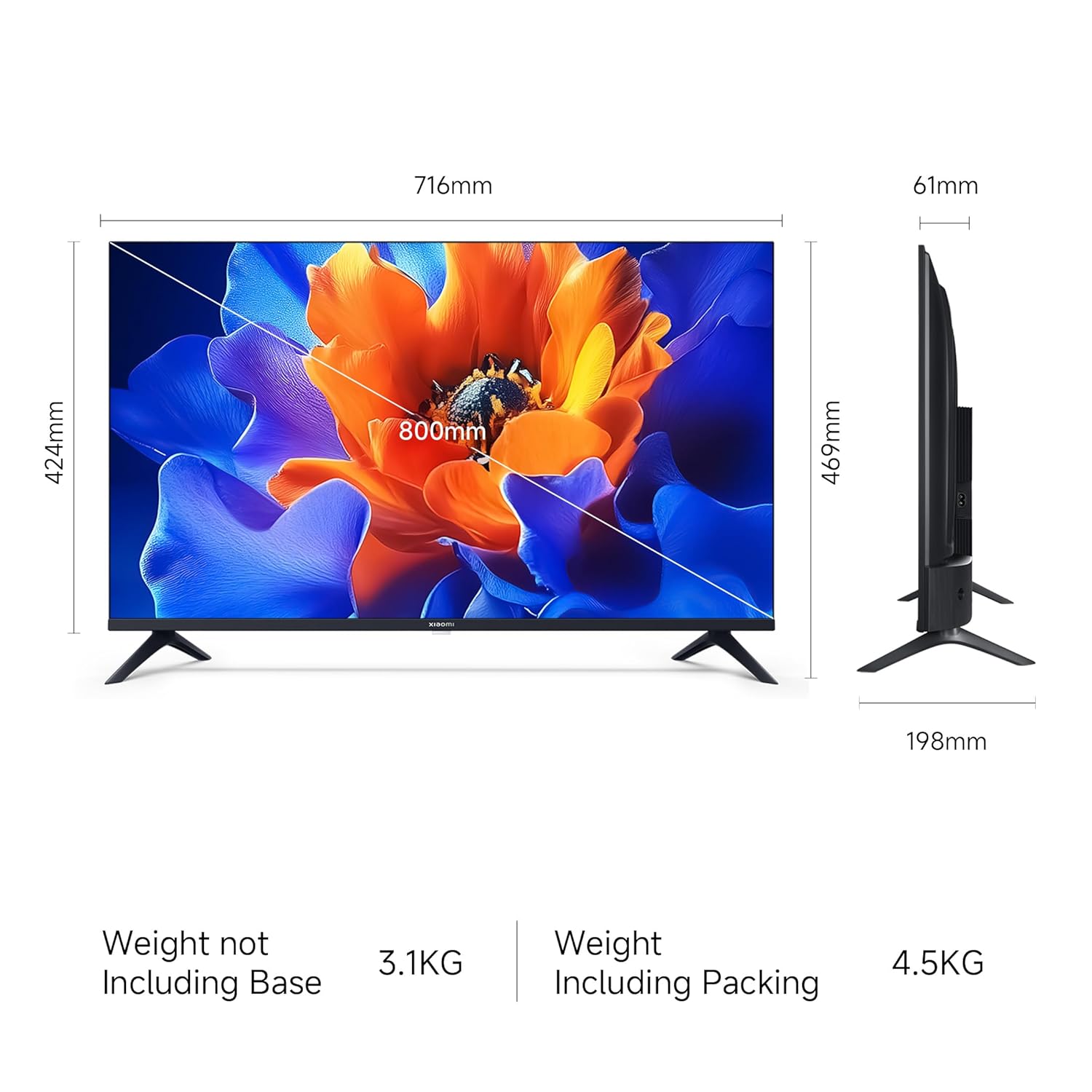
Image 6.1: Google TV interface and features.
- Acceso á aplicación: Launch pre-installed apps like Netflix, Prime Video, YouTube, and download more from the Google Play Store.
- Asistente de Google: Press the Google Assistant button on your remote and speak your commands to search for content, control smart home devices, or get information.
- Screen Mirroring (Google Cast): Cast content from your compatible smartphone or tablet directly to the TV.
- Pro persoalfiles: Crear un profesional individualfiles para recomendacións personalizadas e listas de vixilancia.
6.3 Configuración da pantalla e do son
- Modos de imaxe: Adjust picture settings (e.g., Standard, Vivid, Movie) to suit your viewing preference. The TV supports HDR 10 for enhanced contrast and color.
- Modo confort ocular: Activate this feature to reduce blue light emission, which can be beneficial during long viewsesións de ing.
- Modos de son: Select from various sound modes (e.g., Standard, Music, Movie) to optimize audio output. The TV features Dolby Audio and DTS-X for a cinematic sound experience.

Image 6.2: MagiQLED technology for vibrant colors.

Image 6.3: Vivid Picture Engine 2 in action.
Image 6.4: Eye Care Mode for comfortable viewing.

Image 6.5: Cinematic Audio features.
7. Mantemento
7.1 Limpeza do televisor
- Desconecte sempre o televisor antes de limpalo.
- Usa un pano suave, seco e sen fiapos para limpar a pantalla e a carcasa.
- Para marcas difíciles, espolvoree lixeiramenteampEnxugue o pano con auga ou cun limpador de pantallas suave e non abrasivo. Non pulverice o limpador directamente sobre a pantalla.
- Evite o uso de limpadores abrasivos, ceras ou disolventes.
7.2 Coidados xerais
- Non bloquee as aberturas de ventilación.
- Evite colocar obxectos pesados no televisor.
- Protexa o cable de alimentación para evitar que se pise ou se pinche.
8 Solución de problemas
Before contacting support, try these common solutions:
| Problema | Posible Solución |
|---|---|
| Sen poder | Ensure the power cord is securely connected and the power outlet is working. Try a different outlet. |
| Sen imaxe, pero hai son | Comprobe a fonte de entrada. Asegúrese de que os dispositivos externos estean acendidos e conectados correctamente. |
| Sen son, pero si imaxe | Check volume levels and mute status. Verify audio settings and external speaker connections. |
| O control remoto non funciona | Replace batteries. Ensure no obstructions between the remote and TV. Re-pair Bluetooth remote if necessary. |
| Smart TV features are slow or unresponsive | Check internet connection. Restart the TV by unplugging it for a few minutes. Clear app caches or factory reset if issues persist (data will be lost). |
9. Especificacións
| Característica | Detalle |
|---|---|
| Marca | XIAOMI |
| Modelo | L32MB-APIN |
| Tamaño da pantalla | 32 polgadas (80 cm) |
| Tecnoloxía de visualización | QLED |
| Resolución | HD Ready (1366 x 768 píxeles) |
| Taxa de actualización | 60 Hz |
| Sistema Operativo | Google TV (Android 14 OS) |
| Memoria RAM | 1 GB |
| Almacenamento interno | 8 GB |
| Saída de audio | 20 vatios |
| Funcións de audio | Dolby Audio, DTS-X, DTS Virtual:X |
| Conectividade | Dual Band Wi-Fi, Bluetooth, Ethernet, 2 HDMI, 2 USB, AV Input, 3.5mm Audio |
| Características especiais | Eye Comfort Mode, HDR 10, HLG, Vivid Picture Engine 2, Google Assistant |
| Dimensións do produto (LxWxH) | 71.6 x 19.8 x 46.9 cm (con soporte) |
| Peso do elemento | 3.2 kg |
| Fonte de enerxía | CA 240 voltios |

Image 9.1: TV dimensions.
10. Garantía e soporte
10.1 Información da garantía
Your Xiaomi A Pro QLED Series Smart TV comes with a 1 ano de garantía integral from the date of purchase. To avail warranty services, please retain your purchase invoice. The user manual can also be accessed from the official Xiaomi brand websitio.
10.2 Atención ao cliente
For any assistance, service requests, or technical queries, please contact Xiaomi Support. Our team aims to provide swift solutions:
- Expect a call back from our team within minutos 60 for any service request.
- Our experts strive to arrive at your home within 24 horas of your service request, 99% of the time.
- 99% of new TV installations are completed within 3 horas of your appointment.
For the most up-to-date contact information, please visit the official Xiaomi India support website or refer to the contact details provided with your product documentation.