
Introdución
This user manual provides detailed instructions for setting up, operating, and maintaining your FIFINE AmpliGame H13BP Wired USB Gaming Headset. Please read this manual thoroughly before using the product to ensure optimal performance and longevity.
O que hai na caixa
- FINE AmpliGame H13BP Gaming Headset
- Micrófono desmontable
- Manual de usuario

Imaxe: The FIFINE AmpliGame H13BP headset, its detachable microphone, and the user manual as packaged.
Produto rematadoview
A FIFINE AmpliGame H13BP headset features a robust design with comfortable earcups and an adjustable headband for extended gaming sessions. It includes a versatile USB control box for easy audio management.
Compoñentes clave:
- Auriculares: Equipped with 50mm dynamic drivers for clear audio across all frequencies.
- Micrófono desmontable: Features noise-canceling technology for clear communication.
- USB Control Box: In-line controls for volume, mic mute, 7.1 surround sound, EQ modes, and game/chat balance.
- Iluminación RGB: Customizable RGB effects on the earcups.
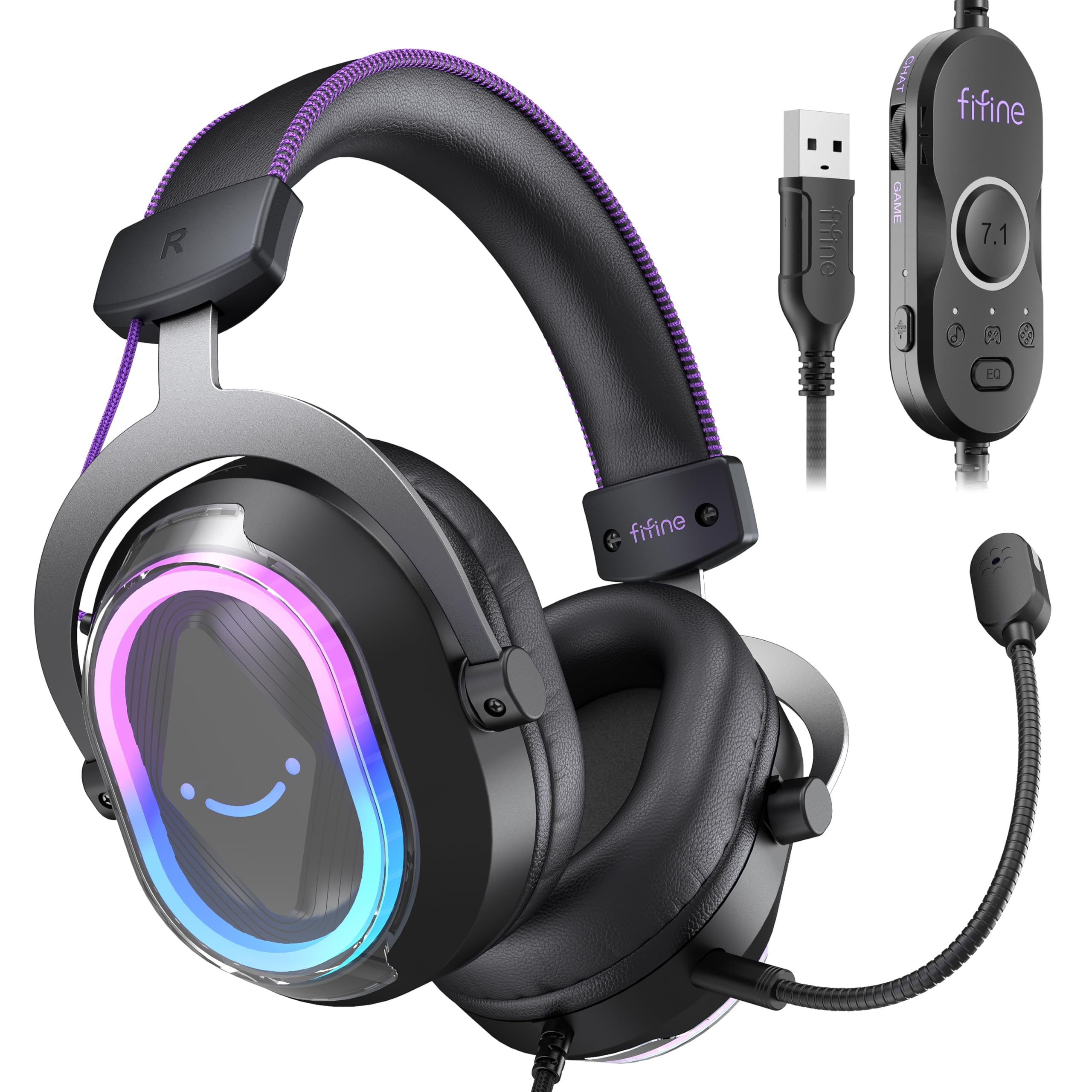
Imaxe: Unha detallada view of the FIFINE AmpliGame H13BP Gaming Headset.

Image: Close-up diagram of the USB Control Box with labeled functions.
Configuración
- Conecta os auriculares: Plug the USB-A connector of the headset into an available USB port on your PC, Mac, PS5, or PS4. No additional software is required for basic functionality.
- Conecta o micrófono: Insert the detachable microphone into the designated port on the left earcup until it clicks into place.
- Axustar axuste: Adjust the headband and earcup positions for a comfortable and secure fit. The protein skin ear pads and memory foam cushions are designed for long-term comfort.

Image: Headset connected to various compatible devices.
Instrucións de funcionamento
USB Control Box Functions:
- Control de volume dos auriculares: Use the volume wheel on the side of the control box to adjust the overall headset volume.
- Silenciar o micrófono: Press the mic mute button on the control box to toggle the microphone on/off. The mic indicator light on the microphone will glow red when muted.
- Equilibrio do xogo/chat: Use the dedicated slider on the control box to prioritize game audio or chat audio. Slide towards 'CHAT' to increase chat volume relative to game volume, or towards 'GAME' to increase game volume.
- Son envolvente 7.1: Press the 7.1 button on the control box to activate or deactivate 7.1 virtual surround sound.
- Modos de ecualización: Press the EQ button to cycle through four pre-set equalizer modes: Default (Balanced Audio), Music (Clear Vocal), Game (Powerful Bass), and Movie (Dynamic Enhancement). Long press the EQ button to return to default mode.

Image: Demonstrating the game/chat balancing feature.

Imaxe: Máis deview of the different EQ modes available.
Control de iluminación RGB:
- Change RGB Modes: Press the dedicated button on the earcup to cycle through 11 different RGB lighting modes.
- Turn RGB On/Off: Long press the RGB button to turn the lighting on or off.

Image: Headset displaying various RGB lighting effects.
Características do micrófono
The detachable microphone is designed for clear voice pickup and features noise-canceling capabilities to reduce background distractions, ensuring your teammates hear you clearly.

Image: The microphone with its noise-canceling indicator.
Comodidade e durabilidade
The H13BP headset is built for comfort during long gaming sessions. It features protein skin ear pads and soft memory foam cushions that conform to your ears. The adjustable headband ensures a snug fit for various head sizes. The durable construction includes metal and plastic components, and the braided cable enhances longevity.

Image: Close-up of the headset's comfortable earcups and adjustable headband.
Especificacións
| Característica | Detalle |
|---|---|
| Marca | FINE |
| Número de modelo | H13BP |
| Tecnoloxía de conectividade | Con cable (USB-A) |
| Colocación do oído | Sobre orella |
| Tamaño do controlador de audio | 50 milímetros |
| Tipo de controlador de audio | Driver dinámico |
| Rango de frecuencias | 20 Hz - 20,000 Hz |
| Impedancia | 32 ohmios |
| Control de ruído | Cancelación de ruído pasiva |
| Características adicionais | 7.1 Surround Sound, Noise Canceling Mic, RGB Lighting |
| Dispositivos compatibles | PC, Mac, PS5/PS4 (Not compatible with Xbox) |
| Características do cable | Braided material cable (7.55ft) |
| Tipo de control | Volume Control, Mic Mute, EQ Modes, 7.1 On/Off, Game/Chat Balance |
| Material | Coiro, metal, plástico |
Resolución de problemas
Sen son/Micrófono non funciona:
- Comproba as conexións: Asegúrate de que o conector USB-A estea completamente inserido no porto.
- Verify Mute Status: Check the mic mute button on the control box and the mic indicator light. Ensure the headset volume is not at minimum.
- Configuración do sistema: Confirm that the FIFINE H13BP headset is selected as the default audio input and output device in your computer's or console's sound settings.
- Compatibilidade: Remember that the headset is not compatible with Xbox consoles.
As luces RGB non funcionan:
- Comprobar a conexión: Asegúrate de que os auriculares estean conectados correctamente mediante USB.
- Toggle RGB: Long press the RGB button on the earcup to ensure the lighting is not simply turned off.
Garantía e Soporte
For warranty information and detailed support, please refer to the official FIFINE website or contact their customer service. FIFINE offers product specialists assistance and free technical support for their products.
You can visit the FIFINE Store for more information: FIFINE Store on Amazon
Vídeos oficiais de produtos
FIFINE H13 USB Gaming Headset Review
Vídeo: Unha análise exhaustivaview of the FIFINE H13 USB Gaming Headset, demonstrating its features and performance.
Testing This Colorful Headset Immersive High-Quality Sound!
Video: A demonstration of the headset's immersive sound quality and vibrant RGB lighting.