
1. Introdución
This manual provides detailed instructions for the safe and effective operation of your HTVRONT H17 Phone Case Heat Press Machine. This device is designed for sublimation transfers on compatible phone cases, badges, and other items with a sublimation coating. Please read this manual thoroughly before use and retain it for future reference.

Image 1.1: HTVRONT H17 Phone Case Heat Press Machine with various customized phone cases.
2. Produto rematadoview
2.1 Compoñentes incluídos
The HTVRONT H17 Phone Case Heat Press Machine package typically includes the following items:
- HTVRONT H17 Phone Case Heat Press Machine (x1)
- Phone Case Fixture Set for iPhone (x1)
- Phone Case Fixture Set for Android (x1)
- Sublimation Film (A4) (x5)
- Heat-resistant Gloves (x1 pair)
- Sublimation Badges (58mm) (x3)
- Badge Fixture Set (x1)
- Heat-resistant Tape (x1)
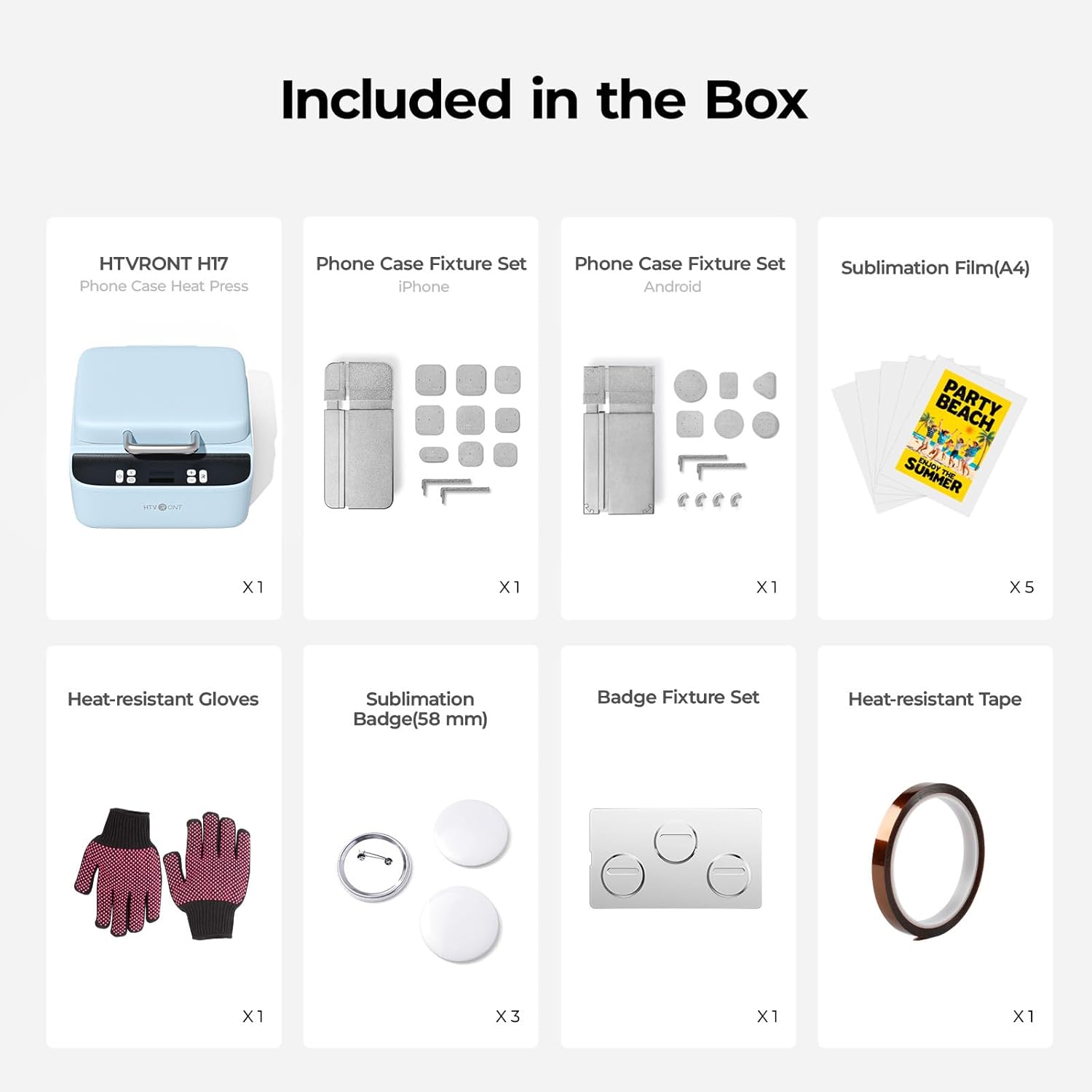
Image 2.1: All components included in the HTVRONT H17 package.
2.2 Características principais
- 3D Vacuum Pressure Technology: Ensures full-wrap, edge-to-edge sublimation transfers without bubbles.
- Control de temperatura preciso: Adjustable from 100°C to 180°C, with rapid heating.
- Temporizador axustable: Settings from 1 to 600 seconds.
- Universal Phone Fixtures: Compatible with most iPhone (12 and above) and Android models (Samsung, Xiaomi, Google, Huawei, etc.).
- Design Software Integration: Supports design software with AI technology for pattern adjustment, mirroring, and sublimation file xeración.
- Apagado automático: For safety, the machine powers off after 15 minutes of inactivity.
- Deseño compacto: Measures approximately 30.5L x 33W x 17.8H cm.

Image 2.2: Key features including vacuum press technology, compact design, and adjustable temperature control.
3. Instrucións de seguridade
- Always operate the heat press on a stable, heat-resistant surface.
- Keep hands and fingers clear of the heating plate during operation to prevent burns.
- Use the provided heat-resistant gloves when handling hot items or components.
- Ensure proper ventilation in your workspace to dissipate any fumes from sublimation.
- Non mergullo a máquina en auga ou outros líquidos.
- Desconecte a máquina da toma de corrente cando non a estea a usar ou antes de limpala.
- Manter fóra do alcance dos nenos e animais.
- This machine is designed for use with sublimation-coated items only.
4. Configuración
- Desembalaxe: Carefully remove all components from the packaging. Inspect the machine for any damage during transit.
- Colocación: Place the heat press machine on a flat, stable, and heat-resistant surface with adequate clearance around it for ventilation.
- Conexión de alimentación: Conecte o cable de alimentación á máquina e despois a unha toma de corrente con conexión a terra.
- Preparation for Sublimation: Ensure you have sublimation film, sublimation ink, and a compatible inkjet printer ready. The sublimation film requires sublimation ink and an inkjet printer for use.
5. Instrucións de funcionamento
5.1 Acendido/Apagado
Press the power button to turn the machine on. The display will illuminate. To turn off, press and hold the power button.
5.2 Axuste da temperatura e da hora
- Axuste de temperatura: Use the '+' and '-' buttons to adjust the temperature. Short press for 5°C increments, long press for 10°C increments. The temperature range is 100°C to 180°C. The machine heats from 25°C to 130°C in approximately 2 minutes.
- Axuste horario: Use the time setting buttons to adjust the pressing duration. Short press for 5-second increments, long press for 10-second increments. The time range is 1 to 600 seconds.
5.3 Sublimation Process for Phone Cases
- Design Preparation: Use the provided design software or your preferred graphic design program. The software includes a mobile model library and AI technology to adjust pattern size/position, perform mirror processing, and generate sublimation-ready files.
- Print Design: Print your mirrored design onto the sublimation film using sublimation ink and an inkjet printer.
- Prepare Phone Case: Select the appropriate adjustable fixture for your iPhone or Android model. The fixtures are designed to fit most models in their respective series (e.g., iPhone 12 and above).
- Película de posición: Carefully place the printed sublimation film onto the sublimation-coated phone case, ensuring correct alignment. Use heat-resistant tape to secure the film if necessary.
- Colocar na máquina: Open the heat press lid. Place the phone case with the film attached onto the heating plate, ensuring it is centered and properly seated within the fixture.
- Comezar a premer: Close the lid. The machine will apply vacuum pressure and heat according to your set temperature and time.
- Eliminar elemento: Once the timer completes, the machine will beep. Open the lid and, using heat-resistant gloves, carefully remove the hot phone case. Allow it to cool before handling further.

Image 5.1: Design software interface for precise phone case matching.

Image 5.2: Adjustable phone case mold for universal compatibility.

Imaxe 5.3: Ex.ample of a high-fidelity, full-wrap sublimation transfer on a phone case.
6. Mantemento
- Limpeza: Ensure the machine is unplugged and completely cool before cleaning. Wipe the exterior with a soft, damp pano. Non use produtos de limpeza ou disolventes abrasivos.
- Placa de calefacción: Gently wipe the heating plate with a clean, dry cloth. Avoid scratching the surface.
- Almacenamento: Almacene a máquina nun ambiente seco e sen po cando non estea en uso.
7 Solución de problemas
| Problema | Causa posible | Solución |
|---|---|---|
| Poor transfer quality (faded, uneven) | Incorrect temperature or time settings; insufficient pressure; non-sublimation coated item; incorrect ink/film. | Verify temperature and time settings for your specific material. Ensure the item has a sublimation coating. Check ink and film compatibility. Ensure the vacuum seal is effective. |
| Bubbles or imperfections in transfer | Improper vacuum seal; dust or debris on the surface; film not properly adhered. | Ensure the item and film are clean. Verify the vacuum seal engages correctly. Secure film with heat-resistant tape. |
| A máquina non se acende | Power cord not connected; power outlet issue; machine malfunction. | Check power cord connection. Test the outlet with another device. If the issue persists, contact customer support. |
| Design misalignment or cutting errors | Incorrect design software settings; improper placement of film. | Utilize the design software's template and alignment features. Ensure the film is precisely positioned on the item. |
8. Especificacións
- Marca: HTVRONT
- Número de modelo: sjkj (H17)
- Material: Aluminio
- Cor: Azul
- Dimensións do produto (L x W x H): 30.5 cm x 33 cm x 17.8 cm (12.0 po x 13.0 po x 7.0 po)
- Peso do artigo: 7.49 quilogramos (16.5 libras)
- Rango de temperatura: 25°C (minimum) to 180°C (maximum)
- Uso recomendado: Customization of phone cases, badges, and other sublimation-ready items.
9. Garantía e soporte
HTVRONT offers excellent after-sales service. If you encounter any questions or issues with your HTVRONT H17 Phone Case Heat Press Machine, please contact our customer support team for assistance. Refer to your purchase documentation for specific warranty details and contact information.
For further assistance, you may visit the official HTVRONT websitio web ou póñase en contacto directamente co vendedor.


