
1. Introdución
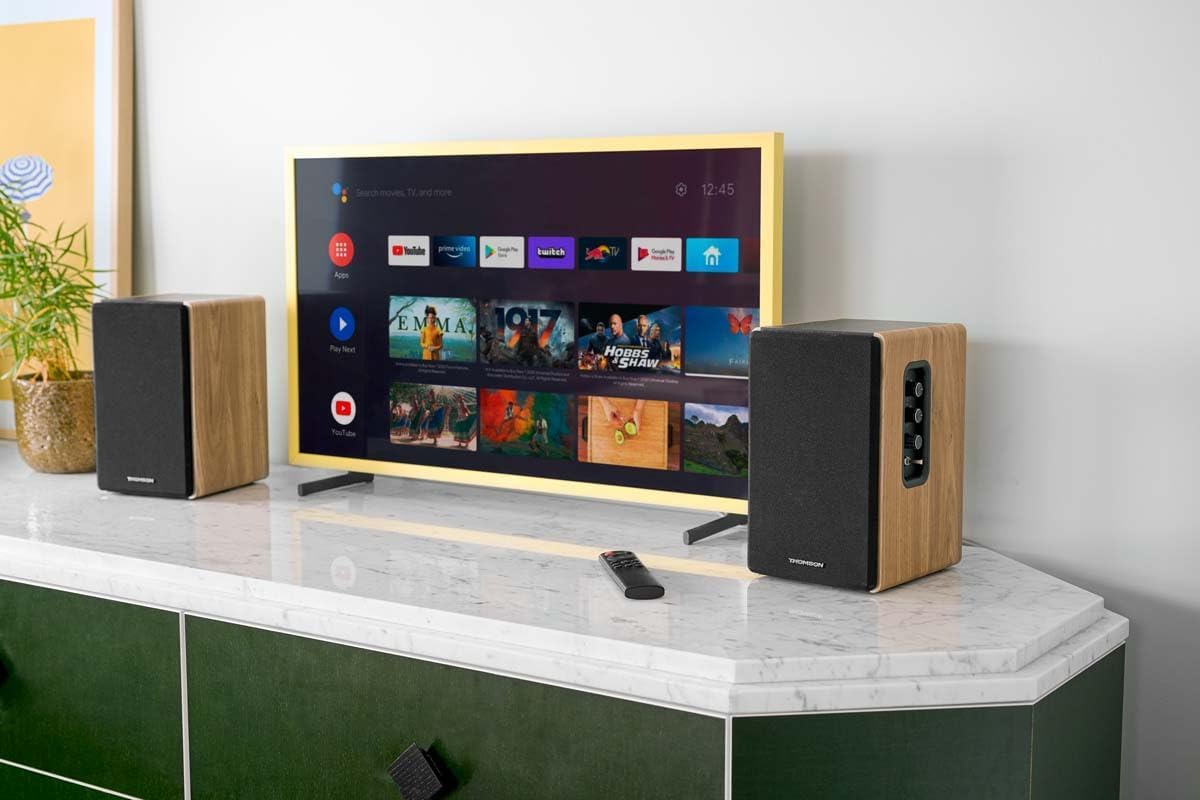
Thank you for choosing the THOMSON WS902DUO Cosy Bookshelf Speakers. These active stereo speakers deliver a powerful 150W audio experience with deep bass from two 10 cm woofers. They offer versatile connectivity options including Bluetooth 5.3, Optical, HDMI (ARC), RCA, and USB playback. The included remote control and side panel adjustments provide precise control over your audio. Please read this manual carefully before use to ensure proper operation and to maximize your listening experience.

Image 1.1: THOMSON WS902DUO Bookshelf Speakers in a living space, showcasing their elegant wood finish.
2. Instrucións de seguridade importantes
- Read these instructions thoroughly before operating the product.
- Conserve estas instrucións para referencia futura.
- Ten en conta todas as advertencias do produto e das instrucións de funcionamento.
- Siga todas as instrucións.
- Non use este aparello preto da auga.
- Limpar só cun pano seco.
- Non bloquee ningunha abertura de ventilación. Instáleo segundo as instrucións do fabricante.
- Non instale preto de fontes de calor como radiadores, rexistros de calor, cociñas ou outros aparellos (incluíndo amplificadores) que producen calor.
- Non derogue o propósito de seguridade do enchufe polarizado ou con conexión a terra. Un enchufe polarizado ten dúas láminas, unha máis ancha que a outra. Un enchufe tipo toma de terra ten dúas láminas e unha terceira punta de conexión a terra. A folla ancha ou a terceira punta son proporcionadas para a súa seguridade. Se o enchufe proporcionado non encaixa na súa toma de corrente, consulte a un electricista para a substitución da toma obsoleta.
- Protexa o cable de alimentación para evitar que se pise ou se pinche, especialmente nos enchufes, tomas de corrente e no punto de saída do aparello.
- Use só anexos/accesorios especificados polo fabricante.
- Use só co carro, soporte, trípode, soporte ou mesa especificados polo fabricante ou vendidos co aparello. Cando se use un carro, teña coidado ao mover a combinación de carro/aparato para evitar feridas por envorco.
- Desenchufe este aparello durante tormentas eléctricas ou cando non se use durante longos períodos de tempo.
- Encargue toda a reparación a persoal de servizo cualificado. O mantemento é necesario cando o aparello resultou danado dalgún xeito, como o cable de alimentación ou o enchufe está danado, se derrama líquido ou caen obxectos no aparello, o aparello estivo exposto á choiva ou á humidade, non funciona normalmente. , ou foi abandonado.
3. Contido do paquete
Comprobe que todos os elementos que se indican a continuación estean incluídos no seu paquete:
- THOMSON WS902DUO Bookshelf Speakers (2 units)
- Control remoto
- Cable de alimentación
- Cable de conexión do altofalante
- 3.5mm Jack to RCA Adapter Cable
- Manual de usuario (este documento)

Image 3.1: Packaging of the THOMSON WS902DUO Bookshelf Speakers.
4. Produto rematadoview
4.1. Side Control Panel (Active Speaker)
The active speaker features a side control panel for easy access to essential functions.

Image 4.1: Side control panel.
- Control de graves: Axusta a saída de baixa frecuencia.
- Control de agudos: Axusta a saída de alta frecuencia.
- Control de volume: Axusta o volume xeral do son.
- Interruptor de alimentación: Activa ou desactiva os altofalantes.
- Indicador LED: Shows the current status or selected input.
4.2. Rear Panel (Active Speaker)
The rear panel of the active speaker provides all necessary input and output connections.
Imaxe 4.2: Conexións do panel traseiro.
- Entrada óptica: For connecting digital audio sources like TVs, game consoles, or Blu-ray players.
- Entrada auxiliar (RCA): For connecting analog audio sources such as turntables, CD players, or PCs. A 3.5mm jack adapter is provided.
- TV Audio (HDMI ARC): For connecting to a TV's HDMI ARC port, allowing TV remote control of the speaker volume.
- USB Play: Para reproducir MP3 files directamente desde unha unidade flash USB.
- Sub Saída: For connecting an external active subwoofer for enhanced bass.
- Saída do altofalante: Conéctase ao altofalante pasivo.
- Entrada de enerxía: Conéctase á fonte de alimentación principal.
4.3. Control remoto
The remote control provides convenient access to all speaker functions from a distance.

Image 4.3: Remote control.
- Botón de encendido: Turns the speakers on/off.
- Botón de silencio: Silencia/activa o son.
- Volume +/-: Axusta o nivel de volume.
- Playback Controls (Play/Pause, Skip): Para reprodución por USB.
- Source Selection Buttons (OPT, BT, ARC, USB, LINE): Selecciona a fonte de entrada de son.
- EQ Mode Buttons (MOVIE, MUSIC, DIALOG): Selects preset equalization modes.
5. Configuración
5.1. Colocación de altofalantes
Place the speakers on a stable, flat surface such as a bookshelf, desk, or speaker stands. For optimal stereo imaging, position the speakers equidistant from your listening position and at ear level. Ensure there is adequate space around the speakers for ventilation.
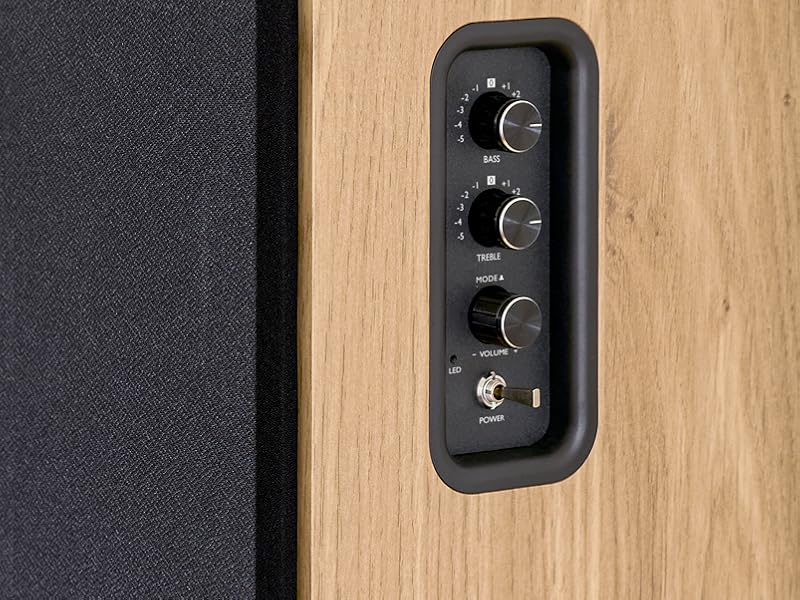
Image 5.1: Recommended speaker placement on a desk.
5.2. Conectando os altofalantes
- Identify the active speaker (with controls and inputs) and the passive speaker.
- Connect the included speaker cable from the speaker output terminals on the active speaker to the input terminals on the passive speaker. Ensure correct polarity (+ to + and - to -).
5.3. Conexión de fontes de son
Connect your desired audio sources to the active speaker using the appropriate cables.
- Entrada óptica: Use an optical cable to connect your TV, game console, or Blu-ray player to the OPTICAL IN port.
- HDMI (ARC) Input: Use an HDMI cable to connect your TV's HDMI ARC port to the TV AUDIO (HDMI) port on the speaker. This allows your TV remote to control the speaker volume.
- RCA (AUX) Input: Use an RCA cable (or the provided 3.5mm jack to RCA adapter) to connect devices like a turntable, CD player, or PC to the AUX IN (RCA) ports.
- Entrada USB: Insira unha unidade flash USB que conteña MP3 files into the USB PLAY port.

Image 5.2: Speakers connected to a television via HDMI ARC.
5.4. Emparellamento Bluetooth
- Asegúrate de que os altofalantes estean acesos.
- Press the 'BT' button on the remote control or the side panel to select Bluetooth input. The LED indicator will flash, indicating pairing mode.
- No teu teléfono intelixente, tableta ou ordenador, activa o Bluetooth e busca os dispositivos dispoñibles.
- Select "THOMSON WS902DUO" from the list of devices.
- Once paired, the LED indicator will stop flashing and remain solid. You can now stream audio wirelessly.
5.5. Subwoofer Connection (Optional)
If you wish to enhance bass further, connect an active subwoofer to the 'Sub Out' port on the rear panel of the active speaker using an RCA cable.
6. Instrucións de funcionamento
6.1. Acendido/apagado
Use the power switch on the side control panel or the power button on the remote control to turn the speakers on or off.
6.2. Selección da fonte
Press the corresponding source button on the remote control (OPT, BT, ARC, USB, LINE) to switch between connected audio inputs. The LED indicator will change to reflect the selected source.
6.3. Control de volume
Adjust the volume using the 'Volume' knob on the side control panel or the 'VOL+/-' buttons on the remote control.
6.4. Axustes de audio
Fine-tune the sound to your preference:
- Graves/Agudos: Use the 'Bass' and 'Treble' knobs on the side control panel to adjust the low and high frequencies.
- Modos de ecualización: Press the 'MOVIE', 'MUSIC', or 'DIALOG' buttons on the remote control to select preset equalization settings optimized for different content types.
6.5. Reprodución USB
When a USB flash drive with MP3 files is inserted and USB source is selected, the speakers will automatically begin playing. Use the playback control buttons on the remote control (Play/Pause, Skip) to manage your music.
6.6. Funcionamento Bluetooth
After successful pairing (see Section 5.4), you can stream audio from your Bluetooth device. Use your device's controls or the speaker's remote control for playback and volume adjustments.
7. Mantemento
Un mantemento axeitado garante a lonxevidade e o rendemento dos seus altofalantes.
- Limpeza: Wipe the speaker surfaces with a soft, dry cloth. Do not use liquid cleaners or abrasive materials.
- Ventilación: Asegúrese de que as aberturas de ventilación non estean bloqueadas para evitar o sobrequecemento.
- Almacenamento: If storing the speakers for an extended period, unplug them from the power outlet and store them in a cool, dry place.
- Evitar a humidade: Keep the speakers away from water and high humidity.
8 Solución de problemas
Se atopa algún problema, consulte a seguinte guía de solución de problemas:
| Problema | Causa posible | Solución |
|---|---|---|
| Sen poder | Power cable not connected; Power switch off; Wall outlet not working. | Ensure power cable is securely connected. Turn on the power switch. Test the wall outlet with another device. |
| Sen son | Incorrect input source selected; Volume too low; Mute function active; Audio cable not connected properly. | Select the correct input source. Increase volume. Press Mute button on remote. Check all audio cable connections. |
| O emparejamento por Bluetooth falla | Speakers not in pairing mode; Device too far; Bluetooth disabled on source device. | Ensure speakers are in Bluetooth pairing mode (flashing LED). Move device closer to speakers. Enable Bluetooth on your source device. |
| A reprodución USB non funciona | USB drive not formatted correctly; Files not MP3; USB drive not inserted properly. | Ensure USB drive is FAT32 formatted. Verify files are in MP3 format. Re-insert USB drive firmly. |
| Distorsión do son | Volume too high; Source audio quality poor; Bass/Treble settings too extreme. | Lower the volume. Test with a different audio source. Adjust Bass and Treble controls. |
9. Especificacións
| Característica | Especificación |
|---|---|
| Marca | THOMSON |
| Número de modelo | WS902DUO |
| Potencia máxima de saída do altofalante | 150 vatios |
| Resposta en frecuencia | 60 Hz |
| Tecnoloxía de conectividade | Bluetooth, HDMI (ARC), óptico, RCA, USB |
| Versión Bluetooth | 5.3 |
| Modo de saída de audio | Stereo (2.0 channels) |
| Vol. De entradatage | 230 voltios (CA) |
| Tipo de montaxe | Montaxe en andel |
| Tipo de altofalante | Multimedia Bookshelf |
| Características especiais | Stereo Pairing, USB Port, Sub-Out, Remote Control, EQ Modes |
| Usos recomendados | Smartphone, Tablet, PC, TV, Game Console, DVD Player, Turntable |
| Cor | Acabado de madeira natural |
| Método de control | Remote Control, Side Panel Knobs |
| Tamaño do woofer | 10 Centímetros |
| Dimensións (H x W x D) | 28 cm x 24 cm x 47 cm (approximate, per speaker) |
| Peso | 5048 Grams (total for pair) |
| Número de elementos | 2 |
| País de Orixe | China |
10. Información da garantía
This THOMSON WS902DUO product comes with a 1 ano de garantía limitada desde a data de compra. Esta garantía cobre os defectos de fabricación e a man de obra en condicións de uso normal. Non cobre os danos causados por mal uso, accidentes, modificacións non autorizadas ou desgaste normal. Conserve o comprobante de compra para reclamacións de garantía.
11. Atención ao cliente
For technical assistance, warranty claims, or any questions regarding your THOMSON WS902DUO speakers, please contact your retailer or visit the official THOMSON support website. Please have your model number (WS902DUO) and proof of purchase ready when contacting support.
Soporte en liña: www.thomsonconsumer.com (Consulte os contactos de asistencia rexional)