
1. Introdución
This manual provides essential information for the safe and efficient operation of your TOPTRO Quadra Projector. Please read this manual thoroughly before using the projector and retain it for future reference. The TOPTRO Quadra Projector is designed to deliver a high-quality visual and audio experience with its advanced features and smart capabilities.
2. Información de seguridade
- Non bloquee as aberturas de ventilación. Asegúrese de que haxa un fluxo de aire axeitado arredor do proxector para evitar o sobrequecemento.
- Non expoña o proxector á choiva nin á humidade para evitar descargas eléctricas ou incendios.
- Empregue só o adaptador de corrente subministrado co proxector.
- Evite mirar directamente a lente do proxector cando o lamp está acendido, xa que a luz brillante pode causar danos nos ollos.
- Coloque o proxector sobre unha superficie estable e nivelada para evitar que caia.
- Non intente desmontar nin reparar o proxector vostede mesmo. Encargue calquera mantemento a persoal cualificado.
3. Contido do paquete
Verifica que todos os elementos estean presentes no paquete:
- 1 x TOPTRO Quadra Projector
- 1 x cable HDMI
- 1 x Manual de usuario
- 1 x mando a distancia
4. Produto rematadoview
Familiarize yourself with the main components and interfaces of your TOPTRO Quadra Projector.
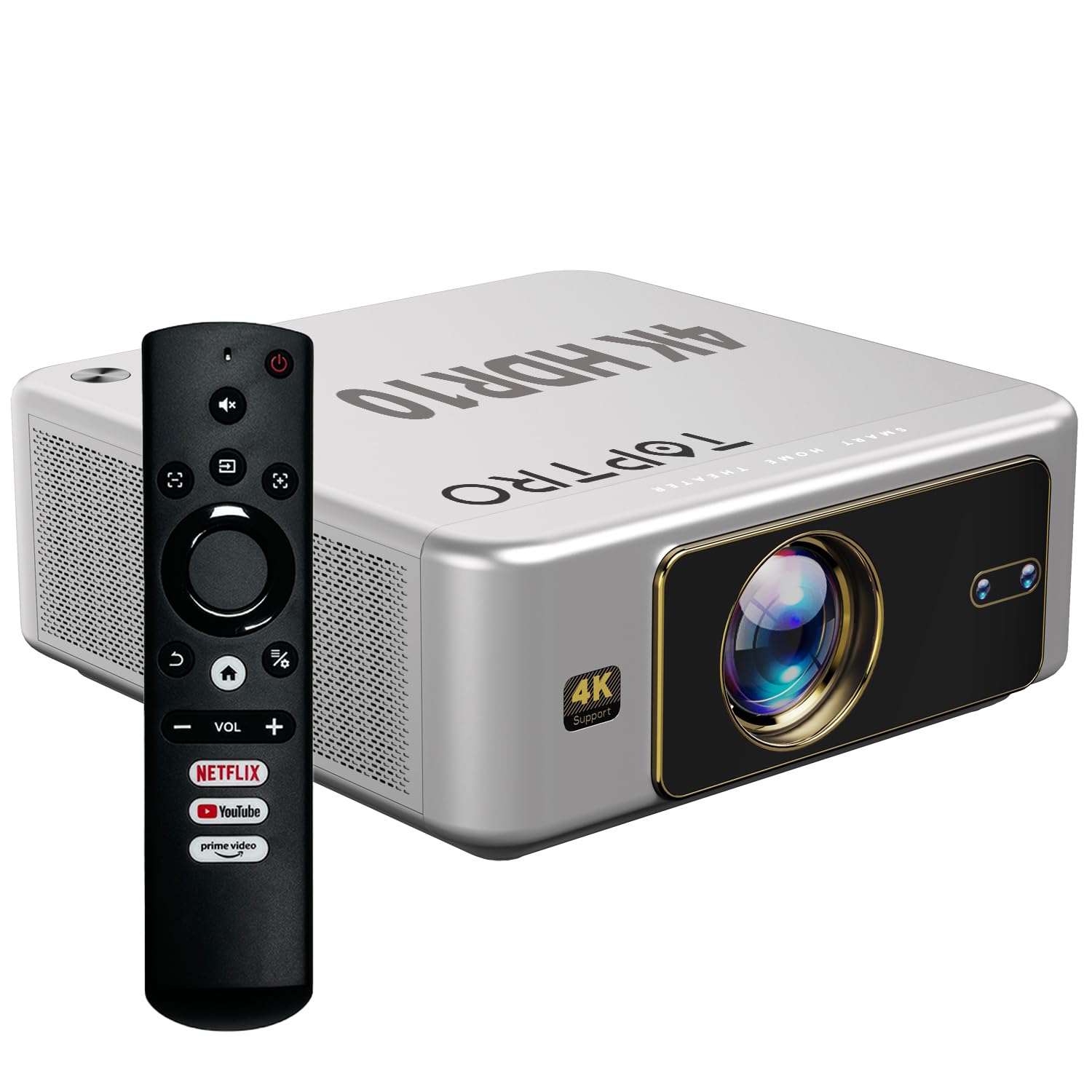
Figura 4.1: Fronte view of the TOPTRO Quadra Projector with included remote control.

Figure 4.2: Rear panel of the projector displaying the power input, audio jack, HDMI ports, and USB ports.
5. Configuración
5.1 Placement and Projection Size
Position the projector on a stable surface. The TOPTRO Quadra Projector supports a maximum screen size of 300 inches. Adjust the distance from the wall or screen to achieve your desired image size.

Figure 5.1: Recommended projection distances for different screen sizes.
5.2 Conexión de alimentación
- Conecte o cable de alimentación ao porto de entrada de alimentación do proxector.
- Conecte o outro extremo do cable de alimentación a unha toma de corrente axeitada.
5.3 Acendido inicial e configuración básica
- Preme o botón de acendido do proxector ou do control remoto para acendelo.
- Upon first use, the projector may guide you through initial setup steps, including language selection and network connection.
5.4 Corrección de enfoque e trapezoide
The TOPTRO Quadra Projector features AI-powered automatic focus and keystone correction. This system automatically adjusts the image for optimal clarity and shape.
- Foco automático: The projector will automatically adjust the image sharpness.
- Auto Keystone: The projector will automatically correct trapezoidal distortion to ensure a rectangular image.
- Auto Obstacle Avoidance & Screen Fit: The projector can detect obstacles and adjust the image to fit the screen area.
If automatic adjustments are not satisfactory, manual adjustments can be made through the settings menu. Navigate to the 'Display & Sound' settings to access these options.

Figure 5.2: Automatic image correction features.
6. Funcionamento
6.1 Interface de usuario e navegación
The TOPTRO Quadra Projector runs on a Net-Flix Certified Linux OS, providing a user-friendly interface. Use the remote control to navigate through menus and select applications.

Figure 6.1: Home screen with pre-installed streaming applications.
6.2 Conectividade
The projector offers various connectivity options for external devices.
- HDMI: Connect your laptop, MacBook, Blu-ray player, TV sticks, TV boxes, or gaming consoles (e.g., PS4) using the dual HDMI ports. The projector supports HDMI CEC and HDMI EARC for enhanced audio return channel functionality.
- USB: Two USB ports are available for connecting pendrives or hard disks to play media files directamente.
- Saída de audio de 3.5 mm: Connect external headphones or speakers for a personalized audio experience.
- Wi-Fi: Utilize the 6th Gen Dual Band Wi-Fi (2.4 GHz + 5 GHz) for internet access and streaming.
- Bluetooth 5.2: Connect Bluetooth speakers, headphones, or other compatible audio devices. The projector also supports two-way Bluetooth, allowing it to function as a Bluetooth speaker.
- Miracast: Wirelessly mirror your screen from compatible devices.

Figure 6.2: Connectivity options for external devices.
6.3 Configuración da pantalla
Adjust image quality and display features through the 'Display & Sound' menu.
- Modo de imaxe: Select from various preset picture modes (e.g., Vivid) or customize settings like brightness, contrast, and color.
- 4K HDR10+ Support: The projector plays true 4K resolution HDR10+ videos, offering enhanced contrast and color depth.
- MEMC (Estimación de movemento, Compensación de movemento): This technology improves video smoothness and clarity, especially for fast-moving scenes, by interpolating frames.

Figure 6.3: MEMC technology for smoother visuals.
6.4 Configuración de audio
Manage audio output and formats via the 'Display & Sound' menu.
- Dolby Atmos e Dolby Dixital Plus: The projector supports these advanced audio technologies for immersive sound.
- Modo eARC: Enable eARC for high-quality audio return from compatible devices.
- Formato de saída: Select the appropriate audio output format (e.g., Auto, PCM, Passthrough, Dolby Digital, Dolby Digital Plus) based on your connected audio system.

Figure 6.4: Immersive audio with Dolby Atmos support.
7. Mantemento
Un mantemento axeitado garante a lonxevidade e o rendemento óptimo do seu proxector.
- Limpeza de lentes: Limpe con coidado a lente do proxector cun pano suave e sen fiapos deseñado especificamente para superficies ópticas. Evite materiais abrasivos ou produtos químicos agresivos.
- Limpeza exterior: Use un pano suave e seco para limpar o exterior do proxector.
- Prevención de po: The TOPTRO Quadra Projector features a fully sealed optical engine, which helps prevent dust, dirt, and moisture from entering the light path. This design reduces the need for frequent internal cleaning and maintains consistent image quality.
8 Solución de problemas
Se tes problemas co teu proxector, consulta os seguintes problemas e solucións comúns:
| Problema | Causa posible | Solución |
|---|---|---|
| Non se mostra ningunha imaxe | Incorrect input source selected; loose HDMI/USB connection; power issue. | Verify input source in settings; check cable connections; ensure projector is powered on. |
| Sen son | Volume too low or muted; incorrect audio output setting; external audio device not connected properly. | Adjust volume; check 'Sound output' settings; ensure external speakers are connected and powered. |
| A imaxe está borrosa ou distorsionada | Focus or keystone correction issues; projector not placed correctly. | Allow auto-focus/keystone to complete. If issues persist, manually adjust focus and keystone in 'Display & Sound' settings. Ensure the projector is perpendicular to the screen. |
| O control remoto non funciona | Batteries are low or depleted; remote not pointed at IR receiver; obstruction. | Substitúa as pilas; asegúrese de que haxa unha liña de visión clara co receptor de infravermellos do proxector. |
| Fan noise is noticeable | Normal operation; projector is working hard; ventilation blocked. | Ensure adequate ventilation around the projector. Fan noise is a normal part of projector operation, especially during high-performance tasks. |
9. Especificacións
Key technical specifications of the TOPTRO Quadra Projector:
| Característica | Detalle |
|---|---|
| Marca | TOPTRO |
| Nome do modelo | TOPTRO Quadra Projector 4K HDR10+ Dolby |
| Dimensións do produto | 24 x 20 x 10 cm |
| Peso do elemento | 2 kg |
| Interface de hardware | 3.5mm Audio, Bluetooth 5.2, Dual HDMI (CEC, EARC), Dual USB |
| Dispositivos compatibles | Gaming Console, Laptop, Smartphone, Speaker, Television |
| Características especiais | Dolby Atmos - Dolby Digital Plus, 4K HDR 10+/HLG, Net-Flix Certified Linux OS, 2GB RAM, 32GB ROM, Auto Focus & Keystone, Native 1080p Full HD & True 4K Support, 32000 Lumens Brightness (2600 ANSI), 15W Big Speakers, HDMI ARC, Dual HDMI, Built-in Apps, Dual 5G & 2.4G WiFi 6, Bluetooth, WiFi Display, Electronic Focus & 6D Electronic correction, Fully Sealed Optical Engine, MEMC |
| Tecnoloxía de visualización | LCD |
| Brillo da imaxe | 32000 lúmenes (2600 ANSI) |
| Relación de contraste da imaxe | 22000:1 |
| Relación de aspecto | 16:9 |
| Resolución de pantalla nativa | 1920 x 1080 (Full HD) |
| Resolución admitida | Ata 3840 x 2160 píxeles (4K) |
| Taxa de actualización | 60 Hz |
| Lamp A vida | 50000 horas |
| Factor de forma | Portátil |
| Tipo de montaxe | Montaxe no teito |
| País de Orixe | China |
10. Garantía e soporte
For warranty information, technical support, or service inquiries, please contact TOPTRO Projectors India using the details below:
- Correo electrónico: support@toptro.in or sreeprojectors@gmail.com
- Whatsapp: 8341888860
- Websitio: toptro.in
Please have your product model number (Quadra 4K HDR10+ Dolby) and purchase details ready when contacting support.