
Introdución
Thank you for choosing the hizpo Android 14 9-inch Car Radio. This manual provides essential information for the proper installation, operation, and maintenance of your new car multimedia system. Please read these instructions carefully before use to ensure optimal performance and safety.
Configuración e instalación
1. Contido do paquete
Antes de comezar a instalación, comproba que estean presentes todos os compoñentes:
- 9-inch Touch Screen Unit
- Custom Frame for Citroen C2 C3
- Arnés de cables de alimentación
- Cables RCA
- Cables USB
- Antena GPS
- External Microphone (optional/included)
- CANBUS Decoder (if applicable for steering wheel controls)
- Outros accesorios necesarios
2. Compatibilidade do vehículo
This car radio is designed for Citroen C2 and C3 models manufactured between 2001 and 2010. Please confirm your vehicle's center console matches the compatible configurations shown below before installation.

Imaxe: Examples of compatible Citroen C2 and C3 dashboards (2001-2010) where the car radio can be installed. Green checkmarks indicate compatible layouts, while red crosses indicate incompatible ones.
3. Pasos da instalación
Installation is generally straightforward, but professional installation is recommended if you are unfamiliar with car electronics. Ensure the vehicle's battery is disconnected before starting.
- Eliminar a radio orixinal: Carefully remove the existing car radio and any surrounding trim. For some Citroen C3 models, it may be necessary to remove the small storage compartment below the original 1DIN radio to properly fit the new 9-inch screen.
- Conectar o arnés de cableado: Connect the provided power cable harness, RCA cables, USB cables, and GPS antenna to the corresponding ports on the new hizpo unit. Ensure all connections are secure.
- CANBUS Connection: If your vehicle supports steering wheel controls, connect the CANBUS decoder (if included) to integrate these functions.
- Proba de conexións: Before fully mounting, temporarily reconnect the battery and test the unit's basic functions (power on, sound, touch screen response).
- Montar a unidade: Secure the new car radio unit into the dashboard opening using the custom frame. Ensure it is firmly in place.
- Remontar: Volva instalar calquera peza de adorno retirada.
Instrucións de funcionamento
1. Funcionamento básico
The unit features a 9-inch capacitive touchscreen with Android 14 OS. Navigate through menus and applications by touching and swiping on the screen. The system is powered by a 4-core processor with 2GB RAM and 64GB internal storage, providing a smooth user experience.

Image: A hand interacting with the 9-inch capacitive touch screen, demonstrating its multi-touch capabilities and responsive interface.
2. Wireless CarPlay / Android Auto / MirrorLink
The car radio supports wireless Apple CarPlay and both wireless and wired Android Auto, along with MirrorLink functionality. Connect your smartphone via Wi-Fi, Bluetooth, or USB cable to access phone features directly on the car radio screen.
- CarPlay/Android Auto: Enjoy online navigation, make calls, send/receive messages, and listen to music/podcasts while focusing on driving.
- Conexión: For wireless CarPlay/Android Auto, connect via Bluetooth and Wi-Fi. For wired Android Auto, use a USB cable.

Image: The Apple CarPlay interface displayed on the car radio screen, showing various app icons like Phone, Music, and Maps.
3. Navegación GPS
The unit features an integrated GPS module for accurate and fast map tracking, even without an internet connection. It supports 2D/3D map views and allows music playback during navigation (dual zone function).
- Mapas sen conexión: Supports offline map data for navigation without an internet connection.
- Navegación en liña: Compatible with various online navigation applications when connected to the internet.

Image: The car radio screen displaying a GPS navigation map with route guidance and current speed information.
4. Funcións multimedia
The car radio supports a wide range of multimedia formats for music and video playback. It includes a 30-band EQ DSP for sound customization and surround sound effects.
- Formatos musicais: MP3, WMA, AAC, RM, FLAC, etc.
- Formatos de vídeo: MPEG-1/2/4, H264, H263, VC1, RMVB, DivX, Sorenson Spark, VP8, AVS Stream, etc.
- Formatos de imaxe: JPG/BMP/JPEG/GIF/PNG.

Image: The car radio screen displaying a video playback, demonstrating its multimedia capabilities.
5. Conectividade Bluetooth
Connect your phone via Bluetooth for hands-free calling and audio streaming. The built-in microphone ensures clear voice capture, and car speakers provide clear audio for calls.

Image: The car radio screen showing a music player interface, with a smartphone connected via Bluetooth for audio streaming.
6. Control do volante (SWC)
The unit supports steering wheel controls, allowing you to change music tracks, adjust volume, and manage calls directly from your steering wheel for safer driving.
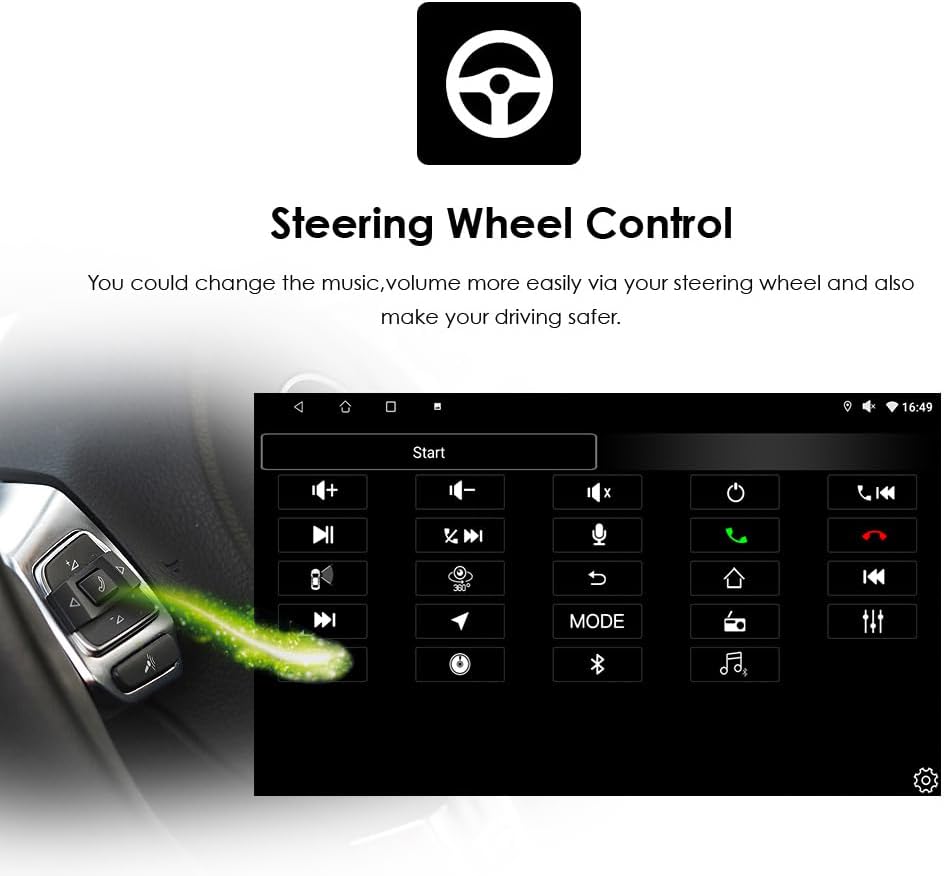
Image: The car radio screen displaying the steering wheel control configuration interface, with a visual representation of a steering wheel control button.
7. Outras características
- Pantalla dividida: Run two applications simultaneously on the screen, such as navigation and music playback.
- WLAN/4G: Connect to Wi-Fi via your phone's hotspot to access the internet, download apps from Google Play, and browse online.
- AM/FM Radio with RDS: Enjoy radio broadcasts with clear reception and RDS (Radio Data System) support.
- Soporte para cámaras de marcha atrás: The unit is prepared for connection to a backup camera (not included), displaying the view on the screen when reverse gear is engaged.
Mantemento
To ensure the longevity and optimal performance of your hizpo car radio, follow these maintenance guidelines:
- Limpeza da pantalla: Use a soft, lint-free cloth to gently wipe the touchscreen. Avoid abrasive cleaners or solvents that could damage the screen.
- Actualizacións de software: Periodically check for and install software updates to ensure the system runs efficiently and has the latest features and security patches.
- Evita temperaturas extremas: Do not expose the unit to extreme heat or cold, as this can affect its electronic components.
- Conexións por cable: Asegúrate de que todos os cables estean conectados de forma segura. As conexións soltas poden provocar problemas intermitentes.
Resolución de problemas
Se tes problemas coa radio do teu coche, consulta os seguintes problemas e solucións comúns:
| Problema | Causa posible | Solución |
|---|---|---|
| A unidade non se acende | Conexión eléctrica solta, fusible fundido, cableado incorrecto. | Check power cable connections. Inspect vehicle's fuse box and the unit's fuse. Verify wiring diagram. |
| Sen son | Volume too low, mute activated, incorrect speaker wiring, faulty RCA connections. | Increase volume. Check mute settings. Verify speaker and RCA cable connections. |
| Os controis do volante non funcionan | CANBUS not connected or configured, incompatible vehicle, initial setup issue. | Ensure CANBUS decoder is correctly installed and configured in settings. Contact support if issues persist after initial setup. |
| Touchscreen unresponsive or inaccurate | Software glitch, screen calibration needed, physical damage. | Restart the unit. Check for screen calibration options in settings. If physically damaged, contact support. |
| Sinal GPS perdido ou impreciso | GPS antenna not properly installed or obstructed, software issue. | Ensure GPS antenna is mounted in a clear location with an unobstructed view of the sky. Restart navigation app or unit. |
| Problemas de conexión Bluetooth | Bluetooth off, pairing mode not active, interference. | Ensure Bluetooth is enabled on both the unit and your phone. Put the unit in pairing mode. Delete previous pairings and try again. |
Se o problema persiste despois de intentar estas solucións, póñase en contacto co servizo de atención ao cliente para obter máis axuda.
Especificacións
| Característica | Detalle |
|---|---|
| Marca | hizpo |
| Nome do modelo | hizpo Android 14 Car Radio |
| Sistema Operativo | Android 14 |
| Tamaño da pantalla | 9 polgadas |
| Tipo de pantalla | Capacitive Touch Screen (FHD 1024*600) |
| Procesador | CPU de 4 núcleos |
| Memoria (RAM) | 2 GB |
| Almacenamento (ROM) | 64 GB |
| Conectividade | USB, Bluetooth, WLAN (Wi-Fi), SD Card Slot |
| Características especiais | Wireless Apple CarPlay, Wireless/Wired Android Auto, MirrorLink, Offline Maps, AM/FM Radio, RDS, DSP (30-band EQ), GPS, Steering Wheel Control (SWC), Backup Camera Support |
| Supported Navigation | GPS (supports online and offline maps) |
| Compoñentes incluídos | Screen, Frame, Power Cable, RCA Cable, USB Cable, etc. |
| Método de control | Pantalla táctil |
| Pilas incluídas | Non |
Información da garantía
Your hizpo car radio comes with a 1-year free parts warranty, covering manufacturing defects. This warranty does not cover artificial damage.
Additionally, we offer free returns and exchanges for any unsatisfactory purchase within 30 days of receipt.

Image: Hizpo's commitment to customer satisfaction, highlighting 30-day refund, 1-year warranty, and attentive after-sales services.
Atención ao cliente
For any questions, technical assistance, or warranty claims, please contact our customer support team. We provide pre-sales and after-sales technical support to ensure your satisfaction.
Información de contacto:
- Vendedor: i-Stereo EU
- Please refer to your purchase platform for direct contact methods (e.g., 'Contact Seller' option on Amazon).
Our team is dedicated to providing attentive after-sales services and is backed by a professional production team with over 10 years of experience in car audio innovation.