
1. Introdución
Grazas pola compraasing the Surge Wireless Pro Controller. This controller is designed for multi-platform compatibility, offering an enhanced gaming experience across various devices. Please read this manual carefully before use to ensure proper operation and to maximize your gaming enjoyment.
Características principais:
- Multi-Platform Compatibility: Nintendo Switch/Switch 2 (Note: No C Button/Audio Port support for Switch 2), Windows PC, Steam Deck, Android, and iOS devices.
- Hall Effect Thumb Sticks & Triggers: Provides precise control and reduces the likelihood of stick drift.
- Turbo Functionality: Offers three adjustable turbo levels for rapid-fire control.
- Vibration Feedback: Four adjustable vibration levels for customizable haptic feedback.
- Motion Controls: Supports motion sensing in compatible games.
- Console Wake Up: Ability to wake the Nintendo Switch console from sleep mode (Nintendo Switch only).
- Rechargeable Battery: Built-in 600mAh Li-polymer battery provides up to 10 hours of play.
- USB-C Charging: Includes a 1-meter USB-C charging cable.
2. Contido do paquete
- 1 x Surge Wireless Pro Controller
- 1 x cable de carga USB-C (1 metro)
- 1 x manual de instrucións
3. Deseño do controlador
Familiarize yourself with the buttons and features of your Surge Wireless Pro Controller.
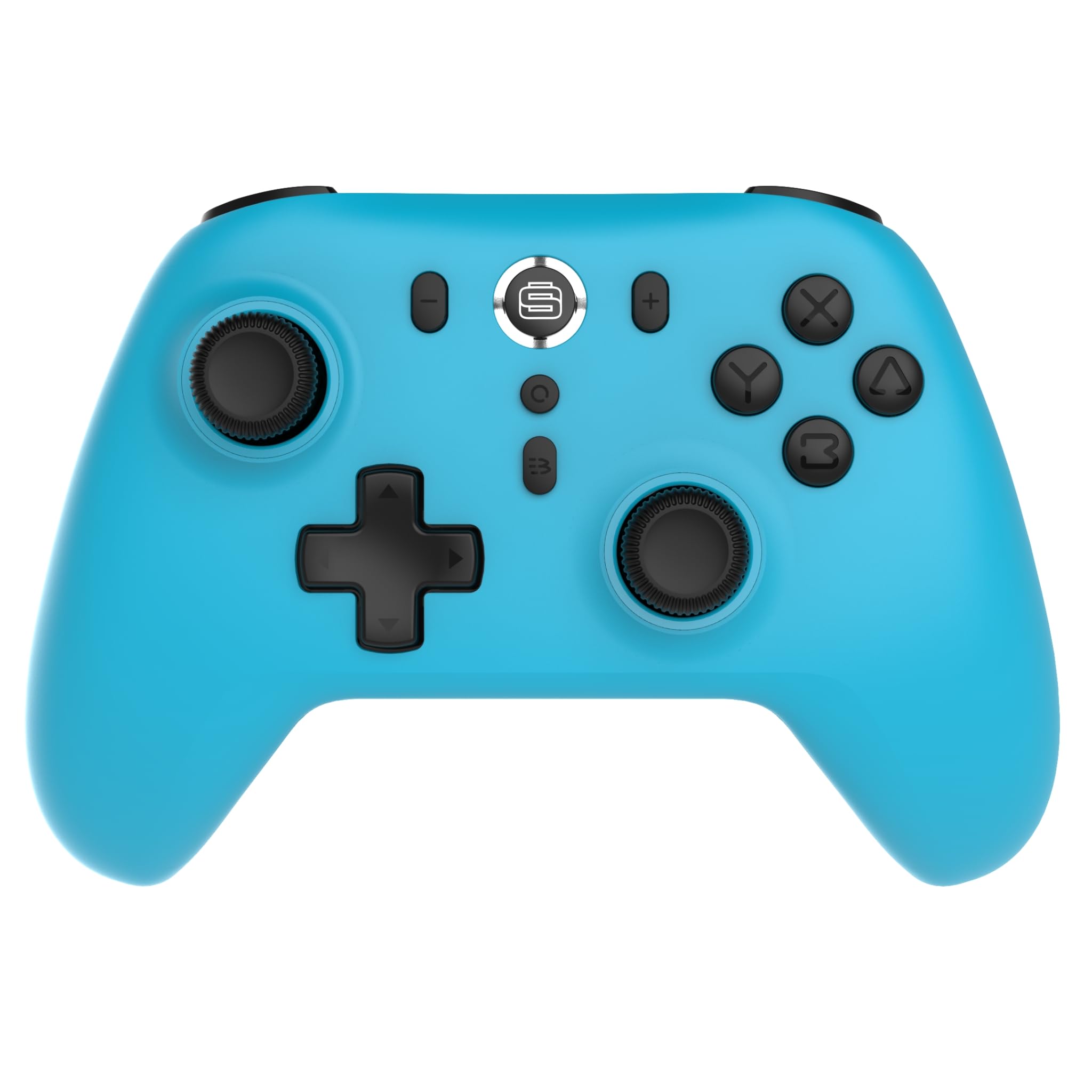
Fronte view of the Surge Wireless Pro Controller, showing the D-pad, left and right analog sticks, A/B/X/Y buttons, Home button, Capture button, Plus and Minus buttons, and the Surge logo button.

De volta view of the Surge Wireless Pro Controller, showing the textured grips and the charging port.
4. Configuración e emparellamento
The Surge Wireless Pro Controller supports multiple connection methods depending on your device.

This image displays the various platforms compatible with the Surge Wireless Pro Controller, including Nintendo Switch, Nintendo Switch 2, Windows PC, Android, and iOS.
4.1. Pairing with Nintendo Switch / Switch 2
- No menú HOME, seleccione Controladores > Cambiar Grip/Orden.
- No controlador, manteña premido o botón Botón de inicio for 3-5 seconds until the indicator lights begin to flash rapidly.
- Once paired, the indicator light(s) on the controller will remain solid.
- To wake the console from sleep mode, press the Botón de inicio no controlador.
4.2. Pairing with Windows PC
- Asegúrate de que o teu PC teña o Bluetooth activado.
- Ir a Bluetooth & other devices settings no teu PC.
- Seleccione Engade Bluetooth ou outro dispositivo > Bluetooth.
- No controlador, manteña premido o botón Botón de inicio for 3-5 seconds until the indicator lights begin to flash rapidly.
- Select the controller from the list of available devices on your PC.
- Once paired, the indicator light(s) on the controller will remain solid.
4.3. Pairing with Android / iOS Devices
- Activa o Bluetooth no teu dispositivo Android ou iOS.
- Go to the Bluetooth settings menu on your device.
- No controlador, manteña premido o botón Botón de inicio for 3-5 seconds until the indicator lights begin to flash rapidly.
- Select the controller from the list of available devices.
- Once paired, the indicator light(s) on the controller will remain solid.
5. Características operativas
5.1. Hall Effect Thumb Sticks & Triggers
The controller is equipped with Hall Effect technology for its thumb sticks and triggers. This technology uses magnets and electrical conductors to detect position, providing enhanced precision and significantly reducing the risk of stick drift over time compared to traditional potentiometers.

This image highlights the Hall Effect thumbsticks and triggers, emphasizing their role in providing precise inputs and preventing stick drift.
5.2. Función Turbo
The Turbo function allows for rapid, repeated input of a button press. This controller features 3 adjustable turbo levels.
- Para activar Turbo: Manteña premido o Botón Turbo, then press the desired action button (A/B/X/Y, L1/R1, L2/R2, D-pad directions). The button will now rapidly repeat its input when held.
- Para axustar a velocidade do turbo: With Turbo active on a button, press and hold the Botón Turbo e move o Joystick analóxico dereito arriba ou abaixo to cycle through the 3 speed levels.
- Para desactivar Turbo: Manteña premido o Botón Turbo, then press the same action button again.
5.3. Retroalimentación de vibración
The controller provides haptic feedback through vibration. You can choose from 4 vibration levels.
- To adjust Vibration level: Manteña premido o Botón de vibración (if present, or a designated button combination, refer to specific button mapping if available) and move the Left Analog Stick Up or Down to cycle through the 4 levels (Off, Low, Medium, High).
5.4. Controis de movemento
The controller supports motion controls for compatible games, particularly on Nintendo Switch/Switch 2. This allows for intuitive gameplay where physical movement of the controller translates into in-game actions.

This image visually represents the controller's advanced features, including Turbo Function, Motion Controls, and Rumble Vibration, enhancing the gaming experience.
6. Cargando
The controller is equipped with a built-in 600mAh Li-polymer battery, providing up to 10 hours of gameplay on a single charge.

This image shows the controller being held, emphasizing its internal rechargeable battery for extended play sessions.
- Connect the included USB-C charging cable to the controller's USB-C port.
- Connect the other end of the cable to a USB power source (e.g., console, PC, USB wall adapter).
- The indicator lights on the controller will show charging status (e.g., blinking while charging, solid when fully charged).
- Unha carga completa adoita tardar aproximadamente de 2 a 3 horas.
7. Mantemento
Para garantir a lonxevidade e o rendemento óptimo do seu controlador, siga estas pautas de mantemento:
- Limpeza: Use un pano suave e seco para limpar o controlador. Para a sucidade persistente, dóreo lixeiramenteampEnxágüe o pano con auga. Evite o uso de produtos químicos agresivos ou produtos de limpeza abrasivos.
- Almacenamento: Garde o controlador nun lugar fresco e seco, lonxe da luz solar directa e de temperaturas extremas.
- Evita gotas: Protexa o controlador de caídas e impactos, que poden danar os compoñentes internos.
- Exposición ao líquido: Do not expose the controller to water or other liquids.
8 Solución de problemas
If you encounter issues with your Surge Wireless Pro Controller, please refer to the following common solutions:
| Problema | Solución |
|---|---|
| O controlador non se acende. | Ensure the controller is charged. Connect it to a power source using the USB-C cable. |
| Controller does not pair. | Ensure the controller is in pairing mode (indicator lights flashing rapidly). Check that Bluetooth is enabled on your device. Try restarting both the controller and the device. |
| Retardo ou desconexión da entrada. | Ensure the controller is within range of the device. Reduce interference from other wireless devices. Ensure the controller is fully charged. |
| Os botóns ou as palancas non responden. | Try resetting the controller (if a reset button is available, typically a small pinhole on the back). Ensure no debris is obstructing the buttons. |
| A vibración non funciona. | Check the vibration settings on the controller and in the game. Ensure the vibration level is not set to 'Off'. |
9. Especificacións
| Característica | Detalle |
|---|---|
| Número de modelo | SG60095 |
| Tipo de batería | 1 Nonstandard Battery (Li-polymer, 600mAh) |
| Duración da batería | Ata 10 horas (aprox.) |
| Porto de carga | USB-C |
| Dimensións | 20.5 x 14 x 6.6 cm |
| Peso | 320 g |
| País de Orixe | China |
10. Garantía e soporte
For warranty information and customer support, please refer to the documentation included with your purchase or visit the official Surge websitio. Garda o comprobante de compra para reclamacións de garantía.