
1. Introdución
This manual provides detailed instructions for the installation, operation, and maintenance of your Aninerel 3600W Hybrid Solar Inverter Charger, Model SPI4836M80-300P. This advanced inverter is designed to efficiently convert 48Vdc solar power to 110Vac for various applications, featuring a built-in 80A MPPT controller and pure sine wave output. It supports both battery-less operation and compatibility with AGM and Lithium battery systems.
2. Características do produto
The Aninerel 3600W Hybrid Solar Inverter Charger offers a range of features for optimal performance and flexibility:
- Saída de alta potencia: 3600W continuous power output.
- Voltage Conversión: Converts 48Vdc to 110Vac.
- Controlador MPPT avanzado: Integrated 80A MPPT (Maximum Power Point Tracking) solar charge controller for efficient solar energy harvesting, supporting up to 500Vdc maximum PV input.
- Saída de onda sinusoidal pura: Ensures compatibility and safe operation for all types of home appliances.
- Compatibilidade da batería: Supports battery-less operation or connection with AGM, Lithium, and Flooded batteries. Includes Lithium Battery Communication (BMS).
- Conexión á rede: Designed for grid-tied systems with no feedback to the grid.
- Scalable Power: Capable of connecting up to six units in parallel for a total output of 21.6kW.
- Deseño versátil: Supports 120V/240V split-phase and 208V 3-phase configurations for various residential and commercial applications.
- Flexible Settings: Customizable charging profiles, alarms, and cut-off parameters.
- Monitorización sen fíos: Built-in Wi-Fi for remote monitoring of your system via a smartphone application.
- Conexión do xerador: Allows for integration with a generator for additional power input.
- Portos de comunicación: Includes RS485 for communication.

Figura 1: Máisview of Aninerel 3600W Hybrid Inverter features, including battery compatibility, grid connection, scalable power, versatile design, flexible settings, and wireless communication.
3. Produto rematadoview e Compoñentes
Familiarize yourself with the main components and connection ports of the inverter:

Figure 2: Detailed diagram showing the various components and ports of the Aninerel Hybrid Solar Inverter.
- Luz indicadora: Ofrece indicacións de estado.
- Pantalla LCD: Mostra os datos e a configuración operacionais.
- Teclado: Buttons for navigation and setting adjustments.
- Protector de sobrecarga: Safety mechanism against excessive current.
- Grounding Screw Hold: Point for system grounding.
- Porto de saída de CA: Connects to household loads.
- WiFi Port (Optional): For wireless monitoring module connection.
- Porto de entrada de CA: Connects to grid or generator AC power.
- Porto de comunicación RS485-2: For external communication.
- Porto de comunicación RS485-1: For external communication.
- Porto de comunicación USB: For data transfer or firmware updates.
- Ventilador de refrixeración: Disipación de calor durante o funcionamento.
- Interruptor basculante de acendido/apagado: Interruptor principal de alimentación para o inversor.
- Porto de contacto seco: Para sinais de control externos.
- Current Sharing Port (Parallel Module Only): Para operación en paralelo.
- Parallel Communication Port (Parallel Module Only): Para operación en paralelo.
- Porto da batería: Conéctase ao banco de baterías.
- Porto PV: Conéctase a paneis solares.
4. Configuración e instalación
Proper installation is crucial for the safe and efficient operation of your inverter. Please follow these steps carefully.
4.1. Guía de cableado
This video demonstrates the basic wiring procedure for the inverter, including connecting AC output and battery terminals.
Video 1: This video demonstrates general wiring steps for an Aninerel Solar Inverter, including connecting AC output and battery terminals. While the video features a 3KW 24V model, the wiring principles are similar for the 3600W 48Vdc inverter.
- Remove Port Cover: Carefully remove the bottom port cover of the inverter to access the wiring terminals.
- Conectar a saída de CA: Connect the Live (L) and Neutral (N) wires of your main AC output to the designated terminals.
- Conectar batería: Connect the positive and negative terminals of your battery bank to the corresponding battery ports on the inverter. Ensure correct polarity.
- Reinstall Port Cover: Once all connections are secure, reinstall the port cover.
Importante: Always ensure the inverter is powered off before making any electrical connections. Consult a qualified electrician if you are unsure about any wiring procedures.
4.2. Compatibilidade da batería
The inverter is compatible with various battery types, including Lead-Acid (AGM, GEL, Flooded) and Lithium batteries. For Lithium batteries, the inverter supports communication with Battery Management Systems (BMS) for optimized charging and discharge.

Figure 3: Illustration showing the inverter's compatibility with various 48V battery types, including GEL, FLD (Flooded), LI (Lithium), and SLD (Sealed Lead-Acid).
4.3. Conexión en paralelo
For increased power output, multiple inverters can be connected in parallel. The system supports up to six units for a maximum of 21.6kW power delivery in 120V residential systems. It also supports split-phase and 3-phase configurations.
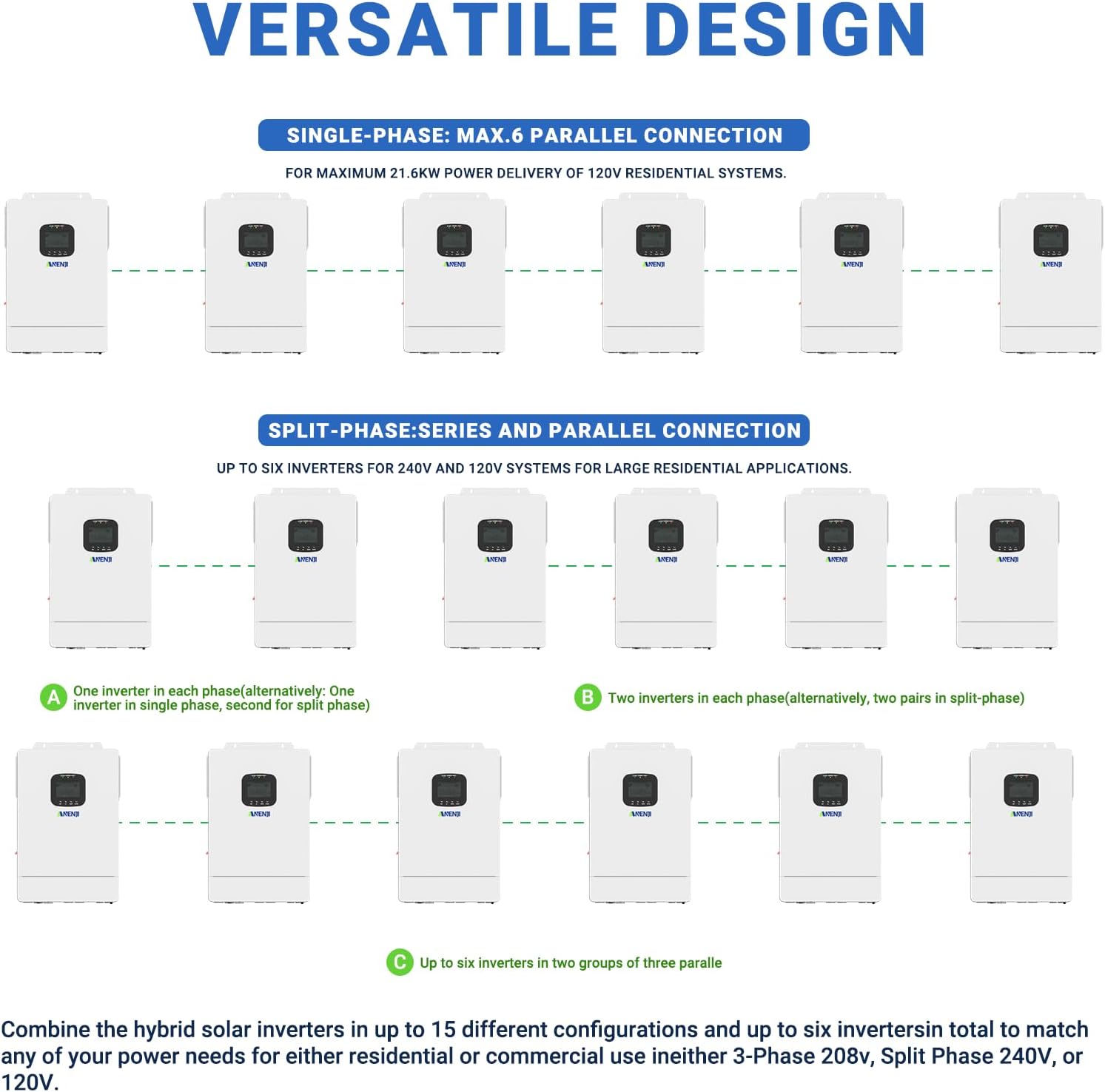
Figure 4: Diagrams illustrating single-phase and split-phase parallel connection options for the Aninerel Hybrid Inverter, showing how to combine multiple units for higher power output.
5. Instrucións de funcionamento
5.1. Charging Priority Settings
The inverter allows you to configure how the battery bank is charged from different power sources. You can select from the following priorities:
- Prioridade solar: The inverter prioritizes solar power for charging. AC input will only charge the battery when solar power is no longer available.
- Solar and AC Input: The inverter charges the battery bank from both solar and AC power simultaneously.
- Só solar: The inverter will only charge the battery bank from available solar power.
5.2. Load Priority Settings
Control how your appliances are powered to ensure continuous operation. Options include:
- Prioridade solar: The inverter uses solar power first. If solar is insufficient, it will compensate with AC input.
- AC Priority: The inverter uses AC input to power all loads. DC input is used only if AC input is unavailable.
- DC Priority: The inverter prioritizes inverting from solar first. If solar is not enough, it will convert from battery power and will only power loads from AC input once the low battery warning triggers.

Figure 5: Visual guide to setting charging and load priorities on the Aninerel Hybrid Inverter, explaining Solar Priority, Solar and AC Input, Solar Only, AC Priority, and DC Priority modes.
5.3. Wi-Fi Monitoring
The inverter includes a built-in Wi-Fi module, allowing you to monitor its status and performance remotely via a smartphone application. Registration may be required to use the monitoring features.
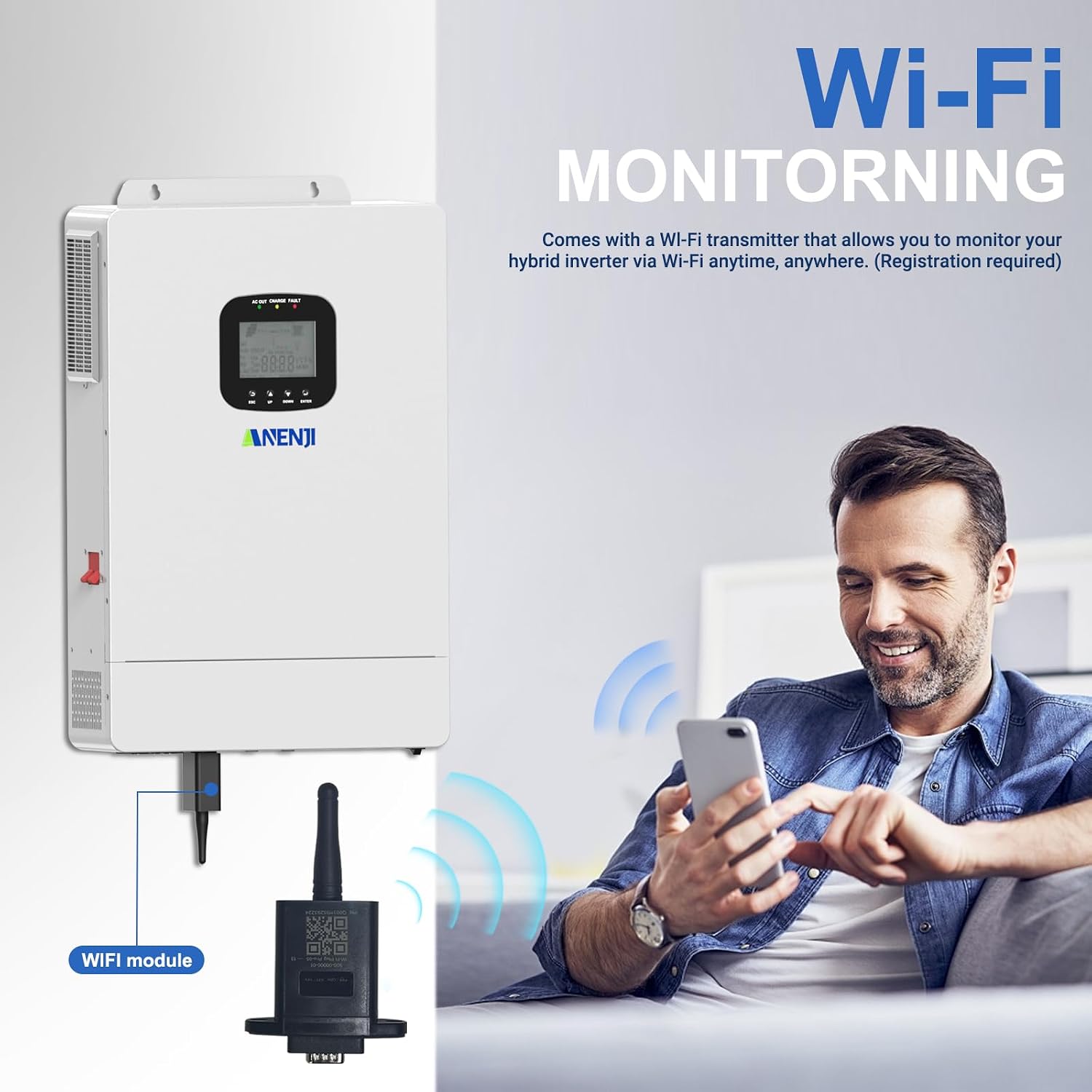
Figure 6: Diagram illustrating the Wi-Fi module connection and remote monitoring capabilities of the Aninerel Hybrid Inverter via a smartphone app.
6. Mantemento
Regular maintenance ensures the longevity and optimal performance of your Aninerel Hybrid Solar Inverter. Always disconnect all power sources (solar, battery, AC input) before performing any maintenance.
- Limpeza: Keep the inverter's exterior clean and free from dust and debris. Use a dry, soft cloth. Do not use liquid cleaners.
- Ventilación: Ensure that the cooling fans and ventilation openings are not blocked. Proper airflow is essential to prevent overheating.
- Conexións: Comprobe periodicamente todas as conexións eléctricas para comprobar se están ben apertadas e se presentan signos de corrosión. As conexións soltas poden provocar un baixo rendemento ou riscos para a seguridade.
- Inspección da batería: If using batteries, regularly inspect them for any signs of damage, leakage, or swelling. Ensure battery terminals are clean and secure.
- Actualizacións de firmware: Consulte o do fabricante website or the monitoring app for any available firmware updates to ensure your inverter has the latest features and bug fixes.
7 Solución de problemas
This section provides solutions to common issues you might encounter with your inverter. For problems not listed here, please contact customer support.
| Problema | Causa posible | Solución |
|---|---|---|
| O inversor non se acende | No DC input from battery/solar; Main switch off; Loose connections. | Comprobar vol. bateríatage and solar input. Ensure the ON/OFF switch is in the 'ON' position. Verify all wiring connections are secure. |
| Sen saída de CA | Sobrecarga; Curtocircuíto; Fallo do inversor; Disxuntor de saída de CA disparado. | Reduce load. Check for short circuits in the AC wiring. Reset AC output breaker. Check LCD for error codes. |
| Batería baixa voltage alarma | Insufficient charging; Excessive load; Battery degradation. | Check solar panel output and connections. Reduce load. Consider battery health and replacement if necessary. Adjust charging priority. |
| Alarma de sobrequecemento | Blocked ventilation; High ambient temperature; Excessive load. | Ensure clear airflow around the inverter. Reduce ambient temperature if possible. Decrease the connected load. |
| Wi-Fi monitoring not working | Wi-Fi module not connected; Network issues; App not configured. | Ensure the Wi-Fi module is securely connected. Check your local Wi-Fi network. Reconfigure the monitoring app settings. |
8. Especificacións
Key technical specifications for the Aninerel 3600W Hybrid Solar Inverter Charger:
| Atributo | Valor |
|---|---|
| Número de modelo | SPI4836M80-300P |
| Marca | Aninerel |
| Wattage | 3600 vatios |
| Voltage | 48 Volts (DC input) |
| Saída CA Voltage | 110 Vca |
| Corrente do controlador MPPT | 80A (integrado) |
| Vol. de entrada PV máxtage | 500 Vcc |
| Fonte de enerxía | Alimentado por enerxía solar e batería |
| Dimensións do produto (L x W x H) | 29.5L x 10W x 38.5H Centimetres (29.49 x 10.01 x 38.51 cm) |
| Peso do elemento | 9.18 kg |
| Fabricante | Shenzhen Anenji Energy Technology Co.,Ltd |
| ASIN | B0FLX9RHDG |
| UPC/GTIN | 757577193368 |
9. Accesorios do produto
The following accessories are typically included with your Aninerel 3600W Hybrid Solar Inverter Charger:
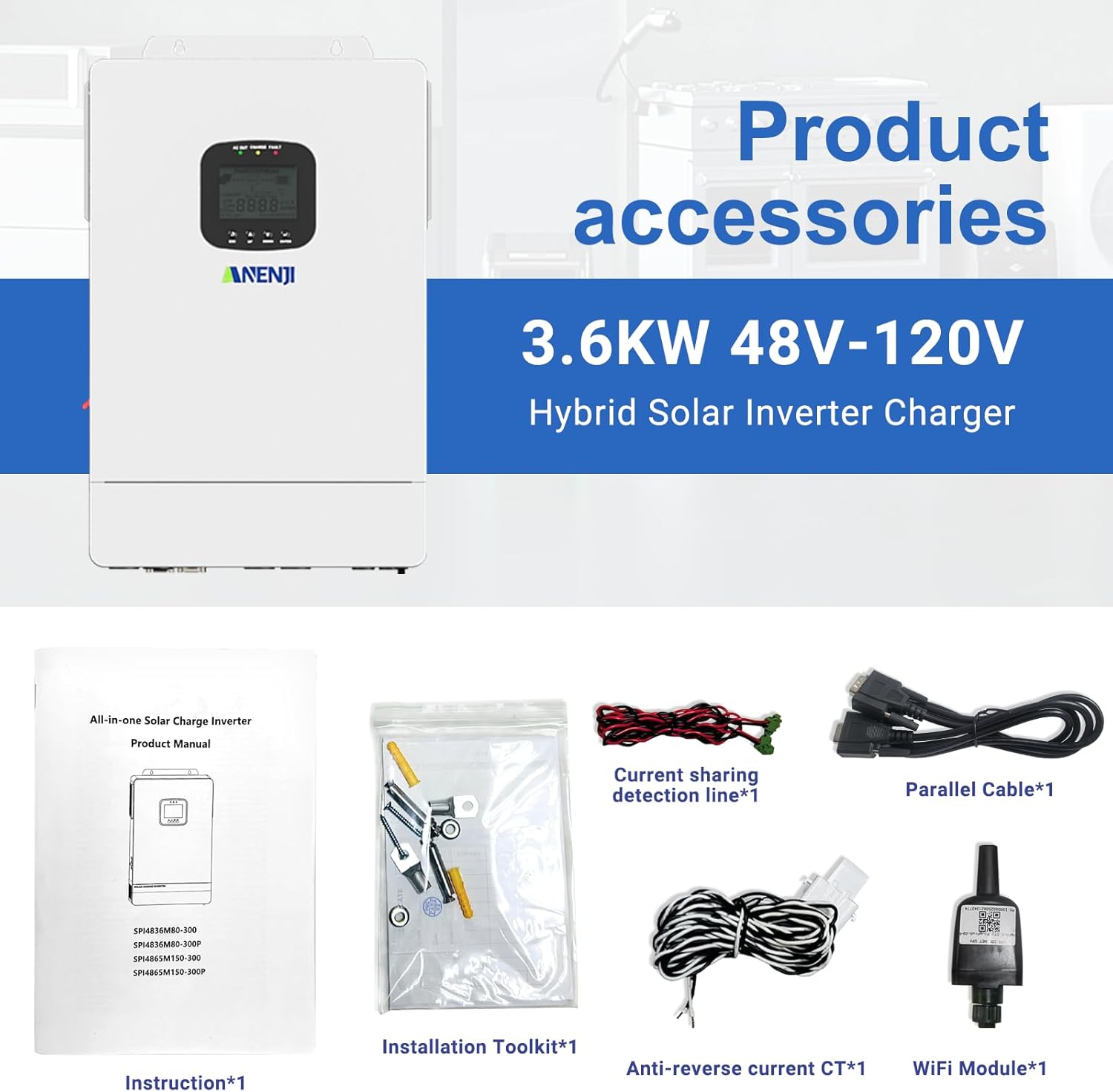
Figure 7: Image displaying the standard accessories included with the inverter, such as the instruction manual, installation toolkit, current sharing detection line, parallel cable, anti-reverse current CT, and WiFi module.
- Manual de instrucións (x1)
- Installation Toolkit (x1)
- Current Sharing Detection Line (x1)
- Parallel Cable (x1)
- Anti-reverse Current CT (x1)
- WiFi Module (x1)
10. Product Application Scenarios
The Aninerel 3600W Hybrid Solar Inverter is versatile and suitable for a wide range of applications, including:

Figura 8: Examples of where the Aninerel Hybrid Inverter can be used, such as Solar Home Systems, Solar RV Systems, Solar Street Light Systems, Solar Power Plant Systems, Solar Vessels (Boat) Systems, and Hybrid Energy Systems.
- Solar Home Systems
- Solar RV Systems
- Solar Street Light Systems
- Solar Power Plant Systems
- Solar Vessels (Boat) Systems
- Hybrid Energy Systems
11. Garantía e soporte
For warranty information, technical support, or service inquiries, please refer to the contact details provided with your purchase documentation or visit the official Aninerel websitio. Garde o recibo da compra como xustificante de compra para reclamacións de garantía.