
Introdución
Grazas pola compraasing the INGA Computer Speaker MZ-631. This USB plug-and-play desktop speaker is designed to provide enhanced stereo sound and deep bass for your computer, laptop, or Mac. Its convenient clamp design allows for easy attachment to most monitors, saving valuable desk space. This manual provides detailed instructions for setup, operation, maintenance, and troubleshooting to ensure optimal performance and longevity of your speaker.
Contido do paquete
Comprobe se o paquete contén os seguintes elementos:
- 1 x INGA Computer Speaker (Model MZ-631)
- 1 x Manual de usuario
- 1 x USB-C to USB-A Adapter (included for versatile connectivity)
Produto rematadoview
The INGA MZ-631 speaker features a compact design with an integrated clamping mechanism for monitor attachment. It delivers 10 Watts of stereo sound with enhanced bass through dual precision-tuned speakers and a passive radiator. Connectivity is simplified with a single USB cable for both audio and power.
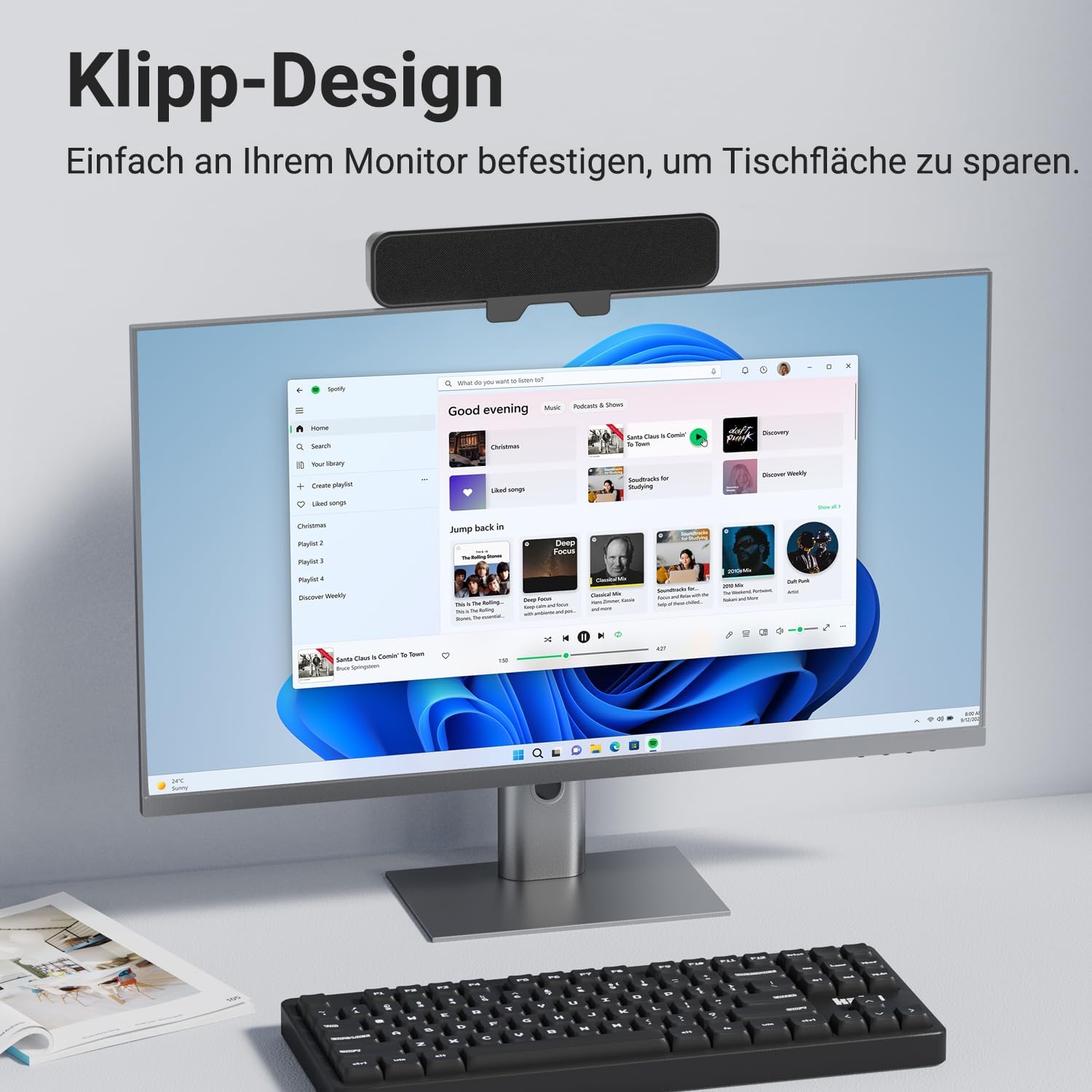
Imaxe: Fronte view of the INGA Computer Speaker MZ-631, shown clamped to the top of a computer monitor, displaying its sleek design and space-saving placement.
Características principais:
- Enhanced Stereo Sound with Rich Audio & Deep Bass: Dual speakers and a passive radiator provide balanced, powerful, and clear audio.
- Instant Plug & Play Setup: Single USB cable for audio and power, no additional drivers or software needed.
- Secure Clip System: Enhanced clamping mechanism fits most monitors up to 1.5 inches thick, with protective silicone pads. (Note: Not compatible with curved-back monitors.)
- Multi-Function Controls: Top-mounted buttons for Volume Down, Mute, Volume Up, and Power.
- Compatibilidade universal: Works with PC, Mac, Laptops, and other devices via USB.
Instrucións de configuración
1. Connecting the Speaker
- Locate the USB cable attached to the INGA Computer Speaker.
- Plug the USB connector into an available USB port on your computer (PC or Mac). If your computer only has USB-C ports, use the included USB-C to USB-A adapter.
- The speaker will automatically power on and be recognized by your operating system as an audio output device.

Image: The INGA Computer Speaker connected via its USB cable to a laptop, illustrating the plug-and-play setup. The control buttons (Volume+, Mute, Volume-, Power) are visible on top.
2. Audio Output Selection
After connecting, ensure your computer's audio output is set to the INGA speaker.
- Windows: Right-click the speaker icon in the taskbar, select "Sound settings" or "Playback devices," and choose "INGA Speaker" as the default output device.
- macOS: Go to System Settings > Sound > Output, and select "INGA Speaker."
Installation (Monitor Mounting)
The INGA MZ-631 speaker is designed for easy and secure attachment to most flat-panel monitors.
- Abre o cl con coidadoamping mechanism on the back of the speaker.
- Position the speaker on top of your monitor, ensuring the front grille faces you.
- Axuste o clamp so that it securely grips the top edge of your monitor. The protective silicone pads will prevent scratches and ensure a firm hold.
- Ensure the speaker is stable and does not obstruct your monitor's view or ventilation.
Nota importante: This speaker is not compatible with curved-back monitors due to its mounting requirements. The clamping mechanism is designed for monitors up to 1.5 inches (approximately 3.8 cm) thick.

Imaxe: Unha detallada view of the speaker's clamping mechanism, showing how it securely attaches to the top edge of a monitor, highlighting the 1-inch (2.54 cm) thickness capacity.
Alternative Placement: Desktop
If monitor mounting is not suitable, the speaker can also be placed directly on your desk in front of your monitor. Ensure it is on a stable, flat surface.

Image: Demonstrates various placement options for the speaker, including clamping to the top or bottom of a monitor, or resting on a desk surface.
Instrucións de funcionamento
The INGA MZ-631 speaker features intuitive controls located on the top panel.
Imaxe: Primeiro plano view of the speaker's top panel, clearly showing the four control buttons: Volume Down, Mute, Volume Up, and Power.
- Botón de encendido (⏻): Preme para activar ou desactivar o altofalante.
- Botón para subir o volume (+): Prema para aumentar o volume.
- Botón para baixar o volume (-): Prema para baixar o volume.
- Botón de silencio (🔇): Press to instantly mute or unmute the audio.
Experiencia Audio
The speaker is engineered to deliver a rich audio experience with clear dialogues and powerful bass, suitable for various applications including music, movies, and online meetings.

Image: An internal diagram of the speaker, highlighting its dual speaker drivers and passive radiator, which contribute to its 10W audio output and enhanced sound quality.
Mantemento
To ensure the longevity and optimal performance of your INGA Computer Speaker, follow these simple maintenance guidelines:
- Limpeza: Use a soft, dry cloth to wipe the speaker's surface. Do not use liquid cleaners, aerosols, or solvents, as these may damage the finish or internal components.
- Almacenamento: Cando non o use durante períodos prolongados, garde o altofalante nun lugar fresco e seco, lonxe da luz solar directa e de temperaturas extremas.
- Manexo: Evite deixar caer o altofalante ou sometelo a impactos fortes.
- Ambiente: Keep the speaker away from water, moisture, and excessive dust.
Resolución de problemas
If you encounter issues with your INGA Computer Speaker, please refer to the following common problems and solutions:
| Problema | Causa posible | Solución |
|---|---|---|
| Non hai son do altofalante. |
|
|
| O son está distorsionado ou pouco claro. |
|
|
| Speaker does not clamp securely to monitor. |
|
|
If the problem persists after trying these solutions, please contact INGA Customer Service for further assistance.
Especificacións
| Característica | Detalle |
|---|---|
| Nome do modelo | MZ-631 |
| Marca | INGA |
| Tipo de altofalante | Supervisar Speaker |
| Tecnoloxía de conectividade | USB |
| Modo de saída de audio | Estéreo |
| Configuración da canle de son envolvente | 2.0 |
| Potencia de saída máxima do altofalante | 10 vatios |
| Resposta en frecuencia | 20000 kHz |
| Vol. De entradatage | 5 voltios (DC) |
| Fonte de enerxía | Eléctrico con cable (USB) |
| Tipo de montaxe | Clip |
| Material | Plástico |
| Cor | Negro |
| Dimensións do produto | 8" de profundidade x 2" de ancho x 3" de alto (aprox. 20.3 cm de profundidade x 5.1 cm de ancho x 7.6 cm de alto) |
| Peso do elemento | 12.3 onzas (aprox. 348 gramos) |
| Método de control | Pulsador |
| Dispositivos compatibles | Desktop, Laptop, MAC, PC, Smartphone, Tablet |
| Características especiais | Bass Boost, Clip-on, Hi Res Audio, Portable, USB-C to USB Port |
Garantía e Soporte
Información da garantía
The INGA Computer Speaker MZ-631 comes with a Limited Warranty. Please refer to the warranty card included in your package for specific terms and conditions.
Atención ao cliente
INGA is committed to providing lifetime technical support for its products. If you have any questions, concerns, or require assistance with your speaker, please do not hesitate to contact our Customer Service team. We aim to resolve all inquiries within 24 hours.
Información de contacto:
Please visit the official INGA websitio web ou consulte os datos de contacto que aparecen na embalaxe do produto ou na tarxeta de garantía.