
Introdución
Thank you for choosing the Miroddi RGB Mouse Pad with Foldable Phone Stand and Wireless Charger. This product is designed to enhance your desk setup with a large gaming surface, customizable RGB lighting, and convenient wireless charging capabilities for compatible devices. Please read this manual carefully to ensure proper use and optimal performance.
Contido do paquete
- 1x Miroddi RGB Wireless Charging Mouse Pad
- 1x USB-C to USB-C Cable (PD Adapter Not Included)
- 1 x Manual de usuario
Instrucións de configuración
- Desembalar a alfombrilla do rato: Carefully remove the mouse pad and all accessories from the packaging.
- Coloca a alfombrilla do rato: Place the mouse pad on a flat, stable surface. Ensure there is enough space for your keyboard, mouse, and other peripherals.
- Conectar enerxía: Connect the provided USB-C to USB-C cable to the mouse pad's Type-C interface. Connect the other end of the cable to a compatible power adapter (PD adapter recommended, not included) or a USB port on your computer. For optimal wireless charging performance, a power adapter with sufficient wattage é recomendable.
- Encendido inicial: Once connected, the RGB lighting should illuminate, indicating the device is powered on.
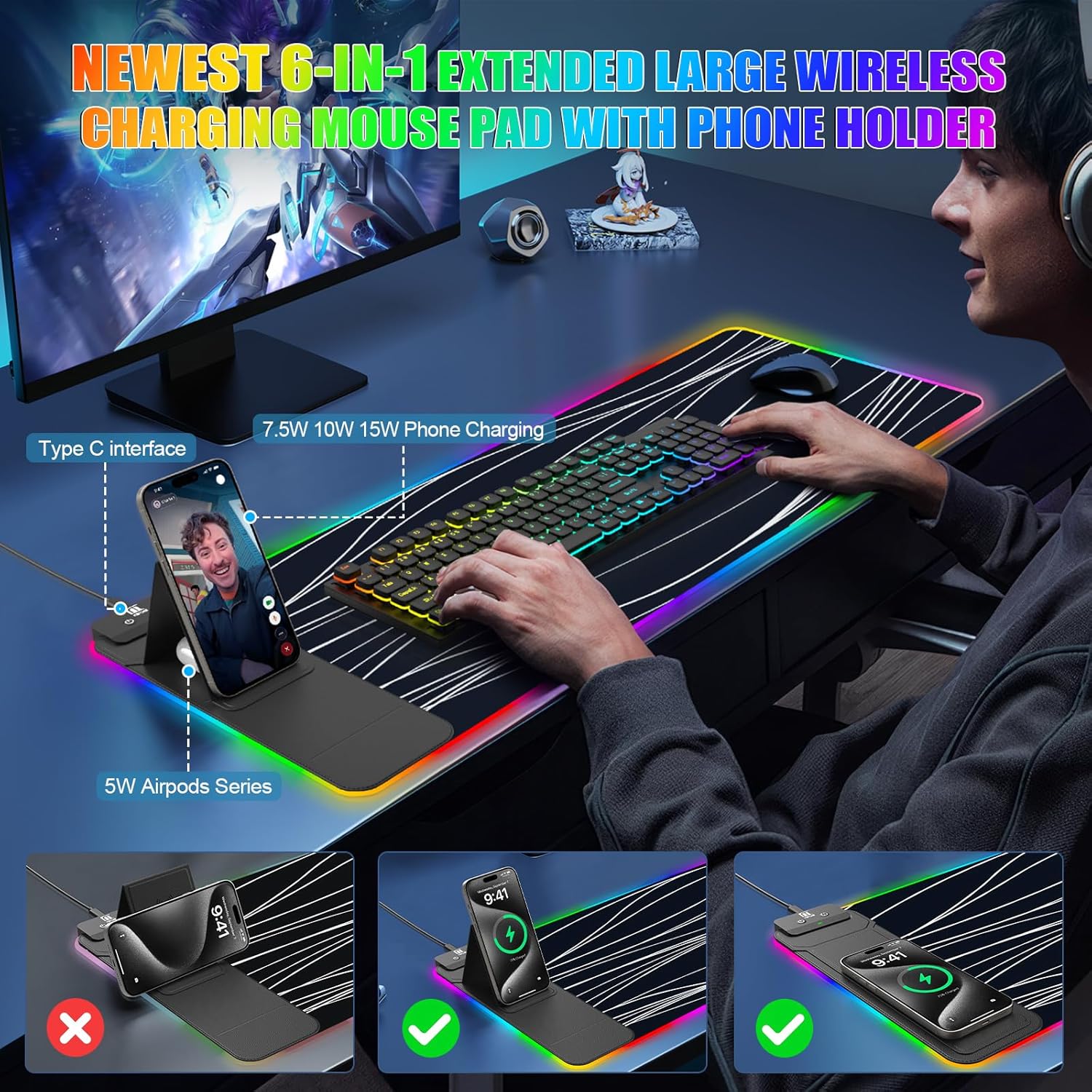
Image: The mouse pad set up on a desk with a phone charging on the foldable stand and a keyboard and mouse in place.
Instrucións de funcionamento
Control de iluminación RGB
The mouse pad features 11 vibrant RGB colors and 5 dynamic lighting modes. Control is managed via a touch-sensitive button located on the charging module.
- Encendido: One touch to turn on the RGB lighting.
- Apagado: Long press the button to turn off the RGB lighting. The device has a memory function that will recall the last lighting setting when powered on again.
- Cambiar as cores: Short press the button to cycle through the 11 available RGB colors.
- Cambiar modos: Double-click the button to switch between the 5 dynamic lighting modes: Static, Breathing, Color Cycle, Wave, and OFF.

Image: A diagram illustrating the touch control functions for the RGB lighting, including single touch for power, long press for off, short press for color change, and double press for mode change.
Funcionalidade de carga sen fíos
The mouse pad includes two Qi-certified wireless charging spots, providing up to 15W/5W max output. These spots are compatible with a wide range of Qi-enabled devices.
- Charging Placement: Place your Qi-enabled smartphone on the 15W charging spot (larger area) or your AirPods (with wireless charging case) on the 5W charging spot (smaller area, located below the phone stand).
- Luz indicadora: The indicator light next to the charging area provides status:
- Verde: Cargando
- Azul: Modo de espera
- Azul intermitente: Placed-error, Over-temperature, or Foreign Object Detection (FOD) triggered.
- Compatibilidade: Compatible with iPhone 11/12/13/14/15/16/17, Samsung Galaxy S/Note Series, Google Pixel, AirPods Pro/2/3 (wireless charging case), and other Qi-enabled devices.
- Espesor da caixa: For optimal charging, ensure your phone case thickness is less than 8mm. Remove any metal cases, magnets, grips, stands, or credit cards from your phone case before charging to prevent interference or damage.
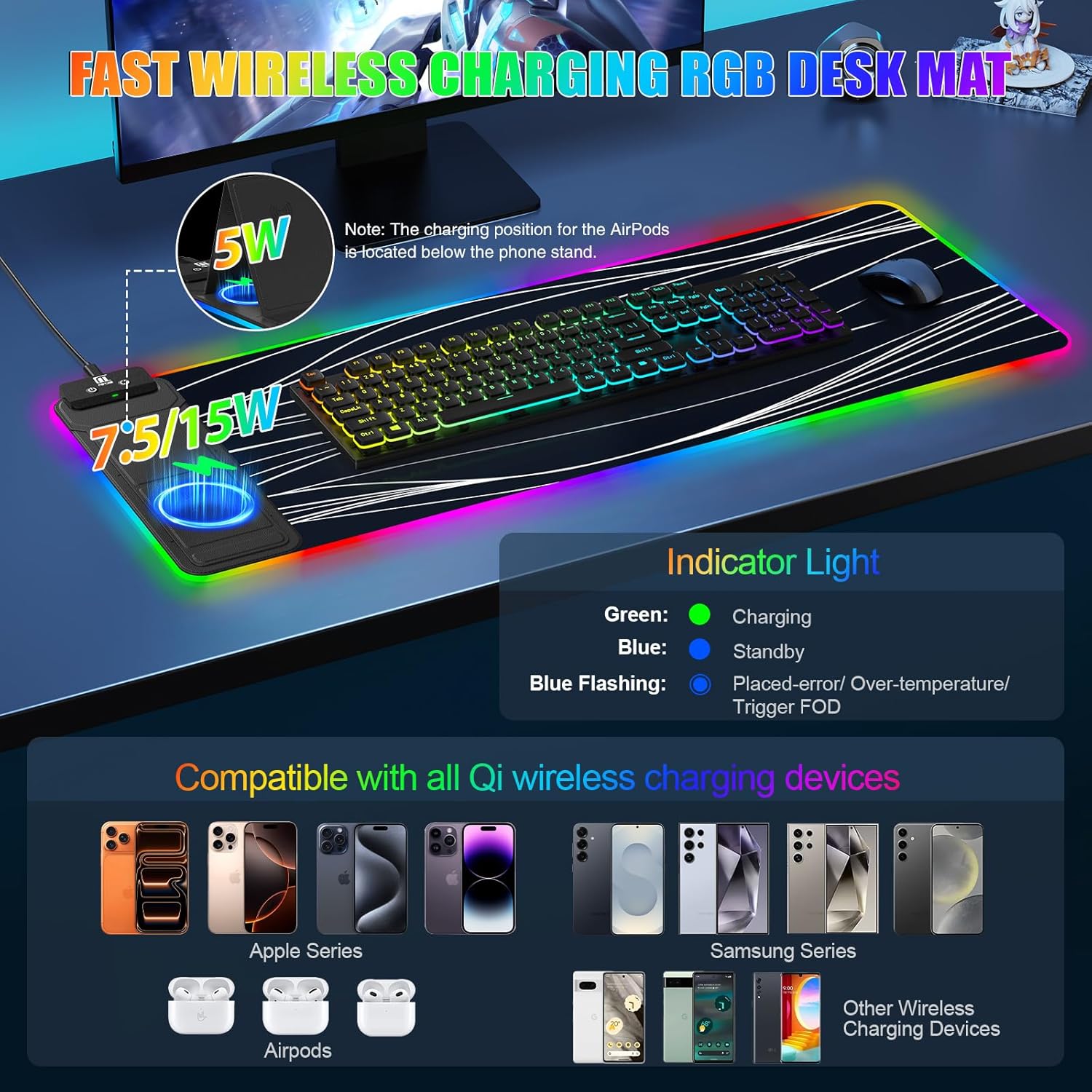
Image: The mouse pad highlighting the 15W and 5W wireless charging areas, along with a guide for the indicator light colors (Green for charging, Blue for standby, Blue flashing for error).
Foldable Phone Stand
The leather-clad phone charging area doubles as an adjustable phone stand.
- Adjusting the Stand: Gently lift the phone charging area to adjust the viewing angle from 0° to 70°.
- Uso: Use the stand for hands-free video calls, viewing tutorials, or monitoring charts while your device charges.
Mantemento
To ensure the longevity and performance of your Miroddi RGB Mouse Pad, follow these maintenance guidelines:
- Limpeza da superficie: The micro-textured PC surface is waterproof and easy to clean. For spills or dirt, gently wipe with a damp pano. Evite produtos químicos agresivos ou produtos de limpeza abrasivos.
- Eliminación de po: Regularly wipe the surface with a soft, dry cloth to remove dust and debris.
- Almacenamento: When not in use for extended periods, store the mouse pad flat or rolled loosely to prevent creases or damage to the RGB strip.
- Evita temperaturas extremas: Do not expose the mouse pad to extreme heat or cold, as this may affect its materials and electronic components.

Image: A hand wiping the surface of the mouse pad, demonstrating its waterproof and easy-to-clean properties.
Resolución de problemas
| Problema | Causa posible | Solución |
|---|---|---|
| A iluminación RGB non se acende. | No power, loose connection, or device malfunction. | Ensure the USB-C cable is securely connected to both the mouse pad and the power source. Try a different USB port or power adapter. |
| A carga sen fíos é lenta ou non funciona. | Phone not properly aligned, phone case too thick, foreign object detected, or insufficient power input. | Reposition your device on the charging spot. Remove phone case or any metal/magnetic objects. Ensure your power adapter provides sufficient wattage (PD adapter recommended). Check indicator light for blue flashing. |
| Mouse pad slides on desk. | Surface is not clean or non-slip base is compromised. | Ensure the desk surface is clean and dry. The mouse pad features an anti-slip rubber base for stability. |
| RGB colors are inconsistent or dim. | Power issue or damage to the RGB strip. | Ensure adequate power supply. If the issue persists, contact customer support. |
Especificacións
- Dimensións: 31.5"L x 11.81"W (80cm x 30cm)
- Espesor: 4 mm
- Material: Faux Leather, Rubber, Superior Micro-Weave Cloth
- Saída de carga sen fíos: 15W/5W Max (Qi-certified)
- Iluminación RGB: 11 Colors, 5 Modes (Static, Breathing, Color Cycle, Wave, OFF)
- Características especiais: Foldable Phone Stand (0°-70° adjustable), Waterproof Surface, Anti-Fray Edges, Non-Slip Rubber Base
- Peso: 0.5 quilogramos

Image: The mouse pad displaying its dimensions (31.5 inches by 11.81 inches) and a visual representation of the 5 RGB lighting modes.
Garantía e Soporte
This Miroddi RGB Mouse Pad comes with a 1 ano de garantía desde a data de compra. Esta garantía cobre defectos de fabricación e man de obra en condicións de uso normal.
For warranty claims, technical support, or any questions regarding your product, please contact Miroddi customer service through the retailer where you purchased the item or visit the official Miroddi websitio para información de contacto.
Garde o comprobante de compra para validar a garantía.