
1. Rematadoview
The GetPairr Vista 11-inch Portable Display Audio Android Navigation System is designed to enhance your in-car entertainment and navigation experience. Featuring a built-in Android system, it supports wireless connectivity for popular smartphone integration platforms and offers versatile audio output options.
Características principais:
- Integrated Android System: Equipped with a 4-core CPU, 2GB RAM, and 32GB ROM, allowing direct access to streaming applications like YouTube, Netflix, and Spotify via Wi-Fi tethering.
- CarPlay sen fíos/Android Auto: Seamlessly connect your smartphone via Bluetooth for wireless access to navigation, music, messaging, and calls, eliminating cable clutter.
- Smart Split Screen (PIP Function): The 11-inch wide display supports a 5:5 split-screen ratio, enabling simultaneous viewing of navigation and other Android applications.
- Conectividade Bluetooth dual: Allows simultaneous connection to your smartphone for input and your car's audio system for wireless output to car speakers.
- Pantalla de alta resolución: An 11-inch screen with 1920x720 resolution provides clear visuals for maps, videos, and applications, improving visibility and operational ease while driving.

2. Configuración
2.1 Contido do paquete
Verifica que todos os elementos estean presentes no paquete:
- Portable Display Audio Main Unit
- Stand
- Cable AUX
- Cigarette Lighter Plug Adapter
- Manual de usuario (este documento)

2.2 Instalación
- Montaxe da unidade: Attach the provided stand to the main unit. Secure the stand to your dashboard using the 3M tape. Ensure the unit is placed in a location that does not obstruct your view or interfere with driving.
- Conexión de alimentación: Connect the cigarette lighter plug adapter to the main unit's 5V power cable. Insert the cigarette lighter plug into your vehicle's accessory socket. The unit supports both 12V and 24V vehicle systems.
- Encendido inicial: Once connected, the unit will power on automatically when the vehicle's ignition is turned on.


3. Instrucións de funcionamento
3.1 Android System and App Usage
The GetPairr Vista unit runs on an Android operating system, allowing you to install and use various applications.
- Conexión Wi-Fi: To access online services and download apps, connect the unit to a Wi-Fi network. This can be done via your smartphone's tethering function or an in-car Wi-Fi hotspot.
- Instalación da aplicación: Use the pre-installed app store or other compatible methods to download and install applications like YouTube, Netflix, Spotify, etc.
- Navegación: Utilize navigation apps directly on the unit or through connected CarPlay/Android Auto.

3.2 Conexión sen fíos de CarPlay/Android Auto
Connect your smartphone wirelessly to access CarPlay or Android Auto features.
- Emparejamento: On your smartphone, enable Bluetooth and search for the GetPairr Vista unit. Pair the devices.
- Conexión automática: Once paired, CarPlay or Android Auto will automatically connect when the unit powers on.
- Funcionalidade: Access your phone's navigation, music, messages, and make calls directly from the unit's display.
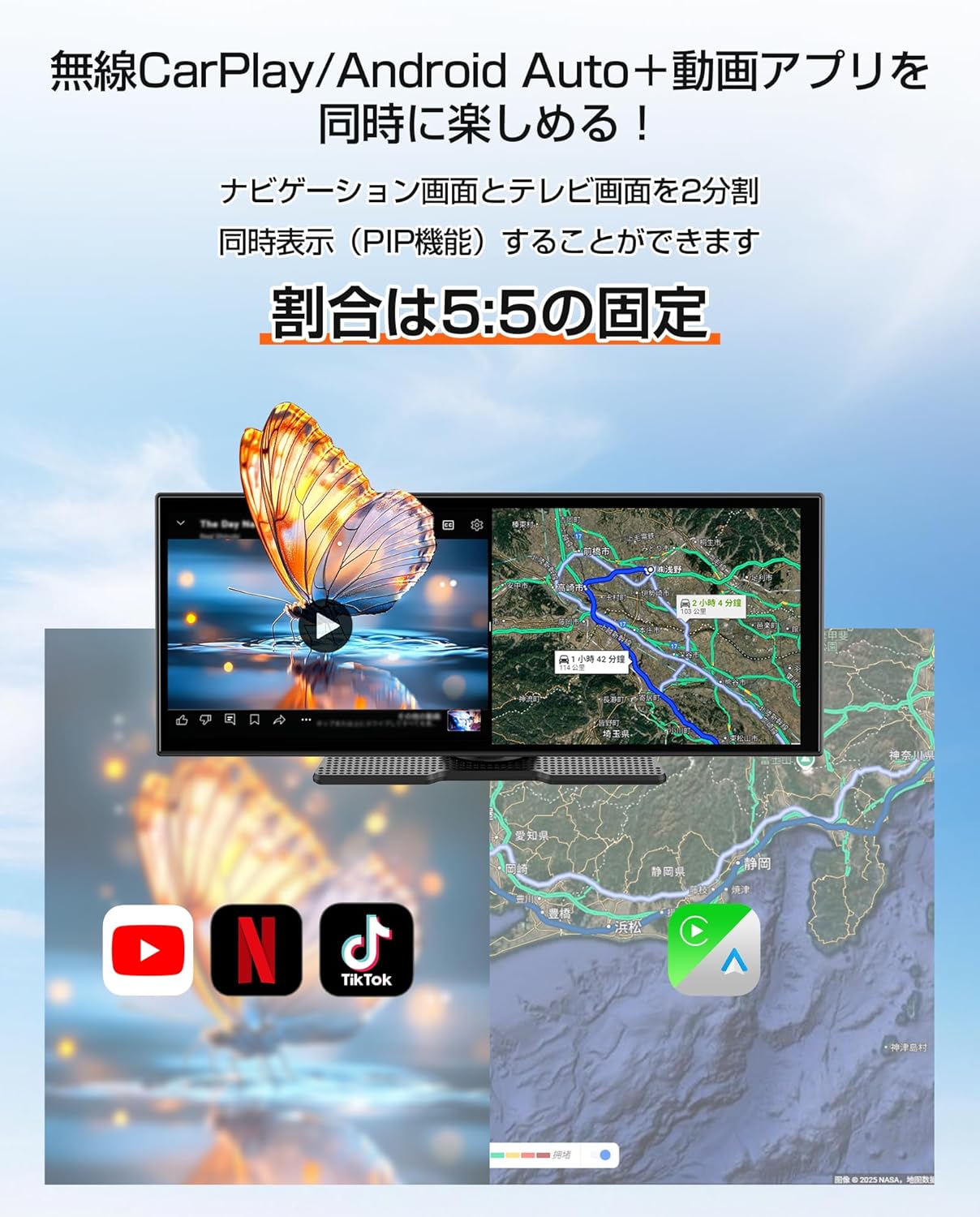
3.3 Split Screen Function (PIP)
The 11-inch display supports a 5:5 split-screen mode, allowing two applications to run side-by-side.
- Activación: Refer to the on-screen interface for activating split-screen mode.
- Uso: Por example, display navigation on one half (via CarPlay/Android Auto) and a video streaming app (via the built-in Android system) on the other.

3.4 Opcións de saída de audio
The unit offers multiple ways to output audio to your car's speakers.
- Bluetooth dobre: The unit can receive audio from your smartphone via Bluetooth and transmit it to your car's audio system (if it supports Bluetooth audio input).
- Cable AUX: Connect the provided AUX cable from the unit to your car's AUX input for a wired audio connection.
- Transmisor FM: The unit can transmit audio via an FM frequency, which you can tune into on your car's radio.
- Altavoz incorporado: The unit has a small built-in speaker for basic audio output. For optimal sound quality, connecting to your car's audio system is recommended.

4. Mantemento
4.1 Limpeza
To maintain the display's clarity and unit's appearance:
- Limpe a pantalla con suavidade cun pano suave e sen pelusa. Para manchas difíciles, d lixeiramenteampLimpe o pano con auga ou cun limpador de pantallas.
- Avoid using abrasive cleaners, solvents, or aerosol sprays directly on the unit.
- Manteña os portos libres de po e residuos.
4.2 Almacenamento
Cando non se use durante períodos prolongados:
- Desconecte a unidade da fonte de alimentación.
- Garde a unidade nun lugar fresco e seco, lonxe da luz solar directa e de temperaturas extremas.
5 Solución de problemas
If you encounter issues with your GetPairr Vista unit, refer to the following common solutions:
- Sen enerxía: Ensure the cigarette lighter adapter is securely plugged into both the unit and the vehicle's accessory socket. Check if the vehicle's accessory socket is receiving power.
- Sen son: Verify the audio output method selected (Bluetooth, AUX, FM). Ensure your car's audio system is set to the correct input source. Adjust volume on both the unit and your car's audio system.
- CarPlay/Android Auto non conecta: Ensure Bluetooth is enabled on your smartphone and the unit. Try unpairing and re-pairing the devices. Check for any software updates for your smartphone or the unit.
- Slow Performance/App Freezing: Close unused applications. Ensure a stable Wi-Fi connection for online activities. Restart the unit if necessary.
- Pantalla sen resposta: Perform a soft reset by holding the power button (if available) or disconnecting and reconnecting power.
Se os problemas persisten, póñase en contacto co servizo de atención ao cliente.
6. Especificacións
| Característica | Detalle |
|---|---|
| Tamaño da pantalla | 11 polgadas |
| Tipo de visualización | LCD |
| Resolución | 1920x720 |
| Sistema Operativo | Android, Wireless Apple CarPlay, Wireless Android Auto |
| CPU | 4 núcleos |
| RAM | 2 GB |
| ROM | 32 GB |
| Conectividade | Bluetooth, USB, Wi-Fi |
| Modo de saída de audio | Estéreo |
| Tipo de montaxe | Cinta 3M |
| Dimensións do produto | 26 cm (L) x 2.7 cm (W) x 10.5 cm (H) |
| Peso | 1 kg |
| Entrada de enerxía | DC 12V/24V (via cigarette lighter adapter) |
| Compoñentes incluídos | AUX Cable, Cigarette Plug Adapter, Portable Display Audio Main Unit, User Manual |
7. Garantía e soporte
7.1 Información da garantía
The GetPairr Vista unit comes with a 1 anos de garantía do fabricante from the date of purchase. In the event of any defects or malfunctions, the manufacturer offers exchange or refund services.
7.2 Atención ao cliente
For inquiries or support, please contact us via the official LINE account: @getpairr.