
1. Introdución
Thank you for choosing the T-Wolf T61 60% Wired Mechanical Gaming Keyboard. This manual provides detailed instructions for setting up, operating, and maintaining your keyboard to ensure optimal performance and longevity. Please read this manual carefully before using the product.
2. Produto rematadoview
2.1 Características principais
- Interruptores mecánicos: Delivers precise tactile feedback and long-lasting performance.
- Conexión USB con cable: Stable USB 2.0 plug-and-play interface; no drivers required.
- Deseño compacto ao 60 %: Functional design that saves space while maintaining key usability.
- Multi-Key Rollover: Supports simultaneous key presses without input errors, ensuring precise performance during intense typing or gaming sessions.
- Retroiluminación RGB: Customizable vibrant RGB backlighting for enhanced aesthetics.
- Funcionamento con baixo ruído: Moderate sound level suitable for various environments.
- Deseño resistente a derrames: Helps protect against light spills (not waterproof).
2.2 Contido do paquete
- 1 x T-Wolf T61 60% Wired Mechanical Gaming Keyboard
- 1 x Manual de usuario (este documento)
2.3 Diagrama do teclado
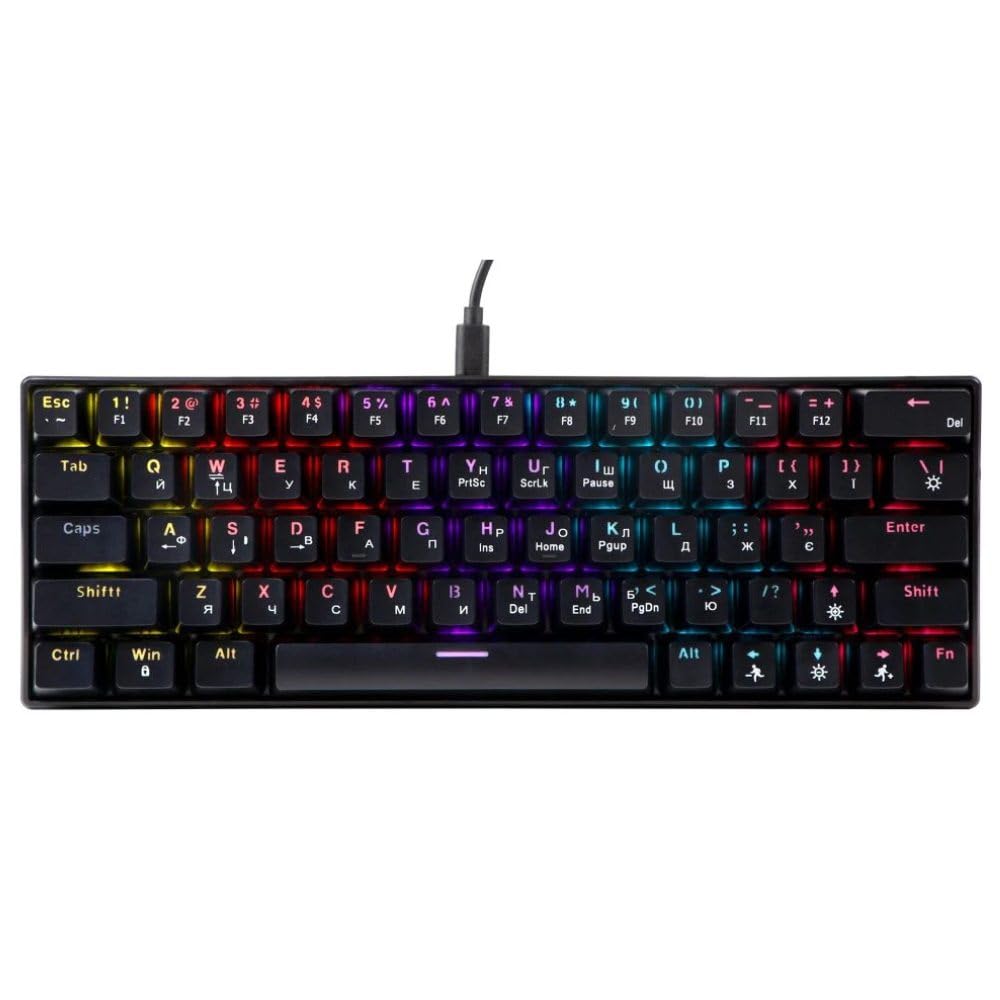
An image showing the T-Wolf T61 60% Wired Mechanical Gaming Keyboard, highlighting its compact layout and design.
3. Configuración
- Descomprimir o teclado: Retire con coidado o teclado e todos os accesorios da embalaxe.
- Conéctate ao teu dispositivo: Locate an available USB port on your computer (PC, laptop) or gaming console. Insert the USB connector of the T-Wolf T61 keyboard into the USB port.
- Instalación automática do controlador: The keyboard is plug-and-play. Your operating system will automatically detect and install the necessary drivers. This process may take a few moments.
- Listo para usar: Unha vez instalados os controladores, o teclado estará listo para o seu uso inmediato.
4. Instrucións de funcionamento
The T-Wolf T61 keyboard functions as a standard QWERTY layout keyboard. Its 60% compact design means some functions are accessed via key combinations.
4.1 Control da retroiluminación RGB
The keyboard features customizable RGB backlighting. Specific key combinations are used to change lighting modes and effects. Refer to the keyboard's function layer markings for exact controls, typically involving the Fn key combined with other keys (e.g., Fn + \| for mode changes, Fn + [{ or Fn + ]} for brightness/speed adjustments).
- Cambio de modos de iluminación: Preme Fn + \| to cycle through various RGB lighting effects.
- Axuste do brillo: Use Fn + [{ para diminuír o brillo e Fn + ]} para aumentar o brillo.
- Velocidade de axuste: Use Fn + ;: para reducir a velocidade do efecto e Fn + '" para aumentar a velocidade do efecto.
4.2 Multi-Key Rollover
The T61 keyboard supports multi-key rollover, allowing multiple keys to be pressed simultaneously without ghosting or missed inputs. This feature is particularly beneficial for fast typing and complex gaming commands.
5. Mantemento
Un mantemento axeitado garante a lonxevidade e o rendemento do teu teclado.
- Limpeza: Use a soft, dry cloth to wipe the surface of the keyboard. For deeper cleaning, use a can of compressed air to remove dust and debris from between the keycaps. For stubborn dirt, a slightly damp Pódese usar un pano cunha solución de limpeza suave, garantindo que non entre líquido no teclado.
- Deseño resistente a derrames: While the keyboard features a spill-resistant design to protect against light spills, it is non impermeable. In case of a spill, immediately disconnect the keyboard from your device, gently wipe away any liquid, and allow it to air dry completely before reconnecting.
- Almacenamento: Garda o teclado nun lugar fresco e seco, lonxe da luz solar directa e de temperaturas extremas.
6 Solución de problemas
If you encounter issues with your T-Wolf T61 keyboard, please refer to the following common solutions:
- O teclado non responde:
- Ensure the USB cable is securely connected to both the keyboard and your device.
- Tenta conectar o teclado a un porto USB diferente.
- Test the keyboard on another computer to rule out a device-specific issue.
- Reinicia o teu ordenador.
- RGB Backlighting Not Working/Incorrect:
- Asegúrate de que o teclado estea correctamente alimentado.
- Cycle through the RGB modes using the designated key combinations (e.g., Fn + \|).
- Adjust brightness settings (e.g., Fn + [{ / Fn + ]}).
- As teclas non se rexistran ou escriben dúas veces:
- Clean the affected keycap and switch area using compressed air to remove any debris.
- Ensure no software conflicts are present (e.g., other keyboard drivers or utilities).
Se o problema persiste despois de probar estes pasos, ponte en contacto co servizo de atención ao cliente.
7. Especificacións
| Característica | Descrición |
|---|---|
| Marca | LOBO-T |
| Modelo | T61 |
| Tecnoloxía de conectividade | USB con cable |
| Descrición do teclado | Mecánica |
| Número de chaves | 65 |
| Disposición do teclado | QWERTY |
| Características especiais | RGB Backlit, Multi-Key Rollover, Low-Noise Operation, Spill-Resistant Design |
| Dispositivos compatibles | PC, laptop, gaming consoles |
| Material | Metal, Plástico |
| Cor | Negro |
| País de Orixe | China |
8. Garantía e soporte
The T-Wolf T61 keyboard comes with a standard manufacturer's warranty. Please refer to the warranty card included with your purchase or contact your retailer for specific warranty terms and conditions.
For technical support, troubleshooting assistance, or warranty claims, please contact the retailer where you purchased the product or visit the official T-Wolf websitio para recursos de apoio.