
Introdución
This manual provides essential information and instructions for the safe and efficient use of your XIAOMI Redmi 15C 4G LTE smartphone. Please read this manual thoroughly before operating your device to ensure proper functionality and to prevent damage.
The Redmi 15C features a 6.9-inch FHD+ DotDisplay, a 50MP AI dual camera system, a 6000mAh battery with 33W turbo charging, and IP64 dust and water resistance.
Contido do paquete
Verifique que o seu paquete conteña os seguintes elementos:
- XIAOMI Redmi 15C Smartphone
- Cargador de pared de 33 W
- Cable USB Tipo-C
- Funda do teléfono
- Ferramenta de expulsión da SIM
Dispositivo rematadoview
Below is an image of the XIAOMI Redmi 15C smartphone, highlighting its design and display.
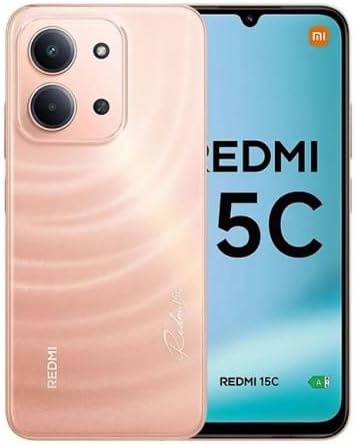
Imaxe: Anverso e reverso view of the XIAOMI Redmi 15C smartphone in Twilight Orange.
Configuración
1. Instalación da tarxeta SIM e da tarxeta Micro SD
- Localiza a bandexa da tarxeta SIM no lateral do teu dispositivo.
- Insert the SIM eject tool into the small hole next to the tray and press firmly until the tray pops out.
- Place your Nano SIM cards (up to two) and a Micro SD card (if desired) into the designated slots on the tray. Ensure the gold contacts face downwards.
- Volva inserir a bandexa no teléfono con coidado.
Nota importante sobre a compatibilidade da rede: This device supports Dual Nano SIM. For users in the USA, it is compatible with T-Mobile, Mint, and Tello networks. It is also compatible with 4G VoLTE networks globally. Please verify your carrier's compatibility before use. The device is not compatible with Verizon, AT&T, Xfinity, Boost, Virgin, Visible, Cricket, or other CDMA carriers.

Image: Chart indicating compatible (T-Mobile, Mint, Tello, Outside USA) and incompatible (Verizon, AT&T, Xfinity, Boost, Virgin, Visible, Cricket, other CDMA) network carriers.
2. Carga inicial e acendido
- Connect the USB Type-C cable to your phone and the 33W wall charger. Plug the charger into a power outlet.
- Allow the phone to charge for at least 30 minutes before first use, or until the battery indicator shows sufficient charge.
- To power on, press and hold the Power button (usually on the right side) until the XIAOMI logo appears.
3. Configuración inicial do dispositivo
Siga as instrucións na pantalla para completar a configuración inicial, que inclúe:
- Seleccionando o teu idioma e rexión.
- Conectando a unha rede wifi.
- Iniciando sesión coa túa conta de Google.
- Setting up screen lock methods (PIN, pattern, password).
- Configuring the rear fingerprint sensor and AI face unlock for enhanced security.
Instrucións de funcionamento
1. Pantalla e navegación
- The 6.9-inch FHD+ DotDisplay offers a resolution of 720x1600.
- The refresh rate can be adjusted up to 120Hz for smoother visuals in supported applications. The touch sampling rate is up to 288Hz for responsive interaction.
- Adjust brightness in Settings > Display. The display features 700 nits (typ) and 850 nits HBM brightness.
- Utilize Reading mode to reduce eye strain, certified by TÜV Rheinland for Low Blue Light, Circadian Friendly, and Flicker Free.
- Navigate the device using the touchscreen interface. Swipe, tap, and pinch gestures are standard.
2. Uso da cámara
Your Redmi 15C is equipped with a 50MP main camera and an 8MP front camera.
- Cámara traseira: The 50MP main camera (f/1.8, 5P lens) captures high-resolution images. It supports 1080p HD video recording at 30 fps and 720p HD video recording at 30 fps.
- Cámara frontal: The 8MP front camera (f/2.0) is ideal for selfies and video calls. It supports 1080p HD video recording at 30 fps and 720p HD video recording at 30 fps.
- Modos da cámara: Access various modes such as filmCamera, HDR mode, Soft-light ring (for front camera), Portrait mode, and Time-lapse through the camera application.
3. Conectividade
- Wi-Fi: Connect to 2.4GHz and 5GHz Wi-Fi networks via Settings > Wi-Fi.
- Bluetooth: Pair with Bluetooth 5.1 devices (e.g., headphones, speakers) via Settings > Bluetooth.
- GPS: The device supports GPS, AGPS, GLONASS, Beidou, and Galileo for accurate location services.
- Conector de audio: A 3.5mm headphone jack is available for wired audio accessories.
Mantemento
1. Coidado da batería
- The 6000mAh (typical) battery provides extended usage.
- Use only the provided 33W wall charger and USB Type-C cable for optimal and safe charging.
- Avoid exposing the device to extreme temperatures, as this can degrade battery life.
- For long-term storage, charge the battery to approximately 50% and power off the device.
2. Limpeza e protección
- Limpa a pantalla e a carcasa cun pano suave e sen fiapos. Evita materiais abrasivos ou produtos químicos agresivos.
- The device features IP64 dust and water resistance, offering protection against dust ingress and splashes of water. It is not designed for submersion.
- Use the included phone case for additional physical protection.
3. Actualizacións de software
Your device runs on Xiaomi HyperOS based on Android 15. Regularly check for and install software updates via Settings > About phone > System update to ensure optimal performance, security, and access to new features.
Resolución de problemas
1. O dispositivo non se acende
- Asegúrate de que a batería estea cargada. Conecta o cargador e agarda uns minutos antes de tentar acender de novo.
- Mantén premido o botón de acendido durante polo menos 10-15 segundos para forzar un reinicio.
2. Problemas de conectividade de rede
- Verify that your SIM card is correctly inserted and activated with a compatible carrier.
- Check if Airplane Mode is disabled.
- Reinicie o dispositivo.
- Reset network settings via Settings > Connection & sharing > Reset Wi-Fi, mobile networks, and Bluetooth.
3. A pantalla non responde
- Force restart the device (hold Power button).
- Ensure the screen is clean and free of moisture.
4. Factory Reset (Data Loss Warning)
Se persisten os problemas, pode ser necesario restablecer os datos de fábrica. Isto borrará todos os datos do dispositivo. Fai unha copia de seguridade dos datos importantes antes de continuar.
- Go to Settings > About phone > Factory reset.
- Siga as instrucións en pantalla para confirmar o restablecemento.
Especificacións
Below are the key technical specifications for the XIAOMI Redmi 15C smartphone.
| Característica | Detalle |
|---|---|
| Número de modelo | Redmi 15C (25078RA3EL) |
| Sistema Operativo | Xiaomi HyperOS baseado en Android 15 |
| Mostrar | 6.9-inch FHD+ DotDisplay, 720 x 1600 resolution, up to 120Hz refresh rate, 700 nits (typ) brightness |
| Procesador | Octa Core Helio G81 2.0GHz, GPU Mali-G52 MC2 |
| RAM | 4 GB |
| Almacenamento | 256GB (expandable via Micro SD) |
| Cámara traseira | 50MP main camera (f/1.8) + auxiliary lens |
| Cámara frontal | 8MP (f/2.0) |
| Batería | 6000mAh (typ), 33W turbo charging |
| Conectividade | 4G LTE, Wi-Fi (2.4GHz/5GHz), Bluetooth 5.1, GPS (AGPS, GLONASS, Beidou, Galileo) |
| Portos | USB tipo C, toma de auriculares de 3.5 mm |
| Sensores | Sensor de impresión dixital traseiro, desbloqueo facial con IA, sensor de proximidade, sensor de luz ambiental, acelerómetro |
| Dimensións | 7 x 4 x 2 inches (Package Dimensions, actual device dimensions not provided) |
| Peso | 6 onzas (peso do artigo) |
| Resistencia ao po e á auga | IP64 |
For regulatory compliance and certification details, refer to the device's information screen:
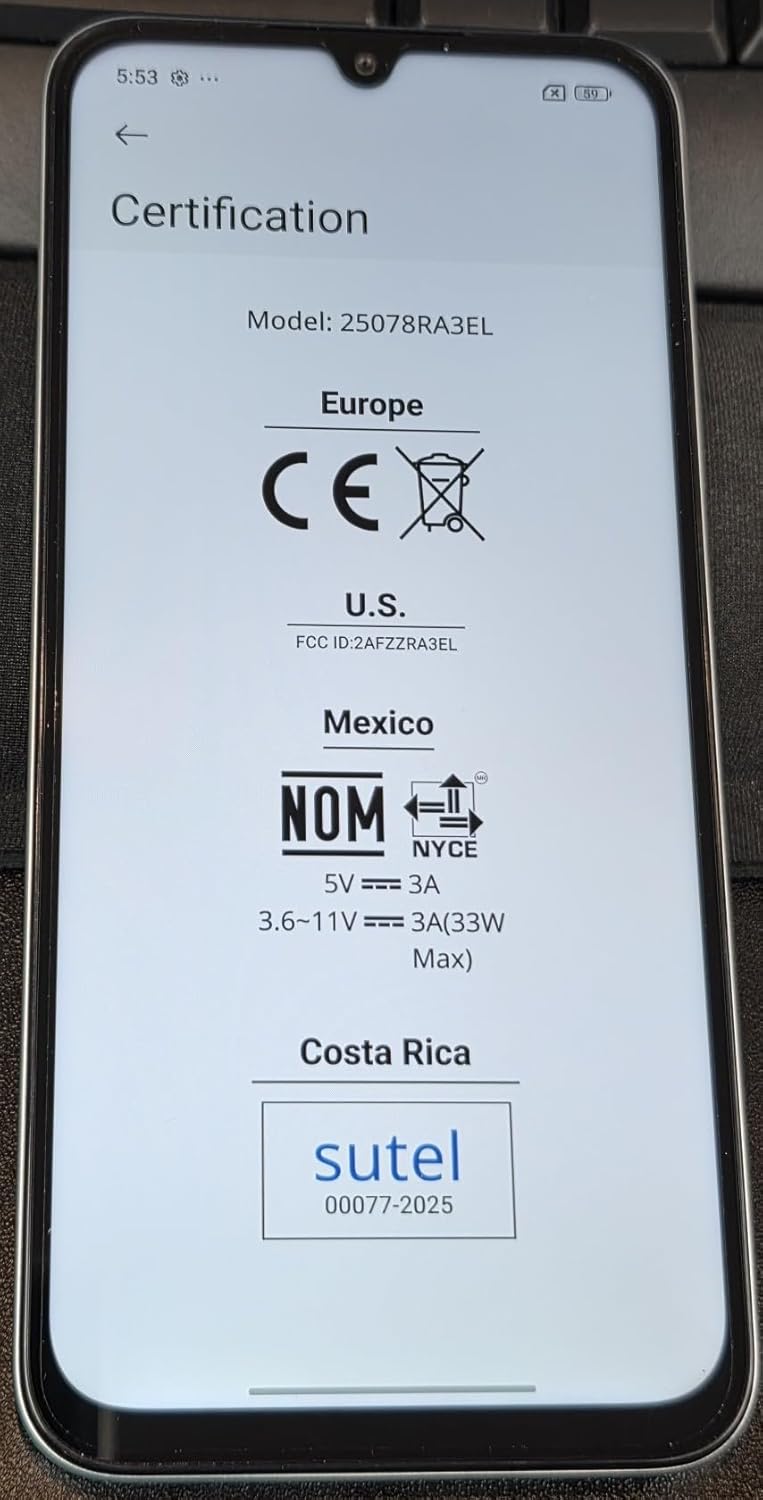
Image: Screen displaying certification information for the XIAOMI Redmi 15C, including Model: 25078RA3EL, CE, FCC ID: 2AFZZRA3EL, NOM, and SUTEL markings.
Garantía e Soporte
Your XIAOMI Redmi 15C smartphone is covered by a manufacturer's warranty. For detailed warranty terms, conditions, and duration, please refer to the warranty card included in your product packaging or visit the official XIAOMI support websitio.
For technical support, service, or further inquiries, please contact XIAOMI customer service or visit their official support channels. Keep your proof of purchase for warranty claims.
Official XIAOMI Store: Tenda XIAOMI en Amazon