
Introdución
This manual provides essential instructions for setting up, operating, and maintaining your XIAOMI Redmi 15 4G LTE smartphone. Please read this guide thoroughly to ensure optimal performance and longevity of your device. The Redmi 15 features a quad-curved design, IP64 dust and water resistance, a 50MP AI dual camera system, and a 7000mAh battery with 33W turbo charging.
Configuración
1. Desembalaxe e carga inicial
Your XIAOMI Redmi 15 package includes:
- Teléfono intelixente XIAOMI Redmi 15
- Cargador de pared de 33 W
- Cable USB Tipo-C
- Funda do teléfono
- Adaptador
Before first use, fully charge your device using the provided 33W wall charger and USB Type-C cable. The 7000mAh battery supports 33W turbo charging for quick power-ups.
2. Instalación da tarxeta SIM e da tarxeta Micro SD
The Redmi 15 supports Dual Nano SIM cards and one Micro SD card. Locate the SIM tray on the side of the device. Use the SIM ejector tool (not explicitly listed but standard) to open the tray. Insert your Nano SIM cards and Micro SD card into the designated slots, ensuring correct orientation. Close the tray securely.
3. Compatibilidade de rede
For users in the USA, this device is compatible with T-Mobile, Mint, Tello, and Ultra networks. It requires a previously activated SIM card for these carriers. Outside the USA, the device supports 4G VoLTE and is worldwide unlocked. Please verify your carrier's compatibility before use.

Image: Carrier compatibility chart. The chart indicates that the XIAOMI Redmi 15 is compatible with T-Mobile, Mint, Tello, Ultra, and networks outside the USA. It is not compatible with Verizon, AT&T, Xfinity, Boost, Virgin, Visible, Cricket, or other CDMA carriers.
4. Acendido e configuración inicial
Press and hold the power button until the XIAOMI logo appears. Follow the on-screen prompts to complete the initial setup, including language selection, Wi-Fi connection, Google account setup, and security settings (fingerprint, face unlock, PIN/pattern).
Operando o seu dispositivo
1. Características da pantalla
The Redmi 15 features a 6.9-inch FHD+ DotDisplay with a resolution of 2340 × 1080 pixels (374 PPI). It offers a refresh rate of up to 144Hz for supported applications and a touch sampling rate of up to 288Hz. The display provides 700 nits (typical) and 850 nits HBM brightness, with a contrast ratio of 1400:1 and 85% NTSC color gamut. It includes Reading mode and is TÜV Rheinland Low Blue Light, Circadian Friendly, and Flicker Free Certified for eye comfort.
2. Uso da cámara
The device is equipped with a 50MP main camera (5P lens, f/1.8) and an auxiliary lens for the rear camera system. The 8MP front camera features an f/2 aperture. Both cameras support various modes including filmCamera, HDR mode, Soft-light ring, Portrait mode, and Time-lapse.
Video recording capabilities:
- Rear Camera: 1080p (1920x1080) HD video recording at 30 fps, 720p (1280x720) HD video recording at 30 fps.
- Front Camera: 1080p (1920x1080) HD video recording at 30 fps, 720p (1280x720) HD video recording at 30 fps.
3. Características de seguridade
Your Redmi 15 includes a rear-mounted fingerprint sensor for secure unlocking and AI face unlock for convenient access.
4. Conectividade
The device supports Wi-Fi (2.4GHz | 5GHz) and Bluetooth 5.1 for wireless connections. For navigation, it utilizes GPS, AGPS, GLONASS, Beidou, and Galileo systems. A 3.5mm headphone jack is available for audio accessories.
5. Sistema Operativo
The XIAOMI Redmi 15 runs on Xiaomi HyperOS, based on Android 15, providing a user-friendly interface and access to a wide range of applications.
Mantemento
1. General Device Care
The Redmi 15 features an IP64 rating for dust and water resistance. While it offers protection against splashes and dust, it is not fully waterproof. Avoid submerging the device in water or exposing it to high-pressure water jets. Clean the screen and body with a soft, dry cloth. Avoid using harsh chemicals or abrasive materials.
2. Duración da batería
To maximize battery life, avoid extreme temperatures. Use only the provided 33W charger and USB Type-C cable. While the device supports fast charging, occasional full discharge and recharge cycles can help maintain battery health. The 7000mAh battery is designed for extended use.
3. Actualizacións de software
Regularly check for and install system updates to ensure your device has the latest features, security patches, and performance improvements. Updates are typically found in the device's settings menu under "About phone" or "System update."
Resolución de problemas
If you encounter issues with your XIAOMI Redmi 15, consider the following common solutions:
- O dispositivo non se acende: Asegúrate de que a batería estea cargada. Conecta o dispositivo ao cargador e agarda uns minutos antes de tentar acendelo de novo.
- Problemas de conectividade de rede: Check if your SIM card is properly inserted. Verify that mobile data is enabled in settings. If in the USA, confirm your carrier is T-Mobile, Mint, Tello, or Ultra. Restart the device.
- Problemas de conexión wifi: Restart your Wi-Fi router and the phone. Forget the network in your phone's Wi-Fi settings and reconnect.
- Problemas de rendemento da aplicación: Close background applications. Clear the cache of the problematic app. If the issue persists, uninstall and reinstall the app.
- Rendemento lento: Libera espazo de almacenamento eliminando innecesarios files or apps. Restart the device regularly.
- Pantalla táctil sen resposta: Restart the device. If the issue persists, a factory reset might be necessary (back up data first).
Para problemas máis complexos, consulte o soporte oficial de XIAOMI. websitio ou póñase en contacto co servizo de atención ao cliente.
Especificacións

Imaxe: Anverso e reverso view of the XIAOMI Redmi 15 4G LTE smartphone in Midnight Black. The front shows the large display with a small notch for the front camera, and the back features a dual camera module and the Redmi branding.
| Característica | Detalle |
|---|---|
| Nome do modelo | 25062RN2DL |
| Marca | XIAOMI |
| Sistema Operativo | Xiaomi HyperOS baseado en Android 15 |
| Procesador | Snapdragon 685 |
| Mostrar | 6.9" FHD+ DotDisplay, 2340 × 1080 Resolution, 144Hz Refresh Rate, 288Hz Touch Samptaxa de ling |
| RAM | 8 GB |
| Almacenamento | 256 GB (expandable via Micro SD) |
| Cámara traseira | 50MP Main (f/1.8) + Auxiliary lens |
| Cámara frontal | 8MP (f/2) |
| Batería | 7000mAh (typ), 33W Turbo Charging |
| Conectividade | Wi-Fi (2.4GHz/5GHz), Bluetooth 5.1, GPS, AGPS, GLONASS, Beidou, Galileo |
| Soporte SIM | Dual Nano SIM + 1 Micro SD slot |
| Jack de audio | 3.5 mm |
| Sensores | Rear Fingerprint Sensor, AI Face Unlock, Proximity sensor, Ambient light sensor, Accelerometer |
| Dimensións | 7 x 4 x 2 polgadas (dimensións do paquete) |
| Peso | 6 onzas |
| Resistencia ao po e á auga | IP64 |
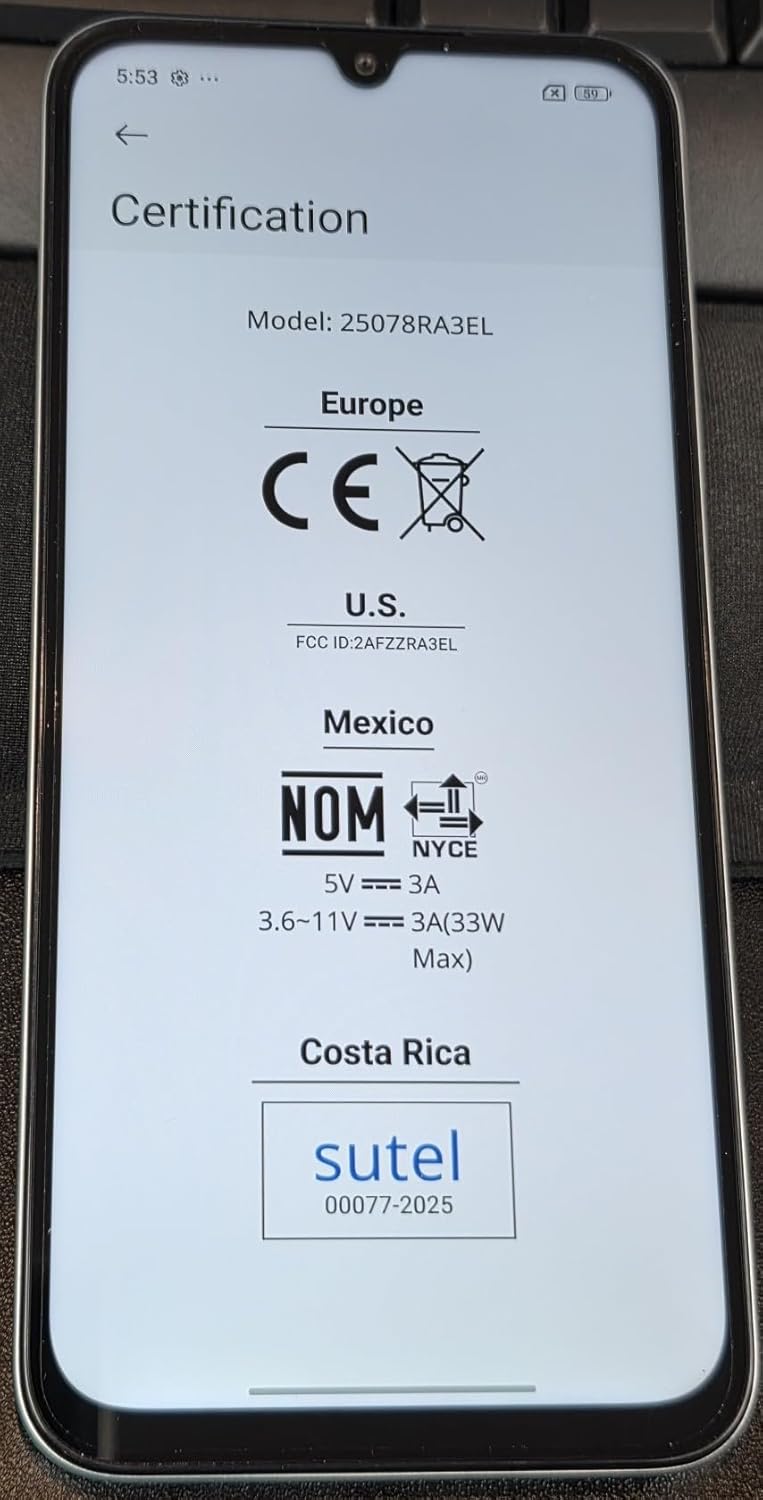
Image: Screen displaying certification details for the XIAOMI Redmi 15. It shows Model: 25078RA3EL (note: this model number is different from the product's 25062RN2DL, but it's from the provided image), CE mark for Europe, FCC ID: 2AFZZRA3EL for U.S., NOM for Mexico, and Sutel for Costa Rica, along with power input specifications.
Garantía e Soporte
Your XIAOMI Redmi 15 smartphone is covered by a manufacturer's warranty. For detailed information regarding warranty terms, conditions, and duration, please refer to the warranty card included in your product packaging or visit the official XIAOMI support websitio. Garda o comprobante de compra para reclamacións de garantía.
For technical support, software updates, and service inquiries, please visit the official XIAOMI support portal. You can also find FAQs and community forums for additional assistance.