
Introdución
This instruction manual provides detailed guidance for the safe and effective use of your Cearvol Nano Case Control OTC Hearing Aids. Please read this manual thoroughly before operating the device and retain it for future reference. These hearing aids are designed to assist individuals with mild to moderately severe hearing loss by amplifying sounds and reducing unwanted noise.
O que hai na caixa
Your Cearvol Nano Case Control OTC Hearing Aids package includes the following items:
- Nano Hearing Aids (Left & Right)
- Charging Case with UV Cleaning
- Ear Tips (Sizes S, M, L)
- Cepillo de limpeza
- Cable de carga tipo C
- Manual de usuario (este documento)
- Guía de inicio rápido
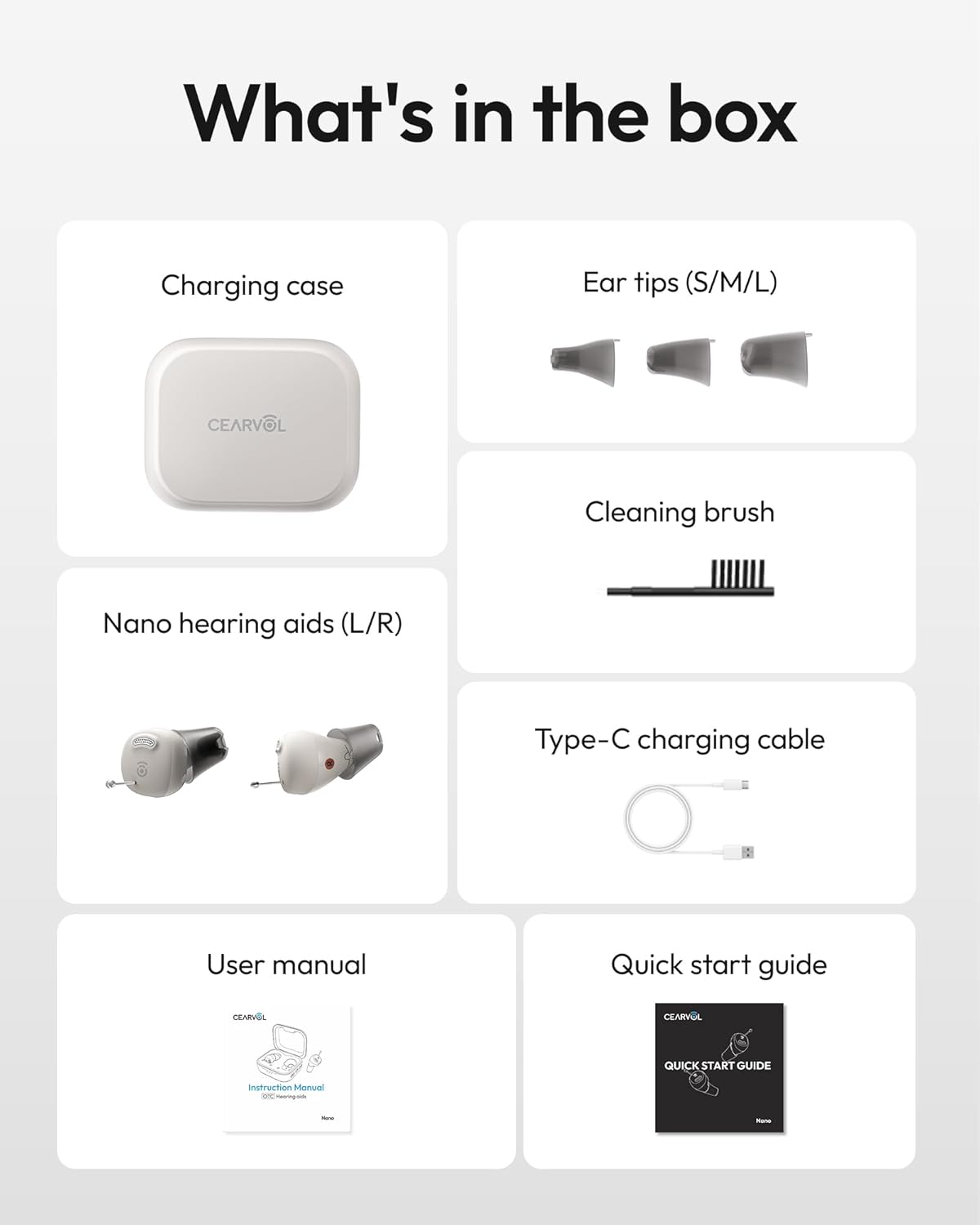
Image: All items included in the Cearvol Nano Case Control package.
Características do produto
Case Controls
The charging case features integrated controls for adjusting volume, switching environment modes, and changing hearing programs directly on the case. This allows for convenient and quick adjustments without needing to interact with the hearing aids themselves.

Image: Close-up of the Cearvol Nano charging case with clearly visible control buttons for volume and mode selection.

Image: Detailed diagram illustrating the function of each button on the charging case for both left and right hearing aids.
3 Hearing Programs
The device offers three preset hearing programs tailored for different levels of hearing loss: Mild, Mild-to-Moderate, and Moderate-to-Severe. These programs provide gain up to 30dB, adjustable directly from the case, ensuring smart protection against over-amplificación.

Image: Visual representation of the three hearing programs and their corresponding gain levels.
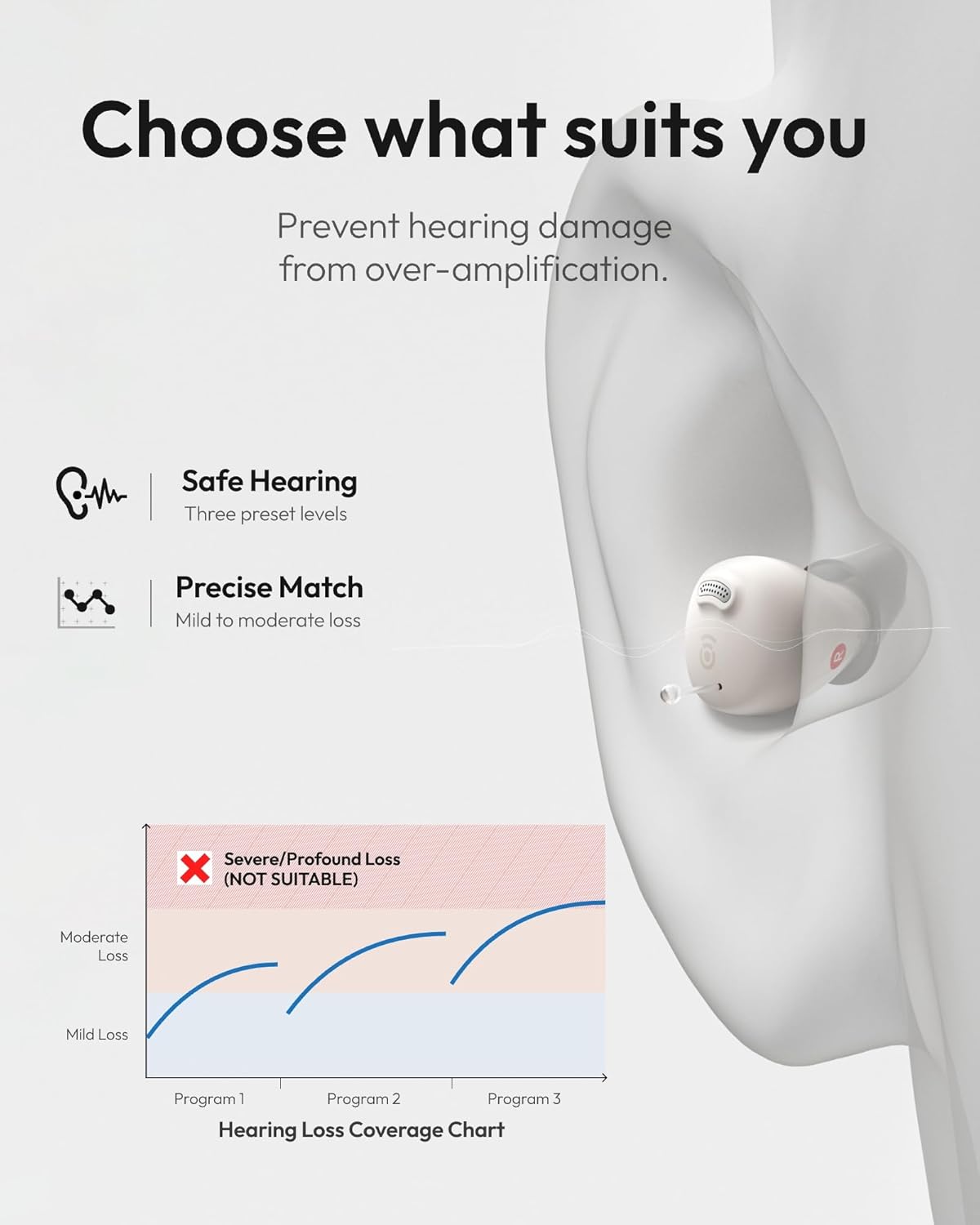
Image: Hearing Loss Coverage Chart, detailing the range of hearing loss each program is designed for.
Cancelación de comentarios
The Cearvol Nano features smart feedback reduction technology, providing a whistle-free and comfortable listening experience. This advanced system dynamically evaluates and cancels feedback in real-time.
Video: Demonstrates the 100% whistle-free experience of the Cearvol Nano hearing aids.

Image: Illustrates the advanced feedback cancellation technology for a comfortable, natural hearing experience.
Redución de ruído
Advanced processing in the Nano hearing aids lowers background noise and improves speech focus, ensuring clearer and more comfortable hearing. The Knowles BA Driver enhances speech clarity for a natural sound experience.

Imaxe: Detallada view of the Knowles BA Driver, emphasizing clear sound in detail.

Image: Focus on what matters: illustration of background noise reduction and speech clarity enhancement.
Long Battery Life & Quick Charge
Enjoy up to 17 hours of listening from the hearing aids themselves, and over 54 hours combined with the portable charging case. A quick 15-minute charge can provide multiple hours of listening, perfect for fast top-ups.

Image: All-day battery power with 54 hours total, highlighting quick charge capabilities.
Discreet & Comfortable Design
The Nano hearing aids feature a low-profile, in-ear (ITC) design for a natural and discreet appearance. Multiple ear tip sizes (S, M, L) are included to ensure a personalized and secure fit, promoting all-day comfort.

Image: Invisible comfort design, showing the discreet placement of the hearing aid in the ear.

Image: The small size of the hearing aid, designed to be barely noticeable.

Image: Breathable comfort provided by medical-grade and ergonomic ear tips.
Protección IPX5
The Cearvol Nano hearing aids are rated IPX5, making them water and sweat resistant. This protection ensures durability for daily activities and light rain exposure.

Image: IPX5 rating for dust and water resistance, suitable for rain and sweat.
Configuración
Primeiro uso
- Carefully remove the hearing aids from the charging case.
- Tear off the dielectric film protecting the charging contacts on each hearing aid.
- Place the hearing aids back into the charging case to ensure proper contact.

Image: The Cearvol Nano hearing aids in their charging case, ready for first use.
Carga o teu dispositivo
- Connect the charging case to a suitable power adapter (not included) using the provided Type-C USB cable.
- While charging, the three blue lights on the front of the charging case will pulse.
- When fully charged, all blue lights will change to a steady glow.
Instrucións de funcionamento
Wearing and Removing Your Device
- Choose an ear tip size (S, M, L) that fits you comfortably and securely.
- To wear: Pinch the body of the hearing aid with your index finger and thumb, gently insert it into your ear canal, and twist it until it feels comfortable.
- To remove: Gently pull out the hearing aid by holding the 'Assistive pull line' at the end.
Axuste de volume
The hearing aids have 4 volume levels. When the hearing aid is on, press the '+' or '-' buttons on the charging case to adjust the volume for the left or right hearing aid independently.
Mode Switching (Environment Modes)
The device has 3 environment modes: Indoor, Outdoor, and Restaurant. Switching modes: When the hearing aid is on, press the 'M' button on the left side of the charging case to cycle through the modes. Each change is accompanied by an audible indicator.

Image: Smart hearing for every scene: visual examples of Indoor, Outdoor, and Restaurant modes.

Image: Indoor mode, designed for clear sound at home.

Image: Outdoor mode, for clear and safe hearing outdoors.

Image: Restaurant mode, to focus on conversations in noisy places.
Preset Program Switching
The hearing aid has 3 preset programs (Mild, Mild-to-Moderate, Moderate-to-Severe). When the hearing aid is on, press the '+' button on the right side of the charging case to cycle through the hearing compensation programs. Each change is accompanied by an audible indicator.
Mantemento
Limpeza
Regular cleaning of your hearing aids is essential for optimal performance and hygiene. Use the provided cleaning brush to gently remove any earwax or debris from the ear tips and microphone ports.
UV Hygiene Charging Case
The charging case features built-in UV light sanitation, which disinfects the hearing aids while they charge. This process helps kill up to 99.9% of bacteria, ensuring cleaner wear and reducing the risk of ear infections.

Image: UV hygiene charging case in action, indicating 99.9% cleaning sanitation.

Image: Built-in UV light disinfects hearing aids while they charge, killing 99.9% of bacteria.
Resolución de problemas
If you experience any issues with your Cearvol Nano hearing aids, please refer to the quick start guide or contact customer support. Common issues may include:
- Sen son: Ensure the hearing aids are charged and properly inserted. Check volume levels.
- Whistling/Feedback: Ensure ear tips are correctly sized and seated snugly in the ear canal. Clean ear tips and microphone ports.
- Son distorsionado: Clean ear tips and microphone ports. Try switching to a different hearing program or adjusting volume.
- A batería non se carga: Ensure the charging cable is securely connected to both the case and a power source. Check that the hearing aids are correctly placed in the case for charging.
Especificacións
- Modelo: Nano Case Control
- Programas de audición: 3 (Mild, Mild-to-Moderate, Moderate-to-Severe)
- Ganancia máxima: Ata 30 dB
- Battery Life (Aids): Ata 17 horas
- Battery Life (with Case): Ata máis de 54 horas
- Porto de carga: Tipo C USB
- Resistencia á auga: IPX5
- Peso: 8.8 onzas (paquete total)
- Fabricante: Cearvol
Garantía e soporte
For any questions, technical support, or warranty claims regarding your Cearvol Nano Case Control OTC Hearing Aids, please contact Cearvol customer service:
- Teléfono: 1(959)-206-0088 (MON-FRI 9AM-6PM PST)
- Correo electrónico: support@cearvol.com
- Websitio: www.cearvol.com
Video: Official Cearvol Nano OTC Hearing Aids overview, demonstrating features and ease of use.