
Introdución
Grazas pola compraasing the Anker Soundcore P31i True Wireless Earbuds. This manual provides detailed instructions on how to set up, operate, and maintain your earbuds to ensure optimal performance and longevity. Please read this manual carefully before use and retain it for future reference.
Que está incluído
Your Soundcore P31i package includes the following items:
- Soundcore P31i Earbuds (Left and Right)
- Estuche de carga
- Ear Tips (XS, S, M, L - M size pre-installed)
- Cable de carga USB-C a USB-A
- Guía de inicio rápido
- Manual de seguridade
Produto rematadoview
The Soundcore P31i earbuds are designed for comfort and high-quality audio. Each earbud features a touch control area and an indicator light. The charging case protects the earbuds and provides additional battery life.
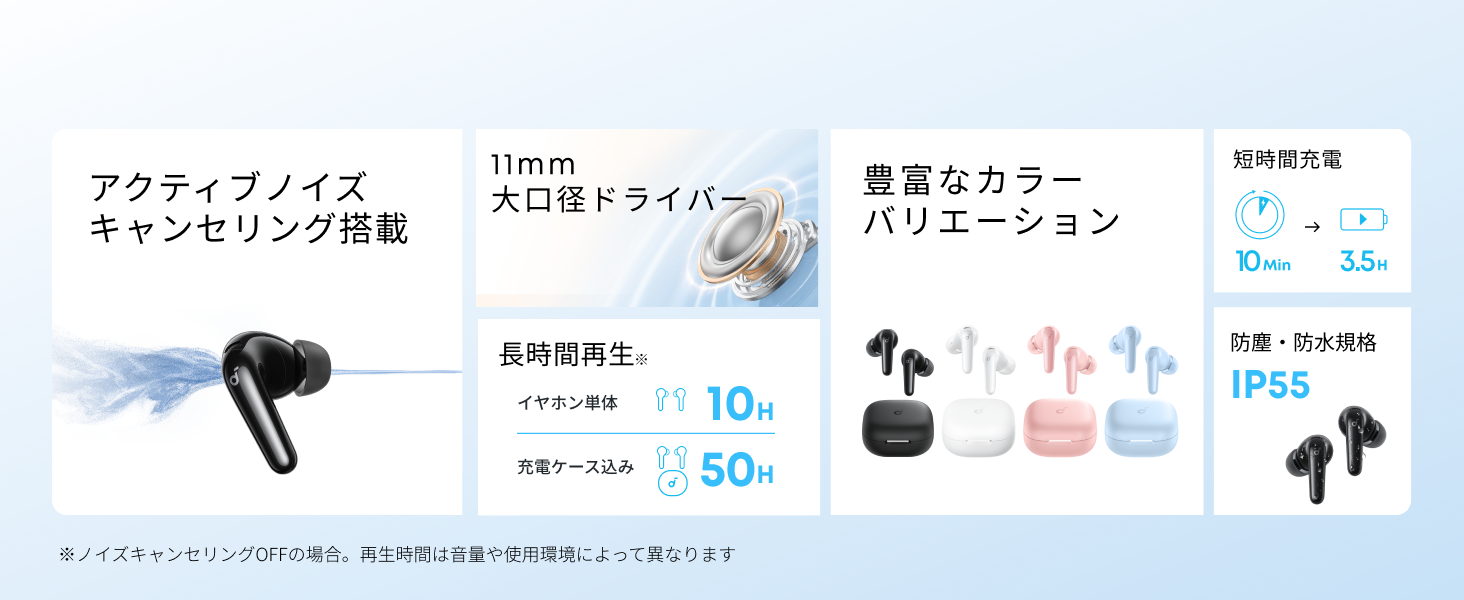
Diagram showing the Soundcore P31i earbuds and charging case with key components labeled.
Auriculares: Each earbud is equipped with an 11mm dynamic driver for powerful bass and clear sound. They feature active noise cancellation and AI noise reduction for calls. The ergonomic design ensures a secure and comfortable fit.
Estuche de carga: The compact charging case not only stores and protects your earbuds but also recharges them on the go. It has a USB-C charging port and a strap hole for portability.
Cargando os teus auriculares e a funda
Antes do primeiro uso, carga completamente tanto os auriculares como a caixa de carga.
- Cargando os auriculares: Place the earbuds into the charging case. The indicator lights on the earbuds will show charging status.
- Carga do estuche: Connect the charging case to a power source using the provided USB-C to USB-A cable. A full charge for the case and earbuds takes approximately 3 hours.
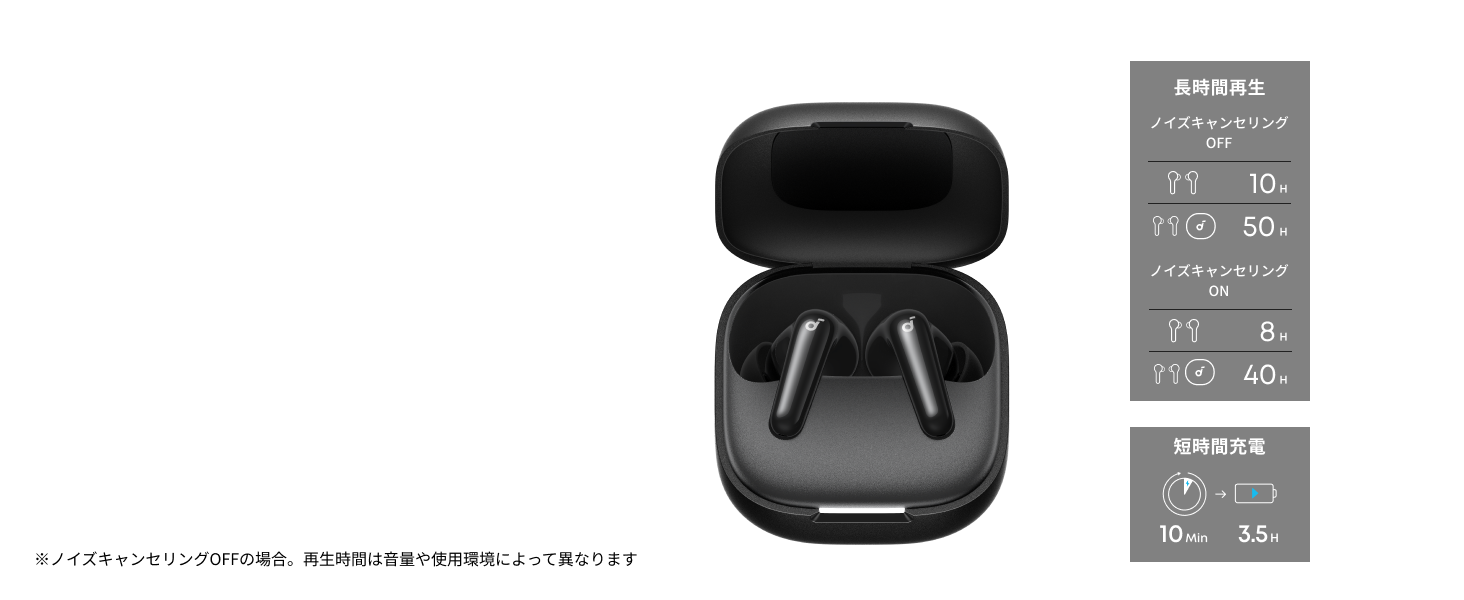
Diagram illustrating charging times and playback duration for Soundcore P31i earbuds.
Duración da batería:
- Up to 10 hours of playback on a single charge (earbuds only).
- Ata 50 horas de reprodución total coa caixa de carga.
- Unha carga rápida de 10 minutos proporciona ata 3.5 horas de escoita.
Note: Playback time varies depending on volume level and audio content.
Usando os teus auriculares
For optimal sound quality and comfort, it is important to wear your earbuds correctly.
- Escolla as almofadas axeitadas: Select the ear tips that provide the best seal and comfort for your ears. Experiment with different sizes (XS, S, M, L) to find the perfect fit.
- Insira os auriculares: Gently insert the earbuds into your ear canals.
- Xirar para asegurar: Twist the earbuds slightly until they fit snugly and securely in your ears.

Image showing a person wearing the Soundcore P31i earbuds correctly.
Emparejamento Bluetooth
Follow these steps to pair your Soundcore P31i earbuds with your device:
- Primeira parella:
- Open the charging case. The earbuds will automatically enter Bluetooth pairing mode. The indicator lights on the earbuds will flash white.
- No teu dispositivo (teléfono intelixente, tableta, etc.), vai á configuración de Bluetooth.
- Select "Soundcore P31i" from the list of available devices.
- Once connected, the indicator lights on the earbuds will turn solid white for 1 second and then turn off.
- Emparejamento con outro dispositivo:
- Coloca os auriculares na caixa de carga e deixa a tapa aberta.
- Press and hold the button on the charging case for 3 seconds until the earbud indicator lights flash white rapidly.
- Repeat steps 2 and 3 from "First-Time Pairing" on your new device.
Controis
The Soundcore P31i earbuds feature touch controls for managing playback, calls, and other functions. Specific control configurations can often be customized via the Soundcore app.
General Touch Controls (Default):
- Reproducir/Pausa: Toca unha vez en calquera dos auriculares.
- Próxima pista: Toca dúas veces o auricular dereito.
- Pista anterior: Toca dúas veces o auricular esquerdo.
- Responder/Finalizar chamada: Toca unha vez en calquera dos auriculares.
- Rexeitar a chamada: Mantén premido calquera dos auriculares durante 2 segundos.
- Activar o asistente de voz: Triple-tap either earbud (may vary).
- Cambiar o modo ANC/Transparencia: Press and hold the right earbud for 2 seconds (may vary).
For detailed and customizable controls, please refer to the Soundcore app or the included Quick Start Guide.
Cancelación activa de ruído (ANC)
The Soundcore P31i earbuds feature Active Noise Cancelling technology to minimize ambient noise, allowing for an immersive listening experience.

Illustration demonstrating the active noise cancelling feature of the Soundcore P31i earbuds.
ANC detects and reduces various types of noise, such as engine hum on trains or buses, and chatter in cafes. This allows you to enjoy your music or podcasts with greater clarity and fewer distractions.
To switch between ANC, Normal, and Transparency modes, use the touch controls on the earbuds or adjust settings within the Soundcore app.
Calidade de son
The Soundcore P31i earbuds are engineered to deliver a rich audio experience.

Diagram illustrating the 11mm dynamic driver responsible for the audio output.
- Controladores dinámicos de 11 mm: Equipped with large 11mm drivers, these earbuds produce a wide frequency range and detailed sound.
- BassUp™ Technology: Anker's proprietary BassUp™ technology enhances low frequencies, delivering powerful and impactful bass.
You can further customize the sound profile using the equalizer settings within the Soundcore app.
Chama a Calidade
The Soundcore P31i earbuds ensure clear voice calls and web conferencias.

Illustration depicting AI noise reduction technology for clear voice calls.
Redución de ruído AI: Integrated AI noise reduction technology effectively filters out background noise, ensuring your voice is transmitted clearly to the person on the other end of the call, even in noisy environments.
Conexión de varios puntos
The Soundcore P31i supports multi-point connection, allowing you to connect to two Bluetooth devices simultaneously.

Illustration showing the Soundcore P31i connected to multiple devices simultaneously.
This feature enables seamless switching between devices. For example, you can listen to music on your laptop and instantly switch to answer a call on your phone without manually re-pairing.
To enable multi-point connection, ensure both devices are paired with your earbuds. The earbuds will automatically connect to the last two paired devices when powered on.
Aplicación Soundcore
Download the Soundcore app to enhance your experience with the P31i earbuds. The app offers various features and customization options.

Screenshots of the Soundcore app interface, highlighting customization features.
App Features include:
- Controis personalizables: Personalize touch controls for playback, calls, and voice assistant.
- Configuración do ecualizador: Axustar audio profiles to your preference or choose from preset EQs.
- ANC/Transparency Mode Switching: Easily toggle between noise cancelling and transparency modes.
- Actualizacións de firmware: Manteña os seus auriculares actualizados coas últimas funcións e melloras.
- Función de tradución da IA: (Available from Spring 2026, requires Soundcore app ver 4.0.0 or higher).
The Soundcore app is available for download on both iOS and Android devices.
Produto rematadoview Vídeo
Vídeo de presentación oficial do produtoasing the key features and design of the Soundcore P31i True Wireless Earbuds, including active noise cancellation, powerful bass, long battery life, and multi-point connectivity.
Mantemento e coidados
Proper maintenance ensures the longevity and performance of your Soundcore P31i earbuds.
- Limpeza: Limpa regularmente os auriculares e a funda de carga cun pano suave, seco e sen pelusa. Non empregues produtos químicos agresivos nin materiais abrasivos.
- Consellos para oídos: Remove the ear tips and clean them with water and mild soap if necessary. Ensure they are completely dry before reattaching.
- Contactos de carga: Manteña os contactos de carga tanto dos auriculares como da funda limpos e secos para garantir unha carga axeitada.
- Almacenamento: Cando non os uses, garda os auriculares na súa funda de carga para protexelos do po e dos danos.
- Resistencia á auga: The earbuds are rated IP55 for dust and water resistance. This means they can withstand sweat and light rain, but are not designed for submersion in water. Ensure the earbuds are dry before placing them back in the charging case.

Image showing Soundcore P31i earbuds with water droplets, highlighting their IP55 water resistance.
Resolución de problemas
If you encounter any issues with your Soundcore P31i earbuds, refer to the following common solutions:
- Os auriculares non se emparejan:
- Asegúrate de que os dous auriculares estean completamente cargados.
- Coloca os auriculares na funda, pecha a tapa e ábrea de novo para volver entrar no modo de emparellamento.
- Forget "Soundcore P31i" from your device's Bluetooth list and try pairing again.
- Reset the earbuds (refer to the Quick Start Guide for specific reset instructions).
- Only One Earbud Playing Audio:
- Place both earbuds back into the charging case and close the lid for 5 seconds, then open it again.
- Asegúrate de que ambos auriculares teñan batería suficiente.
- Restablece os auriculares.
- Mala calidade de son:
- Asegúrate de que as almofadas selen ben o conduto auditivo. Proba diferentes tamaños.
- Limpa calquera residuo das boquillas dos auriculares.
- Acércate máis ao dispositivo conectado para evitar interferencias.
- Problemas de carga:
- Comprobe se o cable de carga e o adaptador están danos.
- Ensure the charging contacts on the earbuds and case are clean.
- Proba cun cable de carga ou fonte de enerxía diferente.
Especificacións
| Característica | Detalle |
|---|---|
| Marca | Soundcore |
| Nome do modelo | P31i |
| Número de modelo | D1202 |
| Cor | Black (This specific variant) |
| Factor de forma | In-Ear |
| Tecnoloxía de conectividade | Sen fíos (Bluetooth 6.1) |
| Control de ruído | Cancelación activa de ruído |
| Tamaño do controlador | Controladores dinámicos de 11 mm |
| Tempo de reprodución (auriculares) | Ata 10 horas |
| Tempo total de reprodución (con estuche) | Ata 50 horas |
| Carga rápida | Carga de 10 minutos para 3.5 horas de reprodución |
| Charging Time (Full) | Aproximadamente 3 horas |
| Resistencia á auga | IP55 |
| Conexión de varios puntos | Soportado |
| UPC | 194644251543 |
| País de Orixe | China |
Garantía e Atención ao Cliente
Soundcore provides a comprehensive warranty for your P31i earbuds.

Image detailing the warranty period and extension for Soundcore P31i.
- Garantía estándar: An 18-month warranty is provided for products purchased from authorized retailer AnkerDirect.
- Garantía ampliada: Anker members can extend their warranty up to a maximum of 24 months.
- Nota importante: Purchases from unauthorized sellers may not be covered under warranty.
For product inquiries, delivery questions, or technical support, please contact Soundcore customer support. Contact details can typically be found on the official Soundcore websitio web ou na Guía de inicio rápido.
Información de seguridade
Lea e siga estas pautas de seguridade para evitar danos no seu dispositivo ou lesións a vostede mesmo:
- Non desmontes nin modifiques os auriculares nin a caixa de carga.
- Manteña o dispositivo lonxe de temperaturas extremas, luz solar directa e chamas abertas.
- Avoid exposing the device to excessive moisture or liquids, beyond its IP55 rating.
- Do not use the device at high volume levels for extended periods to prevent hearing damage.
- Manter fóra do alcance dos nenos e animais.
- Eliminar o produto de forma responsable segundo a normativa local.


