
TOPUTURE TP5
TOPUTURE TP5 Folding Treadmill User Manual
Model: TP5 | Brand: TOPUTURE
Introdución
This manual provides essential instructions for the safe and efficient use of your TOPUTURE TP5 Folding Treadmill. Please read this manual thoroughly before operating the device and retain it for future reference.
Instrucións de seguridade importantes
To reduce the risk of serious injury, read all important precautions and instructions in this manual before using the treadmill. The manufacturer assumes no responsibility for personal injury or property damage sustained by or through the use of this product.
- Asegúrate sempre de que a chave de seguridade estea correctamente suxeita á roupa antes de poñer en marcha a cinta de correr.
- Manteña os nenos e as mascotas lonxe da fita durante a operación.
- Place the treadmill on a level surface with adequate clearance around it.
- Non fagas funcionar a cinta de correr se ten o cable ou a clavija danados ou se non funciona correctamente.
- Consulte a un médico antes de comezar calquera programa de exercicios.
Configuración e montaxe
The TOPUTURE TP5 treadmill comes largely pre-assembled. Follow these steps for quick setup:
- Desembalaxe: Carefully remove the treadmill from its packaging. Ensure all components are present.
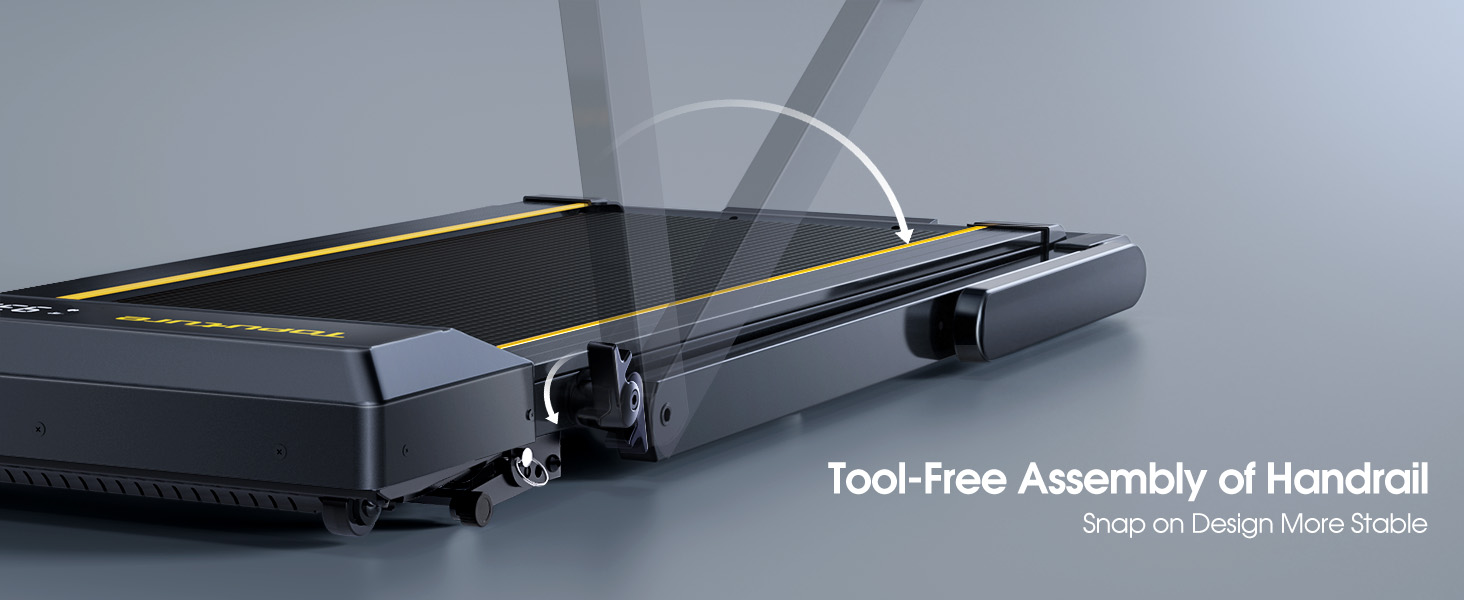
- Despregando o manillar: Gently lift the handlebar into its upright position until it locks securely. The quick-release snaps allow for easy transition between walking pad and running treadmill configurations.
- Potencia de conexión: Enchufe o cable de alimentación a unha toma eléctrica conectada a terra.
- Verificación inicial: Before first use, ensure the running belt is centered and properly tensioned. Refer to the maintenance section for belt adjustment if needed.

Instrucións de funcionamento
Panel de control e pantalla
The treadmill features a multifunctional LED display and touch controls. Information displayed includes time, speed, calories burned, distance, and heart rate.

Starting and Adjusting Speed
- Inicio/Parada: Press the Start/Pause button on the control panel or remote to begin/end your workout.
- Axuste de velocidade: Use the Speed +/- buttons on the control panel or remote to adjust the speed from 0.6 to 10 MPH.
- Control da aplicación: Connect your smartphone or tablet via Bluetooth to control the treadmill and access guided workouts.

Función de inclinación
The treadmill offers three manual incline levels: 1%, 6%, and 12%. Adjust the incline by manually setting the support legs at the rear of the treadmill to the desired position.

Altavoz Bluetooth
Connect your device to the treadmill's built-in Bluetooth speaker to enjoy music or audio during your workout.
Monitor de frecuencia cardíaca
Grip the hand sensors on both sides of the display to monitor your heart rate during exercise.
Mantemento
- Lubricación: Regularly apply treadmill lubricant under the running belt to ensure smooth operation and prolong belt life. Refer to the lubricant instructions for frequency.
- Limpeza: Limpa a cinta de correr cun anuncioamp un pano despois de cada uso para eliminar a suor e o po.
- Axuste do cinto: If the running belt feels loose or is off-center, use the provided tools to adjust the tension and alignment as per the detailed instructions in the full manual.

Resolución de problemas
Se tes algún problema coa túa cinta de correr, consulta as seguintes solucións habituais:
- A cinta de correr non arranca: Ensure the power cord is securely plugged in and the safety key is correctly placed on the console. Check the power switch on the treadmill.
- Deslizamento do cinto: The running belt may need tensioning. Refer to the maintenance section or the full manual for instructions on adjusting belt tension.
- Ruídos pouco comúns: Check for any loose parts or foreign objects under the belt. Lubricate the running belt if it has not been done recently.
- A pantalla non funciona: Asegúrese de que todas as conexións estean seguras. Se o problema persiste, póñase en contacto co servizo de atención ao cliente.
Especificacións
| Característica | Detalle |
|---|---|
| Marca | TOPUTURA |
| Nome do modelo | TP5 |
| Cor | Negro |
| Dimensións do produto | 52.3" D x 28.2" W x 5.1" H |
| Peso do elemento | 78 libras |
| Material | Aceiro de aliaxe |
| Velocidade máxima | 10 millas por hora |
| Porcentaxe de inclinación máximatage | 12 % |
| Potencia máxima | 2.5 HP |
| Recomendación de peso máximo | 300 libras |
| Mostrar | LED |
| Tecnoloxía de conectividade | Bluetooth |
| Características especiais | Altofalante integrado, plegable, monitor de frecuencia cardíaca, portátil, absorbente de impactos |
| Requírese montaxe | Non (premontado) |
| Compoñentes incluídos | Cable de alimentación |
Garantía e Soporte
Your TOPUTURE TP5 Treadmill comes with a garantía dun ano. For any assistance, questions, or warranty claims, please contact TOPUTURE customer support.
Como contactar co servizo de asistencia:
- Inicie sesión na súa conta de Amazon.
- Vaia a "Os seus pedidos".
- Find the order ID for your treadmill.
- Fai clic en "Contactar co vendedor".
Please have your model name (TP5) and purchase details ready when contacting support.