Introdución
Grazas pola compraasing the MD-1308BT Portable 3-Band Radio. This device offers a classic listening experience combined with modern connectivity options, including FM/AM/SW radio, Bluetooth, USB, AUX, and TF card playback. This manual provides detailed instructions for safe and efficient use of your radio.
Información de seguridade
- Non expoña a unidade á choiva, á humidade ou a temperaturas extremas.
- Avoid disassembling the radio. Refer all servicing to qualified personnel.
- Manteña o dispositivo lonxe de campos magnéticos fortes.
- Use only the specified charging cable and power adapter (DC 5V) to prevent damage.
- Desfágase das baterías de forma responsable segundo a normativa local.
Contido do paquete
Marque a caixa para os seguintes elementos:
- MD-1308BT Portable Radio
- Cable de carga USB
- Antena externa
- Manual do propietario (este documento)

Image: The MD-1308BT radio shown alongside its retail packaging and included USB charging cable.
Produto rematadoview
Familiarize yourself with the main components and controls of your MD-1308BT radio:
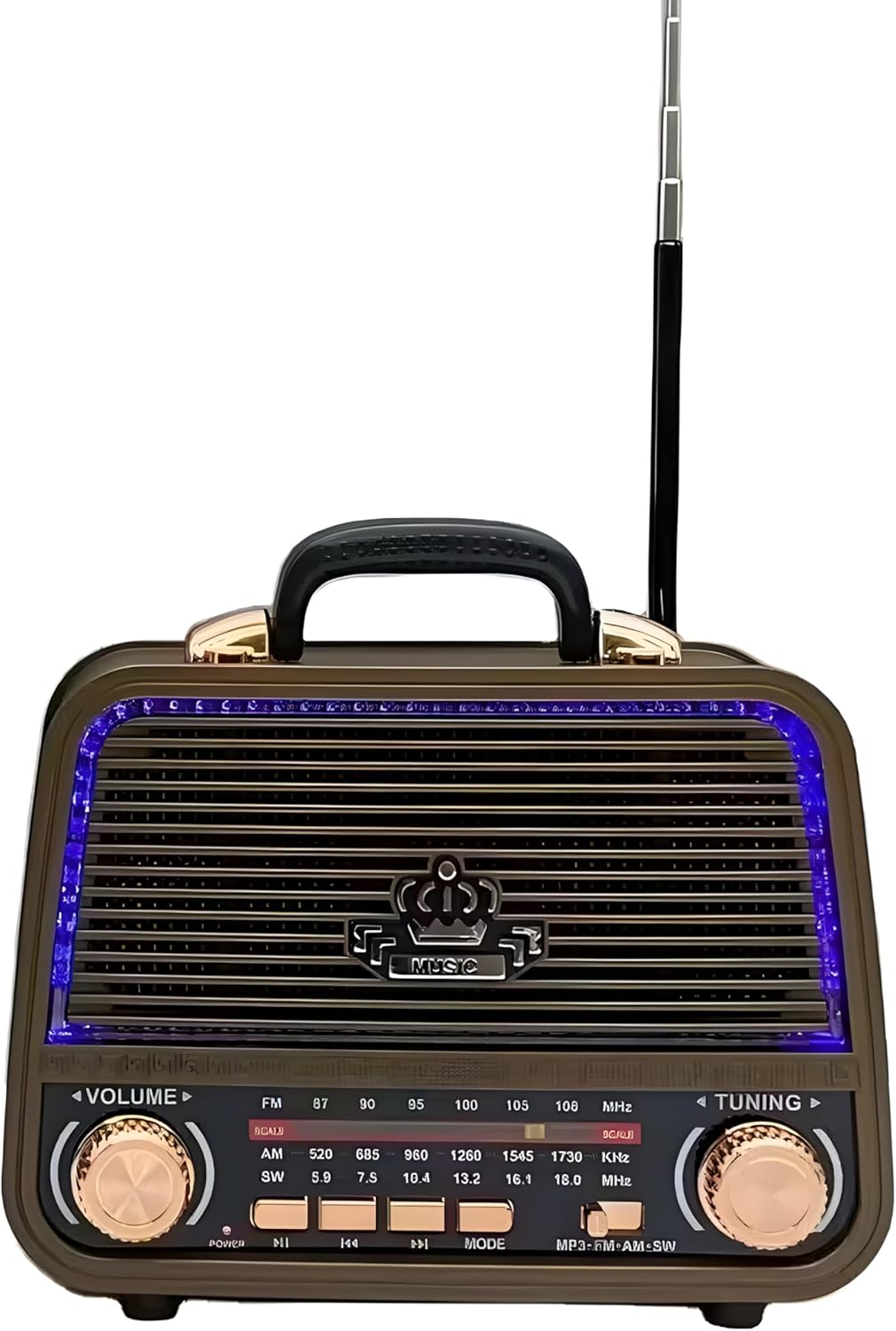
Imaxe: Fronte view of the MD-1308BT radio, showing the speaker grille, LED lighting, volume and tuning knobs, and playback control buttons.
Controis do panel frontal:
- Botón VOLUME: Rotate to adjust the sound level.
- Botón de afinación: Rotate to tune into radio stations.
- Selector de banda: Switch between FM, AM, and SW bands.
- Botón de acendido/reproducir/pausa: Press to power on/off or play/pause media.
- Botóns de pista anterior/seguinte: Navigate tracks in USB/TF/Bluetooth modes.
- Botón MODE: Switch between Radio, Bluetooth, USB, AUX, and TF card modes.
- Pantalla LED: Shows frequency or mode information.

Imaxe: Traseira view of the MD-1308BT radio, illustrating the battery compartment, USB port, TF card slot, and AUX input.
Rear Panel / Side Ports:
- Porto USB: Para a reprodución desde unha unidade flash USB.
- Ranura para tarxetas TF: Para reprodución con tarxeta TF (MicroSD).
- Entrada AUX: Para conectar dispositivos de son externos mediante un cable de 3.5 mm.
- Entrada DC 5V: For charging the internal battery or direct power.
- Compartimento de batería: Alberga a batería recargable.
- Antena externa: Antena extensible para unha mellor recepción de radio.
Configuración
1. Cargando a batería
- Connect the supplied USB charging cable to the DC 5V input port on the radio.
- Conecta o outro extremo do cable USB a un adaptador de corrente USB compatible (non incluído) ou a un porto USB do ordenador.
- The LED indicator will show charging status (specific indicator behavior may vary by unit).
- A full charge typically takes several hours. Disconnect the charger once fully charged.
2. Inserting Storage Media (USB/TF Card)
- For USB playback, insert a USB flash drive into the USB port.
- For TF card playback, insert a TF (MicroSD) card into the TF card slot with the contacts facing down.
3. Estensión da antena
For optimal radio reception, fully extend the external telescopic antenna.
Instrucións de funcionamento
1. Acendido/apagado
Manteña premido o Encender/Reproducir/Pausa botón para acender ou apagar a radio.
2. Axuste do volume
Xire o VOLUME knob to increase or decrease the sound level.
3. Radio Mode (FM/AM/SW)
- Preme o MODO button until the radio mode (FM, AM, or SW) is selected.
- Usa o Selector de banda switch to choose between FM, AM, or SW bands.
- Xire o TUNING knob to scan for and select radio stations. The frequency will be displayed on the LED screen.
- Extend the external antenna for better reception, especially for FM and SW bands.
4. Modo Bluetooth
- Preme o MODO button until "BT" or "Bluetooth" appears on the display. The radio will enter pairing mode.
- No teu dispositivo móbil, activa o Bluetooth e busca os dispositivos dispoñibles.
- Select "MD-1308BT" from the list to pair. A confirmation sound may be heard.
- Once paired, you can play audio from your device through the radio. Use the radio's playback control buttons (Play/Pause, Previous/Next) or your device's controls.

Image: The MD-1308BT radio wirelessly connected to a smartphone, demonstrating Bluetooth audio playback.
5. Reprodución de tarxetas USB/TF
- Insert a USB flash drive or TF card containing MP3 audio files no porto respectivo.
- Preme o MODO button to switch to USB or TF card mode. Playback should start automatically.
- Usa o Reproducir/Pausa e Anterior/Seguinte botóns para controlar a reprodución.
6. Modo de entrada AUX
- Conecta un dispositivo de son externo (por exemplo, un teléfono intelixente ou un reprodutor de MP3) ao porto de entrada AUX mediante un cable de son de 3.5 mm (non incluído).
- Preme o MODO botón ata que apareza "AUX" na pantalla.
- Controla a reprodución e o volume desde o dispositivo externo conectado.
Mantemento
- Clean the radio's exterior with a soft, dry cloth. Do not use abrasive cleaners or solvents.
- Cando non a use durante períodos prolongados, garde a radio nun lugar fresco e seco.
- To prolong battery life, avoid fully discharging the battery frequently and recharge it regularly.
Resolución de problemas
| Problema | Causa posible | Solución |
|---|---|---|
| A radio non se acende. | A batería está baixa ou esgotada. | Charge the radio using the USB cable. |
| Sen son ou volume baixo. | Volume is too low; incorrect mode selected. | Increase volume using the VOLUME knob; ensure correct mode (Radio, BT, USB, AUX) is selected. |
| Mala recepción de radio. | Antena non estendida; sinal débil. | Fully extend the external antenna; try repositioning the radio. |
| O Bluetooth non se conecta. | Radio not in pairing mode; device too far. | Ensure radio is in BT mode; keep devices within 10 meters; unpair and re-pair if necessary. |
| A tarxeta USB/TF non se reproduce. | Incorrecto file format; card/drive not inserted correctly. | Garantir files are MP3 format; reinsert the USB drive/TF card; try a different drive/card. |
Especificacións
- Modelo: MD-1308BT
- Marca: Xenérico
- Tecnoloxía do sintonizador: FM/AM/SW (3-Band)
- Conectividade: Bluetooth, USB, AUX, tarxeta TF
- Fonte de enerxía: Rechargeable Battery / DC 5V
- Características especiais: Volume Control, LED Display, Rechargeable, Built-in Speaker, External Antenna
- Cor: marrón
- Dimensións aproximadas do paquete: 10 x 10 x 8.5 cm
Garantía e Soporte
This product comes with a standard manufacturer's warranty. Please refer to the retailer's policy for specific warranty terms and conditions. For technical support or service inquiries, please contact your point of purchase.


