
1. Introdución
Thank you for choosing the VCOROS VR2 Plus Motorcycle Bluetooth Intercom. This device is designed to enhance your riding experience by providing seamless communication, music playback, and navigation audio directly to your helmet. Featuring a robust IP56 waterproof and dustproof design, CVC and DSP noise reduction, and vibrant RGB lighting, the VR2 Plus ensures clear audio and reliable performance in various conditions. This manual will guide you through the installation, operation, and maintenance of your intercom system.
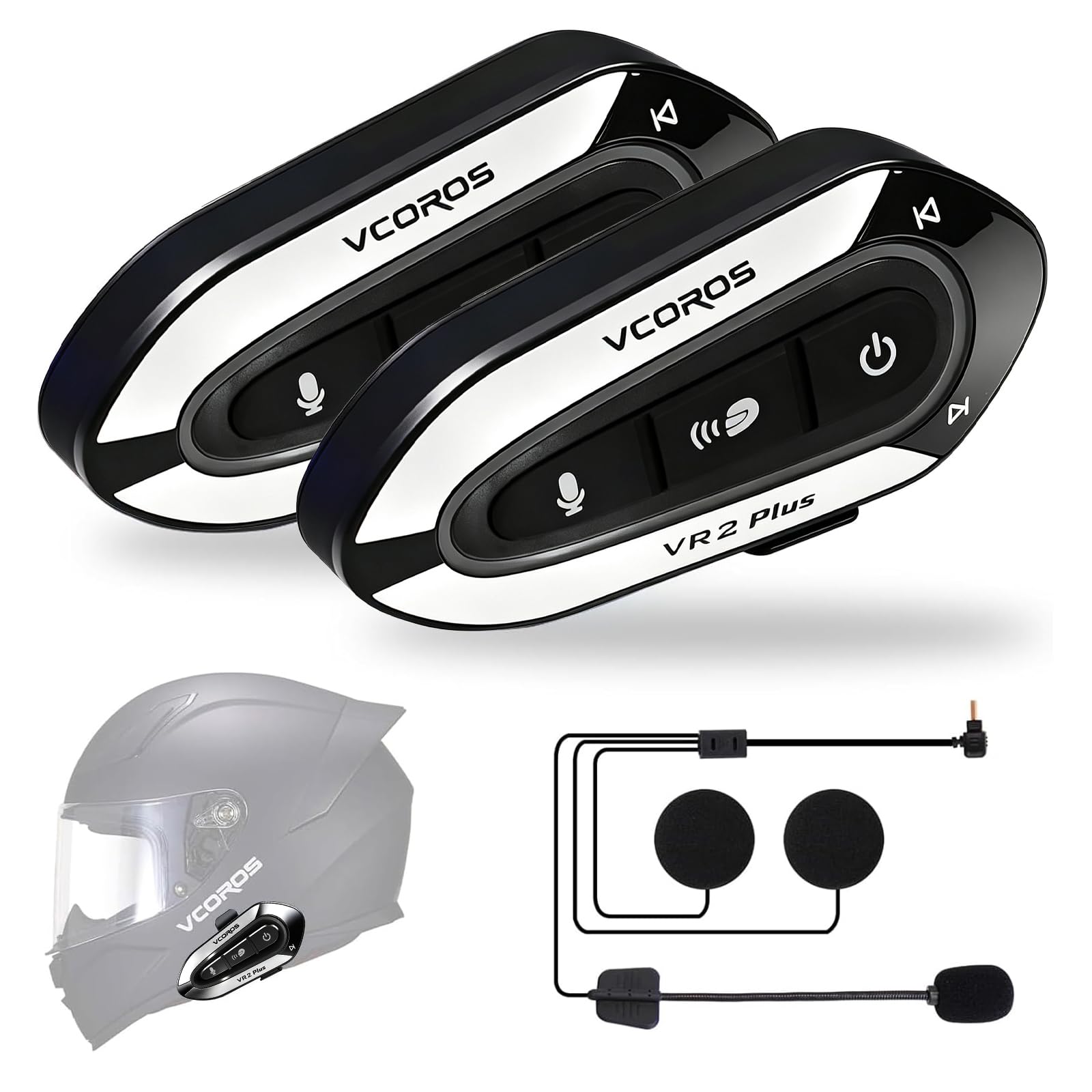
Image: The VCOROS VR2 Plus intercom unit, showcasing its sleek design and RGB lighting.
2. Contido do paquete
Antes de continuar coa instalación, comproba que todos os elementos estean presentes no teu paquete:
- VR2 Plus Device (1 unit)
- TYPE-C Interface Hard Tube Mic Headset (1 unit)
- Manual de usuario (1 unidade)
- Cable de carga tipo C (1 unidade)
- Clip-on Base (1 unit)
- Host Velcro (1 unit)
- Mic Stick Velcro (multiple pieces)
- Horn Velcro (multiple pieces)

Image: A visual representation of all items included in the VCOROS VR2 Plus product package.
3. Configuración e instalación
3.1 Instalación do casco
The VR2 Plus intercom is compatible with all helmet types and offers two installation methods: adhesive and clip-on. For optimal stability, it is recommended to use both methods in conjunction. The integrated hard microphone is suitable for full-face, open-face, and modular helmets.
- Escolla lugar de montaxe: Select a flat surface on the left side of your helmet for the intercom unit.
- Montaxe adhesivo: Clean the helmet surface thoroughly. Attach the Host Velcro to the intercom unit and then firmly press it onto the chosen helmet location.
- Clip-on Mount: Slide the clip-on base between the helmet shell and the inner padding. Secure the intercom unit to the clip.
- Instalación de altofalantes: Attach the Horn Velcro to the back of the speakers. Place the speakers inside the helmet's ear pockets, ensuring they are aligned with your ears for best audio quality.
- Instalación de micrófono: Attach the Mic Stick Velcro to the microphone. Position the hard tube microphone inside the helmet, ensuring it is close to your mouth but not obstructing your vision or comfort.
- Conectar auriculares: Plug the headset cable into the Type-C port on the intercom unit.

Image: Illustration demonstrating the compatibility of the hard microphone with various helmet types.
3.2 Bluetooth Pairing (Phone)
The VR2 Plus supports Bluetooth V6.0 and can connect to two mobile phones simultaneously.
- Ensure the VR2 Plus is powered off.
- Press and hold the Power button until the RGB light flashes rapidly, indicating pairing mode.
- On your smartphone, enable Bluetooth and search for "VCOROS VR2 Plus".
- Select the device to pair. Once connected, the RGB light will slow its flashing or turn solid blue.
- To connect a second phone, repeat the process. You can switch between devices for music or calls.
3.3 Intercom Pairing (Two Units)
The VR2 Plus supports two-person intercom communication up to 500 meters. Intercom functionality is only compatible between two VR2 Plus units.
- Ensure both VR2 Plus units are powered off.
- On both units, press and hold the Intercom/Light button until the RGB light flashes rapidly, indicating intercom pairing mode.
- The units will automatically search and connect to each other. Once connected, the intercom indicator (blue) will illuminate.
- To initiate intercom communication, briefly press the Intercom/Light button on either unit.

Image: Diagram illustrating the intercom function between two VCOROS VR2 Plus units.
4. Instrucións de funcionamento
4.1 Funcións dos botóns anterioresview

Image: Detailed diagram showing the location and function of each button on the VCOROS VR2 Plus intercom.
- Power Button (Rightmost):
- Press and hold: Power On/Off
- Short press: Play/Pause music, Answer/Hang up calls
- Music Sharing / Voice Assistant Button (Leftmost):
- Short press: Activate Voice Assistant
- Long press: Initiate Music Sharing (with another VR2 Plus unit)
- Intercom / Light Button (Middle):
- Short press: Initiate/End Intercom call
- Long press: Change RGB lighting mode
- Volume Up / Next Song (Top edge): Short press for Volume Up, Long press for Next Song.
- Volume Down / Previous Song (Bottom edge): Short press for Volume Down, Long press for Previous Song.
4.2 Reprodución de música
Once paired with your smartphone, you can stream music wirelessly.
- Reproducir/Pausa: Prema brevemente o botón de acendido.
- Próxima canción: Mantén premido o botón para subir volume.
- Canción anterior: Mantén premido o botón para baixar o volume.
- Axuste de volume: Prema brevemente os botóns Subir volume ou Baixar volume.
- Compartir música: Long press the Music Sharing / Voice Assistant button to share your music with a paired VR2 Plus intercom.
4.3 Chamadas telefónicas
Manage your calls hands-free while riding.
- Responder chamada: Prema brevemente o botón de acendido.
- Finalizar a chamada: Prema brevemente o botón de acendido.
- Rexeitar a chamada: Manteña premido o botón de acendido.
- Volver a marcar o último número: Prema dúas veces o botón de acendido/apagado.
4.4 Asistente de voz
Activate your smartphone's voice assistant for navigation, calls, or other commands.
- Activar: Short press the Music Sharing / Voice Assistant button.

Image: The VCOROS VR2 Plus unit demonstrating its AI Voice Assistant capability, allowing connection to two mobile phones.
Iluminación RGB de 4.5
Customize your intercom's appearance with the integrated RGB lighting.
- Cambiar modo: Long press the Intercom / Light button to cycle through different RGB lighting modes.
5. Mantemento
5.1 Carga
The VR2 Plus is equipped with a 1000 mAh rechargeable battery.
- Porto de carga: Use the provided Type-C charging cable to connect the intercom to a USB power source.
- Tempo de carga: Aproximadamente 2.5 horas para unha carga completa.
- Duración da batería:
- Bluetooth Headset: Up to 18 hours
- Intercom: Up to 15 hours
- Tempo de conversa continua: Ata 18 horas
- Tempo de espera: ata 270 horas
- Aforro de enerxía: The unit will automatically shut down after 10 minutes if not paired to save battery.

Image: Visual representation of the VCOROS VR2 Plus's 1000mAh battery capacity and its impressive battery life for various functions.
5.2 Limpeza e coidado
Para garantir a lonxevidade e un rendemento óptimo:
- Limpe a unidade cun d, suaveamp pano. Evite produtos químicos agresivos ou produtos de limpeza abrasivos.
- Ensure the Type-C port cover is securely closed when not charging to maintain IP56 water and dust resistance.
- Garda o dispositivo nun lugar fresco e seco cando non estea en uso.

Image: The VCOROS VR2 Plus intercom shown in scenarios highlighting its IP56 deep waterproof and dustproof capabilities.
6 Solución de problemas
If you encounter issues with your VCOROS VR2 Plus, please refer to the following common problems and solutions:
| Problema | Posible causa/solución |
|---|---|
| Sen Poder | Battery might be depleted. Charge the unit for at least 30 minutes. Ensure the charging cable is properly connected. |
| Non se pode emparellar co teléfono |
|
| Intercom Not Connecting |
|
| Poor Audio Quality / Noise |
|
| Os botóns non responden | Try restarting the device. If the issue persists, the battery might be critically low. |
7. Especificacións
| Característica | Detalle |
|---|---|
| Marca | VCOROS |
| Nome do modelo | VR2 Plus |
| Tecnoloxía de conectividade | Sen fíos (Bluetooth) |
| Versión Bluetooth | 6.0 |
| Alcance Bluetooth | 10 Meters (for phone connection) |
| Rango de intercomunicador | Up to 500 Meters (2-person) |
| Capacidade da batería | 1000 mAh |
| Tempo de carga | 2.5 horas |
| Battery Life (Bluetooth Headset) | 18 horas |
| Battery Life (Intercom) | 15 horas |
| Tempo de conversa continua | 18 horas |
| Tempo de espera | 270 horas |
| Porto de carga | USB-C |
| Nivel de resistencia á auga | IP56 (resistente á auga e ao po) |
| Control de ruído | Active Noise Cancellation (CVC and DSP) |
| Tipo de controlador de audio | Dynamic (40mm speakers) |
| Rango de frecuencias | 80 Hz ~ 18 KHz |
| Método de control | Voice, Button |
| Dispositivos compatibles | Motorcycles, Smartphones, GPS, Music Players |
| Peso | 170 gramos |
| Material | Acrilonitrilo Butadieno Estireno (ABS) |
8. Garantía e soporte
8.1 Información da garantía
According to product specifications, there is no explicit warranty description provided. Please refer to your point of purchase or retailer for their specific return and warranty policies.
8.2 Atención ao cliente
For further assistance, technical support, or inquiries not covered in this manual, please contact VCOROS customer service through the retailer where you purchased the product. You may also visit the official VCOROS websitio para recursos adicionais e información de contacto.