
1. Introdución
This manual provides detailed instructions for the proper use and maintenance of your BAOFENG UV-32 10W Ham Radio. The UV-32 is a multi-band two-way radio featuring 10W selectable power, GPS navigation, a 2.0-inch color display, and multiple programming options including wireless app connectivity. Please read this manual thoroughly before operating the device to ensure safe and efficient communication.
2. Información de seguridade
Observe the following safety precautions to prevent injury or damage to the radio:
- Non utilice a radio en atmosferas explosivas (por exemplo, gases inflamables, partículas de po ou pos metálicos).
- Do not transmit without an antenna connected.
- Keep the antenna at least 2.5 cm (1 inch) away from your body when transmitting.
- Use only BAOFENG-approved batteries and chargers. Unauthorized accessories may cause damage or fire.
- Non desmontes nin modifiques a radio. As reparacións só deben ser realizadas por técnicos cualificados.
- Evitar a exposición prolongada á luz solar directa ou a temperaturas extremas.
- Non opere a radio mentres conduce ou realiza outras actividades que requiran a máxima atención.
3. Contido do paquete
Verifica que todos os elementos estean presentes no teu paquete:
- 1 x BAOFENG UV-32 Radio
- 1 batería de 2500 mAh
- 1 x USB-C Charger
- 1 x Desktop Charger Base
- 1 x Standard UV Antenna
- 1 x Long Airband Antenna
- 1 x auriculares
- 1 x Clip para cinto
- 1 x Radio Case Holder

Image: The BAOFENG UV-32 radio shown with its complete set of accessories, including the battery, charger, antennas, headset, belt clip, and case holder.
4. Produto rematadoview
Familiarize yourself with the main components of your UV-32 radio.

Imaxe: Fronte view of the BAOFENG UV-32 radio, highlighting the 2.0-inch color display, alphanumeric keypad, and function buttons.
Compoñentes clave:
- Conector de antena: For attaching the standard UV or airband antenna.
- Botón de potencia/volume: Acende/apaga a radio e axusta o volume.
- Visualización: Pantalla a cor de 2.0 polgadas que mostra a frecuencia, o canal, o estado da batería e outros indicadores.
- Botón PTT: Botón Push-To-Talk para transmitir.
- Side Keys (P1, P2): Customizable function keys.
- Teclado: Alphanumeric input for frequencies, channels, and menu navigation.
- Porto de carga USB-C: For direct battery charging.
- Conector de accesorios: For connecting the headset or programming cable.
5. Configuración
5.1 Instalación e carga da batería
- Align the 2500mAh Li-ion battery with the grooves on the back of the radio.
- Deslice a batería cara arriba ata que encaixe no seu lugar.
- To charge, connect the USB-C charger directly to the battery's USB-C port or place the radio with the battery attached into the desktop charging base.
- The charging indicator on the desktop base will show red during charging and green when fully charged.

Image: A close-up of the 2500mAh Li-ion battery for the UV-32, highlighting its integrated USB-C charging port.
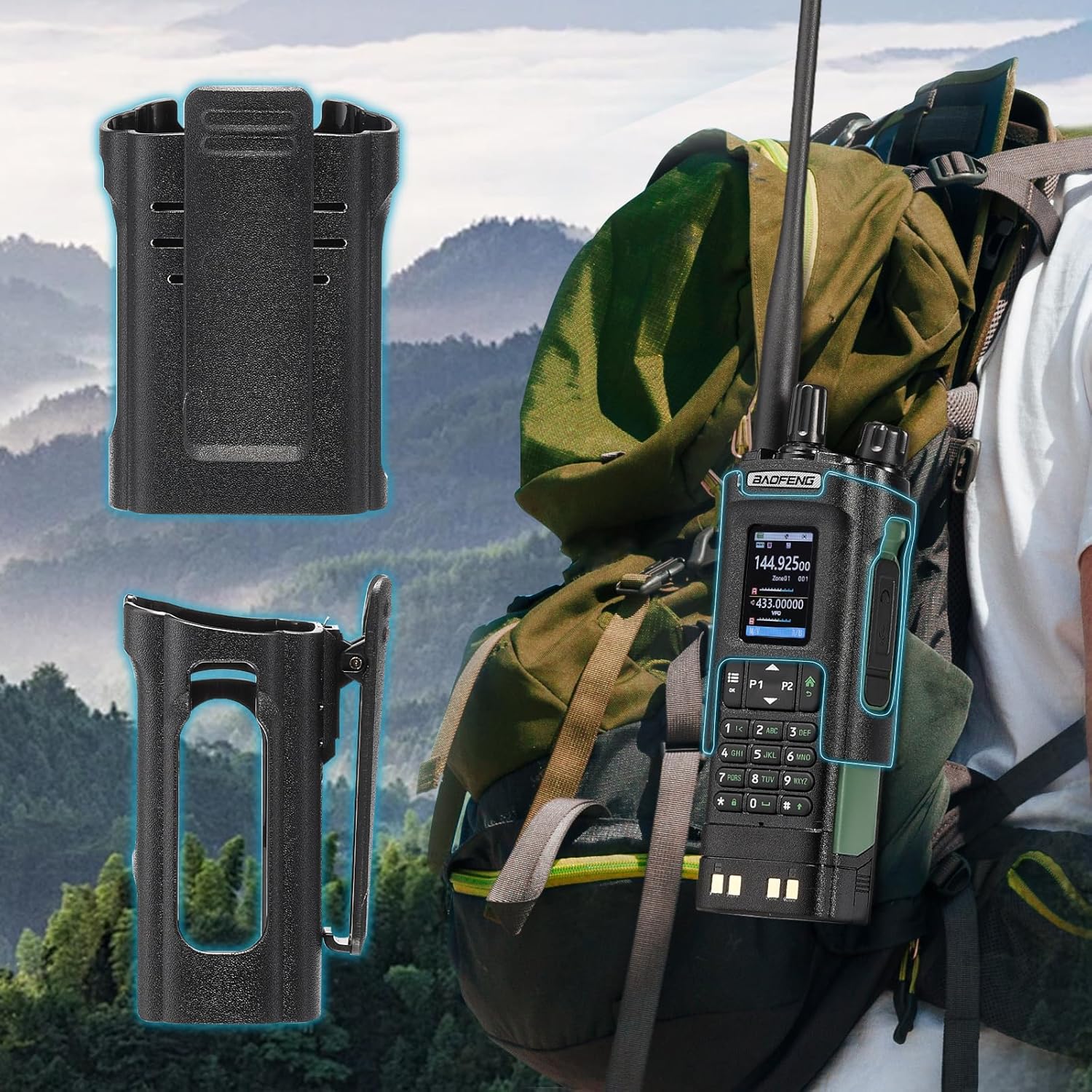
Image: The BAOFENG UV-32 radio demonstrating both direct USB-C charging and charging via its desktop cradle.
5.2 Instalación de antenas
- Select the appropriate antenna: the standard UV antenna for general VHF/UHF use or the long airband antenna for enhanced aviation signal reception.
- Screw the chosen antenna clockwise onto the antenna connector at the top of the radio until it is finger-tight. Do not overtighten.

Image: The BAOFENG UV-32 radio illustrating the use of two different antennas: a standard antenna for UHF/VHF and a longer antenna specifically designed for airband reception.
5.3 Instalación da pinza do cinto
- Aliña a pinza do cinto cos orificios dos parafusos da parte traseira da radio.
- Secure the belt clip using the provided screws.
- The radio case holder can be used to attach the radio to a backpack or belt for secure carrying.

Image: The BAOFENG UV-32 radio securely mounted to a backpack strap using its belt clip and an additional case holder, demonstrating portability.
6. Funcionamento da radio
6.1 Acendido/apagado e volume
Xire o botón de acendido/volume no sentido das agullas do reloxo para acender a radio e aumentar o volume. Xire no sentido antihorario para diminuír o volume e apagar a radio.
6.2 Mostrar máisview
The 2.0-inch color display provides essential information:
- Frecuencia/Canle: Displays the current operating frequency or channel number.
- Nivel de batería: Indica a carga restante da batería.
- Potencia do sinal: Shows the strength of received signals.
- Indicadores de modo: Icons for various functions like GPS, Bluetooth, power level, etc.

Image: A close-up of the BAOFENG UV-32's 2-inch color display, showing detailed frequency, channel, and status information.
6.3 Channel Mode vs. Frequency Mode
The radio operates in two primary modes:
- Modo de frecuencia (VFO): Allows direct input of frequencies for scanning or temporary use.
- Modo de canle (MR): Uses pre-programmed channels for quick access to stored frequencies.
Preme o MENÚ button and navigate to the mode setting to switch between VFO and MR modes.
6.4 Selección de frecuencia
- Teclado: In Frequency Mode, directly enter the desired frequency using the numeric keypad.
- Quick Channel Knob: Rotate the top knob to quickly scroll through frequencies or channels.
- Frechas cara arriba/abaixo: Use the arrow keys (P1/P2) to fine-tune frequencies or navigate channels.
6.5 Transmisión e recepción
- Ensure an antenna is properly connected.
- Select the desired frequency or channel.
- Para transmitir, manteña premido o botón PTT botón que hai no lateral da radio. Fala con claridade no micrófono.
- Soltar o PTT botón para deter a transmisión e volver ao modo de recepción.
- Niveis de potencia: The UV-32 offers High (H), Medium (M), and Low (L) power settings. Adjust this in the menu to balance range and battery life.
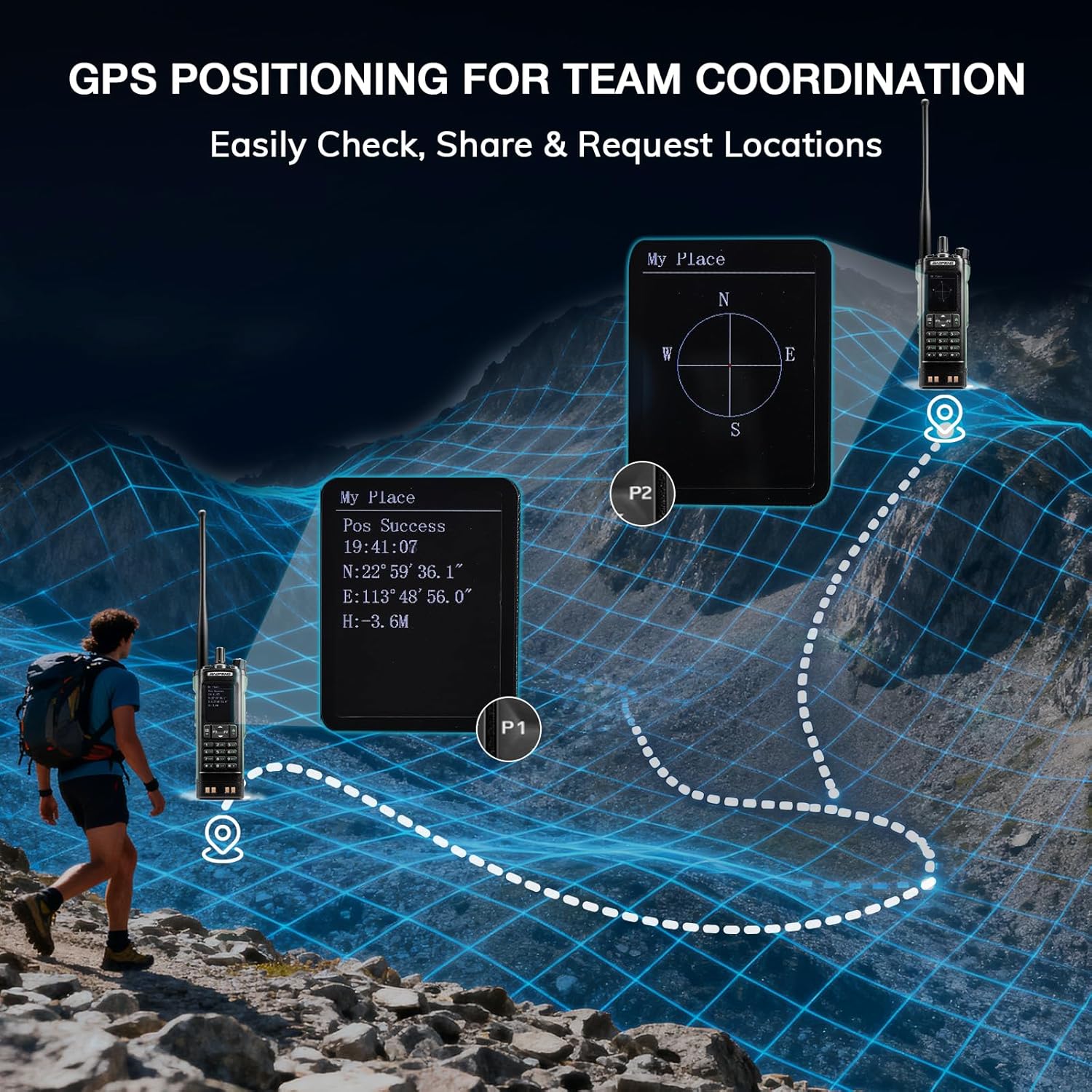
Image: The BAOFENG UV-32 radio's display showing different power output levels (High, Medium, Low) and an external SWR meter for measurement.
6.6 Opcións de programación
The UV-32 offers several methods for programming frequencies and settings:
- Wireless APP Programming: Connect your radio to a smartphone (iOS/Android) via Bluetooth using the dedicated BT app for quick and wireless programming.
- CHIRP Software: For advanced or bulk programming, use CHIRP software on a PC. Select "UV-17ProGPS" as the radio model in CHIRP.
- Programación do teclado: Basic programming can be done directly on the radio using the keypad and menu system.
- Copia de frecuencia dunha soa tecla: This feature allows for easy cloning of frequencies from another radio. Refer to the radio's on-screen prompts or full manual for specific steps.

Image: An illustration depicting the various programming methods available for the BAOFENG UV-32, including mobile app (Bluetooth), CPS software, CHIRP software, and direct keypad input.

Image: Two BAOFENG radios illustrating the one-key frequency copy function, allowing for quick and easy channel cloning between devices.
6.7 Navegación GPS
The integrated GPS module provides real-time location data:
- Access the GPS function through the radio's menu.
- View your current latitude, longitude, and altitude.
- The radio supports sharing your location or requesting coordinates from other team members for improved coordination.

Image: A visual representation of the BAOFENG UV-32's GPS functionality, showing how it displays coordinates and facilitates location sharing for team coordination in outdoor environments.
6.8 Enhanced Airband Reception
For clearer reception of aviation signals, utilize the dedicated AM antenna included with your UV-32. This specialized antenna is designed to provide more accurate and stable airband listening compared to standard UV dual-band antennas.
6.9 Radio meteorolóxica da NOAA
The UV-32 can receive NOAA weather alerts. Consult the radio's menu for instructions on how to scan for and select NOAA channels in your area.
6.10 Teclas laterais personalizables
The radio features four customizable side keys (P1, P2, and two others). These can be programmed via the menu or programming software to quickly access frequently used functions such as scan, monitor, or power level adjustment.

Image: A close-up of the BAOFENG UV-32's side, highlighting the customizable P1 and P2 function keys.
7. Mantemento
7.1 Limpeza da radio
Limpe a superficie da radio cun pano suave eamp pano. Non empregue produtos químicos agresivos nin produtos de limpeza abrasivos. Asegúrese de que todos os portos estean secos antes de usalos.
7.2 Coidado coa batería
- Cargue a batería completamente antes do primeiro uso.
- Evite sobrecargar ou esgotar completamente a batería.
- Garde a batería nun lugar fresco e seco cando non a use durante períodos prolongados.
7.3 Almacenamento
When storing the radio for a long time, remove the battery and store it separately. Keep the radio in a dry, dust-free environment away from direct sunlight and extreme temperatures.
8 Solución de problemas
| Problema | Causa posible | Solución |
|---|---|---|
| A radio non se acende | Batería non instalada correctamente ou descargada. | Asegúrate de que a batería estea ben conectada. Cárgaa completamente. |
| Non se pode transmitir | Antenna not connected. Incorrect frequency/channel. Low power setting. | Attach antenna. Verify frequency/channel. Increase power level. |
| Poor reception/transmission range | Obstructions. Low power setting. Incorrect antenna. | Move to an open area. Increase power. Ensure correct antenna is used and properly connected. |
| Programming errors with CHIRP/APP | Incorrect radio model selected. Connection issues. Outdated software/firmware. | Ensure "UV-17ProGPS" is selected in CHIRP. Re-establish Bluetooth connection. Update software/firmware if available. |
9. Especificacións
| Característica | Detalle |
|---|---|
| Marca | BAOFENG |
| Número de modelo | UV-32 |
| Número de canles | 1000 |
| Rango de frecuencias | UHF, VHF |
| Potencia de saída | Up to 10W (selectable High, Medium, Low) |
| Mostrar | Pantalla a cor de 2.0 polgadas |
| Batería | Ión de litio de 2500 mAh (incluída) |
| Cargando | USB-C, Desktop Charger Base |
| Características especiais | Digital Display, Dual Band, USB-C Rechargeable, Wireless APP Programming, Wireless Channel Clone, GPS, NOAA Reception |
| Protocolo de conectividade | Bluetooth |
| Dimensións do produto | 1.2" D x 2.2" W x 4" H |
| Nivel de resistencia á auga | Non resistente á auga |
10. Garantía e soporte
Your BAOFENG UV-32 radio comes with an 18 meses de garantíaBAOFENG tamén ofrece soporte vitalicio para este produto.
For technical assistance, warranty claims, or further inquiries, please visit the official BAOFENG website or contact their customer support directly. Keep your purchase receipt as proof of purchase for warranty services.