
1. Introdución
This manual provides detailed instructions for the setup, operation, and maintenance of your Bikevee GPS Wireless Cycling Computer, model BKV300B. Please read this manual thoroughly before using the device to ensure proper function and to maximize your cycling experience.
The Bikevee BKV300B is a 2.4-inch LCD display cycling computer designed to accurately track various cycling data, including speed, distance, and trip time. It features automatic start/stop functionality, an auto-backlight for visibility in varying light conditions, and an IPX7 waterproof rating for reliable performance in diverse weather.
2. Contido do paquete
Verifique que todos os elementos que se indican a continuación estean incluídos no seu paquete:
- Bike Computer (Main Unit)
- Cable de carga USB-C
- Out Front Extended Mount
- Parafuso hexagonal
- Chave hexagonal
- Sponge Pads

Image: Contents of the Bikevee GPS Cycling Computer package, including the main unit, charging cable, mount, screw, wrench, and sponge pads.
3. Produto rematadoview
The Bikevee BKV300B is designed for ease of use and comprehensive data tracking. Key features include:
- Pantalla LCD de 2.4 polgadas: Provides clear visibility of cycling data.
- GPS activado: Accurate speed and distance measurement without external sensors.
- Auto Start/Stop: Automatically records ride data when in motion and pauses when stopped.
- Retroiluminación automática: Adjusts display brightness automatically for optimal viewde día ou de noite.
- Impermeable IPX7: Protexido contra a inmersión temporal na auga.
- Batería de longa duración: Ata 28 horas de uso continuo cunha única carga.

Image: The Bikevee GPS Cycling Computer main unit shown alongside its out-front extended mount.

Image: The Bikevee cycling computer display illustrating various data types such as ride time, distance, speed, ascent, gradient, altitude, and clock.

Image: A visual representation of the Bikevee cycling computer's compact dimensions (70mm x 45mm) and lightweight design (50g).
4. Configuración
4.1 Montaxe do dispositivo
The Bikevee BKV300B uses a wireless GPS system, eliminating the need for magnets or wires. Installation is straightforward:
- Attach the Out Front Extended Mount to your bicycle's handlebar using the provided hexagon socket screw and wrench. Ensure it is securely fastened.
- Insert the Bikevee computer into the mount. It should click into place.
- Power on the device. The computer will automatically search for GPS signals to calibrate time and begin tracking.

Image: A comparison showing the complex installation of a wired bike computer versus the simple, wireless installation of the Bikevee GPS computer on a handlebar mount.
4.2 Configuración inicial
Ao primeiro uso ou despois dun reinicio, pode que teñas que configurar axustes básicos:
- Unit Selection (MPH/KM/H): Use the device buttons to navigate to the settings menu and select your preferred speed and distance units.
- Zona horaria: Set your local time zone. The device will automatically synchronize time via GPS.
5. Instrucións de funcionamento
5.1 Encendido/apagado
Press and hold the power button (usually located at the bottom left) to turn the device on or off.
5.2 Inicio/Parada automática
The computer automatically detects movement. When you start cycling, it begins recording data. When you stop for a period, it automatically pauses the recording. This feature conserves battery and simplifies operation.
5.3 Retroiluminación automática
The device features an automatic backlight that adjusts based on ambient light conditions. This ensures readability in both bright daylight and low-light environments. To manually control the backlight:
- Press two specific buttons simultaneously (refer to device interface for exact buttons, often power and mode) to toggle the backlight on or off.
- Turning off the backlight during the day can help extend battery life.
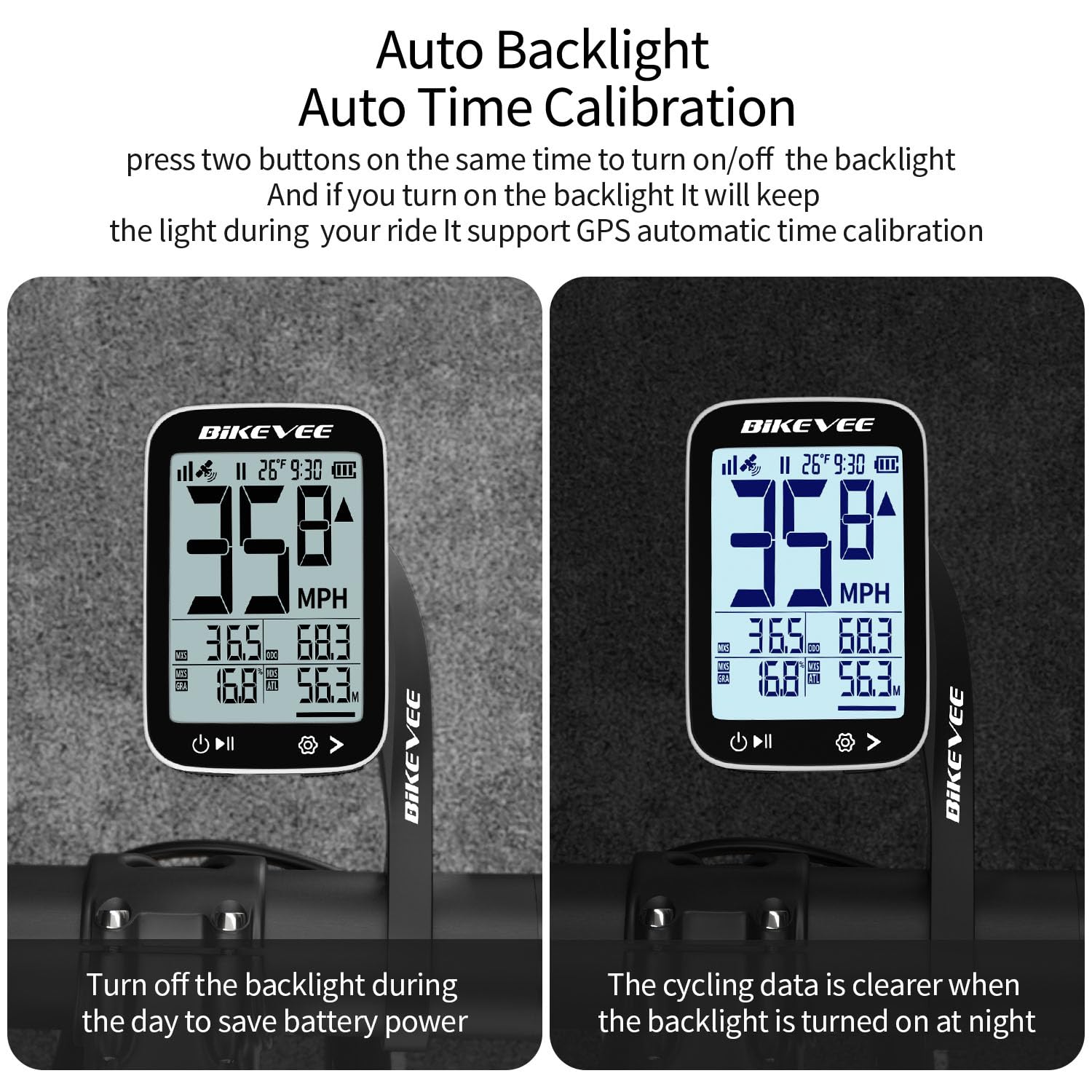
Image: The Bikevee cycling computer display showing the difference in visibility with the auto backlight off (left) and on (right), demonstrating improved clarity in low light.
5.4 Visualización de datos
The 2.4-inch LCD displays various cycling metrics. Use the mode button (usually bottom right) to cycle through different data screens or views. Data points typically include:
- Current Speed (MPH/KM/H)
- Velocidade media
- Velocidade máxima
- Tempo de paseo
- Ride Distance
- Total Distance (Odometer)
- Altitude
- Degradado
- Temperatura
- Reloxo
6. Mantemento
6.1 Carga da batería
The Bikevee BKV300B is equipped with a 650mAh rechargeable Lithium-Ion battery, providing up to 28 hours of use. When the battery indicator is low:
- Connect the device to a USB power source using the provided USB-C charging cable.
- A charging indicator on the screen will confirm the device is charging.
- Asegúrate de que a tapa do porto de carga estea ben pechada despois da carga para manter a resistencia á auga.
6.2 Impermeabilización
The device has an IPX7 international protection rating, meaning it is protected against temporary immersion in water (up to 1 meter for 30 minutes). While it is suitable for use in rain, avoid prolonged immersion or high-pressure water jets.

Image: The Bikevee cycling computer shown with water droplets, illustrating its IPX7 waterproof capability. A note advises against prolonged immersion.
6.3 Limpeza
Limpe o dispositivo cun suave, damp pano. Non use produtos de limpeza ou disolventes abrasivos.
7 Solución de problemas
- O dispositivo non se acende:
Asegúrate de que a batería estea cargada. Conéctaa a unha fonte de alimentación e inténtao de novo.
- Sen sinal GPS:
Asegúrate de estar nunha zona aberta con clara view of the sky. Initial GPS lock may take a few minutes. Avoid using indoors or under heavy tree cover.
- Velocidade/distancia inexacta:
Verify that the device has a stable GPS signal. Ensure unit settings (MPH/KM/H) are correct.
- A retroiluminación non funciona:
Check if the auto-backlight feature is enabled or if it has been manually turned off. Try toggling it using the designated button combination.
- Problemas de visualización:
If the display is frozen or unresponsive, try performing a soft reset by pressing and holding the power button for an extended period (e.g., 10-15 seconds) until the device restarts.
8. Especificacións
| Marca | Bikevee |
| Número de modelo | BKV300B |
| Cor | Branco e negro |
| Dimensións do produto | 70L x 45W x 16H Millimeters |
| Peso do elemento | 100 Grams (50g for main unit) |
| Tamaño da pantalla | 2.4 polgadas |
| Tipo de visualización | LCD |
| Duración da batería | Ata 28 horas |
| Tipo de batería | 650 mAh de iones de litio |
| Clasificación impermeable | IPX7 |
| Tipo de montaxe | Handlebar Mount (Out Front Extended Mount) |
| Entrada da interface humana | Botóns |
9. Garantía e soporte
For warranty information and technical support, please refer to the documentation provided with your purchase or visit the official Bikevee websitio. Garda o comprobante de compra para reclamacións de garantía.
For further assistance, you may contact Bikevee customer service through their official channels.


