
Introdución
This manual provides detailed instructions for the installation, operation, and maintenance of your ANRAN Q04 Solar 4G LTE Security Camera. Please read this manual thoroughly before using the product to ensure proper functionality and safety. Keep this manual for future reference.

Image: Two ANRAN Q04 white solar security cameras, showcasing the solar panel and antenna design.
Contido do paquete
Verify that all components are present in your package. If any items are missing or damaged, please contact customer support.
- ANRAN Q04 Solar 4G LTE Security Camera(s)
- Solar Panel (integrated or separate, depending on model variant)
- Soporte de montaxe e parafusos
- Cable de carga USB
- Manual de usuario (este documento)
- SIM Card (pre-installed or included, depending on region/package)
- MicroSD Card (optional, may be included in some packages)
Produto rematadoview
The ANRAN Q04 camera is a wireless outdoor security solution featuring 4G LTE connectivity and solar power. It is designed for continuous surveillance in locations without Wi-Fi access or consistent power supply.

Image: ANRAN Q04 black solar security camera, highlighting the inclusion of a SIM card and a 32GB microSD card.
Características principais:
- Conectividade 4G LTE: Operates independently without Wi-Fi.
- Alimentación solar: Integrated solar panel for continuous charging of the built-in 9600mAh battery.
- 100 % sen fíos: Flexible placement without power cables.
- Three Night Vision Modes: Smart, Color, and Infrared for clear visibility in low light.
- Resistente ás inclemencias do tempo IP66: Deseñado para uso no exterior, resistente ao po e á auga.
- Almacenamento local e na nube: Supports up to 128GB MicroSD card (not included) and offers cloud storage options.
Configuración
1. Carga inicial
Before first use, fully charge the camera's internal battery using the provided USB cable and a 5V/2A power adapter (not included). A full charge ensures optimal performance, especially during initial setup or periods of low sunlight.
2. SIM Card & MicroSD Card Installation
- Locate the SIM card slot and MicroSD card slot on the camera (usually under a rubber seal).
- Insert the 4G LTE SIM card (ensure it is activated and has a data plan) into the SIM slot with the gold contacts facing down.
- Insert a MicroSD card (up to 128GB, Class 10 or higher recommended) into the MicroSD slot if local storage is desired.
- Securely close the rubber seal to maintain waterproofing.

Image: ANRAN Q04 white solar security camera with an arrow pointing to the MicroSD card slot, indicating local storage capability up to 128GB.
3. App Download & Account Creation
- Download the "ANRAN" app from your smartphone's app store (iOS App Store or Google Play Store).
- Abre a aplicación e crea unha nova conta ou inicia sesión se xa tes unha.
4. Camera Pairing/Connection
- Power on the camera. Wait for the indicator light to show it's ready for pairing (refer to the camera's LED indicator guide in the app or a separate quick start guide).
- Na aplicación ANRAN, toca a icona "+" para engadir un novo dispositivo.
- Select "4G Camera" or the appropriate camera type.
- Siga as instrucións en pantalla para escanear o código QR da cámara ou introduza manualmente o ID do dispositivo.
- Once connected, you can name your camera and configure initial settings.
5. Instrucións de montaxe
Escolla unha localización que reciba ample direct sunlight for the solar panel and provides the desired viewángulo de ing.
- Mark the drilling points on the wall or mounting surface using the mounting bracket as a template.
- Perfore buratos guía e insira ancoraxes de parede se é necesario.
- Fixe o soporte de montaxe á superficie usando os parafusos proporcionados.
- Fixe a cámara ao soporte de montaxe.
- Adjust the camera angle and solar panel orientation for optimal sunlight exposure and coverage.

Image: A woman installing an ANRAN Q04 white solar security camera on an outdoor wall, demonstrating simple installation.

Image: An ANRAN Q04 black solar security camera mounted on a tree, illustrating its 100% wire-free and 4G capabilities, powered by an integrated solar panel.
Funcionamento da cámara
1. En directo View
Open the ANRAN app and select your camera from the device list. The live view will display the real-time feed from your camera. You can use on-screen controls for pan/tilt (if supported by your model), zoom, and two-way audio.
2. Gravación e reprodución
The camera records video based on motion detection or continuous recording settings (if configured).
- Almacenamento local: Recordings are saved to the installed MicroSD card. Access them via the app's playback section.
- Almacenamento na nube: If subscribed, recordings are uploaded to the cloud. Access them through the app's cloud history.
3. Modos de visión nocturna
The ANRAN Q04 supports three night vision modes, which can be configured in the app settings:
- Modo intelixente: Cambia automaticamente entre a visión nocturna por infravermellos e a cor en función do movemento detectado ou da luz ambiental.
- Modo de cor: Utiliza focos incorporados para proporcionar vídeo a toda cor en condicións de pouca luz.
- Modo infravermello: Uses infrared LEDs for black and white video in complete darkness.
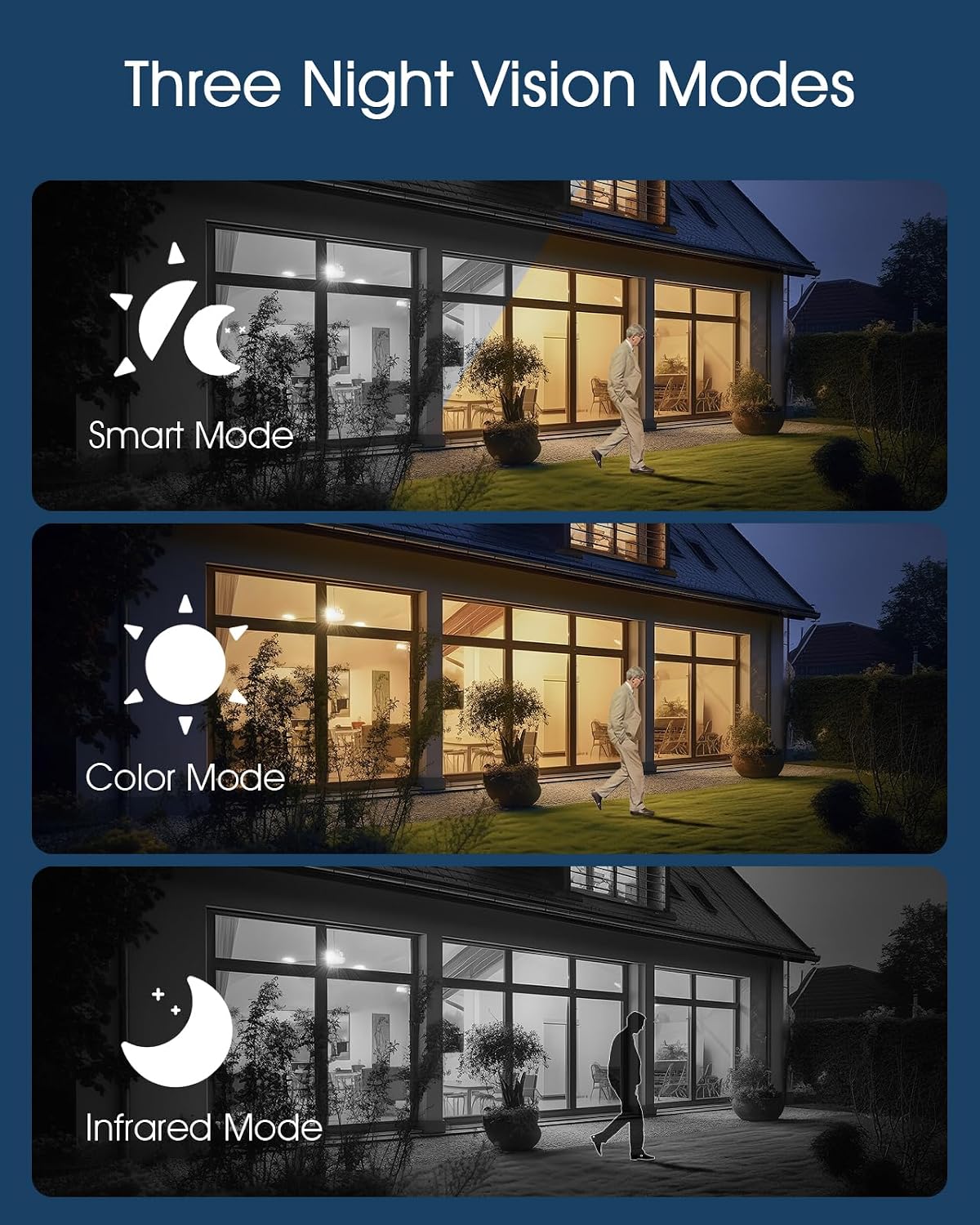
Image: Visual representation of the three night vision modes (Smart, Color, Infrared) available on the ANRAN Q04 camera, showing their distinct appearances.
4. Configuración da detección de movemento
Configure motion detection sensitivity, detection zones, and notification preferences within the ANRAN app. This allows you to receive alerts only for relevant events.
Mantemento
1. Limpeza
- Limpe regularmente a lente da cámara e o panel solar cun pano suave eamp pano para eliminar o po, a sucidade ou os restos.
- Asegúrate de que o panel solar estea limpo para unha carga eficiente.
- Non empregue produtos químicos duros nin limpadores abrasivos.
2. Coidado da batería
- The camera is designed for continuous solar charging. Ensure the solar panel receives adequate direct sunlight daily.
- If the camera is installed in a shaded area or during prolonged periods of low sunlight, occasional manual charging via USB may be required.
- Evita temperaturas extremas que poden degradar o rendemento da batería.

Image: ANRAN Q04 black solar security camera with its solar panel, illustrating its capability for 365 days of non-stop solar power due to the 9600mAh battery and IP66 waterproof rating.
Resolución de problemas
| Problema | Posible Solución |
|---|---|
| A cámara non se acende. | Ensure the battery is charged. Connect to a USB power source for initial charging. Check the power button. |
| Sen sinal 4G. | Verify the SIM card is correctly inserted and activated with a data plan. Check network coverage in the installation area. Try restarting the camera. |
| Non se pode conectar coa aplicación. | Ensure the camera is powered on and the SIM card has an active data connection. Restart the app and the camera. Follow the pairing steps again. |
| Mala calidade de vídeo pola noite. | Check night vision settings in the app (Smart, Color, Infrared). Ensure the camera lens is clean and not obstructed. |
| Battery not charging via solar. | Ensure the solar panel is clean and receives at least 4-6 hours of direct sunlight daily. Reposition the camera or panel if necessary. |
Especificacións
- Modelo: Q04
- Conectividade: 4G LTE (SIM card required)
- Potencia: Solar Panel with 9600mAh Rechargeable Battery
- Almacenamento: MicroSD Card (up to 128GB, not included), Cloud Storage (subscription optional)
- Resistencia á intemperie: IP66 impermeable e a proba de po
- Temperatura de funcionamento: -40 °F a 140 °F (-40 °C a 60 °C)
- Visión nocturna: Smart, Color, Infrared Modes
- Audio: Audio bidireccional

Image: ANRAN Q04 white solar security camera operating outdoors in the rain, demonstrating its IP66 waterproof and dustproof rating and ability to withstand temperatures from -40°F to 140°F.
Garantía e Soporte
ANRAN products typically come with a limited warranty. Please refer to the warranty card included in your package or visit the official ANRAN websitio web para obter información detallada sobre os termos e condicións da garantía.
For technical support, troubleshooting assistance, or warranty claims, please contact ANRAN customer service through their official websitio web ou a información de contacto que se inclúe na embalaxe do produto.
Websitio: www.anran-cctv.com (Please verify official websitio)


