
SKAPENDY VK84 2.4GHz Wireless Gaming Headset User Manual
Model: VK84 | Brand: SKAPENDY
1. Introdución
This manual provides detailed instructions for the SKAPENDY VK84 2.4GHz Wireless Gaming Headset. It covers product features, setup, operation, maintenance, and troubleshooting to ensure optimal performance and user experience. Please read this manual thoroughly before using the headset.
2. Contido do paquete
Verifique que todos os elementos que se indican a continuación estean presentes no seu paquete:
- SKAPENDY VK84 Wireless Gaming Headset
- Dongle USB de 2.4 GHz
- Cable de carga USB-C
- Manual de usuario (este documento)
3. Produto rematadoview
The SKAPENDY VK84 headset features a modern design with comfortable ear cushions and intuitive controls. It offers dual connectivity modes (2.4GHz wireless and Bluetooth) for versatile use across various platforms.

Image: The SKAPENDY VK84 Wireless Gaming Headset in white with its accompanying USB dongle.
Vídeo: Un overview of the VK84 2.4GHz Wireless Gaming Headset, demonstrating its features and components.
Comodidade e Deseño
The headset is designed for extended wear with breathable trans-protein skin ear cushions that dissipate heat, ensuring comfort during long gaming sessions. The adjustable headband provides a secure and comfortable fit for various head sizes.

Image: Close-up of the soft, breathable ear cushions designed for comfort.
4. Configuración e conexión
4.1 Carga inicial
Before first use, fully charge the headset using the provided USB-C charging cable. A full charge takes approximately 2.5 hours and provides up to 50 hours of playtime. A voice alert will notify you when the battery level drops below 10%.

Image: Visual representation of the headset's 50+ hour battery life.
4.2 2.4GHz Dongle Mode
This mode offers ultra-low latency (less than 20ms) for a seamless gaming experience. It is compatible with PC, PS4, PS5, Switch (audio only), Mac, and other devices with a USB port.
- Insert the 2.4GHz USB dongle into an available USB port on your device.
- Acenda os auriculares. Conectarase automaticamente ao dongle.
- Ensure the headset is selected as the audio output/input device in your system settings.

Image: The 2.4GHz USB dongle, highlighting its ultra-low latency capability.
4.3 Modo Bluetooth
Bluetooth mode is suitable for mobile phones, tablets, iPads, and other smart devices. Note that the microphone is not supported when connected to the Nintendo Switch via Bluetooth.
- Power on the headset and switch to Bluetooth mode (refer to Section 5.1 for controls).
- On your device, enable Bluetooth and search for "SKAPENDY VK84".
- Selecciona os auriculares para emparellalos.

Image: A user enjoying media on a smartphone with the headset connected via Bluetooth.
4.4 Cambio entre modos
To switch between 2.4GHz dongle mode and Bluetooth mode, press and hold the microphone button for two seconds. The headset will indicate the current mode.

Image: A diagram illustrating the compatibility of dongle mode (PS5, PS4, PC, Mac, Switch) and Bluetooth mode (Phone, PC, Mac, Switch).
Important Compatibility Note: The SKAPENDY VK84 headset is NOT compatible with Xbox consoles in either 2.4GHz or Bluetooth modes.
5. Instrucións de funcionamento
5.1 Controis dos auriculares
Os auriculares inclúen botóns multifuncionais para un control sinxelo:
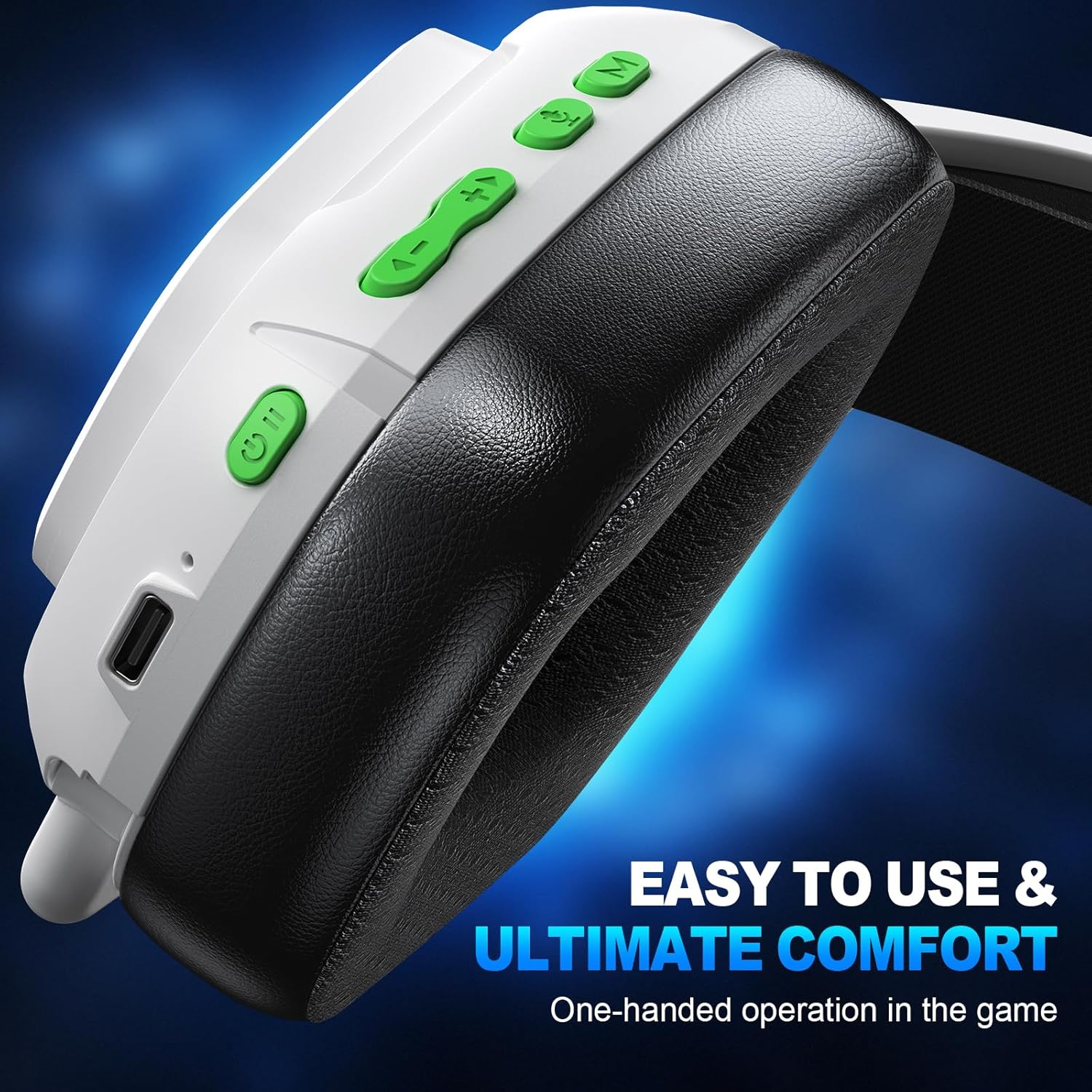
Imaxe: Primeiro plano view of the control buttons located on the headset's earcup.
| Función | Acción |
|---|---|
| Encender | Prema longamente 3s |
| Apagado | Prema longamente 4s |
| Reproducir/Pausa | Fai clic |
| Responder chamada / colgar | Fai clic |
| Rexeitar a chamada | Prema longamente 2s |
| Remarcar última chamada | Dobre clic |
| Baixar o volume | Fai clic |
| Pista anterior | Prema longamente 2s |
| Subir volume | Fai clic |
| Próxima pista | Prema longamente 2s |
| Micrófono activado/desactivado | Fai clic |
| BT <-> 2.4G Mode Switch | Prema longamente 2s |
| Conectando Bluetooth | Prema longamente 3s |
| Game mode <-> Music mode | Fai clic |
| Borrar a correspondencia Bluetooth | Prema longamente 6s |
5.2 Uso do micrófono
The headset features an Environmental Noise Cancellation (ENC) microphone, designed to reduce ambient noise by up to 95% for clear communication with teammates or during calls.

Image: A gamer using the headset, illustrating the ENC microphone's ability to cancel noise for clear calls.
5.3 Experiencia de son
Equipped with 50mm drivers and 2.4G lossless wireless technology, the headset delivers stereo 3D surround sound. This provides precise audio positioning, allowing you to hear subtle in-game cues like footsteps and explosions, enhancing your immersive experience.

Image: A visual demonstrating the 3D stereo sound and the internal components of the 50mm drive unit.
6. Mantemento
6.1 Limpeza
To maintain hygiene and prolong the life of your headset, regularly wipe the ear cushions and headband with a soft, dry cloth. For deeper cleaning, a slightly damp cloth with mild soap can be used, ensuring no moisture enters the speaker grilles or control buttons. Allow to air dry completely before next use.
6.2 Coidado coa batería
To maximize battery lifespan, avoid fully discharging the headset frequently. Charge the headset when the low battery alert is given. Store the headset in a cool, dry place when not in use for extended periods.
7 Solución de problemas
Se tes problemas cos teus auriculares, consulta as seguintes solucións habituais:
- Sen son/Son intermitente:
Ensure the headset is powered on and fully charged. Check that the correct audio output device is selected in your computer/console settings. For 2.4GHz mode, ensure the dongle is securely plugged in. For Bluetooth mode, ensure the headset is paired and within range. Try re-pairing the headset. - O micrófono non funciona:
Verify the microphone is not muted (check the headset control button). Ensure the headset is selected as the input device in your system settings. For Switch in Bluetooth mode, note that the microphone is not supported. - Non se pode conectar:
Ensure the headset is in the correct pairing mode (2.4GHz or Bluetooth). Try restarting both the headset and the device you are trying to connect to. Clear previous Bluetooth pairings on your device and the headset (long press 6s on the 'M' button) and attempt to pair again. - Os auriculares non cargan:
Ensure the USB-C cable is properly connected to both the headset and a power source. Try a different USB-C cable or power adapter.
Se estes pasos non resolven o problema, ponte en contacto co servizo de atención ao cliente.
8. Especificacións
| Característica | Detalle |
|---|---|
| Nome do modelo | VK84 |
| Marca | SKAPENDY |
| Tecnoloxía de conectividade | Sen fíos (2.4 GHz, Bluetooth) |
| Control de ruído | Passive Noise Cancellation (ENC Microphone) |
| Colocación do oído | Sobre orella |
| Factor de forma | Sobre orella |
| Impedancia | 32 ohmios |
| Duración da batería | Ata 50 horas |
| Tempo de carga | Aproximadamente 2.5 horas (mediante USB-C) |
| Dimensións do produto | 7.48 x 3.54 x 5.51 polgadas |
| Peso do elemento | 12 onzas |
| UPC | 657381061283 |
9. Garantía e soporte
The SKAPENDY VK84 Wireless Gaming Headset comes with a standard manufacturer's warranty. For detailed warranty information, product support, or technical assistance, please refer to the contact information provided on the product packaging or the official SKAPENDY websitio. Garde o comprobante de compra para reclamacións de garantía.