
Introdución
This manual provides comprehensive instructions for the setup, operation, maintenance, and troubleshooting of your T-Wolf T60 Wired 60% Mechanical Keyboard. Please read this manual carefully before using the product to ensure proper function and longevity.
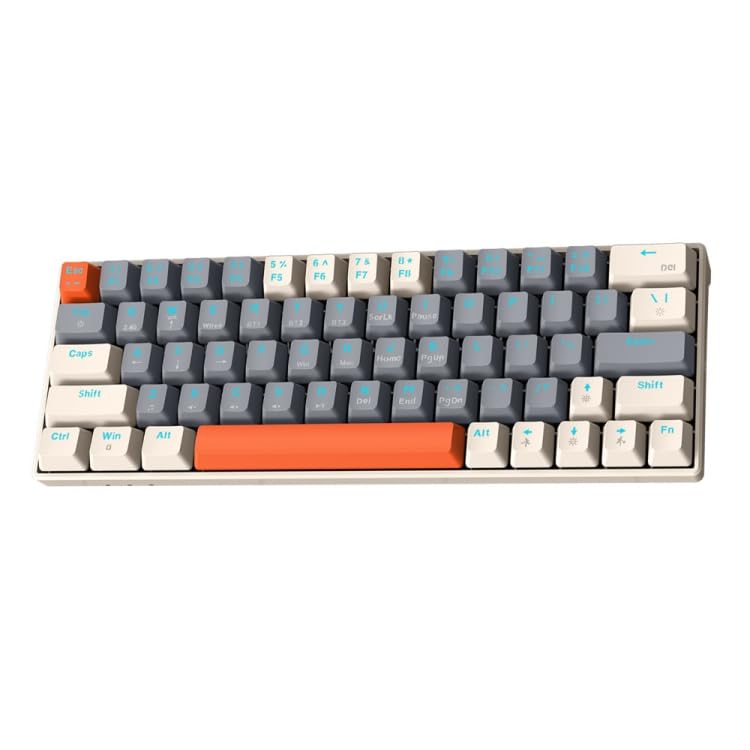
Image: T-Wolf T60 Wired 60% Mechanical Keyboard. This image displays the compact design of the keyboard, highlighting its 63-key layout and wired connectivity.
Configuración
- Desembalaxe: Carefully remove the keyboard and all included accessories from the packaging. Verify that all components are present: T-Wolf T60 keyboard and USB-C to USB cable.
- Conectando o teclado:
- Localiza o porto USB-C no teclado.
- Insert the USB-C end of the provided cable into the keyboard's USB-C port.
- Insert the USB-A end of the cable into an available USB 2.0 port on your computer (PC, desktop, or laptop).
- Instalación de controladores: The T-Wolf T60 keyboard is plug-and-play. Your operating system should automatically detect and install the necessary drivers. No manual driver installation is typically required.
- Proba inicial: Open a text editor or word processor and type to confirm the keyboard is functioning correctly.
Operación
The T-Wolf T60 is a 60% mechanical keyboard with 63 keys, designed for efficient typing and gaming. It features RGB backlighting and multi-key anti-ghosting.
- Funcións básicas das teclas: All standard alphanumeric and symbol keys function as expected. Due to the compact 60% layout, some functions (like F-keys, arrow keys, and navigation keys) are accessed via a Function (Fn) key combination. Refer to the keyboard's keycap legends for specific Fn key combinations.
- Retroiluminación RGB: The keyboard features customizable RGB backlighting.
- To cycle through different lighting modes, use the designated Fn key combination (e.g., Fn + \ or Fn + P).
- To adjust brightness, use the designated Fn key combination (e.g., Fn + Up/Down arrow keys, if available via Fn layer).
- To change lighting speed, use the designated Fn key combination (e.g., Fn + Left/Right arrow keys, if available via Fn layer).
- Multi-Key Anti-Ghosting: This feature ensures that multiple simultaneous key presses are registered accurately, which is beneficial for fast-paced gaming and complex commands.
Mantemento
Proper maintenance helps extend the lifespan of your keyboard.
- Limpeza:
- Desconecte o teclado do ordenador antes de limpalo.
- Usa unha lata de aire comprimido para eliminar o po e os residuos que hai entre as tapas das teclas.
- Limpe as tapas das teclas e a superficie do teclado cun pano suave e lixeiramente damp, pano que non solte fiapos. Evite a humidade excesiva.
- Do not use harsh chemicals, abrasive cleaners, or solvents, as these can damage the keyboard's finish and keycap legends.
- Almacenamento: Cando non o use durante períodos prolongados, garde o teclado nun lugar limpo e seco, lonxe da luz solar directa e de temperaturas extremas.
- Coidado do cable: Avoid bending or twisting the USB-C cable excessively to prevent internal damage.
Resolución de problemas
If you encounter issues with your T-Wolf T60 keyboard, refer to the following common solutions:
- O teclado non responde:
- Asegúrate de que o cable USB-C estea conectado correctamente tanto ao teclado como ao ordenador.
- Tenta conectar o teclado a un porto USB diferente do teu ordenador.
- Test the keyboard on another computer to determine if the issue is with the keyboard or the original computer's setup.
- Reinicia o teu ordenador.
- RGB Backlighting Not Working or Incorrect:
- Asegúrate de que o teclado estea conectado correctamente e reciba alimentación.
- Try cycling through the RGB modes using the Fn key combinations mentioned in the Operation section.
- Check if the brightness is set to maximum.
- As teclas non se rexistran ou escriben dúas veces:
- Clean the keyboard thoroughly, especially around the affected keys, using compressed air.
- Asegúrate de que non haxa residuos aloxados debaixo das tapas das teclas.
- Se o problema persiste, pode indicar un fallo de hardware.
Especificacións
| Característica | Detalle |
|---|---|
| Marca | LOBO-T |
| Modelo | T60 |
| Tecnoloxía de conectividade | USB-C (con cable) |
| Dispositivos compatibles | PC, desktop, laptop |
| Descrición do teclado | Xogos, Mecánica |
| Número de chaves | 63 |
| Características especiais | RGB Backlighting, Multi-Key Anti-Ghosting |
| Material | Plástico |
| Disposición do teclado | QWERTY |
Garantía e Soporte
Para obter información sobre a garantía e asistencia técnica, consulte a documentación incluída coa súa compra ou póñase en contacto directamente co vendedor/fabricante. Garde o comprobante de compra para reclamacións de garantía.
Manufacturer: T-Wolf