
1. Introdución
The THOMSON RT400DABBTBK is a versatile portable radio designed to provide a comprehensive audio experience. It features DAB+ and FM radio reception, Bluetooth connectivity for wireless audio streaming, USB playback for MP3 files, and an AUX-IN port for external devices. Additionally, it includes a dual alarm clock function, making it a practical and convenient device for various settings.
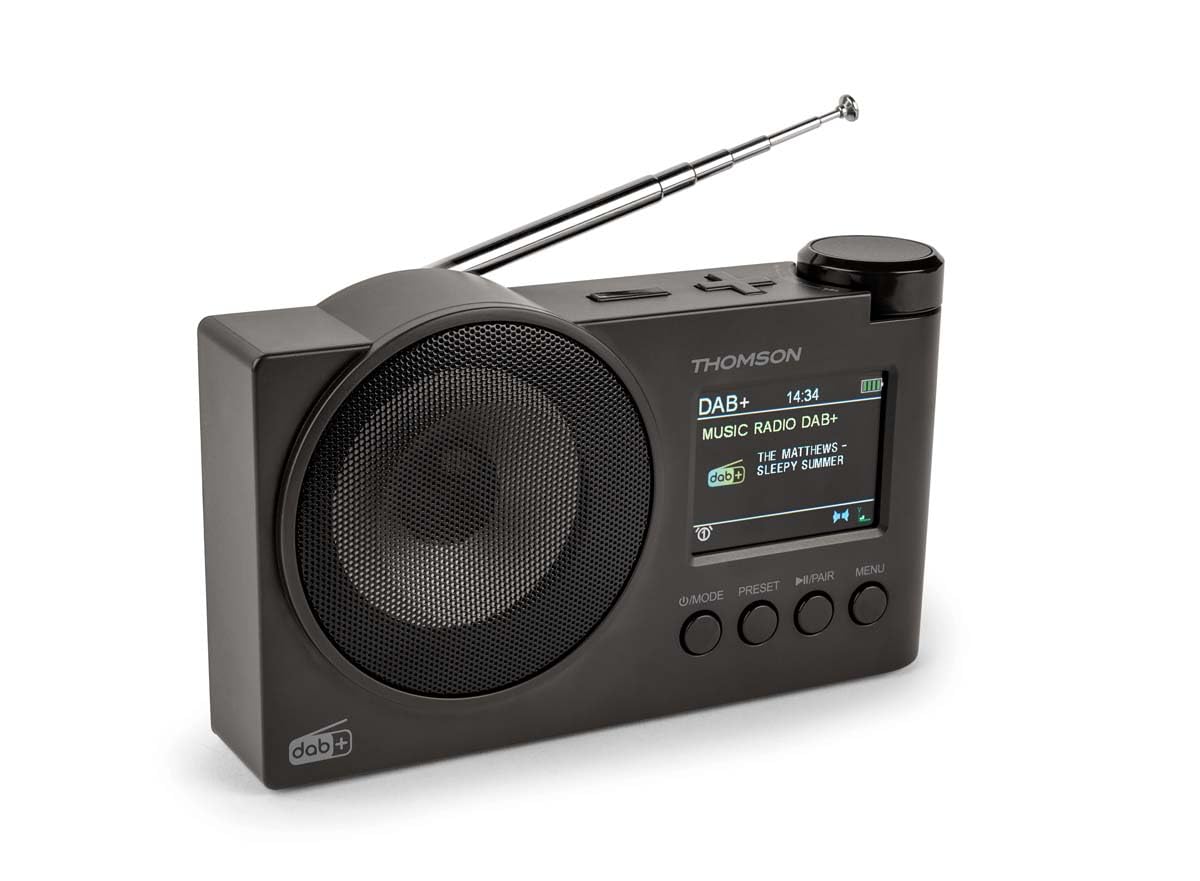
Figura 1.1: THOMSON RT400DABBTBK portable radio. This image shows the front of the radio, featuring the speaker grille on the left and the LED display with control buttons on the right. The display indicates the time, date, and battery level.
2. Instrucións de seguridade importantes
- Lea atentamente todas as instrucións antes de utilizar o dispositivo.
- Conserve este manual para futuras consultas.
- Non expoñas o dispositivo á choiva, á humidade nin a temperaturas extremas.
- Non desmonte a unidade. Encargue calquera mantemento a persoal cualificado.
- Use only the specified power adapter (DC 5V 2A) and USB-C cable.
- Garantir unha ventilación adecuada ao redor do dispositivo.
- Evite colocar o dispositivo preto de fontes de calor ou luz solar directa.
3. Contido do paquete
Comprobe que estean presentes todos os elementos:
- THOMSON RT400DABBTBK Radio
- Cable de carga USB-C
- Manual do propietario (este documento)
4. Disposición e controis do produto

Figura 4.1: Front Panel Controls and Display. This image provides a detailed view of the radio's front panel, featuring the circular speaker on the left and the rectangular LED display on the right. Below the display are four control buttons: MODE, PRESET, PLAY/PAIR, and MENU. The display shows '12/8/2025 Mardi 16:24' with alarm and stop icons.
4.1. Botóns de control
- POWER / MODE: Press to turn on/off. Press to switch between DAB+, FM, Bluetooth, USB, and AUX-IN modes.
- PRESET: Access and save preset radio stations.
- PLAY / PAIR: In Bluetooth mode, press to play/pause or initiate pairing. In USB mode, play/pause.
- MENÚ: Access system settings and options for the current mode.
- Rotary Knob (Top Right): Adjust volume, navigate menus, or tune frequencies. Press to confirm selections.
4.2. Mostrar información
The LED display shows various information depending on the operating mode:
- Current time and date (12/24h format).
- Radio station name, frequency, or DAB+ service information.
- Estado da conexión Bluetooth.
- USB track information.
- Indicador de nivel de batería.
- Alarm icons (Alarm 1, Alarm 2).
5. Configuración
5.1. Acendido
The radio can be powered in two ways:
- Potencia CA: Connect the supplied USB-C cable to the DC 5V 2A input on the radio and to a suitable USB power adapter (not included).
- Batería recargable: The radio has a built-in 1500mAh Lithium rechargeable battery. Ensure it is fully charged before portable use. The battery charges automatically when connected to AC power.
5.2. Axuste da antena
For optimal DAB+ and FM radio reception, fully extend the telescopic antenna. Adjust its position for the best signal quality.
5.3. Configuración inicial
Upon first use or after a factory reset, you may need to configure basic settings:
- Selección do idioma: Use the MENU button to navigate to System Settings, then select 'Language' to choose your preferred language (French, English, German, Italian, Spanish, Portuguese, Dutch).
- Data e hora: The time and date are often automatically updated in DAB+ mode. If not, navigate to System Settings > Time/Date to set manually.
6. Funcionamento da radio
6.1. DAB+ Radio Mode
- Preme o MODO botón para seleccionar o modo DAB+.
- The radio will automatically perform a scan for available DAB+ stations.
- Use the rotary knob to scroll through the list of found stations. Press the knob to select a station.
- Para gardar unha emisora como predefinida, manteña premido o botón PRESET button, select a preset number using the rotary knob, and press the knob to confirm.
6.2. Modo de radio FM
- Preme o MODO botón para seleccionar el modo FM.
- To auto-scan for stations, press and hold the rotary knob. The radio will scan and save stations.
- To manually tune, rotate the knob to adjust the frequency.
- Para gardar unha emisora como predefinida, manteña premido o botón PRESET button, select a preset number using the rotary knob, and press the knob to confirm.
6.3. Modo de altofalante Bluetooth
- Preme o MODO button to select Bluetooth mode. The display will show 'Bluetooth Pairing'.
- On your smartphone or tablet, enable Bluetooth and search for 'THOMSON RT400DABBTBK'.
- Select the device to pair. Once connected, the display will show 'Bluetooth Connected'.
- Play audio from your paired device. Use the radio's rotary knob to adjust volume.
6.4. Reprodución USB
- Insira unha unidade flash USB que conteña MP3 files no porto USB.
- Preme o MODO botón para seleccionar o modo USB.
- The radio will automatically start playing MP3 files. Use the rotary knob to navigate tracks and the PLAY/PAIR botón para reproducir / pausar.
6.5. Modo AUX-IN
- Connect an external audio device (e.g., MP3 player) to the AUX-IN 3.5mm port using an audio cable (not included).
- Preme o MODO botón para seleccionar el modo AUX-IN.
- Control playback from your external device. Use the radio's rotary knob to adjust volume.
6.6. Uso de auriculares
Connect headphones (not supplied) to the 3.5mm headphone jack for private listening. The main speaker will be muted automatically.
7. Reloxo espertador
The radio features a dual alarm clock.
- Preme o MENÚ button and navigate to 'Alarm Settings'.
- Select 'Alarm 1' or 'Alarm 2' to configure.
- Establecer hora: Use the rotary knob to set the desired alarm time.
- Fonte da alarma: Choose your preferred wake-up sound: DAB+, FM, USB, or Bluetooth.
- Duración da alarma: Set the alarm duration (15, 30, 45, 60, or 90 minutes).
- Frecuencia de alarma: Select how often the alarm should sound: Once, Daily, Weekdays, or Weekends.
- Volume: Axuste o volume da alarma.
- Activar/Desactivar: Turn the alarm ON or OFF.
8. Configuración do sistema
Acceda á configuración do sistema premendo o botón MENÚ button and navigating to 'System Settings'.
- Configuración da pantalla: Adjust backlight duration (10 to 180 seconds) and choose between 12-hour or 24-hour time format.
- Idioma: Select the display language (French, English, German, Italian, Spanish, Portuguese, Dutch).
- Automatic Station Update: Enable or disable automatic updates for radio stations.
- Restablecemento de fábrica: Restablece todos os axustes aos seus valores predeterminados.
9. Mantemento
9.1. Limpeza
Wipe the radio's surface with a soft, dry cloth. Do not use abrasive cleaners, waxes, or solvents, as these may damage the finish.
9.2. Coidado da batería
Para prolongar a vida útil da batería de litio integrada:
- Evite descargar completamente a batería con frecuencia.
- Charge the battery regularly, even if the radio is not in use for extended periods.
- Garde a radio nun lugar fresco e seco cando non a estea a usar.
10 Solución de problemas
| Problema | Causa posible | Solución |
|---|---|---|
| Sen poder | Battery discharged or power cable not connected. | Connect the USB-C cable to a power source. Charge the battery. |
| Mala recepción de radio | Antena non estendida ou zona de sinal débil. | Estenda e axuste completamente a antena telescópica. Probe a mover a radio a unha localización diferente. |
| Bluetooth non se conecta | Radio not in pairing mode or device already paired. | Ensure the radio is in Bluetooth mode and 'Bluetooth Pairing' is displayed. Forget the device on your phone/tablet and try pairing again. |
| A reprodución USB non funciona | USB drive not formatted correctly or unsupported file tipo. | Ensure USB drive is formatted to FAT32 and contains MP3 fileProba cunha unidade USB diferente. |
| A alarma non soa | Alarm disabled or incorrect settings. | Check alarm settings (time, source, frequency, enable/disable status). |
11. Especificacións
| Característica | Especificación |
|---|---|
| Marca | THOMSON |
| Número de modelo | RT400DABBTBK |
| Bandas de radio admitidas | DAB+, FM |
| Tecnoloxía de conectividade | Bluetooth |
| Característica especial | Portátil |
| Fonte de enerxía | Battery Powered, Corded Electric (DC 5V 2A via USB-C) |
| Batería | Litio recargable de 1500 mAh |
| Tipo de visualización | LED |
| Dimensións do produto (L x W x H) | 8 x 5 x 15 centímetros |
| Peso do elemento | 300 gramos |
| Dispositivos compatibles | MP3 Player, Speaker, Headphones, Tablet |
12. Garantía e soporte
This THOMSON RT400DABBTBK radio comes with a 1 anos de garantía do fabricante.
For further support, troubleshooting, or warranty claims, please refer to your point of purchase or visit the official THOMSON brand store: