
1. Introdución
This manual provides detailed instructions for the safe and efficient use of your Surfans F20 Pro Android Hi-Res Music Player. Please read this manual thoroughly before operating the device and retain it for future reference.
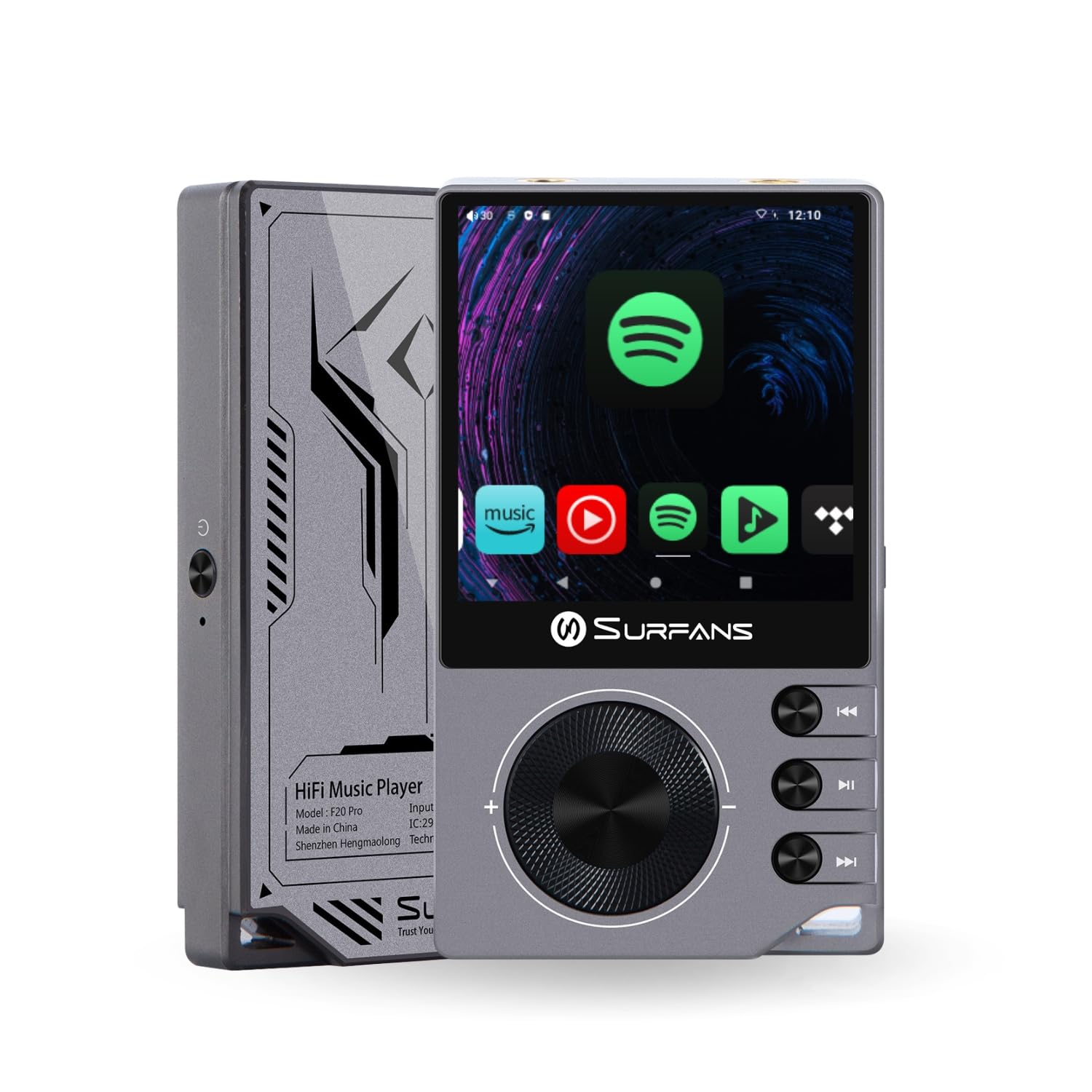
The Surfans F20 Pro Hi-Res Music Player, showcasinpolo seu deseño compacto e a súa interface con pantalla táctil.
2. Contido do paquete
Verifica que todos os elementos estean presentes no paquete:
- Surfans F20 Pro Hi-Res Music Player
- Cable USB Tipo-C
- 32 GB MicroSD Memory Card (pre-installed or separate)
- Funda protectora
- Manual de usuario (este documento)
3. Dispositivo rematadoview
Familiarize yourself with the physical components and ports of your F20 Pro player.

Fronte e traseiro view of the Surfans F20 Pro, highlighting its robust CNC metal chassis and button layout.
3.1. Características clave
- Dual ESS9018Q2M DACs: For high-fidelity audio processing.
- Octa-Core Android 12 System: Enables streaming app compatibility and smooth operation.
- 3.5mm Single-Ended & 4.4mm Balanced Outputs: Versatile headphone connectivity.
- Bluetooth 5.0 con LDAC: High-quality wireless audio transmission.
- Wi-Fi de dobre banda (2.4 GHz e 5 GHz): For stable internet connectivity.
- Almacenamento ampliable: Supports up to 1TB via MicroSD card.
- Pantalla táctil de 2.7 polgadas: Interface de usuario intuitiva.
4. Configuración
4.1. Cargando o dispositivo
Before first use, fully charge the F20 Pro. Connect the included USB Type-C cable to the device's charging port and a compatible USB power adapter (not included) or computer USB port. The charging indicator will show the charging status.
4.2. Inserción dunha tarxeta MicroSD
The F20 Pro supports MicroSD cards up to 1TB for expanded storage. Locate the MicroSD card slot on the side of the device. Gently insert the card until it clicks into place. To remove, push the card in again until it springs out.
4.3. Acendido inicial
Press and hold the power button until the screen illuminates. Follow the on-screen prompts to complete the initial setup, including language selection and Wi-Fi connection.
4.4. Conectando a wifi
Navega ata Configuración > Rede e internet > Wi-Fi. Select your desired network and enter the password if prompted. The F20 Pro supports both 2.4GHz and 5GHz Wi-Fi bands.

The Surfans F20 Pro demonstrating its dual-band Wi-Fi capability for fast and stable connections.
4.5. Emparellamento Bluetooth
Para conectar auriculares ou altofalantes Bluetooth:
- Asegúrate de que o teu dispositivo Bluetooth estea no modo de emparellamento.
- On the F20 Pro, go to Configuración > Dispositivos conectados > Vincular dispositivo novo.
- Select your device from the list and confirm pairing.

An illustration of the Bluetooth 5.0 chip, indicating support for high-resolution wireless audio codecs like LDAC.
5. Funcionamento do dispositivo
5.1. Navegación básica
The F20 Pro features a 2.7-inch touchscreen for navigation. Swipe to scroll, tap to select, and use the physical buttons for quick controls:
- Botón de encendido: Power on/off, screen on/off.
- Roda de volume: Axusta o volume da saída de audio.
- Botóns de control de reprodución: Play/Pause, Next Track, Previous Track.
5.2. Reprodución de música
The F20 Pro supports various audio formats including DSD512, 192kHz/24bit, FLAC, WAV, WMA, M4A, MP3, MP2, and AAC.
5.2.1. Local Files
Transferir música files to the device's internal storage or MicroSD card via USB connection to a computer. Use the pre-installed music player application to browse and play your library.
5.2.2. Aplicacións de transmisión en tempo real
The Android 12 operating system allows installation of streaming apps like Spotify, Apple Music, Tidal, or YouTube. Connect to Wi-Fi and download apps from the Google Play Store or other compatible sources.

The Surfans F20 Pro's screen showing various streaming application icons, demonstrating its Android capabilities.
5.3. Headphone Connections
The device offers both single-ended and balanced audio outputs.
- Saída dun só extremo de 3.5 mm: Standard headphone jack (125mW/32Ω).
- Saída equilibrada de 4.4 mm: For enhanced audio performance with compatible headphones (500mW/32Ω).

Primeiro plano view of the 3.5mm single-ended and 4.4mm balanced audio output ports on the Surfans F20 Pro.
6. Mantemento
6.1. Limpeza
Use a soft, dry, lint-free cloth to clean the device. Avoid using abrasive cleaners or solvents, which may damage the surface.
6.2. Actualizacións de software
Periodically check for software updates to ensure optimal performance and access to new features. Updates can typically be found in Configuración > Sistema > Actualización do sistema.
6.3. Coidado da batería
Para prolongar a duración da batería, evite descargar completamente o dispositivo con frecuencia. Garde o dispositivo nun lugar fresco e seco cando non o use durante períodos prolongados.

Unha interna view of battery cells, representing the long-lasting battery capacity of the F20 Pro.
7 Solución de problemas
If you encounter issues with your F20 Pro, refer to the following common problems and solutions:
| Problema | Causa posible | Solución |
|---|---|---|
| O dispositivo non se acende | Batería baixa; Fallo do sistema | Charge the device; Press and hold the power button for 10-15 seconds to force restart. |
| Sen saída de son | Volume too low; Incorrect output selected; Faulty headphones | Increase volume; Check headphone connection; Test with different headphones. |
| Non se pode conectar á wifi | Incorrect password; Out of range; Router issue | Verify password; Move closer to router; Restart router. |
| Slow performance/App crashes | Demasiadas aplicacións en execución; Pouco almacenamento; Software desactualizado | Close background apps; Free up storage; Check for system updates. |
8. Especificacións
Detailed technical specifications for the Surfans F20 Pro:
| Característica | Detalle |
|---|---|
| Marca | Surfans |
| Nome do modelo | F20 PRO |
| Chips DAC | Dual ESS9018Q2M |
| Op-Amps | Dual OPA1612 |
| Sistema Operativo | Android 12 |
| RAM | 3 GB |
| Almacenamento interno | 32 GB |
| Almacenamento ampliable | Ata 1 TB mediante tarxeta MicroSD |
| Tamaño da pantalla | 2.73 polgadas |
| Conectividade | Aux, Bluetooth 5.0 (LDAC), USB Type-C, Wi-Fi (2.4GHz & 5GHz) |
| Saídas de audio | 3.5mm Single-Ended (125mW/32Ω), 4.4mm Balanced (500mW/32Ω) |
| Formatos de audio admitidos | DSD512, 192kHz/24bit, FLAC, WAV, WMA, M4A, MP3, MP2, AAC |
| Cor | Gris |

An illustration of the dual ESS9018K2M DAC chips, central to the F20 Pro's high-resolution audio capabilities.
9. Información da garantía
The Surfans F20 Pro comes with a 1 ano de garantía desde a data de compra. Esta garantía cobre os defectos de fabricación e a man de obra en condicións de uso normal. Non cobre os danos causados por mal uso, accidentes, modificacións non autorizadas ou desgaste normal. Conserve o comprobante de compra para reclamacións de garantía.
10. Atención ao cliente
For further assistance, technical support, or warranty inquiries, please contact Surfans customer service through the official website or your retailer. You may also find additional resources and FAQs online.