
Introdución
Thank you for choosing the Surfans F20 Pro Android Hi-Res Music Player. This manual provides essential information for setting up, operating, and maintaining your device. Please read it thoroughly to ensure optimal performance and longevity of your music player.
1. Configuración
1.1 Desembalaxe e contido da embalaxe
Carefully unpack your Surfans F20 Pro. Ensure all components are present.
O paquete debe conter:
- 1 x Surfans F20 Pro Music Player
- (Other accessories like USB cable, protective case, etc., may be included depending on the specific package.)
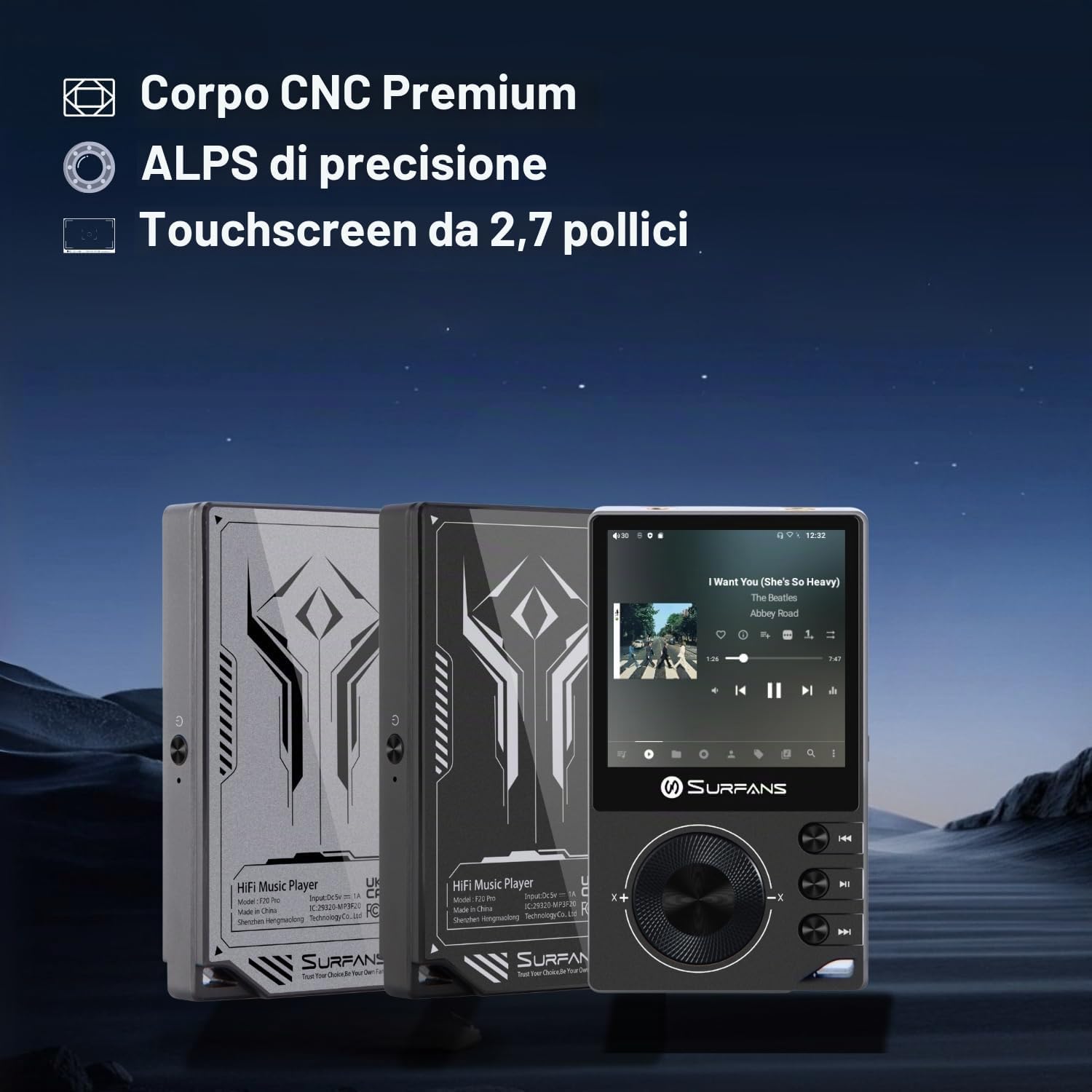
The Surfans F20 Pro features a premium CNC body for durability and aesthetics.
1.2 Carga do dispositivo
Before first use, fully charge the device. Connect the included USB cable to the player's charging port and to a USB power adapter (not included) or a computer's USB port. The charging indicator will show the charging status. A full charge typically takes approximately 3 hours.
The Surfans F20 Pro features a 1450mAh rechargeable battery, providing up to 15 hours of music playback on a full charge.
1.3 Acendido/Apagado
- Para acender: Press and hold the Power button located on the side of the device until the screen lights up.
- Para apagar: Press and hold the Power button until a power-off menu appears on the screen. Select "Power Off" to shut down the device. A short press will turn the screen on/off.
1.4 Configuración inicial
Upon first power-on, you may be guided through an initial setup process. This typically includes:
- Selección do idioma: Escolle o teu idioma preferido.
- Configuración Wi-Fi: Connect to a Wi-Fi network to enable streaming services and software updates. Navigate to Settings > Network & Internet > Wi-Fi.
- Conta de Google: Inicia sesión coa túa conta de Google para acceder a Google Play Store e outros servizos de Google.
1.5 Ampliación do almacenamento
The Surfans F20 Pro comes with 32GB of internal memory. You can expand the storage up to 1TB using a Micro SD card. Insert the Micro SD card into the designated slot on the device.
2. Instrucións de funcionamento
2.1 dispositivo sobreview e Navegación
The F20 Pro features a 2.73-inch touchscreen for primary interaction and physical buttons for quick control.

The Surfans F20 Pro features a touchscreen interface for easy navigation and access to various applications.
- Pantalla táctil: Tap, swipe, and pinch to navigate menus, select options, and control playback.
- Botóns físicos: Use the side buttons for power, volume control, and playback (play/pause, skip tracks). The scroll wheel provides tactile navigation.
2.2 Reprodución de música
The F20 Pro supports various audio formats including MP3, AAC, FLAC, WAV, and DSD. You can play music stored on the device's internal memory or Micro SD card, or stream from online services.
- Reprodución local: Use the pre-installed music player app to browse and play your local audio files.
- Transmisión en tempo real: Install and use streaming applications like Spotify, Apple Music, Tidal, or YouTube from the Google Play Store.
2.3 Conexión de dispositivos de audio
The player offers both wired and wireless audio output options.

The F20 Pro features both 3.5mm single-ended and 4.4mm balanced audio output ports for versatile headphone connectivity.
- Auriculares con cable:
- 3.5 mm de extremo único: Connect standard headphones to the 3.5mm port.
- 4.4 mm equilibrado: For enhanced audio quality and power, connect compatible balanced headphones to the 4.4mm port. This port provides 500mW of power.
- Bluetooth Headphones/Speakers:
- The F20 Pro supports Bluetooth 5.0 with LDAC for high-fidelity wireless audio.
- To pair: Go to Settings > Connected devices > Pair new device. Ensure your Bluetooth device is in pairing mode.

The F20 Pro supports Bluetooth 5.0 with LDAC for high-quality wireless audio streaming.
This video demonstrates the process of pairing a Bluetooth device with a music player. The steps shown are generally applicable to the Surfans F20 Pro.
2.4 Conectividade Wi-Fi
The device supports dual-band Wi-Fi (2.4GHz and 5GHz) for fast downloads and smooth streaming.

The Surfans F20 Pro supports dual-band Wi-Fi for reliable internet connection and streaming.
- To connect: Go to Settings > Network & Internet > Wi-Fi. Select your network and enter the password.
- Once connected, you can use pre-installed or downloaded streaming apps.
2.5 Conectando a un ordenador
You can connect the F20 Pro to a computer via USB to transfer files or use it as a USB DAC.
This video illustrates how to easily connect a music player to a PC for file transfer or other functions. The process is similar for the Surfans F20 Pro.
- Conecte o reprodutor ao ordenador usando o cable USB.
- On the player, swipe down from the top of the screen to access notifications. Tap on the USB connection notification and select "File transfer" or "USB DAC" mode as needed.
3. Mantemento
3.1 Limpeza do dispositivo
To keep your F20 Pro in optimal condition:
- Use a soft, dry, lint-free cloth to wipe the screen and body.
- Avoid using abrasive cleaners, solvents, or aerosol sprays, which can damage the finish.
- Non expoña o dispositivo a unha humidade excesiva.
3.2 Coidado coa batería
Para maximizar a duración e o rendemento da batería:
- Evita temperaturas extremas.
- Do not leave the device fully discharged for extended periods.
- Para o almacenamento a longo prazo, cargue a batería ata aproximadamente o 50 % e gárdea nun lugar fresco e seco.
3.3 Actualizacións de software
The F20 Pro runs on Android 12. Periodically check for software updates to ensure the best performance and access to new features. Connect to Wi-Fi and go to Settings > System > System update.
4 Solución de problemas
4.1 O dispositivo non se acende
- Asegúrate de que a batería estea cargada. Conecta o dispositivo a un cargador durante polo menos 30 minutos.
- Try pressing and holding the Power button for 10-15 seconds to force a restart.
4.2 Sen saída de son
- Check headphone connections (3.5mm or 4.4mm). Ensure they are fully inserted.
- Verify volume levels on the device and any connected Bluetooth audio devices.
- Se usas Bluetooth, asegúrate de que o dispositivo estea correctamente emparellado e conectado.
- Test with different headphones or speakers to rule out a faulty audio accessory.
4.3 Wi-Fi or Bluetooth Connection Issues
- Ensure Wi-Fi or Bluetooth is enabled in the settings.
- Restart the F20 Pro and your router/Bluetooth device.
- Esquece a rede/dispositivo na configuración e tenta conectar de novo.
- Ensure you are within range of the Wi-Fi network or Bluetooth device.
4.4 Slow Performance or App Crashes
While the F20 Pro has an Octa-Core processor and 3GB RAM, some apps or heavy multitasking might affect performance.
- Pecha as aplicacións en segundo plano que non uses.
- Clear app caches (Settings > Apps > [App Name] > Storage & cache > Clear cache).
- Asegúrate de que o software do dispositivo estea actualizado.
- If issues persist, consider a factory reset (Settings > System > Reset options > Erase all data), but back up your data first.
5. Especificacións
Below are the key technical specifications for the Surfans F20 Pro Music Player:
| Característica | Detalle |
|---|---|
| Nome do modelo | F20 Pro |
| Marca | Surfans |
| Sistema Operativo | Android 12 |
| Procesador | Octa-Core |
| RAM | 3 GB |
| Almacenamento interno | 32 GB |
| Almacenamento ampliable | Up to 1TB via Micro SD |
| DAC | Dual ESS9018 |
| Compatibilidade con audio de alta resolución | DSD512 |
| Conectividade | AUX, Bluetooth 5.0 (LDAC), USB, Dual-Band Wi-Fi (2.4GHz & 5GHz) |
| Tamaño da pantalla | 2.73 polgadas |
| Tecnoloxía de pantalla | Pantalla táctil |
| Formatos de audio admitidos | MP3, AAC, FLAC, WAV, DSD |
| Saída equilibrada | 4.4mm (500mW) |
| Capacidade da batería | 1450 mAh |
| Duración da batería | Up to 15 hours music playback |

The Surfans F20 Pro features dual ESS9018 DACs for superior audio decoding.

Internal audio architecture showing dual DACs and multi-stage amplifier design for both single-ended and balanced outputs.
6. Garantía e soporte
For warranty information and technical support, please refer to the documentation provided with your purchase or contact the seller directly. The seller for this product is SurfansAudio.
Garda o comprobante de compra para calquera reclamación de garantía.