
Introdución
This manual provides essential information for setting up, operating, and maintaining your TCL 32S5K 32-inch HD QLED Google Smart TV. Please read this manual thoroughly before using your television to ensure safe and optimal performance. Keep this manual for future reference.
Información de seguridade
Siga sempre as precaucións básicas de seguridade ao usar este televisor para reducir o risco de incendio, descarga eléctrica e lesións. Non expoña o televisor á choiva nin á humidade. Non abra a tapa do televisor.asing; refer all servicing to qualified personnel. Ensure proper ventilation and avoid placing the TV near heat sources. Use only the power cord and accessories specified by the manufacturer.
Contido do paquete
Verifica que todos os elementos estean presentes no paquete:
- TCL 32S5K 32-inch HD QLED Google Smart TV
- Control remoto
- Cable de alimentación
- Soporte para TV (2 pezas) e parafusos
- Guía de inicio rápido
- Tarxeta de garantía
Configuración
Instalación física
Instalación de soporte: Place the TV screen-down on a soft, flat surface. Attach the two stand pieces to the designated slots on the bottom of the TV using the provided screws. Ensure the stand is securely fastened.
Montaxe na parede: If wall-mounting, ensure you use a VESA-compatible wall mount (not included) and follow the wall mount manufacturer's instructions. Disconnect the power cord before mounting.
Conectando Dispositivos
Connect your external devices to the appropriate ports on the TV. Refer to the image below for port locations and types.

Figure 1: Rear and Side Connectivity Ports. This image illustrates the various input and output ports available on the TCL 32S5K Smart TV, including USB 2.0, LAN, Antenna/Cable In, Digital Audio Out (Optical), HDMI 1, HDMI 2, and AV In adapter.
- HDMI Ports (1, 2): Conecta reprodutores de Blu-ray, consolas de xogos, decodificadores de cable/satélite ou outros dispositivos compatibles con HDMI.
- Porto USB 2.0: Conecta dispositivos de almacenamento USB para a reprodución multimedia.
- Porto LAN: Conecta un cable Ethernet para unha conexión a internet por cable.
- Entrada de antena/cable: Conecta unha antena ou un sinal de televisión por cable.
- Saída de audio dixital (óptica): Connect to an external audio receiver or soundbar for digital audio.
- Adaptador de entrada AV: Usa o adaptador fornecido para conectar dispositivos antigos con saídas de vídeo composto e audio estéreo.
Acendido inicial e configuración de Google TV
After connecting all necessary cables, plug the power cord into an electrical outlet. Press the power button on the remote control or on the TV. Follow the on-screen instructions to complete the initial setup, which includes selecting your language, connecting to a Wi-Fi network, and signing in to your Google account to access Google TV features.
En funcionamento
Funcións de control remoto
The remote control allows you to navigate the Google TV interface, adjust volume, change channels, access apps, and control playback. Familiarize yourself with the button layout for easy operation.
Interface de Google TV
Google TV organizes your favorite movies, shows, and live TV from across your apps and subscriptions. Use the remote to browse recommendations, search for content, and manage your watch list. Access the Google Play Store to download additional applications.
Funcións de conectividade
- Wi-Fi: Connects your TV to your home wireless network for internet access and streaming.
- Bluetooth: Pair Bluetooth-enabled devices such as headphones or game controllers for a personalized experience.
- Googlecast (Chromecast built-in): Cast content from your compatible mobile devices or computer directly to your TV screen.
Configuración de imaxe e son
Your TCL 32S5K TV features QLED technology, Full HD resolution, HDR10 support, and Dolby Audio for an enhanced viewing and listening experience. Adjust picture modes (e.g., Standard, Vivid, Movie) and sound modes (e.g., Standard, Music, Movie) through the TV settings menu to suit your preferences.

Figure 2: Image Quality Features. This image highlights the key display technologies of the TCL 32S5K Smart TV, including QLED for vibrant colors, FHD (Full High Definition) for clear resolution, and HDR10 for enhanced contrast and brightness.
Mantemento
Limpeza o teu televisor
Desconecte sempre o televisor antes de limpalo. Use un pano suave e seco para limpar a pantalla e a carcasa. Para marcas difíciles, frote lixeiramente.ampen the cloth with water or a mild, non-abrasive screen cleaner. Never spray cleaner directly onto the screen or allow liquids to enter the TV's openings.
Actualizacións de software
Your Google TV may receive automatic software updates. Ensure your TV is connected to the internet to receive these updates, which can improve performance and add new features. You can also manually check for updates in the TV's settings menu.
Resolución de problemas
Se tes problemas co teu televisor, consulta as seguintes solucións habituais:
- Sen enerxía: Comprobe se o cable de alimentación está ben conectado tanto ao televisor como á toma de corrente. Probe cunha toma diferente.
- Sen imaxe/Imaxe deficiente: Ensure all cables are correctly connected. Check the input source. Adjust picture settings. If using an antenna, check signal strength.
- Sen son/Son deficiente: Check volume levels and mute settings. Ensure external audio devices are properly connected and selected as the audio output.
- O control remoto non funciona: Substitúa as pilas. Asegúrese de que non haxa obstrucións entre o mando a distancia e o sensor de infravermellos do televisor.
- Problemas de conexión á rede: Restart your router and modem. Reconnect to the Wi-Fi network in the TV settings. For wired connections, ensure the Ethernet cable is properly connected.
- Google TV Slow/Unresponsive: Restart the TV by unplugging it for a few minutes and plugging it back in. Clear cache for problematic apps in settings.
Para problemas persistentes, consulte o soporte de TCL websitio ou póñase en contacto co servizo de atención ao cliente.
Especificacións
Below are the technical specifications for the TCL 32S5K Smart TV:
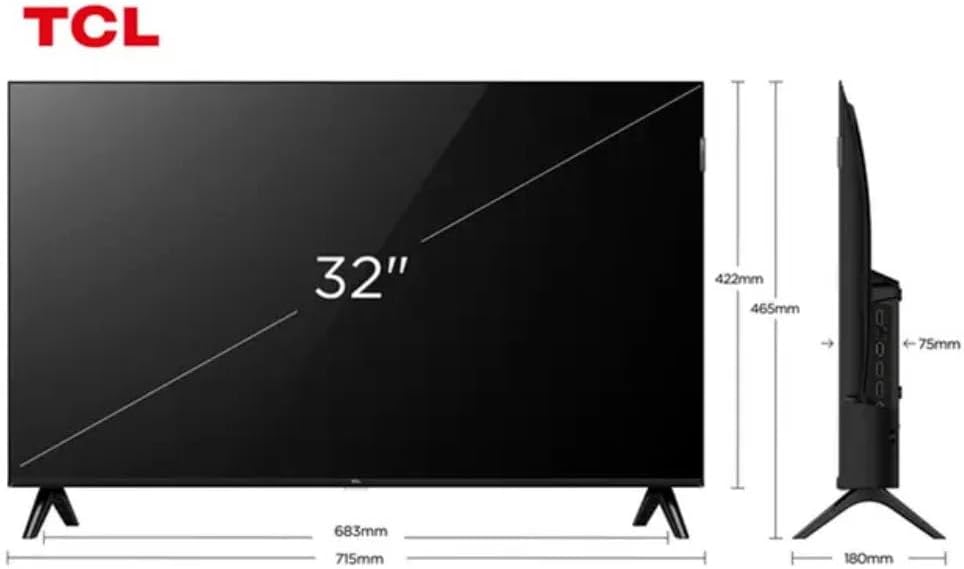
Figure 3: TV Dimensions. This image provides a detailed diagram of the TCL 32S5K Smart TV's physical dimensions, including screen size (32 inches), width (715mm), height (422mm without stand, 465mm with stand), and depth (75mm).
| Característica | Descrición |
|---|---|
| Nome do modelo | 32S5K |
| Tamaño da pantalla | 32 polgadas |
| Tecnoloxía de visualización | QLED |
| Resolución | 1080p (Full HD) |
| Taxa de actualización | 60 Hz |
| Conectividade | Bluetooth, Ethernet, HDMI, USB, Wi-Fi |
| Total de portos HDMI | 2 |
| Características especiais | Integrated Speaker, Google TV, Googlecast Integrated, HDR10, Dolby Audio |
| Dimensións do produto (P x A x A) | 7.6P x 71.6L x 42.3A centimeters (approx. 3 x 28.2 x 16.7 inches) |
| Fabricante | TCL |
| País de Orixe | Brasil |
Garantía e Soporte
Información da garantía
The TCL 32S5K Smart TV comes with a 1 anos de garantía do fabricante. This warranty covers defects in materials and workmanship under normal use. Please retain your proof of purchase for warranty claims. For specific terms and conditions, refer to the warranty card included in your package or visit the official TCL websitio.
Atención ao cliente
If you require technical assistance, have questions about your product, or need to initiate a warranty claim, please contact TCL customer support. You can typically find contact information on the TCL official websitio web ou na documentación do produto.
Before contacting support, please have your TV model number (32S5K) and serial number ready, along with a detailed description of the issue.