
1. Introdución
The ASUS ROG Strix GS-BE12000 is a high-performance tri-band WiFi 7 router designed for demanding network environments, including gaming, streaming, and smart home integration. This manual provides essential information for setting up, operating, maintaining, and troubleshooting your router to ensure optimal performance and security.

Imaxe: Máis deview of the ASUS ROG Strix GS-BE12000 Router highlighting its design and key features.
2. Contido do paquete
Verifica que todos os elementos estean presentes no paquete do teu produto:
- ASUS ROG Strix GS-BE12000 Tri-Band Gaming Router
- Adaptador de alimentación
- Cable RJ-45
- Guía de inicio rápido
- Tarxeta de garantía
3. Configuración
Follow these steps for initial setup of your ASUS ROG Strix GS-BE12000 router:
- Conecta o router:
- Connect the power adapter to the router's DC-in port and plug it into a power outlet.
- Connect one end of the provided RJ-45 cable to your modem's LAN port and the other end to the router's 2.5G WAN port.
- Optionally, connect your computer to one of the router's LAN ports using an Ethernet cable for initial configuration.
- Encendido: Press the power button on the router. Wait for the indicator lights to stabilize, typically indicating a successful connection.
- Configuración inicial:
- Abrir a web navegador no teu ordenador ou dispositivo móbil conectado.
- Navigate to the router's default IP address (usually
router.asus.comor192.168.1.1). - Follow the on-screen instructions in the Quick Internet Setup wizard to configure your internet connection, Wi-Fi network name (SSID), and password.

Imaxe: Traseira view of the router displaying the 2.5G WAN port and multiple 2.5G LAN ports for wired connections.
4. Instrucións de funcionamento
4.1. Wi-Fi 7 Tri-Band Connectivity
The GS-BE12000 supports Wi-Fi 7 (802.11be) with tri-band operation (2.4 GHz, 5 GHz, and 6 GHz) for maximum throughput and reduced latency. It features 320 MHz channels on the 6 GHz band, Multi-Link Operation (MLO), and 4K-QAM for enhanced performance.

Image: Visual representation of Wi-Fi 7 tri-band capabilities, including 6 GHz, 5 GHz, and 2.4 GHz speeds, MLO, and 4K-QAM.
4.2. Conectividade con fíos
The router offers a robust wired capacity of up to 20G, featuring one 2.5G WAN port and seven 2.5G LAN ports. This allows for high-speed connections to multiple devices, ideal for gaming consoles, PCs, and network-attached storage (NAS).

Image: Diagram detailing the router's wired ports, including 2.5G WAN, 2.5G LAN, and dedicated gaming ports.
4.3. Game Acceleration and ROG Gaming Network
Utilize the ROG-exclusive Gaming Network for one-tap SSID game acceleration. This feature streamlines advanced network settings to prioritize gaming traffic, ensuring low ping and reduced lag. The Smart Home Master function allows for easy setup of subnetworks for IoT devices and VPNs.

Image: User interface showing options for ROG Exclusive Gaming Network and Smart Home Master for network management.
4.4. Compatibilidade con AiMesh
The GS-BE12000 is AiMesh compatible, allowing you to create a seamless whole-home mesh Wi-Fi system by adding other AiMesh-compatible ASUS routers. This extends coverage and eliminates Wi-Fi dead zones.

Image: Diagram showing how AiMesh extends Wi-Fi coverage throughout a multi-room environment.
5. Mantemento
Regular maintenance ensures the longevity and optimal performance of your router:
- Actualizacións de firmware: Regularly check for and install the latest firmware updates via the ASUS Router app or web interface. As actualizacións do firmware adoitan incluír melloras de rendemento, parches de seguranza e novas funcións.
- Limpeza física: Keep the router in a well-ventilated area. Periodically clean dust from the vents and surfaces using a soft, dry cloth. Avoid using liquid cleaners.
- Reinicio: If you experience network issues, try restarting the router by unplugging it from the power outlet for 30 seconds and then plugging it back in.
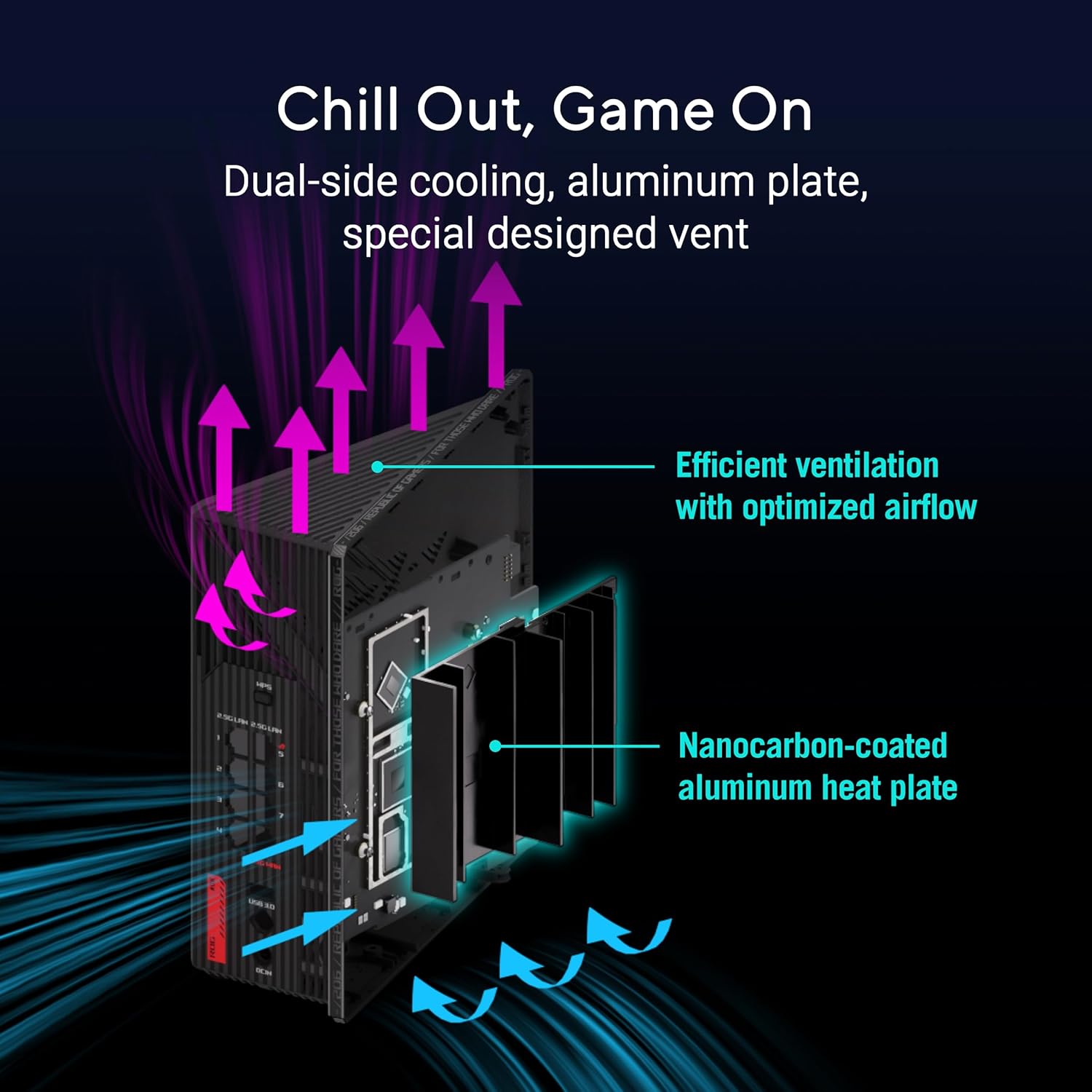
Imaxe: Interna view of the router highlighting its dual-side cooling and nanocarbon-coated aluminum heat plate for efficient heat dissipation.
6 Solución de problemas
Se tes problemas co teu enrutador, consulta as seguintes solucións habituais:
- Sen conexión a Internet:
- Comprobe todas as conexións dos cables (alimentación, WAN, LAN) para asegurarse de que estean ben fixadas.
- Reinicie o seu módem e enrutador.
- Verify your internet service provider (ISP) connection status.
- Velocidade lenta do wifi:
- Ensure your devices are connected to the appropriate Wi-Fi band (6 GHz or 5 GHz for faster speeds).
- Reduce as interferencias afastando o router doutros dispositivos electrónicos.
- Actualiza o firmware e os controladores de dispositivos do teu enrutador.
- Wi-Fi Drops:
- Check for physical obstructions or distance from the router. Consider using AiMesh nodes for extended coverage.
- Ensure the router is placed centrally in your home.
For more detailed troubleshooting or advanced issues, consult the official ASUS support websitio ou póñase en contacto co servizo de atención ao cliente.
7. Especificacións
| Característica | Descrición |
|---|---|
| Marca | ASUS |
| Nome do modelo | GS-BE12000 |
| Clase de banda de frecuencia | Tripla banda (2.4 GHz, 5 GHz, 6 GHz) |
| Estándar sen fíos | WiFi 7 (802.11be), WiFi 6 (802.11ax) |
| Taxa de transferencia de datos | Ata 12000 Mbps |
| Wired Capacity | Up to 20G (1x 2.5G WAN, 7x 2.5G LAN) |
| CPU | 2.0GHz Quad-core |
| RAM | 2 GB |
| Antenas | 8 antenas internas |
| Cobertura | Ata 3000 pés cadrados. |
| Protocolo de seguridade | AiProtection Pro, WPA/WPA2/WPA3 Personal/Enterprise |
| Método de control | Aplicación, botón pulsador |
| Dimensións (L x W x H) | 8.9 cm de longo x 8.9 cm de ancho x 3.5 cm de alto |
| Peso do elemento | 2.04 libras |
8. Garantía e soporte
The ASUS ROG Strix GS-BE12000 comes with a 3 ano de garantía from the manufacturer. For warranty claims, technical support, or additional product information, please visit the official ASUS support websitio web ou na tenda ASUS.
Tenda ASUS: Visita a tenda ASUS en Amazon