
Introdución
Thank you for choosing the TOZO NC9 Bluetooth 5.3 Hybrid ANC Wireless Earbuds. These earbuds are designed to provide a superior audio experience with advanced features such as Hybrid Active Noise Cancellation, clear call quality, and extended battery life. This manual will guide you through the setup, operation, and maintenance of your new earbuds.
Contido do paquete
Asegúrate de que todos os artigos estean presentes no teu paquete:
- TOZO NC9 Wireless Earbuds (Left and Right)
- Estuche de carga
- Ear Tips (Multiple Sizes)
- Cable de carga USB-C
- Manual de usuario (este documento)
Produto rematadoview
Familiarize yourself with the components of your TOZO NC9 earbuds and charging case.
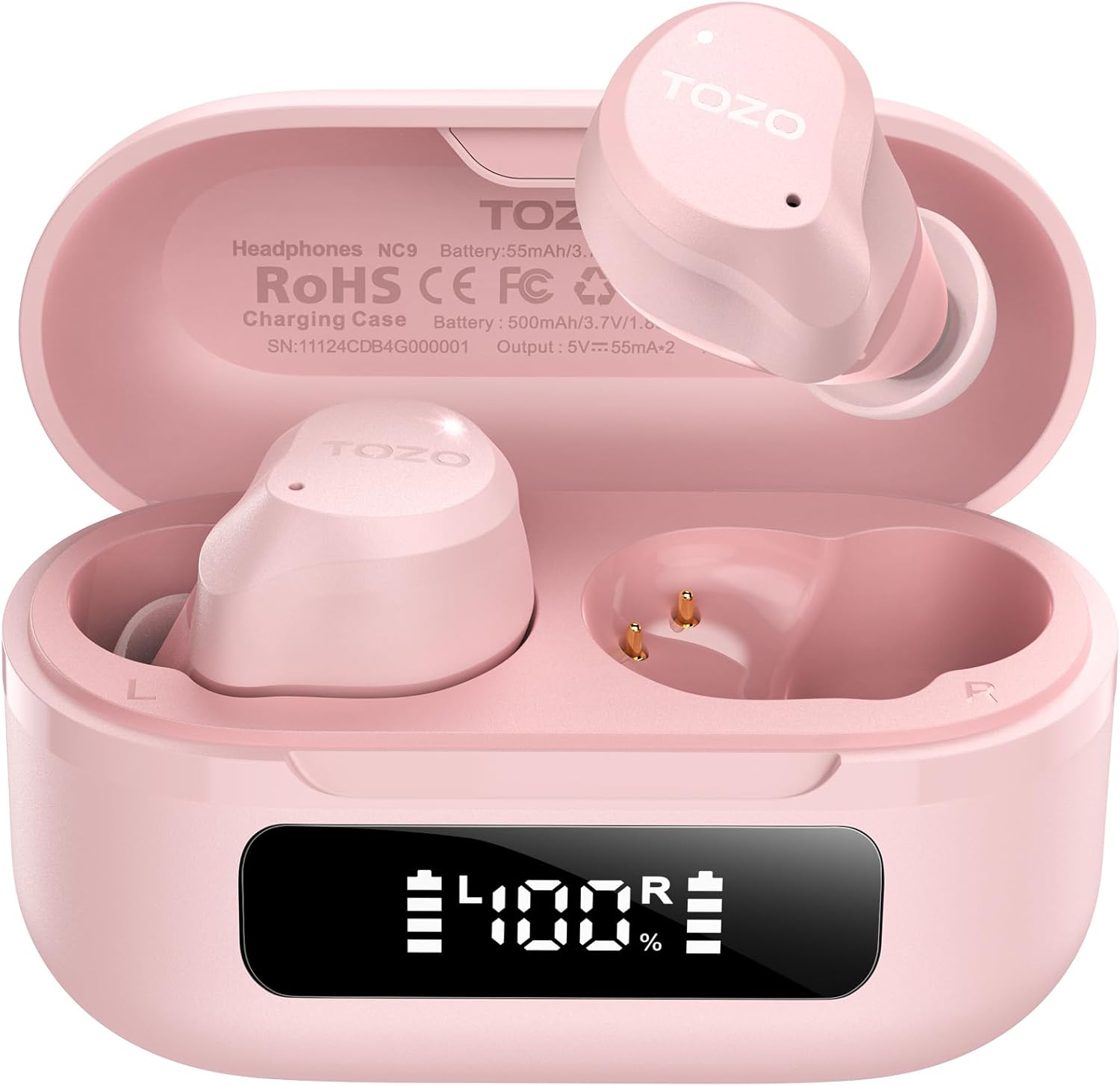
Image: The TOZO NC9 earbuds shown with their charging case. The earbuds are pink and feature an in-ear design. The charging case is also pink with a smooth, compact form factor. This image provides a general view dos compoñentes do produto.

Image: The TOZO NC9 earbuds are placed inside their open charging case, revealing an LED display on the front of the case that shows battery percentage. This illustrates how the earbuds are stored and charged within the case.

Image: A detailed diagram illustrating the internal driver components of the TOZO NC9 earbud, highlighting the OrigX Acoustics Technology. This visual explains the audio engineering behind the sound quality.
Configuración
1. Carga dos auriculares e da funda
Antes do primeiro uso, carga completamente os auriculares e a caixa de carga.
- Coloca os auriculares na caixa de carga. Asegúrate de que estean correctamente asentados.
- Conecta o cable de carga USB-C ao porto de carga da carcasa e a unha fonte de alimentación.
- The LED display on the charging case will indicate the charging status. A full charge may take approximately 5 hours if completely depleted.

Image: The TOZO NC9 charging case with earbuds, displaying "60 hrs" to indicate the total playtime. This image emphasizes the extended battery life of the product.

Image: A close-up of the TOZO NC9 charging case's LED display showing "100%" battery charge, with the "SmartPow Power Management" logo. This highlights the intelligent battery optimization feature.
2. Emparellamento co teu dispositivo
The TOZO NC9 earbuds use Bluetooth 5.3 for a stable connection.
- Abre a caixa de carga. Os auriculares entrarán automaticamente no modo de emparellamento.
- No teu dispositivo (teléfono intelixente, tableta, ordenador), vai á configuración de Bluetooth.
- Busca "TOZO NC9" in the list of available devices and select it to connect.
- Unha vez conectados, escoitarás un aviso sonoro e os auriculares estarán listos para usar.

Image: A visual representation of the TOZO App interface on a smartphone, showing various settings like ANC modes, EQ adjustments, and white noise tracks. This demonstrates the app's capabilities for customizing the earbud experience.
Instrucións de funcionamento
Controis táctiles
The TOZO NC9 earbuds feature intuitive touch controls. Specific functions can be customized via the TOZO App.
| Acción | Función |
|---|---|
| Toque único (E/D) | Reproducir/pausar, responder chamadas |
| Dobre toque (L) | Pista anterior |
| Dobre toque (R) | Próxima pista |
| Triplo toque (E/D) | Activa o asistente de voz |
| Presión longa (E/D) | Switch ANC/Transparency/Normal Mode, Reject Call |
Modos de cancelación activa de ruído (ANC)
The TOZO NC9 offers Hybrid ANC to reduce ambient noise by up to 45dB, along with a Transparency Mode.
- Modo de cancelación activa de ruído (ANC): Reduce o ruído externo, ideal para viaxes ou ambientes ruidosos.
- Modo de transparencia: Permite escoitar o que te rodea sen quitar os auriculares, útil para conversas ou para estar atento.
- Modo normal: Experiencia de audio estándar sen cancelación de ruído nin transparencia.
Cycle through these modes by long-pressing either earbud (customizable via app).

Image: A person wearing TOZO NC9 earbuds on an airplane, illustrating the effectiveness of the up to 45dB advanced noise cancellation feature for a peaceful listening experience.
Chamadas claras
Equipped with 6 ENC (Environmental Noise Cancellation) microphones, the NC9 ensures your voice is clear during calls, even in noisy environments.

Image: A person wearing TOZO NC9 earbuds while walking in a city environment, making a phone call. This image highlights the crystal-clear call quality provided by the six ENC microphones, minimizing background noise.
Integración da aplicación TOZO
Download the TOZO App for enhanced control and customization:
- Adjustable Noise Control Modes (6 options)
- 32 Preset EQ Modes and access to over 2000 user-shared EQs
- 100+ White Noise Tracks
- Actualizacións de firmware
The app allows for a personalized audio experience.
Mantemento
Limpeza
- Limpa os auriculares regularmente, especialmente as almofadas e os contactos de carga, cun pano suave, seco e sen fiapos.
- Non use produtos de limpeza ou disolventes abrasivos.
Almacenamento
- Cando non estean en uso, garde os auriculares no seu estoxo de carga para protexelos e mantelos cargados.
- Gardar nun lugar fresco e seco, lonxe de temperaturas extremas.
Resistencia á auga (IPX8)
The TOZO NC9 earbuds are IPX8 waterproof, meaning they are protected against immersion in water up to 1 meter for up to 30 minutes. This makes them suitable for workouts and light rain, but they are not designed for swimming or prolonged submersion.

Image: A person wearing TOZO NC9 earbuds while reading, demonstrating the ergonomic design for all-day comfort and a secure fit. This image emphasizes the comfort aspect of the earbuds.
Resolución de problemas
| Problema | Posible Solución |
|---|---|
| Os auriculares non se cargan | Ensure earbuds are correctly seated in the case. Check charging cable and power source. Clean charging contacts. |
| Non se pode emparellar co dispositivo | Ensure Bluetooth is enabled on your device. Place earbuds in case, close, then open to re-enter pairing mode. Forget "TOZO NC9" from your device's Bluetooth list and try pairing again. |
| Non hai son dun auricular | Place both earbuds back in the case, close it, then open again. Ensure both earbuds are charged. Perform a factory reset (refer to TOZO App or online support for specific steps). |
| ANC non funciona eficazmente | Ensure ear tips provide a good seal. Try different sized ear tips. Ensure ANC mode is activated. |
| Mala calidade das chamadas | Ensure microphones are not obstructed. Check network signal. |
For further assistance, please refer to the TOZO App or contact TOZO customer support.
Especificacións
| Nome do modelo | NC9 |
| Versión Bluetooth | 5.3 |
| Control de ruído | Hybrid Noise Reduction (up to 45dB ANC) |
| Micrófonos | 6 ENC Microphones |
| Tipo de controlador de audio | Dynamic (10mm drivers) |
| Rango de frecuencias | 15 Hz - 20,000 Hz |
| Duración da batería (auriculares) | Aproximadamente 14 horas (unha soa carga) |
| Tempo de reprodución total (con estuche) | Ata 60 horas |
| Clasificación de resistencia á auga | IPX8 (Impermeable) |
| Tipo de control | Control táctil, Control de aplicacións |
| Dispositivos compatibles | Phones, Laptops, Tablets, Smart Speakers |
| GTIN / UPC | 810102982537 |
Garantía e Soporte
TOZO products come with a standard warranty. For detailed warranty information, product registration, or technical support, please visit the official TOZO websitio web ou póñase en contacto co servizo de atención ao cliente. Garde o recibo de compra para reclamacións de garantía.
Política de devolución: The product has a return policy duration of 30 days for refund/replacement.