
1. Introdución
Thank you for choosing the VOOPEAK TC36 4G LTE Cellular Trail Camera. This manual provides detailed instructions for setting up, operating, and maintaining your camera to ensure optimal performance. The TC36 is designed for outdoor monitoring, featuring 4G LTE connectivity, 2.5K QHD live streaming, night vision, and motion-activated recording, powered by a built-in battery and solar panel.
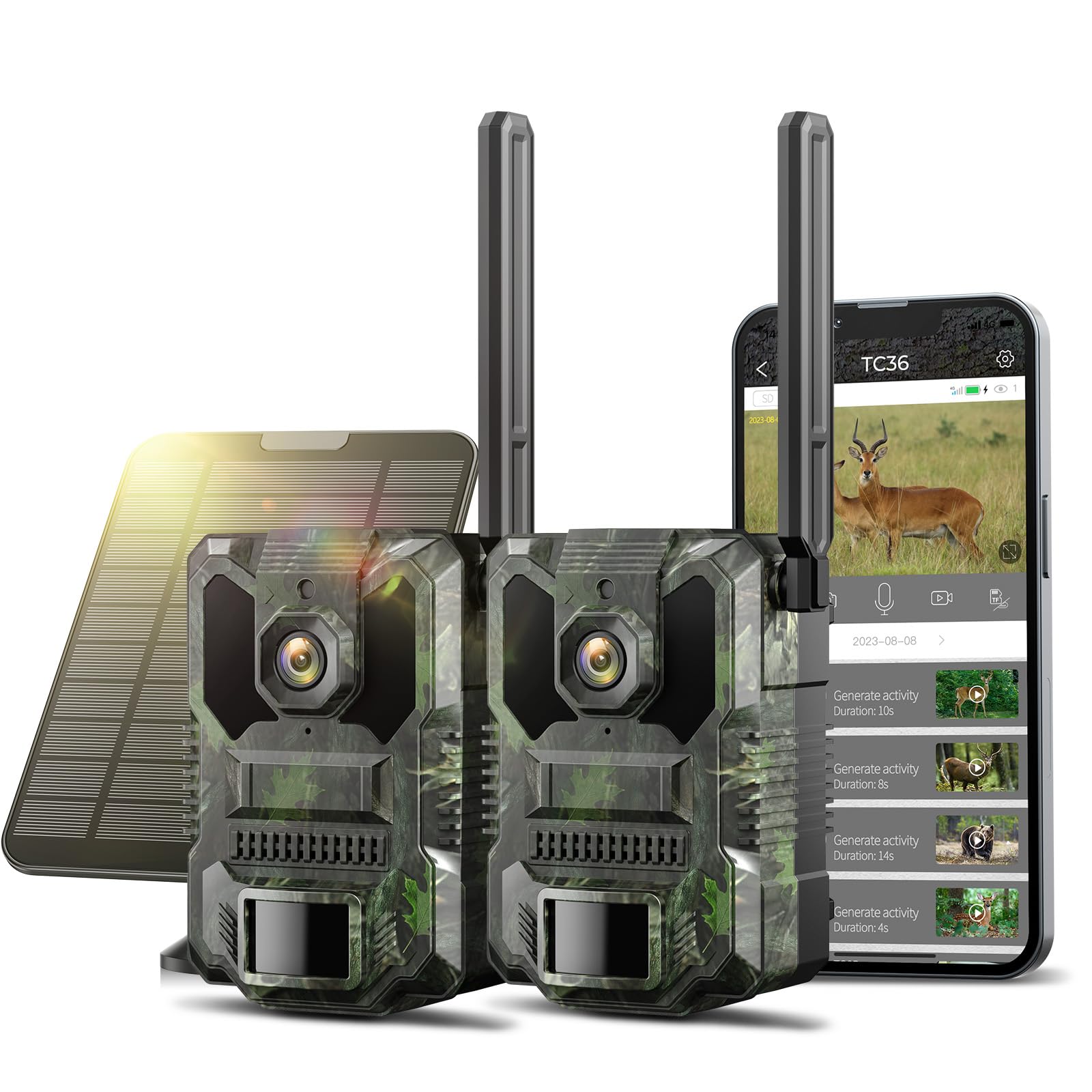
Image: VOOPEAK TC36 4G LTE Cellular Trail Camera, showcasing its compact design and camouflage pattern.
2. Información de seguridade
- Lea atentamente todas as instrucións antes de usar o dispositivo.
- Do not expose the camera to extreme temperatures or direct sunlight for prolonged periods without proper ventilation.
- Ensure all ports and covers are securely closed to maintain the IP66 waterproof rating.
- Use only VOOPEAK-approved accessories and power sources.
- Manteña o dispositivo fóra do alcance dos nenos.
- Desfágase das baterías e dos compoñentes electrónicos de forma responsable segundo a normativa local.
3. Contido do paquete
Verifica que todos os elementos estean presentes no teu paquete:
- VOOPEAK TC36 Cellular Trail Camera (quantity as per pack)
- Panel solar
- Correa de montaxe
- Cable de carga USB
- Mounting Bracket/Screws
- Manual de usuario

Image: Contents of the VOOPEAK TC36 package, including the camera, solar panel, and accessories.
4. Produto rematadoview
The VOOPEAK TC36 is a robust 4G LTE cellular trail camera designed for reliable outdoor surveillance. Key features include:
- Built-in 4G SIM Card: Operates without Wi-Fi, utilizing a built-in SIM card for connectivity (US only). New users receive 100MB trial data for 7 days. Data plan subscription required after trial.
- 2.5K QHD Live Feed: Provides high-definition video streaming day and night.
- 940nm Low-Light Infrared Night Vision: Captures clear night images without disturbing wildlife.
- Smart PIR Detection & 0.1S Trigger: Rapidly detects human or animal activity within 65 feet and triggers recording.
- 4 Area in 1 Screen: View real-time images from up to four cameras simultaneously via the CloudEye 365 app.
- Detection and Privacy Area Settings: Customize detection zones and block out private areas for enhanced control.
- Zoom dixital 10x: Adjust focal length via the mobile app to enlarge distant images.
- 365 Days Non-Stop Power: Equipped with a 4W solar panel and a built-in 7800mAh lithium battery for continuous power.
- Impermeable IP66: Durable housing designed to withstand various weather conditions.

Imaxe: Máis deview of the VOOPEAK TC36 4G LTE Cellular Trail Camera highlighting its key features.
5. Configuración
5.1 Carga inicial
Before first use, fully charge the camera's built-in 7800mAh battery using the provided USB cable. Connect the USB cable to the camera and a standard USB power adapter (not included).
5.2 SIM Card Activation (Built-in)
The TC36 features a built-in 4G SIM card. New users receive 100MB trial data for 7 days. After the trial, a data plan subscription is required for continued cellular functionality. The built-in SIM card is non-removable and for use in the United States only.

Image: VOOPEAK TC36 camera connected to its solar panel, illustrating the 365-day non-stop power feature.
5.3 Montaxe da cámara e do panel solar
- Attach the camera to a tree or pole using the provided mounting strap. Ensure it is securely fastened and positioned to capture the desired area.
- Monte o panel solar nun lugar que reciba ample direct sunlight throughout the day. Use the provided mounting bracket and screws.
- Connect the solar panel cable to the camera's charging port. This will provide continuous power to the camera.

Image: Close-up of the solar panel connected to the VOOPEAK TC36 camera, illustrating the power connection.
5.4 Instalación e conexión da aplicación
- Descarga o CloudEye 365 aplicación desde a tenda de aplicacións do teu teléfono intelixente.
- Abre a aplicación e sigue as instrucións en pantalla para crear unha conta ou iniciar sesión.
- Add your TC36 camera to the app by scanning the QR code located on the camera or by manually entering its ID.
- Ensure the camera is powered on and has a stable 4G connection for successful pairing.
Video: Instructions on how to connect the VOOPEAK TC36 camera to the CloudEye 365 mobile application.
6. Instrucións de funcionamento
6.1 Gravación e transmisión en directo
Once connected to the CloudEye 365 app, you can access the camera's live feed. The 2.5K QHD resolution provides clear visuals. The camera automatically records when motion is detected.

Image: A deer captured by the VOOPEAK TC36 camera, demonstrating the 2.5K QHD live feed capability.
6.2 Detección de movemento e notificacións
The camera features Smart PIR Detection with a 0.1-second trigger time. When motion is detected, the app will send real-time notifications to your smartphone.

Image: A smartphone displaying a real-time notification from the VOOPEAK TC36 camera after detecting activity.

Image: A cheetah in motion, illustrating the VOOPEAK TC36's rapid 0.1-second trigger time for capturing fast-moving subjects.
6.3 Multicámara View (4 Area in 1 Screen)
The CloudEye 365 app allows you to monitor up to four cameras simultaneously on a single screen, simplifying multi-point surveillance.

Image: A smartphone displaying live feeds from four different VOOPEAK TC36 cameras simultaneously on one screen.
6.4 Detection and Privacy Area Settings
Within the app, you can define specific detection areas to focus on critical zones and set privacy areas to block out sensitive regions from recording.

Image: Screenshot of the CloudEye 365 app interface showing options for setting detection and privacy areas.
6.5 10x Digital Zoom
Use the mobile app to digitally zoom up to 10x on live or recorded footage, allowing for closer inspection of details.
7. Mantemento
- Limpeza: Regularly wipe the camera lens and solar panel with a soft, dry cloth to ensure clear images and efficient charging.
- Batería: The built-in 7800mAh battery is designed for long-term use with the solar panel. If the camera is stored for extended periods, ensure it is fully charged before storage and recharged every few months to maintain battery health.
- Actualizacións de firmware: Check the CloudEye 365 app periodically for any available firmware updates to ensure optimal performance and new features.

Image: VOOPEAK TC36 camera in a rainy environment, highlighting its IP66 waterproof and rugged design.
8 Solución de problemas
- Sen enerxía: Ensure the camera is fully charged or the solar panel is receiving adequate sunlight and properly connected. Check the USB cable for damage.
- Sen conexión 4G: Verify that the camera is within a 4G LTE coverage area (US only). Check your data plan status via the app. Restart the camera.
- Sen notificacións: Ensure motion detection is enabled in the app settings. Check your phone's notification settings for the CloudEye 365 app.
- Unclear Images/Videos: Clean the camera lens. Ensure there are no obstructions in front of the lens. Check lighting conditions.
- Problemas de conexión da aplicación: Ensure your smartphone has a stable internet connection. Restart the app and the camera.
9. Especificacións
| Característica | Detalle |
|---|---|
| Nome do modelo | TC36 4G cellular trail camera |
| Tecnoloxía de conectividade | Wireless, Cellular |
| Característica especial | Visión Nocturna |
| Uso interior/exterior | Ao aire libre |
| Dispositivos compatibles | Teléfono intelixente |
| Tipo de montaxe | Monte das árbores |
| Cor | Verde (Camuflaxe) |
| Fonte de enerxía | Battery Powered (Built-in 7800mAh), Solar Panel |
| Formato de captura de vídeo | MP4 |
| Resolución de captura de vídeo | 2.7K (2.5K QHD Live Feed) |
| Viewángulo ing | 120 graos |
| Range de visión nocturna | 65 pés |
| Dimensións do elemento | 10 x 2 x 2.7 polgadas |
| Clasificación impermeable | IP66 |
10. Garantía e soporte
VOOPEAK is committed to providing high-quality products and professional service. For warranty information, technical support, or any inquiries, please refer to the contact information provided in your product packaging or visit the official VOOPEAK websitio.
- Atención ao cliente: Expect quick responses within 24 hours.
- Devolucións e trocos: Hassle-free returns and exchanges within 30 days.
- Soporte de por vida: Continuous support for your trail camera.