
1. Introdución
Welcome to the Rokid AI Glasses Style user manual. These ultra-light smart sunglasses integrate advanced AI features, including ChatGPT 5.2, real-time translation, a 12MP first-person camera, and open-ear audio. Designed for comfort and functionality, they enhance daily activities from cycling and hiking to outdoor vlogging. This manual provides essential information for setup, operation, maintenance, and troubleshooting to ensure optimal use of your device.
2. Que hai na caixa
Video: Unboxing the Rokid AI Glasses Style, showing all included accessories and packaging details.
- Rokid AI Glasses Style
- Cable de carga
- Manual de usuario
- Eyeglass Case
- Bolsa de transporte suave
- Extra Nose Pads

Image: The Rokid AI Glasses Style and its accessories, including the charging cable, user manual, and eyeglass case.
3. Produto rematadoview
Características clave
- Real-Time Global Translator: Supports 89 online languages and 6 offline languages (EN/CN/JP/FR/DE/ES) for seamless communication.
- 12MP First-Person Camera with EIS: Captures 12MP photos and stable 3K videos from your perspective using a Sony IMX681 sensor.
- Integrated ChatGPT 5.2 AI Assistant: Provides hands-free knowledge, object recognition, and real-time information via voice commands.
- Deseño ultralixeiro: Weighs 38.5g (without lenses) with a TR90 polymer titanium frame for extended comfort.
- All-Day Battery System: Built-in 210mAh battery offers 6 hours music, 5 hours calls, 2 hours online translation, or 45 minutes video recording.
- Private Open-Ear Audio: Dual directional AAC speakers deliver clear sound while maintaining environmental awareness.
- Gesture + Voice Control System: Seamless interaction with nods, shakes, and two-finger taps for calls and AI activation.
- Deseño duradeiro: Flexible TR90 frames and titanium alloy hinges ensure longevity.

Image: A user interacting with the AI assistant to identify a cat breed, showcasing the smart capabilities.

Image: Visual representation of the 12MP HD camera and video recording capabilities of the glasses.
Compoñentes

Image: An in-depth look at the glasses, highlighting the power switch, touchpad, HD camera, and open-ear speakers.
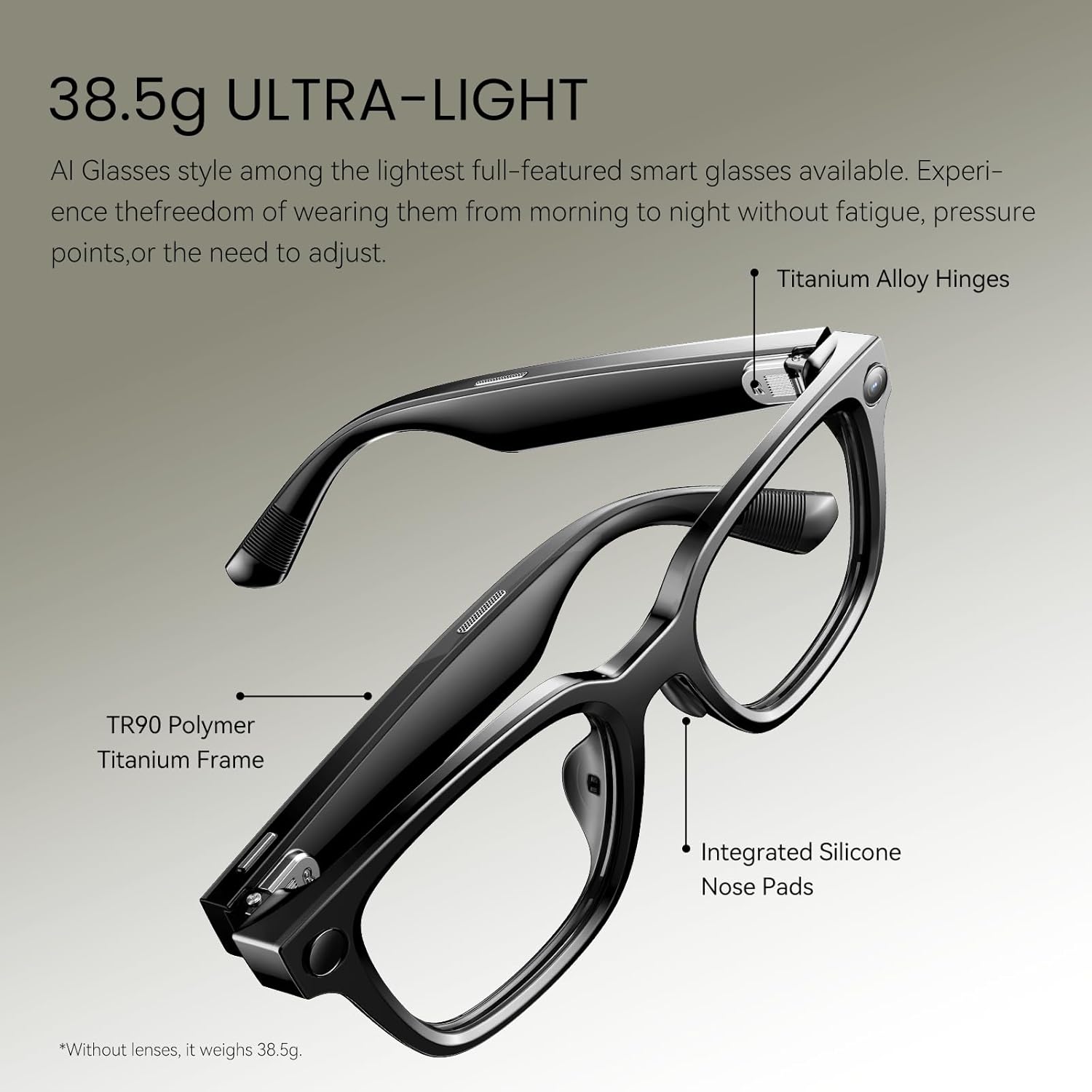
Image: A close-up of the private open-ear audio speakers integrated into the glasses' temples.
4. Configuración
4.1 Carga inicial
Before first use, fully charge your Rokid AI Glasses Style using the provided magnetic charging cable. Connect the cable to the charging port on the glasses and a compatible USB power source.
4.2 Encendido/apagado
- Para acender: Press and hold the button on the right arm for 3 seconds.
- Para apagar: Press and hold the button on the right arm for 3 seconds.
4.3 Emparejamento Bluetooth
- Ensure your glasses are powered on.
- Open the Rokid AI App on your smartphone.
- The device will automatically enter pairing mode. Follow the instructions within the app to complete the pairing process.

Image: The Rokid AI App interface on a smartphone, used for managing and setting up the smart glasses.
5. Instrucións de funcionamento
5.1 AI Assistant (ChatGPT 5.2)
Your Rokid AI Glasses Style integrates ChatGPT 5.2 for hands-free assistance. Activate by voice command or gesture.
- Comando de voz: Say "Hey Rokid" followed by your query (e.g., "Hey Rokid, what's the weather?").
- Visual Intelligence: Point at an object and ask "Hey Rokid, what is this?" for context-aware spoken answers.

Image: A user demonstrating the AI Q&A feature by asking the glasses to identify a cat breed.
5.2 Tradución en tempo real
Break language barriers with instant translation.
- Tradución en liña: Supports 89 languages via Microsoft Translator.
- Tradución sen conexión: Built-in support for 6 major languages (English, Chinese, Japanese, French, German, Spanish).
Video: A demonstration of the real-time translation feature, showing spoken language being translated and displayed.
5.3 12MP First-Person Camera
Capture photos and videos from your perspective.
- Sacar unha foto: Say "Hey Rokid, take a photo" or tap the shutter button.
- Gravar vídeo: Say "Hey Rokid, start recording" or press and hold the shutter button.
- EIS: Electronic Image Stabilization ensures stable 3K videos.

Imaxe: Examples of first-person content captured by the glasses, including a baby, cooking, and a dog walk.
Video: First-person view from the Rokid AI Glasses Style while riding a roller coaster, demonstrating video capture in dynamic environments.
5.4 Open-Ear Audio
Enjoy audio while remaining aware of your surroundings.
- Dual directional AAC speakers provide crisp, clear sound.
- Ideal for calls, music, and AI responses without blocking ambient noise.
5.5 Gesture and Touch Control
Interact with your glasses using intuitive gestures and touch controls.
- Responder chamadas: Nod your head.
- Colgar chamadas: Shake your head.
- Trigger AI: Use two-finger taps on the temple.
- Control de volume: Swipe on the touchpad located on the right temple.

Image: Visual guide to gesture and voice controls for seamless interaction with the glasses.
5.6 Navegación
Receive real-time voice guidance for navigation.
- Activar: Say "Hi Rokid, navigate to [your destination]".
- The glasses will plan the route and provide voice guidance.
- You can also open the navigation feature in the Rokid AI App to view the route and choose options.
Video: Demonstration of the navigation feature, showing how to activate it via voice and view routes in the app.
5.7 AI Meeting Notes
Record meetings and generate AI-assisted summaries and transcriptions.
- Control de voz: Say "Hi Rokid, start meeting minutes" to begin recording. Say "Hi Rokid, end meeting minutes" to stop.
- Control da aplicación: In the Rokid AI App, start the meeting minutes function. The glasses will record audio in real-time. Tap 'Stop' in the app when the meeting ends.
- After recording, tap the recording in the app to view the AI-assisted summary and full transcription.
Video: A demonstration of how to use the AI Meeting Notes feature via voice control and the companion app.
6. Mantemento
6.1 Limpeza
- Use a soft, clean cloth to wipe the lenses and frame.
- Evita produtos químicos agresivos ou materiais abrasivos que poidan danar as lentes ou a montura.
- The lenses have a scratch-resistant treatment, but proper care is still recommended.
6.2 Carga
- Charge the glasses using the provided magnetic charging cable.
- For extended use, an optional 3000mAh charging case is available (sold separately).

Image: Battery performance details for different usage scenarios of the Rokid AI Glasses Style.
6.3 Actualizacións de firmware
The Rokid AI App provides free firmware updates. Regularly update your glasses to access new features and improvements.
7 Solución de problemas
- Glasses not responding: Ensure the glasses are charged and powered on. Try restarting the device.
- Problemas de conexión Bluetooth: Ensure Bluetooth is enabled on your phone and the glasses are in pairing mode. Try unpairing and re-pairing the device.
- AI Assistant not responding: Check your internet connection for online features. Ensure the Rokid AI App is running and updated.
- Camera indicator light: When using camera functions, the indicator light will stay solid white. Do not block this light as it may cause the camera function to become unavailable.
- Lens removal/replacement: If sunglasses lenses are restricted, they can be removed and replaced. Refer to the video tutorial in the Rokid AI App for specific instructions.
8. Especificacións
| Característica | Detalle |
|---|---|
| Número de modelo | Lentes de IA |
| Peso do elemento | 10.2 ounces (38.5g without lenses) |
| Capacidade da batería | 210 millónsamp Horario |
| Sensor da cámara | Sony IMX681 |
| Gravación de vídeo | 3K |
| Almacenamento de memoria | 32 GB |
| RAM | 2 GB |
| Sistema Operativo | YodaOS-Master |
| Conectividade | Bluetooth |
| Resistencia á auga | IPX4 (resistente a salpicaduras) |
| Protección UV | UV400 |

Image: Standard dimensions of the Rokid AI Glasses Style for fit reference.
9. Safety & Warranty
9.1 Información de seguridade
- Non expoñas o dispositivo a temperaturas extremas nin á luz solar directa durante períodos prolongados.
- Evite deixar caer as lentes ou someterlas a impactos fortes.
- Manter fóra do alcance dos nenos.
- Ensure the charging port is completely dry before charging to prevent short circuits.
- When using the camera, be mindful of privacy and local regulations regarding recording.
9.2 Garantía
Refer to the included 'Safety & Warranty' booklet for detailed warranty information, terms, and conditions. For support, visit the Rokid websitio ou póñase en contacto co servizo de atención ao cliente.


